注: 以下の翻訳の正確性は検証されていません。AIPを利用して英語版の原文から機械的に翻訳されたものです。
Iceberg を使用するトランスフォーム
このページでは、Python トランスフォームで Iceberg テーブルを扱うための入門ガイドとして、関連する API と構文の背景を説明します。すぐに実行可能なコードを確認するには、コード例を参照してください。インクリメンタル(差分処理)ロジックについては、Iceberg を使用するインクリメンタル Python トランスフォームを参照してください。
データセットを扱う場合と同様に、Foundry の Iceberg テーブルに対する Python トランスフォームは、次の3つの主要コンポーネントで構成されます。
- トランスフォームデコレーターによる入力と出力の宣言
- 計算関数のシグネチャによるランタイムオブジェクトの定義
- 計算関数の本体による計算ロジック
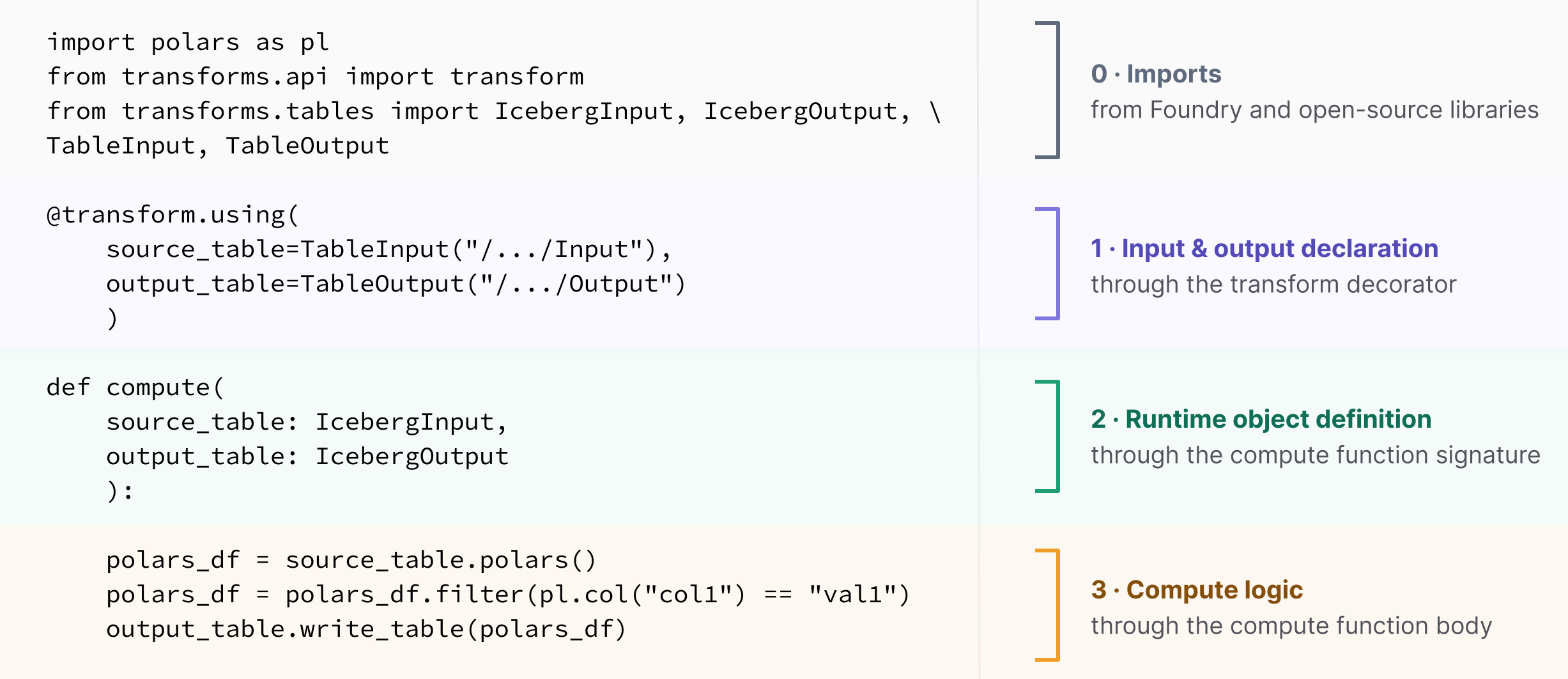
入力と出力の宣言
Foundry は、トランスフォームの Iceberg テーブルの入力と出力を定義するために、transforms.tables ライブラリの一部として次の宣言クラスを提供します。
| API とインポートパス | 説明 | データセットでの相当クラス |
|---|---|---|
TableInput | トランスフォームデコレーター内で Iceberg テーブルを入力として宣言します。 | Input( transforms.api) |
TableOutput | トランスフォームデコレーター内で Iceberg テーブルを出力として宣言します。 | Output( transforms.api) |
これらの入力と出力は、トランスフォームデコレーター内で宣言します。Iceberg は、データセットと同じトランスフォームデコレーターを使用します。単一ノードの計算には @transform.using、PySpark には @transform.spark.using を使用します。
ランタイムオブジェクトの定義
Foundry は、トランスフォームで Iceberg テーブルを読み書きするために、transforms.tables および transforms.api ライブラリの一部として次のランタイムオブジェクトを提供します。
| 単一ノード API | PySpark API | 説明 | データセットでの相当クラス |
|---|---|---|---|
IcebergInput | TableTransformInput | 入力テーブルへのハンドル。 | LightweightInput, TransformInput( transforms.api) |
IcebergOutput | TableTransformOutput | 出力テーブルへのハンドル。 | LightweightOutput, TransformOutput( transforms.api) |
IncrementalIcebergInput | IncrementalTableTransformInput | インクリメンタルトランスフォームの入力テーブルへのハンドル。 | IncrementalTransformInput( transforms.api) |
IncrementalIcebergOutput | TableTransformOutput | インクリメンタルトランスフォームの出力テーブルへのハンドル。 | IncrementalTransformOutput( transforms.api) |
計算ロジック
計算関数の本体では、入力から読み取り、データを加工し、出力に書き込みます。通常は標準的なデータフレームコードでこれらを実行でき、ランタイムオブジェクトが Iceberg テーブルかデータセットかには依存しません。
入力テーブルをデータフレームに読み込み、任意のデータフレームライブラリで加工して、結果を書き戻します。このレイヤーでは、基盤となるテーブルが Iceberg であることを意識する必要はありません。ランタイムオブジェクトが Iceberg に対応した読み書きを行い、その間の計算をデータフレームライブラリが実行します。
利用可能な読み取りメソッドと書き込みメソッドは、受け取ったランタイムオブジェクトによって異なります。
| ランタイムの計算方式 | 入力の読み取り | 出力の書き込み |
|---|---|---|
| 単一ノード ( IcebergInput,IcebergOutput) | .polars() → Polars LazyFrame ↗, .pandas() → pandas DataFrame ↗, .arrow() → Arrow Table ↗* | .write_table(df) |
| PySpark ( TableTransformInput,TableTransformOutput) | .dataframe() → PySpark DataFrame ↗ | .write_dataframe(df) |
* Arrow テーブルは、一般的に DuckDB SQL API ↗ と組み合わせて使用されます。
上記のメソッドは Foundry API であり、ランタイムオブジェクトからの読み取りとランタイムオブジェクトへの書き込みを可能にします。入力を読み取った後は、Foundry 固有の実装を参照することなく、テーブル内にリンクされているオープンソース API を使用してデータを加工できます。
例:
Copied!1 2 3 4 5 6 7 8 9 10 11 12 13import polars as pl from transforms.api import transform from transforms.tables import IcebergInput, IcebergOutput, TableInput, TableOutput @transform.using( source=TableInput("/path/source"), output=TableOutput("/path/output"), ) def compute(source: IcebergInput, output: IcebergOutput): df = source.polars() # Polars LazyFrame に読み込みます df = df.filter(pl.col("status") == "active") # 通常の Polars 処理 output.write_table(df) # フレームを書き戻します
Copied!1 2 3 4 5 6 7 8 9 10 11 12 13 14 15from transforms.api import transform, LightweightContext from transforms.tables import IcebergInput, IcebergOutput, TableInput, TableOutput @transform.using( source=TableInput("/path/source"), output=TableOutput("/path/output"), ) def compute(ctx: LightweightContext, source: IcebergInput, output: IcebergOutput): conn = ctx.duckdb().conn # コンテキストから取得した DuckDB 接続 conn.register("source", source.arrow()) # arrow に読み込み、DuckDB に登録します query = conn.sql( # 通常の DuckDB SQL "SELECT * FROM source WHERE status = 'active'" ) output.write_table(query.to_arrow_table()) # Arrow テーブルを書き戻します
Copied!1 2 3 4 5 6 7 8 9 10 11 12 13import pandas as pd from transforms.api import transform from transforms.tables import IcebergInput, IcebergOutput, TableInput, TableOutput @transform.using( source=TableInput("/path/source"), output=TableOutput("/path/output"), ) def compute(source: IcebergInput, output: IcebergOutput): df = source.pandas() # pandas DataFrame に読み込みます df = df[df["status"] == "active"] # 通常の pandas 処理 output.write_table(df) # DataFrame を書き戻します
Copied!1 2 3 4 5 6 7 8 9 10 11 12from transforms.api import transform from transforms.tables import TableInput, TableOutput, TableTransformInput, TableTransformOutput @transform( source=TableInput("/path/source"), output=TableOutput("/path/output"), ) def compute(source: TableTransformInput, output: TableTransformOutput): df = source.dataframe() # PySpark DataFrame に読み込みます df = df.filter(df.status == "active") # 通常の PySpark 処理 output.write_dataframe(df) # DataFrame を書き戻します
高度な操作:基盤となる Iceberg テーブルにアクセスする
高度な操作を行う場合や、基盤となる Iceberg Spark ↗ および PyIceberg ↗ API にアクセスする場合は、ランタイムオブジェクトを介して、基盤となるオープンソースのオブジェクトと識別子にアクセスできます。詳細については、高度な Iceberg API のページを参照してください。