注: 以下の翻訳の正確性は検証されていません。AIPを利用して英語版の原文から機械的に翻訳されたものです。
Python 環境のソース
Foundry では、プラットフォーム全体の Python 環境で外部システムに接続できます。この機能には、ソースベースの外部トランスフォーム、外部関数、Compute Module ↗ が含まれます。このページでは、Python 環境で外部システムを使用する一般的なユースケースとワークフローについて説明します。詳細については、Palantir のオープンソースライブラリ external-systems ↗ を参照してください。
ソースの初期化方法は環境によって異なるため、以下の例には含まれていません。初期化済みのソースオブジェクトを取得する方法については、環境(トランスフォームリポジトリ、関数リポジトリ、Compute Module など)のソースの使用に関するドキュメントを参照してください。また、ソース情報パネルのサイドバーに、使用手順を示すスニペットが表示される場合もあります。
HTTPS クライアント
REST ベースのソース向けに、Palantir は Python の requests ライブラリを基盤とした設定済みの HTTPS クライアントを提供しています。
ソースは、HTTP 接続を1つだけ使用して初期化する必要があります。HTTP 接続の数が1より多い、または少ない状態で初期化されたソースは無効と見なされ、設定済みのクライアントは作成されません。
ソースの接続設定が無効な状態で接続を作成しようとすると、Only single connection sources are supported. というエラーが返されます。
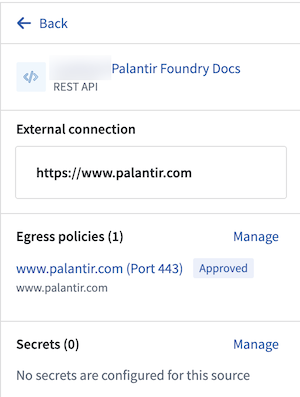
ソースの接続数を確認するには、以下の例に示すように、使用している環境の外部接続セクションにあるソースのサイドバーパネルを参照してください。
Copied!1 2 3 4 5 6 7 8 9 10 11 12from external_systems.sources import Source, HttpsConnection from requests import Session my_source: Source = # Source は環境に応じて異なる方法で初期化されます https_connection: HttpsConnection = my_source.get_https_connection() external_system_url: str = https_connection.url http_client: Session = https_connection.get_client() response = http_client.get(external_system_url + "/api/v1/example/", timeout=10)
HTTPS クライアントの使用前または使用中に作業ディレクトリを変更すると(たとえば、os.chdir() を使用すると)、安全な接続の確立に必要な環境変数への参照が機能しなくなる場合があります。
シークレット
ソースに対して get_secret("<secret_name>") を使用すると、ソースのシークレットを参照できます。
Copied!1 2 3 4 5from external_systems.sources import Source my_source: Source = ... my_secret: str = my_source.get_secret("SECRET_NAME")
セッション資格情報
一部の Foundry ソースの種類では、生成されたセッション資格情報を取得および更新するための専用メソッドを利用できます。
サポートされているソース設定
- S3: クラウド ID、OIDC
- BigQuery: OIDC
- Databricks: OIDC
- Snowflake: OIDC
例: S3
Copied!1 2 3 4 5 6 7 8 9 10 11 12 13 14 15 16 17 18 19 20 21 22 23 24 25import boto3 from external_systems.sources import AwsCredentials, Refreshable, Source, SourceCredentials S3_BUCKET_REGION = <aws_region> S3_BUCKET_NAME = <bucket_name> s3_source: Source = ... refreshable_credentials: Refreshable[SourceCredentials] = s3_source.get_session_credentials() session_credentials: SourceCredentials = refreshable_credentials.get() if not isinstance(session_credentials, AwsCredentials): raise ... s3_client = boto3.client( "s3", region_name=S3_BUCKET_REGION, aws_access_key_id=session_credentials.access_key_id, aws_secret_access_key=session_credentials.secret_access_key, aws_session_token=session_credentials.session_token, ) s3_response = s3_client.list_objects_v2(Bucket=S3_BUCKET_NAME)
例: OIDC 資格情報
Snowflake など、OIDC 認証が設定されたソースでは、セッション資格情報が OauthCredentials として返されます。これには、有効期間の短い access_token と、有効期限を示す expiration タイムスタンプが含まれます。
Copied!1 2 3 4 5 6 7 8 9 10 11 12from external_systems.sources import OauthCredentials, Refreshable, Source, SourceCredentials my_source: Source = ... refreshable_credentials: Refreshable[SourceCredentials] = my_source.get_session_credentials() session_credentials: SourceCredentials = refreshable_credentials.get() if not isinstance(session_credentials, OauthCredentials): raise ... access_token: str = session_credentials.access_token
Foundry が発行したトークンをそのまま受け入れるソースシステムもあれば、最初にソースシステムが発行した資格情報に交換する必要があるシステムもあります。たとえば、Snowflake はこのトークンを OAuth トークンとして受け入れますが、Databricks では、取得したトークンを使用する前に OAuth 2.0 トークン交換 ↗ が必要です。どちらに該当するかは、ソースの種類に対応するドキュメントを参照してください。
Agent プロキシのエグレスポリシーによるオンプレミス接続
Agent プロキシポリシーを使用する Foundry ワーカーのソースでは、公開インターネット経由で接続する場合と同じように、コードからオンプレミスシステムへの接続を確立できます。この設定方法の詳細については、Agent プロキシのドキュメントを参照してください。
ソケット接続
Foundry の Agent プロキシ経由の接続が必要な外部システムへの非 HTTPS 接続用に、設定済みのソケットが提供されます。以下は、このソケットを使用してオンプレミスの SFTP サーバーに接続する例です。
オンプレミスの SFTP サーバーの例
この例では、Fabric ↗ ライブラリを使用します。
Copied!1 2 3 4 5 6 7 8 9 10 11 12 13 14 15 16 17 18 19 20 21 22 23 24 25 26import fabric from external_systems.sources import Source from socket import socket SFTP_HOST = <sftp_host> SFTP_PORT = <sftp_port> on_prem_sftp_server_source: Source = ... username: str = on_prem_sftp_server_source.get_secret("username") password: str = on_prem_sftp_server_source.get_secret("password") proxy_socket: socket = on_prem_sftp_server_source.create_socket(SFTP_HOST, SFTP_PORT) with fabric.Connection( SFTP_HOST, user=username, port=SFTP_PORT, connect_kwargs={ "password": password, "sock": proxy_socket, }, ) as sftp_conn: sftp_client = sftp_conn.sftp() file_list = sftp_client.listdir(".")
認証済みプロキシ URI
より細かな制御が必要なユースケース向けに、オンプレミスの外部システムへの接続を可能にする認証済みプロキシ URI が提供されます。
requests 以外のライブラリの例
requests ライブラリのクライアントでは要件を満たせない場合、別の HTTP クライアントを使用する必要があることがあります。この例では、HTTPX ↗ ライブラリを使用します。
Copied!1 2 3 4 5 6 7 8 9 10 11 12 13import httpx from external_systems.sources import Source from typing import Optional agent_proxy_source: Source = ... authenticated_proxy_uri: Optional[str] = agent_proxy_source.get_https_proxy_uri() source_url: str = agent_proxy_source.get_https_connection().url with httpx.Client(proxy=authenticated_proxy_uri) as client: response = client.get(source_url + "/api/v1/example/", timeout=10.0)
ソースのプロパティ
Foundry API 経由で利用可能なソースの種類では、設定プロパティに直接アクセスしてコードで使用することもできます。
Copied!1 2 3 4 5from external_systems.sources import Source snowflake_source: Source = ... account_id: str = snowflake_source.source_configuration.get("accountIdentifier")