注: 以下の翻訳の正確性は検証されていません。AIPを利用して英語版の原文から機械的に翻訳されたものです。
データセットの列に Cipher 操作を適用する
Cipher では、データセットの列全体を暗号化、復号、ハッシュ化できます。この機能は Pipeline Builder、Contour、Python トランスフォームでサポートされています。
Code Repositories のプレビューまたは Pipeline Builder のプレビューを使用している場合、ユーザーは Cipher 操作の実際の出力を確認できません。プレビューでは、代わりにプレースホルダー値が表示されます。データはビルド時に暗号化されます。Cipher 操作の実際の出力を確認するには、ビルドを実行してください。
Pipeline Builder
Pipeline Builder は、Foundry で高品質のデータ統合を容易に実行できるようにすることを目的としたデータ統合アプリケーションです。このセクションでは、Pipeline Builder で Cipher 操作を適用してデータセットの列を難読化する方法を説明します。Pipeline Builder で Cipher 操作を実行するには、Cipher のデータマネージャーライセンスまたは管理者ライセンスにアクセスできる必要があります。
暗号化
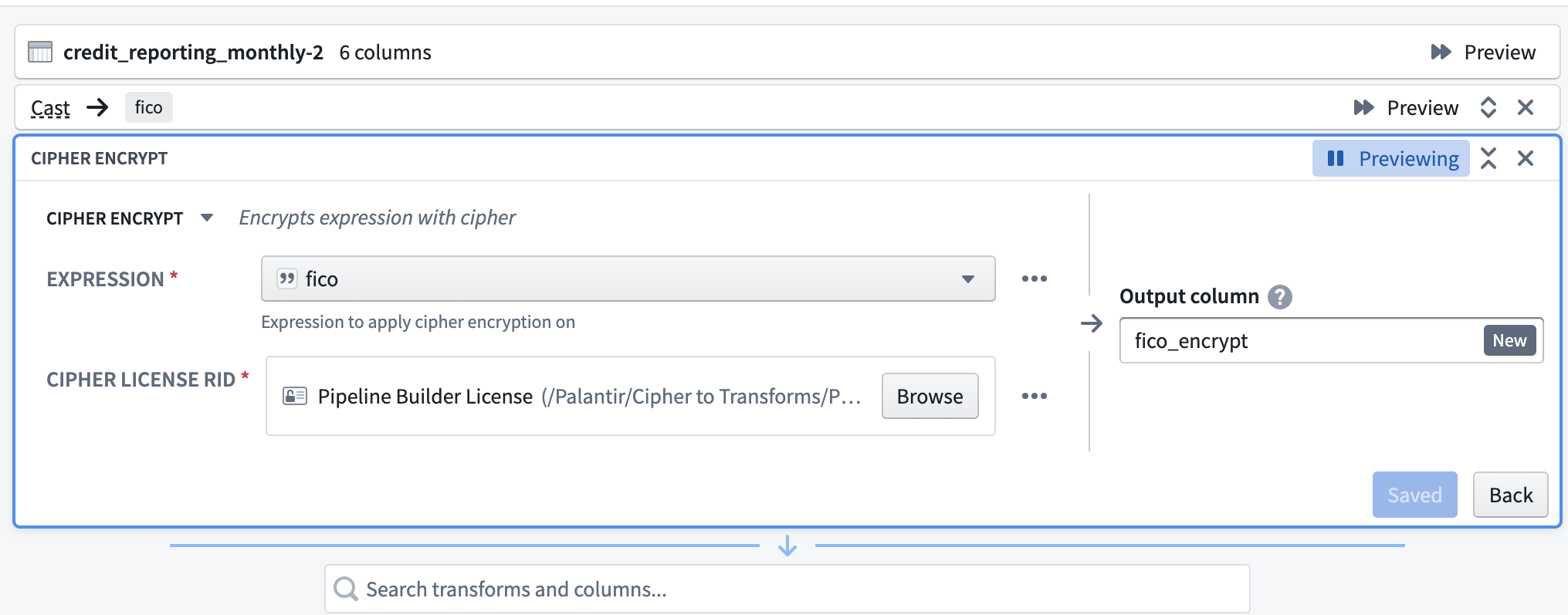
まず、Cipher の暗号化データ加工を選択します。次に、式(暗号化する列)を選択します。続いて、暗号化権限を持つデータマネージャーライセンスを選択します。このライセンスは通常、Cipher アプリケーションで事前に発行され、プロジェクトフォルダーに保存されています。最後に、出力列に名前を付けます。
復号
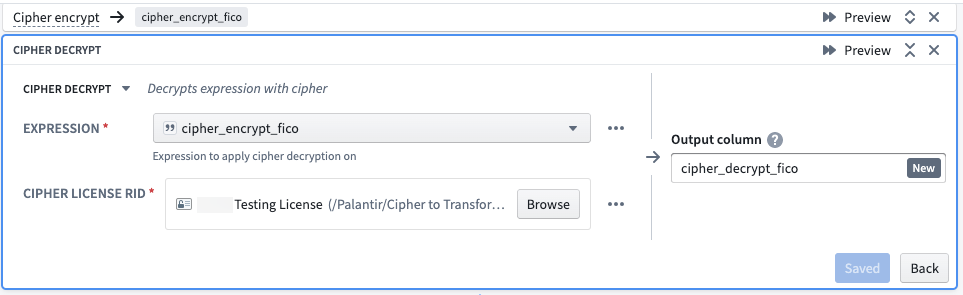
まず、Cipher の復号データ加工を選択します。式を選択する際は、Cipher データ加工ですでに暗号化された列を指定します。Cipher ライセンス RID には、復号権限を持つデータマネージャーライセンスを選択します。このライセンスは通常、Cipher アプリケーションで事前に発行され、プロジェクトフォルダーに保存されています。ライセンスは、対象の列の暗号化に使用したものと同じ Cipher チャネルに属している必要があります。最後に、出力列に名前を付けます。
ハッシュ化
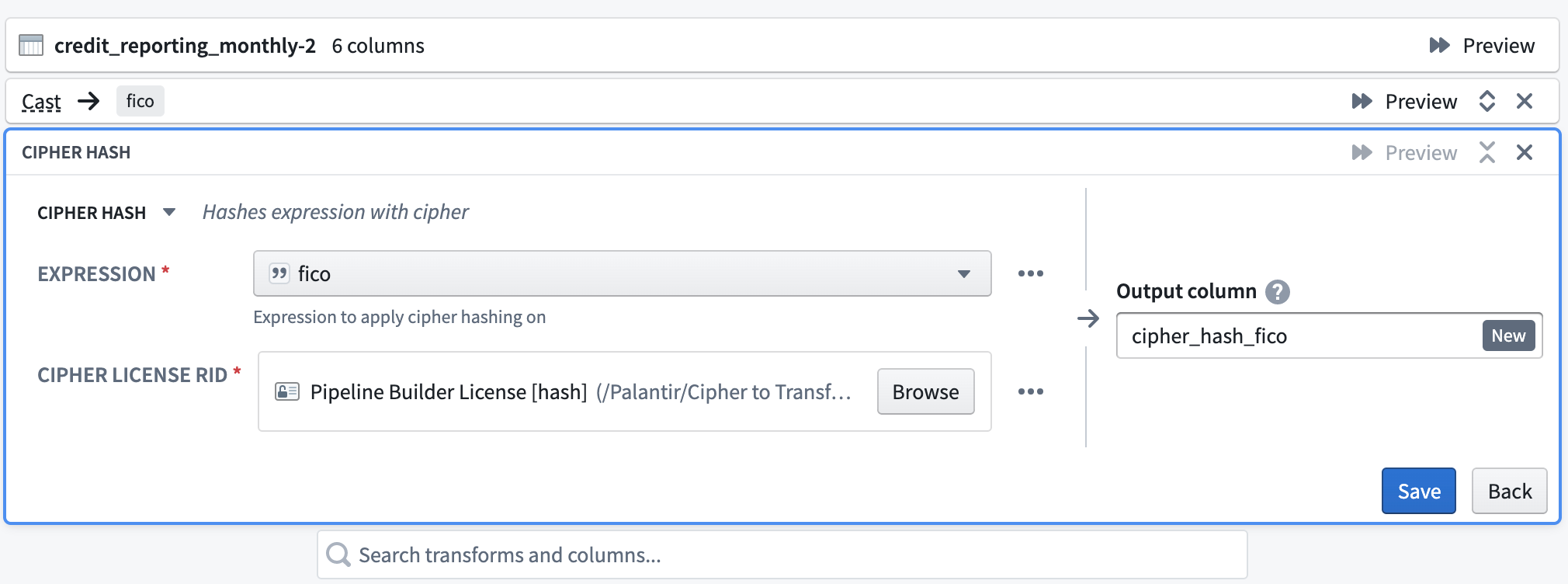
Cipher のハッシュ化データ加工を選択します。式には、ハッシュ化する列を指定します。次に、ハッシュ用の Cipher チャネルから、暗号化権限を持つデータマネージャーライセンスを選択します。このライセンスは、Cipher アプリケーションで発行された後、プロジェクトフォルダーに保存されているものです。最後に、出力列に名前を付けます。
Cipher でパイプラインを暗号化する方法(管理者ライセンスとデータマネージャーライセンスのみ)
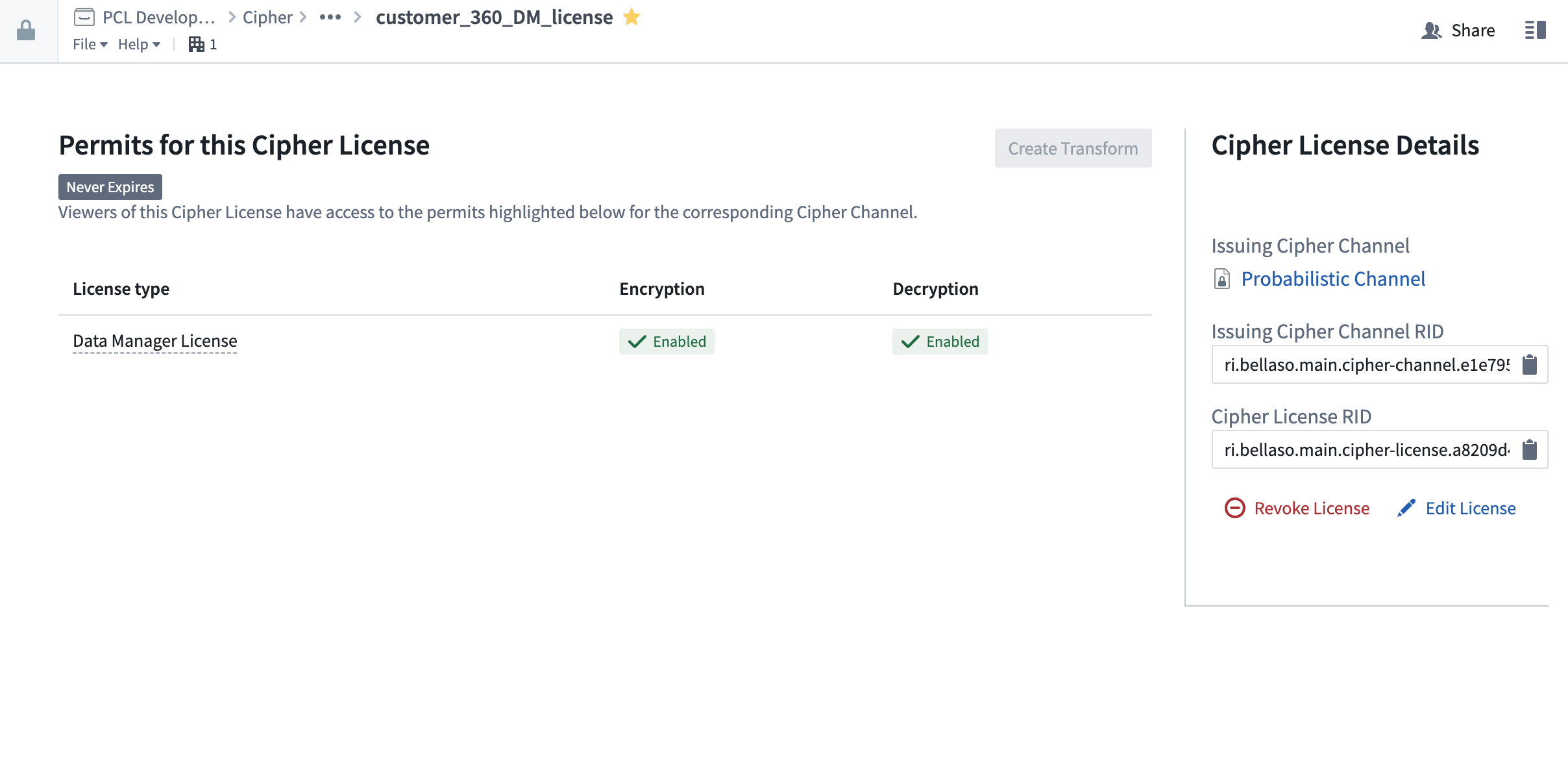
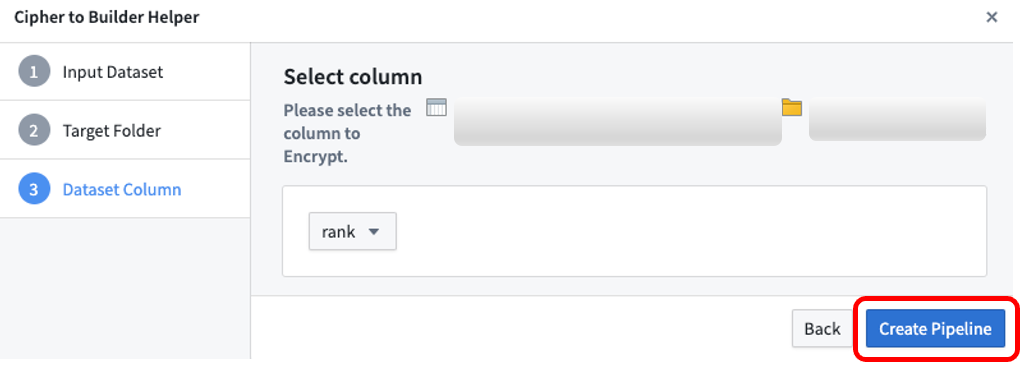
まず、暗号化権限を持つ Cipher ライセンスを開きます。ライセンスは通常、Cipher アプリケーションで事前に発行され、プロジェクトフォルダーに保存されています。次に、右上の「パイプラインの作成」を選択します。
暗号化する入力データセットを選択し、次にパイプラインの保存先フォルダーを選択してから、暗号化するデータセットの列を選択します。暗号化できるのは String 列のみです。ほかの列を暗号化する必要がある場合は、先に String にキャストします。パイプラインの作成を選択すると、Cipher が新しいパイプラインを自動的に生成し、先ほど選択した列を暗号化します。
Contour
Contour は、大規模なテーブルのデータ分析をポイントアンドクリックで実行できるユーザーインターフェースを提供します。このセクションでは、Contour 分析で Cipher 操作を使用してデータセットの列を難読化したり、難読化を解除したりする方法を説明します。Contour で Cipher 操作を実行するには、Cipher のデータマネージャーライセンスまたは管理者ライセンスにアクセスできる必要があります。まず、Contour ツールバーの検索モードを使用して、分析に Cipher ボードを追加します。Contour のテーブルボードとテーブルパネルを使用して、Cipher 操作の結果を確認できます。
Cipher ボードを使用する Contour 分析パスは、データセットとして保存できません。
暗号化
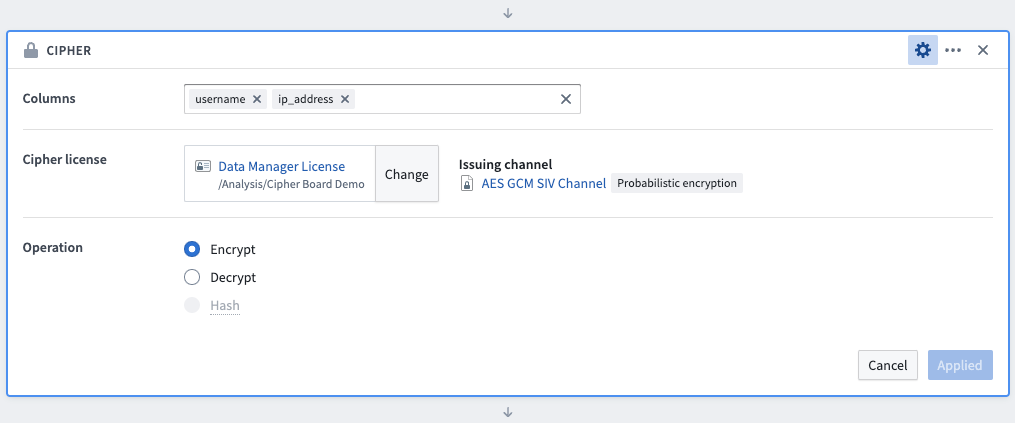
Cipher ボードを使用してデータを暗号化するには、まず暗号化する列を選択します(列を選択する順序は操作に影響しません)。次に、暗号化権限を持つデータマネージャーライセンスまたは管理者ライセンスを選択します。このライセンスは通常、Cipher アプリケーションで事前に発行され、プロジェクトフォルダーに保存されています。暗号化操作を選択し、ボードを保存します。この変換によって列の値は更新されますが、列名は変更されません。
復号
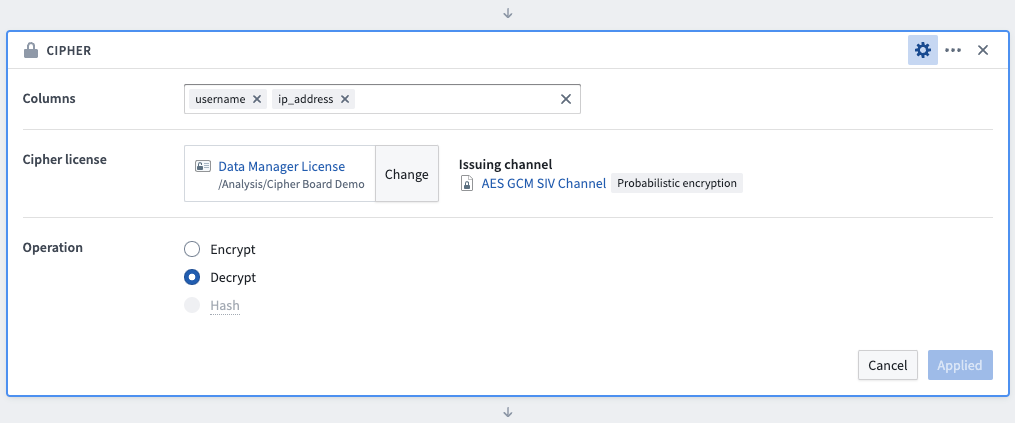
Cipher ボードを使用してデータを暗号化するには、まず復号する列を選択します(列を選択する順序は操作に影響しません)。次に、復号権限を持つデータマネージャーライセンスまたは管理者ライセンスを選択します。このライセンスは通常、Cipher アプリケーションで事前に発行され、プロジェクトフォルダーに保存されています。復号操作を選択し、ボードを保存します。この変換によって列の値は更新されますが、列名は変更されません。
ハッシュ化
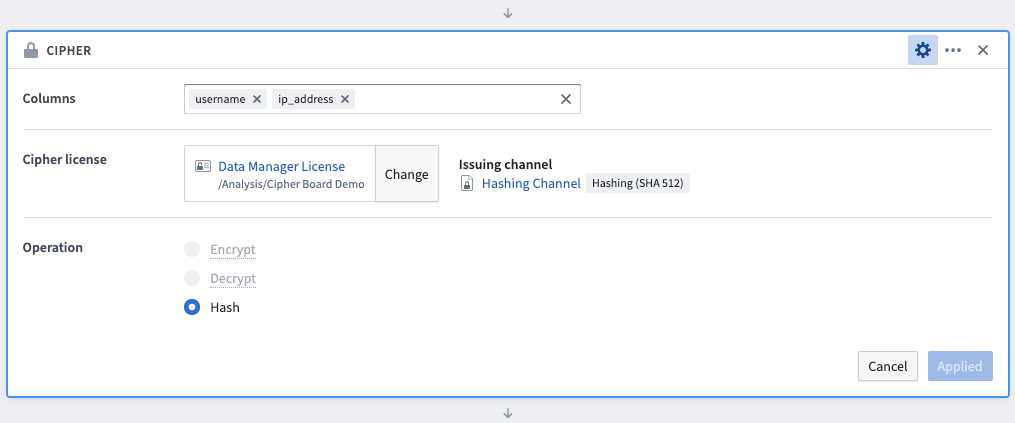
Cipher ボードを使用してデータをハッシュ化するには、まずハッシュ化する列を選択します(列を選択する順序は操作に影響しません)。次に、ハッシュ化権限を持つデータマネージャーライセンスまたは管理者ライセンスを選択します。このライセンスは通常、Cipher アプリケーションで事前に発行され、プロジェクトフォルダーに保存されています。ハッシュ操作を選択し、ボードを保存します。この変換によって列の値は更新されますが、列名は変更されません。
Python トランスフォーム
バージョン 0.75.0 以降、bellaso-python-lib の既存のメソッドはすべて非推奨となり、安定性とパフォーマンスを向上させる新しい実装に置き換えられました。これらの非推奨のメソッドは今後のリリースで削除されますが、引き続き利用可能です。使用すると、Foundry に非推奨の警告が表示されます。
非推奨の bellaso-python-lib メソッドを置き換える
bellaso-python-lib の非推奨のメソッドをまだ使用している場合は、以下のテーブルに従ってコードを更新してください。例外については、文字列レベルの操作セクションを参照してください。
| 非推奨のメソッド | 置き換え先 |
|---|---|
encrypt() | encrypt_column() |
decrypt() | decrypt_column() |
hash() | hash_column() |
encrypt_all_matches() | encrypt_all_matches_column() |
hash_all_matches() | hash_all_matches_column() |
encrypt_image() | obfuscate_image() |
decrypt_image() | deobfuscate_image() |
リポジトリを設定する
conda_recipe/meta.yml の requirements.run ブロックに bellaso-python-lib を追加します。コードリポジトリ環境のライブラリパネルで追加すると、この設定を自動で行うこともできます。トランスフォームで Cipher の操作を実行するには、管理者ライセンスが必要です。
取り込み時にデータを暗号化またはハッシュ化するには、Cipher の Python ライブラリを外部トランスフォームと併用できます。
暗号化
列を暗号化するには、@transforms ブロックで EncrypterInput を定義する必要があります。EncrypterInput には、暗号化権限を持つ Cipher ライセンスの RID またはファイルシステムパスを指定します。
例:
Copied!1 2 3 4 5 6 7 8 9 10 11 12from transforms.api import transform, Input, Output from pyspark.sql.functions import col from bellaso_python_lib.encryption.encrypter_input import EncrypterInput @transform( encrypter=EncrypterInput("/path/to/cipher/license"), output=Output("/path/to/output/dataset"), input_dataset=Input("/path/to/input/dataset") ) def encrypt_column(ctx, input_dataset, output, encrypter): encrypted_df = input_dataset.dataframe().withColumn("your_column_name", encrypter.dataframe().encrypt_column(col("your_column_name"))) output.write_dataframe(encrypted_df)
復号
列を復号するには、@transforms ブロックで DecrypterInput を定義する必要があります。DecrypterInput には、復号権限を持つ Cipher ライセンスの RID またはファイルシステムパスを指定します。
例:
Copied!1 2 3 4 5 6 7 8 9 10 11 12from transforms.api import transform, Input, Output from pyspark.sql.functions import col from bellaso_python_lib.decryption.decrypter_input import DecrypterInput @transform( decrypter=DecrypterInput("/path/to/cipher/license"), output=Output("/path/to/output/dataset"), input_dataset=Input("/path/to/input/dataset") ) def decrypt_column(ctx, input_dataset, output, decrypter): decrypted_df = input_dataset.dataframe().withColumn("your_column_name", decrypter.dataframe().decrypt_column(col("your_column_name"))) output.write_dataframe(decrypted_df)
ハッシュ化
列をハッシュ化するには、@transforms ブロックで HasherInput を定義する必要があります。HasherInput には、ハッシュ化権限を持つ Cipher ライセンスの RID またはファイルシステムパスを指定します。
例:
Copied!1 2 3 4 5 6 7 8 9 10 11 12from transforms.api import transform, Input, Output from pyspark.sql.functions import col from bellaso_python_lib.encryption.hasher_input import HasherInput @transform( hasher=HasherInput("/path/to/cipher/license"), output=Output("/path/to/output/dataset"), input_dataset=Input("/path/to/input/dataset") ) def hash_column(ctx, input_dataset, output, hasher): hashed_df = input_dataset.dataframe().withColumn("your_column_name", hasher.dataframe().hash_column(col("your_column_name"))) output.write_dataframe(hashed_df)
インクリメンタル(差分処理)トランスフォーム
インクリメンタルトランスフォームで Cipher を使用するには、すべての暗号化器、復号器、およびハッシュ化器をスナップショット入力として指定する必要があります。
例:
Copied!1 2 3 4 5 6 7 8 9 10 11 12 13 14 15 16from transforms.api import transform, incremental, Input, Output from bellaso_python_lib.encryption.encrypter_input import EncrypterInput from pyspark.sql.functions import col @incremental( snapshot_inputs=['encrypter'] ) @transform( encrypter=EncrypterInput("<YOUR_CIPHER_LICENSE_RID>"), output=Output("/path/to/output/dataset") input_dataset=Input("/path/to/input/dataset") ) def encrypt_column(ctx, input_dataset, output, encrypter): encrypted_df = input_dataset.dataframe().withColumn("encrypted_column", encrypter.dataframe().encrypt_column(col("<YOUR_COLUMN_NAME>"))) output.write_dataframe(encrypted_df)
視覚的な難読化
列をハッシュ化するには、@transforms ブロックで EncrypterInput を定義する必要があります。EncrypterInput には、暗号化権限を持つ Cipher ライセンスの RID またはファイルシステムパスを指定します。
例:
Copied!1 2 3 4 5 6 7 8 9 10 11 12 13 14 15 16 17 18 19 20 21 22 23 24 25 26 27 28 29 30 31from transforms.mediasets import MediaSetInput, MediaSetOutput import io from bellaso_python_lib.encryption.encrypter_input import EncrypterInput from bellaso_python_lib.types import Coordinate @transform( mediaset_in=MediaSetInput("</path/to/input/media/set"), mediaset_out=MediaSetOutput("</path/to/output/media/set"), encrypter=EncrypterInput("/path/to/cipher/license"), polygons=Input("/path/to/polygon/dataset"), ) def compute(mediaset_in, mediaset_out, encrypter, polygons, ctx,): media_references = mediaset_in.list_media_items_by_path_with_media_reference( ctx ).collect() # noqa for row in media_references: image_file = mediaset_in.get_media_item(row["mediaItemRid"]) plainview_image = image_file.read() # 画像の左上にある 100 px × 100 px の正方形の領域を暗号化します。 polygon = [Coordinate({"x": 0, "y": 0}), Coordinate({"x": 100, "y": 0}), Coordinate({"x": 100, "y": 100}), Coordinate({"x": 0, "y": 100})] polygon_list = [polygon] if plainview_image: encrypted_image = encrypter.obfuscate_image(plainview_image, polygon_list, ctx) mediaset_out.put_media_item(io.BytesIO(encrypted_image), row["path"])
文字列レベルの操作
bellaso-python-lib ライブラリは、PySpark の列ではなく、通常の Python 文字列を処理する文字列レベルのメソッドを提供します。ネストした関数内や、配列の列に F.transform() を使用する場合など、PySpark のユーザー定義関数と互換性のないコンテキストでは、これらのメソッドを使用します。
以下の文字列レベルのメソッドが利用可能です。
| クラス | メソッド | 説明 |
|---|---|---|
TransformsEncrypter | encrypt_string(plaintext) | 単一の文字列値を暗号化 |
TransformsEncrypter | encrypt_all_matches_string(plaintext, regex) | 文字列内で正規表現に一致するすべての部分を暗号化 |
TransformsDecrypter | decrypt_string(ciphertext) | 単一の文字列値を復号 |
TransformsHasher | hash_string(plaintext) | 単一の文字列値をハッシュ化 |
TransformsHasher | hash_all_matches_string(plaintext, regex) | 文字列内で正規表現に一致するすべての部分をハッシュ化 |
例:
Copied!1 2 3 4 5 6 7 8 9 10 11 12 13 14 15 16 17from transforms.api import transform, Input, Output from pyspark.sql import functions as F from pyspark.sql.functions import col from bellaso_python_lib.encryption.encrypter_input import EncrypterInput @transform( encrypter=EncrypterInput("/path/to/cipher/license"), output=Output("/path/to/output/dataset"), input_dataset=Input("/path/to/input/dataset") ) def encrypt_nested_values(ctx, input_dataset, output, encrypter): enc = encrypter.dataframe() encrypted_df = input_dataset.dataframe().withColumn( "encrypted_array", F.transform(col("string_array"), lambda x: F.lit(enc.encrypt_string(x))) ) output.write_dataframe(encrypted_df)