- Capabilities
- Getting started
- Architecture center
- Platform updates
Iceberg table maintenance
The Maintenance tab on a Foundry Iceberg table lets you configure and run table maintenance procedures, such as compaction, snapshot expiration, orphan file cleanup, and more. These procedures can help keep your table performant by optimizing file layout and size, and keep your storage footprint bounded as data is written and rewritten over time.
Access and use the maintenance page
The Maintenance tab is only available on Foundry Iceberg tables. To access the maintenance page, open an Iceberg table resource in Dataset preview and select the Maintenance tab.
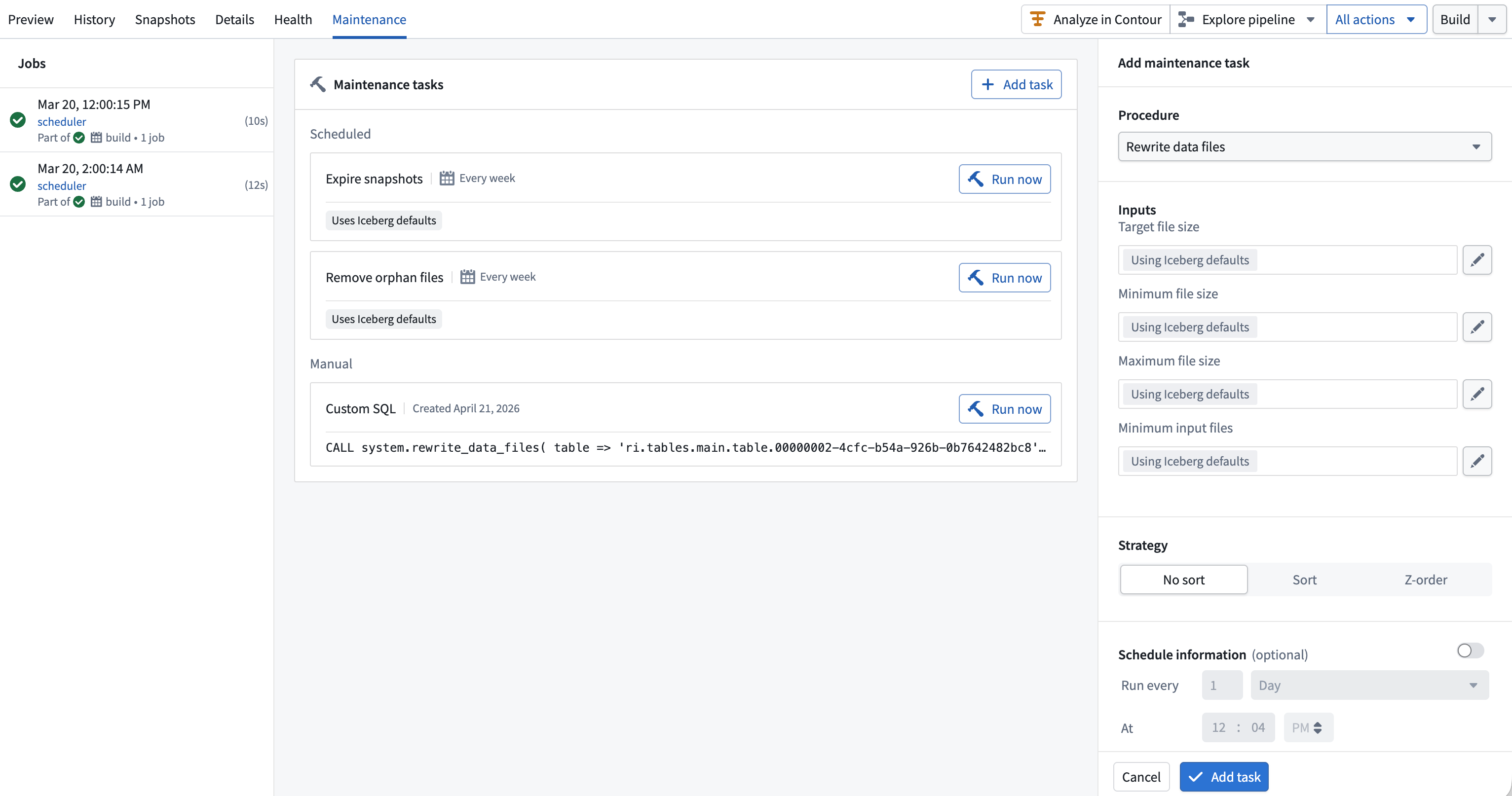
Maintenance tab overview
The Maintenance tab is divided into three panels:
- Jobs: A chronological list of maintenance runs for this table, including status, start/end time, and a link to open the build in the Builds application.
- Tasks: The set of maintenance tasks configured for this table, including any current schedules configured on them.
- Configuration panel: Opens when you create or edit a task. Lets you pick a procedure, configure its parameters, optionally attach a schedule, and save.
Add a maintenance task
- Select Add task.
- In the configuration panel, choose a Procedure from the dropdown.
- Configure the procedure fields to modify any settings from the default parameter values.
- Optionally enable Schedule information and configure a cron trigger.
- Select Add task.
Once saved, the new task will appear in the Tasks panel.
Edit and delete tasks
Select a task in the Tasks panel to open it in the configuration panel. You can change any of its fields, its schedule, or delete it and its associated schedule with Delete task.
Task types
The Maintenance tab supports the following task types:
Rewrite data filesRewrite manifestsExpire snapshots*Remove orphan filesCustom SQL(for arbitrary Iceberg procedures or DML operations)
You can find more details and documentation on these tasks directly in the maintenance configuration panel.
For the operations required to view, create, and edit each kind of task, see Iceberg table permissions. Authoring a Custom SQL task requires additional operations beyond those for the built-in procedures.
Exercise caution when running expire snapshots. Expired snapshots are removed from the table and cannot be restored. This means rollback and time travel to the expired snapshots will no longer be possible. Downstream consumers of those snapshots may also be impacted, including any incremental pipelines that rely on reading previous snapshots for incremental resolution.
For more information about snapshot retention, orphan file cleanup, and disaster-recovery-aware deferred file deletion, see Iceberg table retention.