- Capabilities
- Getting started
- Architecture center
- Platform updates
Iceberg table snapshots
An Iceberg snapshot is a record of a table's state at a single point in time. It captures exactly which data files make up the table at the moment the snapshot was committed. Every data write to an Iceberg table produces a new snapshot.
This page explains what snapshots are, where to explore them in Foundry, the types of snapshot operations, and how snapshots map to Foundry dataset transactions.
How snapshots work
In Iceberg, each data write commits a new snapshot on top of the current one, providing a history of the table's evolution. A snapshot does not store data itself. Instead, it references the set of data files that constitute the table at that moment, recorded through the table's metadata.
Snapshots can be removed by snapshot expiration, which you can configure in the Maintenance tab. Expiration is irreversible: you cannot view, time travel to, or roll back to expired snapshots.
For a full technical description of Iceberg's snapshot and metadata model, see the Apache Iceberg table specification ↗.
Metadata-only operations, including updating the schema, identifier columns, or partitions, do not create Iceberg snapshots and do not appear in the Snapshots tab. A new schema version becomes visible in the tab on the next snapshot-producing operation.
View snapshots in Foundry
The Snapshots tab in Dataset Preview shows an Iceberg table's history as a series of snapshots. It complements the History tab, which lists the Foundry jobs that ran against the table.
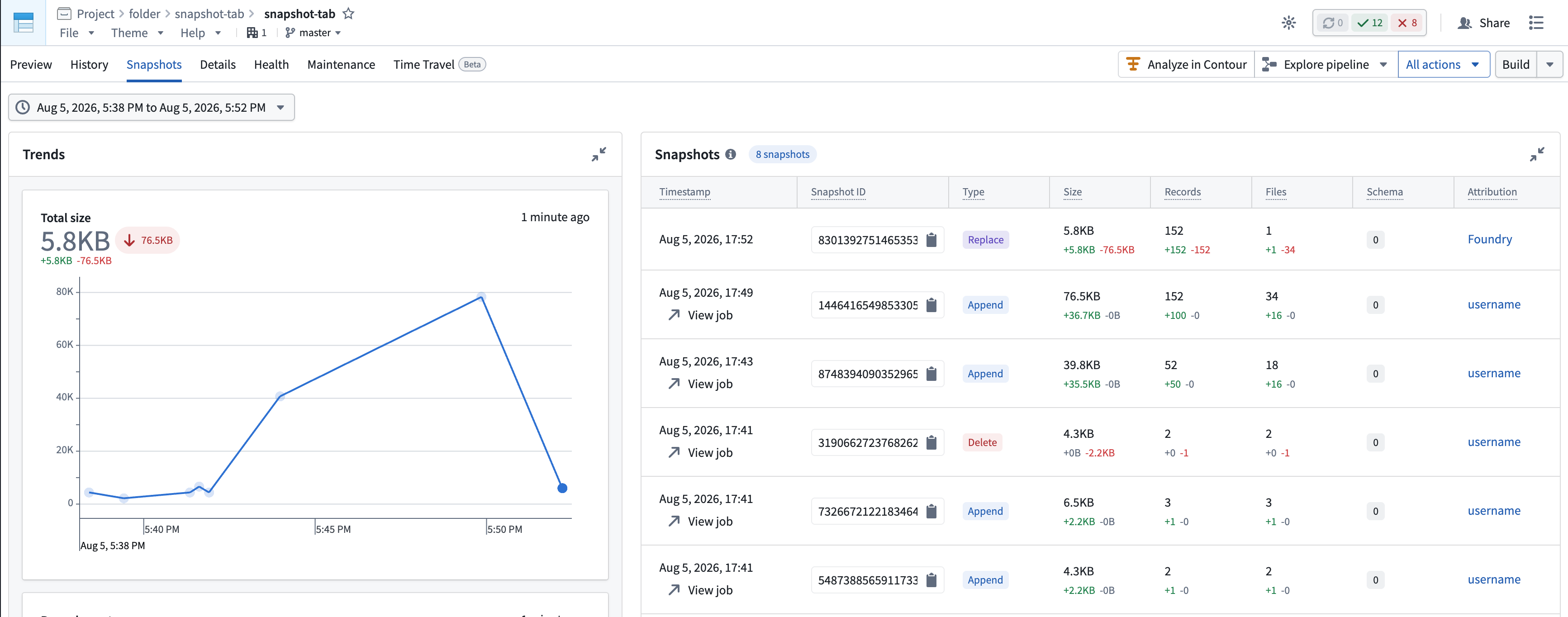
The Trends section provides a visual overview of your snapshots in the selected time range, using Iceberg's snapshot summary metrics ↗. The x-axis represents commit time, with each point representing one snapshot, plotted at the moment it was committed.
- Total size: Iceberg's
total-files-size, measured in bytes and displayed using 1024-based IEC binary units ↗. Represents the total size of live data and delete files as of the given snapshot on the selected branch over time. Excludes metadata files and orphaned files. - Record count: Iceberg's
total-records. Represents records physically contained in live data files. Iceberg calculates this as the previous total plus records in added data files minus records in removed data files. Rows represented by position or equality deletes remain included, so this metric can exceed the number of rows visible to readers. - File count: Iceberg's
total-data-files. Represents the count of data files that are live in the given snapshot. Excludes delete files, metadata files, and orphaned files. - Schema version: The schema version associated with the given snapshot.
The Snapshots table lists every snapshot in the selected time range, newest first, with the following columns:
- Timestamp: When the snapshot was committed. If the snapshot came from a Foundry build, a View job link opens that job.
- Snapshot ID: The snapshot ID as recorded in the table's metadata file. Select to copy.
- Type: The operation that produced the snapshot (Append, Overwrite, Replace, or Delete), as described in Snapshot types.
- Size, Records, Files: The totals for the resulting table, as well as the additions and deletions contributed by that snapshot.
- Schema: The schema version in the snapshot. A marker highlights snapshots that introduced a new version.
- Attribution: The user or group that initiated the write, where available.
Only snapshots present in the current metadata file appear in this view. Expired snapshots are no longer present in metadata and will not appear.
Selecting a schema version in the table opens a dialog with details on that schema version and changes versus the previous schema version.

Snapshot types
Every snapshot records the type of operation that produced it. Iceberg defines four snapshot types.
Append
New data files are added and nothing existing is modified or removed. Ordinary appends produce an append snapshot, as do first writes to an empty table.
The first write to a new Iceberg table is recorded as an append snapshot, even when the intent is to fully replace the table contents. This is expected.
When a table is empty, appending data and replacing data are logically equivalent, as there is nothing to overwrite. Iceberg records the operation as an "append" because files were only added and none were removed.
Overwrite
Data files are both added and removed, changing the logical set of records in the table. Overwrite snapshots cover both partial and full overwrites. A full rewrite of a non-empty table produces an overwrite snapshot, as do "Overwrite" and "Update" Data Connection syncs.
Delete
Data is logically deleted, either by removing data files or by adding delete files that mark rows for deletion.
Replace
Data files are rewritten without changing the table's logical contents. The canonical example is compaction, run from the Maintenance tab, which reorganizes files for performance without altering the records the table represents.
How snapshots map to Foundry dataset transactions
The Foundry dataset transaction types correspond to Iceberg snapshot types as follows.