- Capabilities
- Getting started
- Architecture center
- Platform updates
Branch protection
When there are multiple authors contributing to the same Pipeline Builder instance, or when the pipeline backs critical data assets, you can protect your branch to achieve a greater level of governance and defense against unintentional changes. A protected branch can only be modified with a pull request and must satisfy a predefined set of requirements.
How to protect branches
Navigate to the Settings drop down in the top left. Select Manage branches.
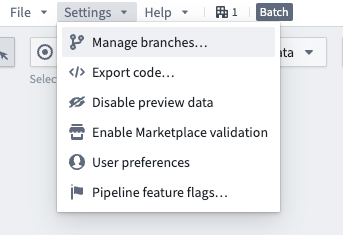
Select the Branch protection tab. In this tab, enable Require proposals... to protect the main branch and any other branches specified in the text box below. Select Save when done.
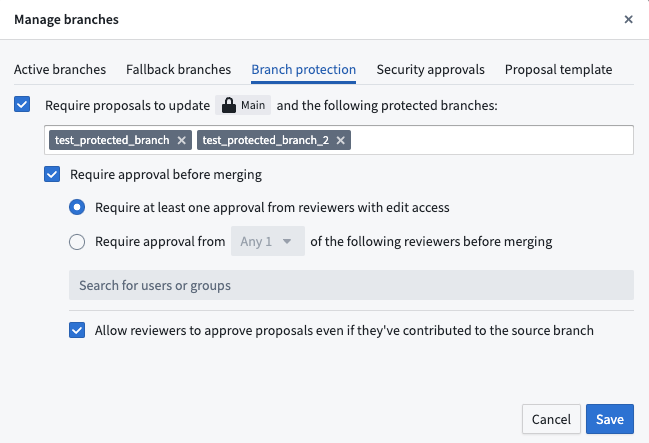
All protected branches require users to make changes on a separate branch before those changes can be merged into protected branches. Currently, all protected branches in Pipeline Builder share the same approval rules.
The Resolve changes action, which allows you to merge a target branch into your current branch, does not work when your target branch is protected. This is by design, as Resolve changes would directly save changes to the pipeline, which is not permitted for protected branches. Instead, use the proposal flow to merge changes into a protected branch.
Interactions with security approvals and marking removals
When changes to security markings are enabled for a pipeline, branch protection settings are subject to additional governance:
- Enabling security approvals for changes to markings and organizations on outputs requires protected branch workflows. While this setting is enabled, you cannot change branch protection settings or disable proposal approval requirements.
- If a protected branch contains marking removals, you must undo those removals before you can disable the setting that allows changes to security markings in the pipeline.
- In pipelines with multiple protected branches, marking removals target all protected branches. If there are marking removals on any branch, stop removing markings from all branches before protecting or unprotecting branches.
Enrollment-level branch protection
Administrators can enable default branch protection for the main branch of all new pipelines on an enrollment. Branch protection enhances the security and integrity of your repository by requiring proposals to be approved before any changes can be made to a protected branch.
Enabling enrollment-level branch protection will not affect existing pipelines. To change the branch protection of existing pipelines, see how to protect branches above.
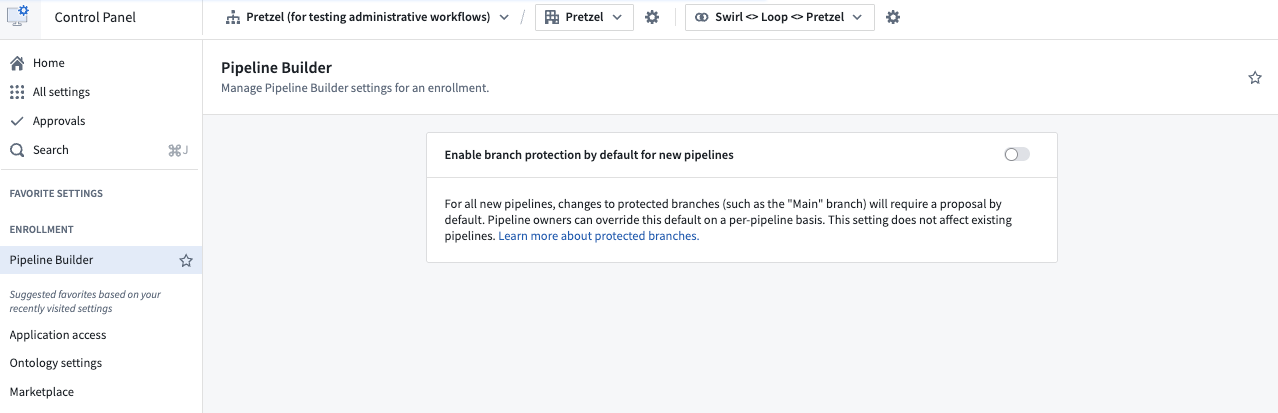
Go to Control Panel and navigate to Pipeline Builder. Then, toggle the setting for Enable branch protection by default for new pipelines. This will make main branches on new pipelines protected branches, so they will require proposals before changes can be merged.
Project approval policies
In addition to the local branch protection settings described above, Pipeline Builder pipelines can also be governed by project approval policies. Project approval policies define approval requirements at the project level for protected resources, providing an additional layer of governance alongside local branch protection settings.