- Capabilities
- Getting started
- Architecture center
- Platform updates
Iceberg tables & Foundry datasets
Iceberg tables and datasets are both resource types which allow you to represent tabular data in Foundry. Iceberg tables offer interoperability with the broader Iceberg ecosystem along with capabilities such as row-level edits and changelogs, while datasets currently support a wider set of Foundry features.
Benefits of Iceberg tables
The following benefits of Iceberg tables are currently available in Foundry:
- Interoperability: Open Iceberg format means third-party tools can more easily read and write Palantir Iceberg tables.
- Compaction: Support for compaction without affecting incremental reads.
- Row edits: Support for
DELETE,UPDATE, andMERGE INTOstatements, which allow you to conditionally modify rows without the need to re-snapshot. - Changelogs: Incrementally consume row deletions and updates.
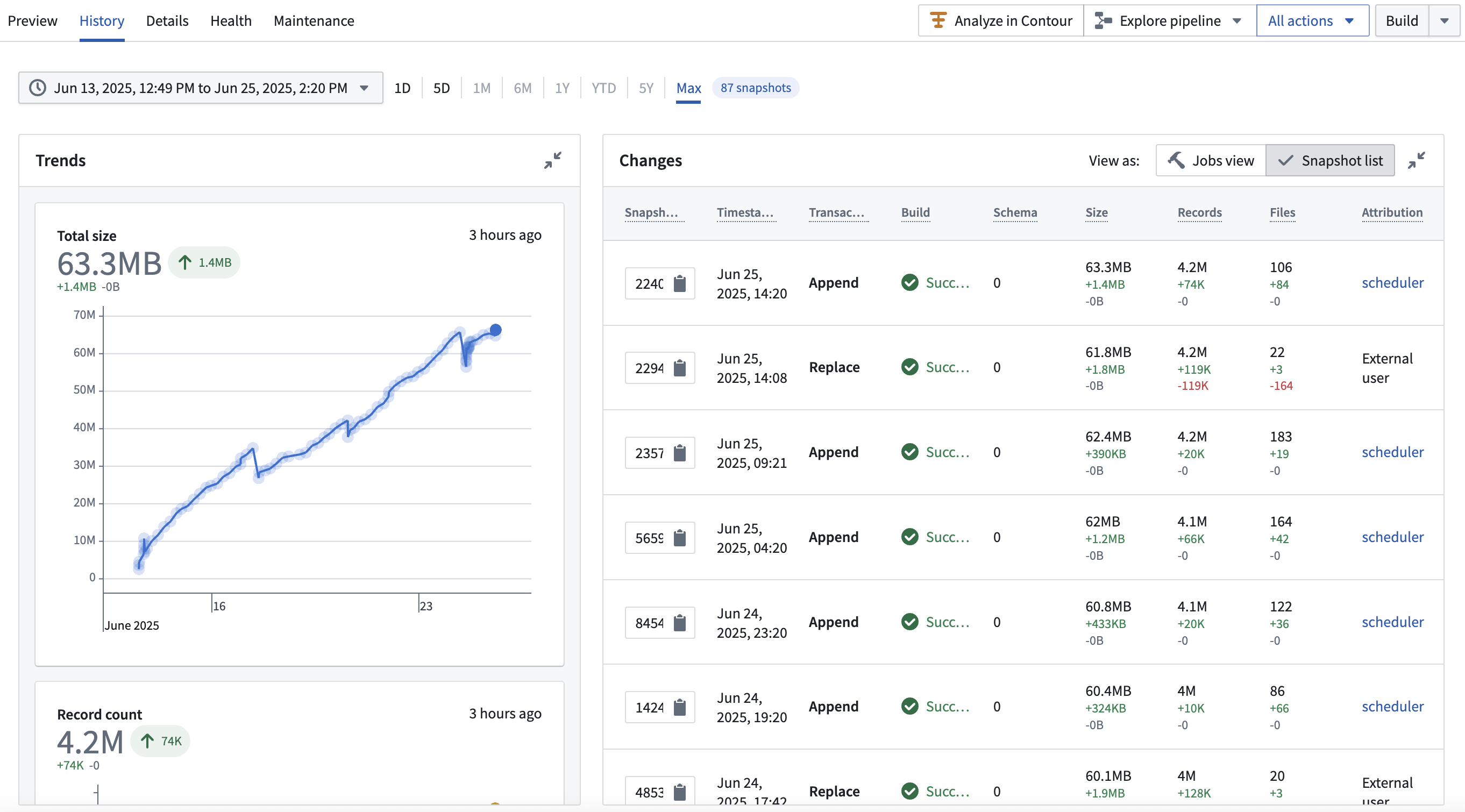
- Enriched table history: Enhanced history view surfacing Iceberg table metadata ↗.
The interface for viewing Iceberg table history can be seen in the following screenshot:
Foundry functionality not available for Iceberg tables
Certain Foundry features are not currently supported for Iceberg tables, including:
- Foundry views (Iceberg views ↗ are also not supported)
- Restricted views
- Streaming
- Time series syncs
- Projections
- Object materializations
Granular access controls
The supported approach to granular access controls depends on where users access the data:
- In the Ontology: Object types backed by Iceberg tables can use object and property security policies for row-level and column-level access control. Support for these policies on Iceberg-backed object types may not be available on your enrollment. Contact Palantir Support to request access.
- At the table level: Iceberg tables cannot directly back restricted views. If you need row-level access control outside the Ontology, create a Foundry dataset that reads from the Iceberg table, then create the restricted view from that dataset.
Iceberg tables also support markings for table-wide access controls. See Markings on Iceberg tables.
Marketplace support
You can package managed Iceberg tables into Marketplace products and install those products into a target environment. Each installed table must use the same storage type as the packaged table: Foundry-managed storage or bring-your-own-bucket (BYOB) storage. For example, a table using Foundry-managed storage cannot be installed as a table using BYOB storage, and vice versa.
Notable differences between Iceberg tables and Foundry datasets
The following differences in behavior between Iceberg tables and Foundry datasets are important to note.
- Default branches: Iceberg's main branch is called
main, whereas Foundry's main branch is calledmaster. In Foundry's integration with Iceberg,mainandmasterare treated as the same, which means a Foundry job running onmasterwill write to an Iceberg table'smain. See Branching for details on how Foundry isolates schema changes per branch. - Markings: A marking inherited by any retained Iceberg snapshot can prevent users who do not satisfy that marking from reading the entire table, including otherwise unmarked branches. Dataset marking enforcement is scoped more narrowly to the requested view. See Markings on Iceberg tables for details and guidance on unmarking workflows.
- Automatic schema evolution: Iceberg table schema evolution is not always automatic. Certain workflows, such as table replaces, evolve the table's schema automatically; however, others require explicit schema evolution commands or settings, such as
ALTER TABLE. When writing through Foundry's transforms APIs and Pipeline Builder, Foundry uses table replaces when running non-incrementally to handle this for you. Other workflows, such as incremental schema evolution, may fail and require manual resolution. See the Apache Iceberg documentation on schema evolution ↗ for details.
Iceberg terminology disambiguation
Iceberg introduces terms that do not always have direct equivalents in Foundry:
| Iceberg term | Meaning | Foundry disambiguation |
|---|---|---|
| Table metadata ↗ | Metadata describing the structure, schema, and state of an Iceberg table. | Foundry also tracks metadata for tables and datasets across all formats, but this metadata is managed internally by Foundry services. For Iceberg tables, Foundry exposes the native Iceberg metadata explicitly as a JSON file via the Iceberg catalog. |
| Snapshots ↗ | A record of the table's state at a specific point in time. Iceberg creates a new snapshot with every data modification. | An Iceberg snapshot is roughly equivalent to a Foundry transaction. However, Foundry also uses the term "snapshot" differently: in Foundry, a "snapshot" refers to a transaction that fully replaces all data in a dataset, while an Iceberg snapshot captures all types of data operations, including incremental changes. See Iceberg snapshot types for a complete disambiguation of Foundry catalog dataset transaction types and Iceberg snapshot types. |