- Capabilities
- Getting started
- Architecture center
- Platform updates
Create a historical dataset from snapshots
If possible, it is best practice for historical datasets to be ingested as APPEND transactions. See the warnings below for additional details.
Workflow overview
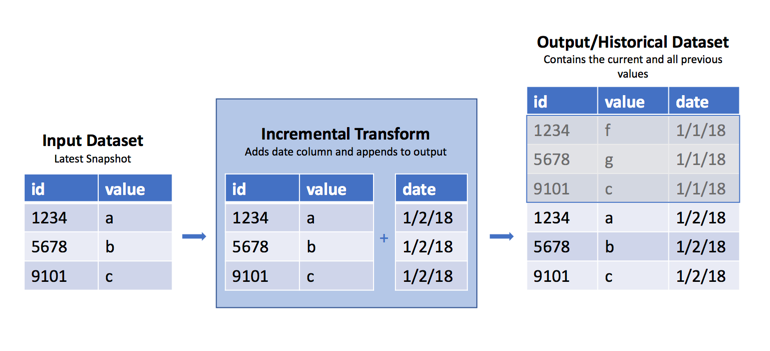
Occasionally, you may encounter a raw dataset where a new SNAPSHOT import replaces the previous view with the dataset's current data each day, week, or hour. However, it is often useful to have the previous data available to determine what has changed from the previous view. As mentioned above, it is best practice to handle this as part of ingestion by using APPEND transactions and adding a column with the import date. However, in cases where this is not possible, you can use the incremental decorator in Python transforms to append these regular snapshots into a historical version of that dataset. See the warnings below for caveats and the potential fragility of this approach.
Sample code
Below are examples of how to create historical datasets using the incremental decorator.
Copied!1 2 3 4 5 6 7 8 9 10 11 12 13 14 15 16 17from datetime import date import polars as pl from transforms.api import transform, incremental, Input, Output @incremental(snapshot_inputs=['input_data']) @transform.using( input_data=Input("/path/to/snapshot/input"), history=Output("/path/to/historical/dataset"), ) def my_compute_function(input_data, history): input_df = input_data.polars() # Import and use datetime.now() instead if the input can change more than once per day. input_df = input_df.with_columns(pl.lit(date.today()).alias('date')) history.write_table(input_df)
Copied!1 2 3 4 5 6 7 8 9 10 11 12 13 14 15 16 17from transforms.api import transform, incremental, Input, Output @incremental(snapshot_inputs=['input_data']) @transform.using( input_data=Input("/path/to/snapshot/input"), history=Output("/path/to/historical/dataset"), ) def my_compute_function(ctx, input_data, history): duckdb = ctx.duckdb() # Use CURRENT_TIMESTAMP instead if the input can change more than once per day. query = duckdb.conn.sql(f""" SELECT *, CURRENT_DATE AS date FROM input_data """) history.write_table(query)
Copied!1 2 3 4 5 6 7 8 9 10 11 12 13 14 15import pandas as pd from transforms.api import transform, incremental, Input, Output @incremental(snapshot_inputs=['input_data']) @transform.using( input_data=Input("/path/to/snapshot/input"), history=Output("/path/to/historical/dataset"), ) def my_compute_function(input_data, history): input_df = input_data.pandas() # Omit .date() if the input can change more than once per day. input_df['date'] = pd.Timestamp.now().date() history.write_table(input_df)
Copied!1 2 3 4 5 6 7 8 9 10 11 12 13 14 15from transforms.api import transform, incremental, Input, Output from pyspark.sql.functions import current_date @incremental(snapshot_inputs=['input_data']) @transform.spark.using( input_data=Input("/path/to/snapshot/input"), history=Output("/path/to/historical/dataset"), ) def my_compute_function(input_data, history): input_df = input_data.dataframe() # Import and use current_timestamp() instead if the input can change more than once per day. input_df = input_df.withColumn('date', current_date()) history.write_dataframe(input_df)
Why this works
The incremental decorator applies additional logic to the read/write modes on the inputs and output. In the example above, we use the default read/write modes for the input and output.
Read mode
When using a SNAPSHOT input, the default read mode is current, which means it takes the entire input DataFrame, and not just the rows added since the last transaction. If the input dataset was created from an APPEND transaction, we could use the incremental decorator to use the added read mode to only access rows added since the last build. The transform obtains schema information from the current output, so there is no need to pass schema information like you would if you were reading a previous version of the DataFrame, for example, dataframe('previous', schema=input.schema).
Write mode
When we say a transform is run incrementally, it means that the default write mode for the output is set to modify. This mode modifies the existing output with data written during the build. For example, calling write_dataframe() when the output is in modify mode will append the written DataFrame to the existing output. This is exactly what is happening in this case.
Verify that the dataset accumulates
Accumulation happens across successive builds, not within a single build. The first build establishes the history with the current input snapshot. After a new SNAPSHOT transaction lands on the input, the next build appends that current snapshot to the existing history.
To observe the history accumulating, follow these steps:
- Run the transform once. An output that has never been built runs non-incrementally and uses the
replacewrite mode, so seeing one snapshot after the first build is expected. - Land a new
SNAPSHOTtransaction on the input dataset, for example by re-importing or re-syncing the source data, then run the transform again. A build without a new input transaction does not add new historical state. - Inspect the output and confirm that it contains rows from both snapshots, identified by the date or timestamp column added in the example. If snapshots can land more than once per day, use a timestamp instead of a date.
- To confirm whether a build ran incrementally, check the incremental report of its job:
- View the build report from Dataset Preview, Data Lineage, or the Builds application.
- Select the job in the list below the Gantt chart, select Spark details, then open the Snapshot/Incremental tab. The report displays the range of transactions that the job read for each input.
The Code Repositories preview feature always runs transforms non-incrementally, even when require_incremental=True is set. As a result, you cannot observe accumulation in a Code Repositories preview, because each run replaces the output with the current snapshot. Use the VS Code preview, which runs transforms incrementally, or inspect the output of a scheduled or manual build instead.
If the output still contains only the latest snapshot after two builds with different input transactions, the second build likely ran non-incrementally and replaced the output. Common causes include the following:
- A changed
semantic_version - An input that is fully rewritten but is not declared as a snapshot input
- An output whose last transaction was produced by a different transform
To confirm the cause, review the requirements for incremental computation and check the incremental report of the build's job as described above. The driver logs of the job also record the warning transforms.api._incremental: Not running incrementally.
Warnings
Because this transform uses SNAPSHOT datasets as inputs, there is no way to recover a snapshot that your build may have missed due to build failures or other reasons. If this is a concern, do not use this method. Instead, contact the owner of the input datasets to see if it is possible to convert it to an APPEND dataset so you can access the dataset's previous transaction. This is the way incremental computation was designed to work.
This approach will fail under the following conditions:
- Columns are added to the input dataset
- The column number of the existing table does not match the input data schema
- Columns on the input datasets change datatype, for example from
integertodecimal - You change the input dataset, even if that dataset has an identical schema. In this case, it will completely replace the output with the input rather than append.
Increased resource consumption
Using this pattern can cause an accumulation of small files in the historical dataset. File accumulation is not a desired outcome and will lead to increased build times and resource consumption in downstream transforms or analyses that use this historical dataset. Batch and interactive compute time may increase, as there is an overhead associated with reading each file. Disk usage may increase because compression is done on a per-file basis, and not across files within a dataset. It is possible to build logic to periodically cause a re-snapshot of the data and prevent this behavior from happening.
By inspecting the number of output files, we can determine an optimal incremental write mode. This mode allows us to read in the previous transaction's output as a DataFrame, union it to the incoming data, and coalesce the data files together. This turns many small files into one larger file.
Inspect the number of files in the output dataset's file system and use an if statement to set the write_mode, as in the following example:
Copied!1 2 3 4 5 6 7 8 9 10 11 12 13 14 15 16 17 18 19 20 21 22 23 24 25 26 27 28 29 30 31 32 33 34 35 36 37 38 39 40 41import polars as pl from transforms.api import transform, Input, Output, incremental FILE_COUNT_LIMIT = 100 # Be sure to insert your desired output schema here schema = { 'Value': pl.Float64, 'Time': pl.Datetime, 'DataGroup': pl.Utf8 } def compute_logic(df): """ This is your transforms logic """ return df.filter(pl.lit(True)) @incremental(semantic_version=1) @transform.using( output=Output("/Org/Project/Folder1/Output_dataset_incremental"), input_df=Input("/Org/Project/Folder1/Input_dataset_incremental"), ) def compute(input_df, output): df = input_df.polars('added') df = compute_logic(df) # Fetches a list of the files that are in the dataset files = list(output.filesystem(mode='previous').ls()) if (len(files) > FILE_COUNT_LIMIT): # Incremental merge and replace previous_df = output.polars('previous', schema) df = pl.concat([df, previous_df]) mode = 'replace' else: # Standard incremental mode mode = 'modify' output.set_mode(mode) output.write_table(df)
Copied!1 2 3 4 5 6 7 8 9 10 11 12 13 14 15 16 17 18 19 20 21 22 23 24 25 26 27 28 29 30 31 32 33 34 35 36 37 38 39 40 41import polars as pl from transforms.api import transform, Input, Output, incremental FILE_COUNT_LIMIT = 100 # Be sure to insert your desired output schema here schema = { 'Value': pl.Float64, 'Time': pl.Datetime, 'DataGroup': pl.Utf8 } def compute_logic(conn): """ This is your transforms logic """ return conn.sql("SELECT * FROM input_df") @incremental(semantic_version=1) @transform.using( output=Output("/Org/Project/Folder1/Output_dataset_incremental"), input_df=Input("/Org/Project/Folder1/Input_dataset_incremental"), ) def compute(ctx, input_df, output): conn = ctx.duckdb().conn df = compute_logic(conn).pl() # Fetches a list of the files that are in the dataset files = list(output.filesystem(mode='previous').ls()) if (len(files) > FILE_COUNT_LIMIT): # Incremental merge and replace previous_df = output.polars('previous', schema) df = pl.concat([df, previous_df]) mode = 'replace' else: # Standard incremental mode mode = 'modify' output.set_mode(mode) output.write_table(df)
Copied!1 2 3 4 5 6 7 8 9 10 11 12 13 14 15 16 17 18 19 20 21 22 23 24 25 26 27 28 29 30 31 32 33 34 35 36 37 38 39 40 41import pandas as pd from transforms.api import transform, Input, Output, incremental FILE_COUNT_LIMIT = 100 # Be sure to insert your desired output schema here schema = { 'Value': 'float64', 'Time': 'datetime64[ns]', 'DataGroup': 'object' } def compute_logic(df): """ This is your transforms logic """ return df[df.index >= 0] # Equivalent to filter(True) @incremental() @transform.using( output=Output("/Org/Project/Folder1/Output_dataset_incremental"), input_df=Input("/Org/Project/Folder1/Input_dataset_incremental"), ) def compute(input_df, output): df = input_df.pandas('added') df = compute_logic(df) # Fetches a list of the files that are in the dataset files = list(output.filesystem(mode='previous').ls()) if (len(files) > FILE_COUNT_LIMIT): # Incremental merge and replace previous_df = output.pandas('previous', schema) df = pd.concat([df, previous_df], ignore_index=True) mode = 'replace' else: # Standard incremental mode mode = 'modify' output.set_mode(mode) output.write_table(df)
Copied!1 2 3 4 5 6 7 8 9 10 11 12 13 14 15 16 17 18 19 20 21 22 23 24 25 26 27 28 29 30 31 32 33 34 35 36 37 38 39 40 41 42from pyspark.sql import types as T from transforms.api import transform, Input, Output, incremental FILE_COUNT_LIMIT = 100 # Be sure to insert your desired output schema here schema = T.StructType([ T.StructField('Value', T.DoubleType()), T.StructField('Time', T.TimestampType()), T.StructField('DataGroup', T.StringType()) ]) def compute_logic(df): """ This is your transforms logic """ return df.filter(True) @incremental() @transform.spark.using( output=Output("/Org/Project/Folder1/Output_dataset_incremental"), input_df=Input("/Org/Project/Folder1/Input_dataset_incremental"), ) def compute(input, output): df = input.dataframe('added') df = compute_logic(df) # Fetches a list of the files that are in the dataset files = list(output.filesystem(mode='previous').ls()) if (len(files) > FILE_COUNT_LIMIT): # Incremental merge and replace previous_df = output.dataframe('previous', schema) df = df.unionByName(previous_df) mode = 'replace' else: # Standard incremental mode mode = 'modify' output.set_mode(mode) output.write_dataframe(df.coalesce(1))