- Capabilities
- Getting started
- Architecture center
- Platform updates
Iceberg table retention
Foundry Iceberg tables support retention and cleanup through snapshot expiration and orphan file removal. These operations remove old table history from Iceberg metadata and help limit storage growth as tables are updated over time. This page explains how to use Iceberg maintenance procedures to implement retention in Foundry on an individual table.
Expire snapshots
The primary mechanism to implement retention on Iceberg tables is through the expire snapshots maintenance procedure ↗. Every data write to an Iceberg table creates a snapshot. Snapshot expiration removes older snapshots from the table's metadata. After a snapshot is expired, it no longer appears in the table's snapshot history, and you cannot roll back or time travel to that snapshot.
When configuring an Expire snapshots maintenance task, choose retention settings based on how much history the table must preserve. Common settings include:
- Minimum snapshots to retain: Always retain at least this many recent snapshots, regardless of age.
- Minimum age or time window to retain: Always retain snapshots newer than the configured window, regardless of how many newer snapshots exist.
A snapshot is retained if it satisfies either configured threshold. For example, consider a table configured to retain at least 3 snapshots and at least 30 days of history. This table would retain a snapshot from 10 days ago even if many newer snapshots exist, due to the configured history; similarly, a snapshot older than 30 days would be retained as long as it is one of the 3 most recent snapshots.
Snapshot expiration applies independently to each Iceberg branch where applicable. For example, if minimum snapshots to retain is 3 and your table has two branches, the minimum snapshots setting means that three snapshots are protected for each branch. The minimum-snapshots setting could therefore protect up to six distinct snapshots across two non-overlapping branches. When a branch is deleted, snapshots that were exclusively protected by that branch become eligible for expiration on a future retention run.
You can also use tags ↗ to protect specific older snapshots from expiration.
Keep the following considerations in mind when using Expire snapshots:
- Exercise caution when expiring snapshots. Expired snapshots are removed from table metadata and cannot be restored for rollback or time travel. Downstream incremental consumers can also be impacted if they rely on older snapshots to resolve changes.
- Snapshot expiration procedures will respect relevant Iceberg table properties unless explicitly overridden in the procedure. For example, the
history.expire.max-snapshot-age-msandhistory.expire.min-snapshots-to-keeptable properties will apply if theolder_thanandretain_lastprocedure arguments are not specified.
Remove orphan files
Orphan files are files in the table's storage location that are not referenced by the current table metadata, which includes files referenced by all non-expired snapshots. Orphan files can be left behind by failed writes, metadata cleanup, or previous expire snapshot operations.
Foundry automatically applies orphan file removal periodically to all Iceberg tables to clean up these old files. Optionally, you can also manually configure a Remove orphan files task on your table from the Maintenance tab.
Foundry differs from open-source Iceberg orphan cleanup by only physically removing files that are outside the configured disaster recovery lookback window. Files inside that window may be retained even if they are no longer referenced by the current table metadata.
Deferred file deletion and disaster recovery
Foundry's Iceberg implementation decouples metadata cleanup from physical file deletion. This ensures that relevant orphan files are retained for a short period after expiration, in compliance with Foundry's disaster recovery procedures.
This means that Foundry behavior differs from the open-source implementation in the following ways:
- In open-source Iceberg, expiring snapshots will commonly also delete the physical files that are no longer referenced by retained snapshots.
Expire snapshotsin Foundry removes snapshots from table metadata, just as in open-source Iceberg, while physical file deletion is deferred to a later date. - In open-source Iceberg, orphan file removal will delete all orphan files before the
older_thantimestamp provided in the procedure.Remove orphan filesin Foundry only deletes orphan files that are older than both the user-suppliedolder_thantimestamp and the configured disaster recovery lookback window on your environment.
To prevent accidental invalidation of disaster recovery backups, Foundry-managed Iceberg tables behave as if they have the property gc.enabled=false. This prevents users from accidentally running vanilla Iceberg operations that may delete files inside the disaster recovery window.
Examples and guidance
A snapshot is produced by every Iceberg commit, including appends, overwrites, deletes, and replace operations such as compaction. A retention configuration that keeps a fixed number of snapshots can therefore preserve very different amounts of wall-clock history depending on how often the table commits and what kinds of commits it produces.
Choose retention settings based on rollback needs, time-travel expectations, downstream incremental build cadence, and storage-management goals. If downstream consumers build infrequently, retain enough snapshot history for them to resolve changes between their last processed snapshot and the current table state.
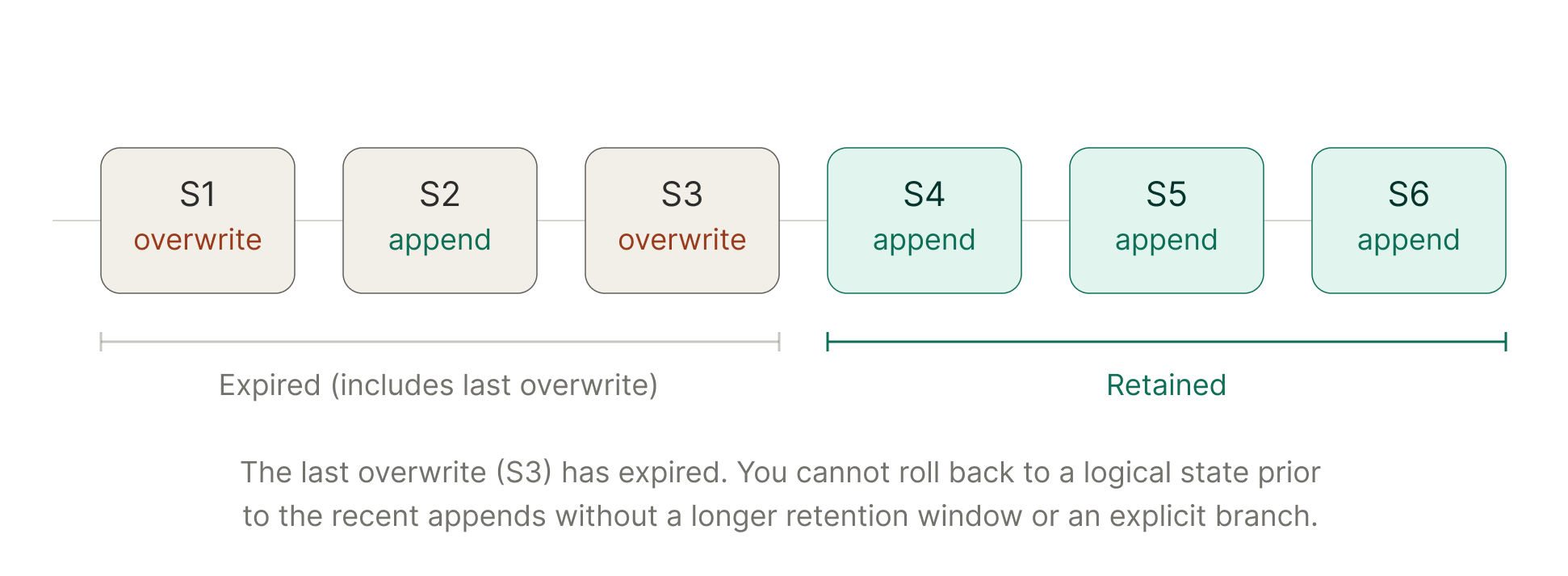
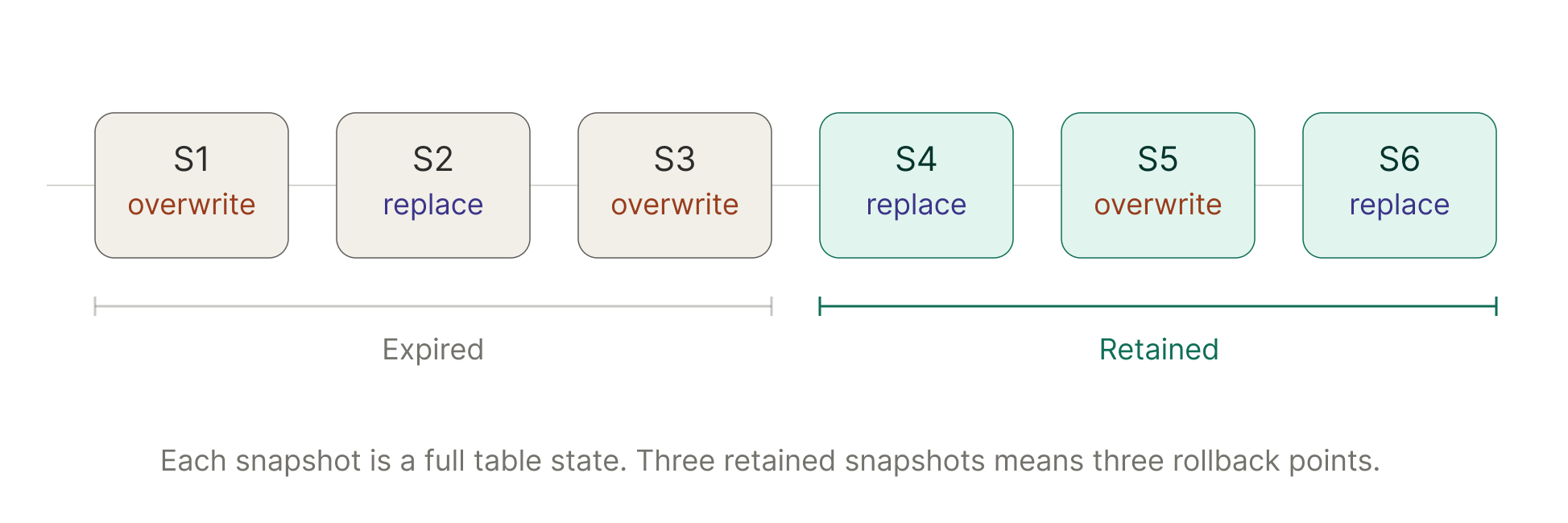
The two examples below illustrate how this can play out when configuring expire snapshots to retain the last three snapshots.
Example 1: A non-incremental table with regular compaction can accumulate snapshots that do not represent logically different versions of the table:
Example 2: On an incremental table, retaining three snapshots may preserve only the current table plus the two most recent append states. Although each snapshot is a complete table state, this may not preserve enough history to return to earlier full-table rebuilds or other major logical versions.