- Capabilities
- Getting started
- Architecture center
- Platform updates
Announcements
REMINDER: Sign up for the Foundry Newsletter to receive a summary of new products, features, and improvements across the platform directly to your inbox. For more information on how to subscribe, see the Foundry Newsletter and Product Feedback channels announcement.
Share your thoughts about these announcements in our Developer Community Forum ↗.
Grok Build 0.1 from xAI is now available in AIP
Date published: 2026-06-16
Grok Build 0.1 is now available for enrollments with xAI enabled in the US and other supported regions.
Model overview
Grok Build 0.1 is xAI's coding model trained for agentic coding tasks, including web development and debugging, with MCP support. xAI positions the model as a fast, low-cost option for general-purpose agentic and tool-calling use cases.
For more information, review xAI's model documentation ↗.
Getting started
To use this model:
- Confirm your enrollment administrator has enabled the xAI model family.
- Review token costs and pricing.
- See the complete list of models available in AIP.
Your feedback matters
We want to hear about your experience using language models in the Palantir platform. Share your thoughts through Palantir Support channels or on our Developer Community ↗ using the language-model-service tag ↗.
SQL Studio, Foundry's dedicated SQL application, is now generally available
Date published: 2026-06-16
SQL Studio, Foundry's dedicated application for writing and running SQL queries, is now generally available as of the week of June 15. SQL Studio brings interactive SQL analysis to Foundry across both tabular data and ontology object types, backed by purpose-built SQL engines and AI-assisted query writing.
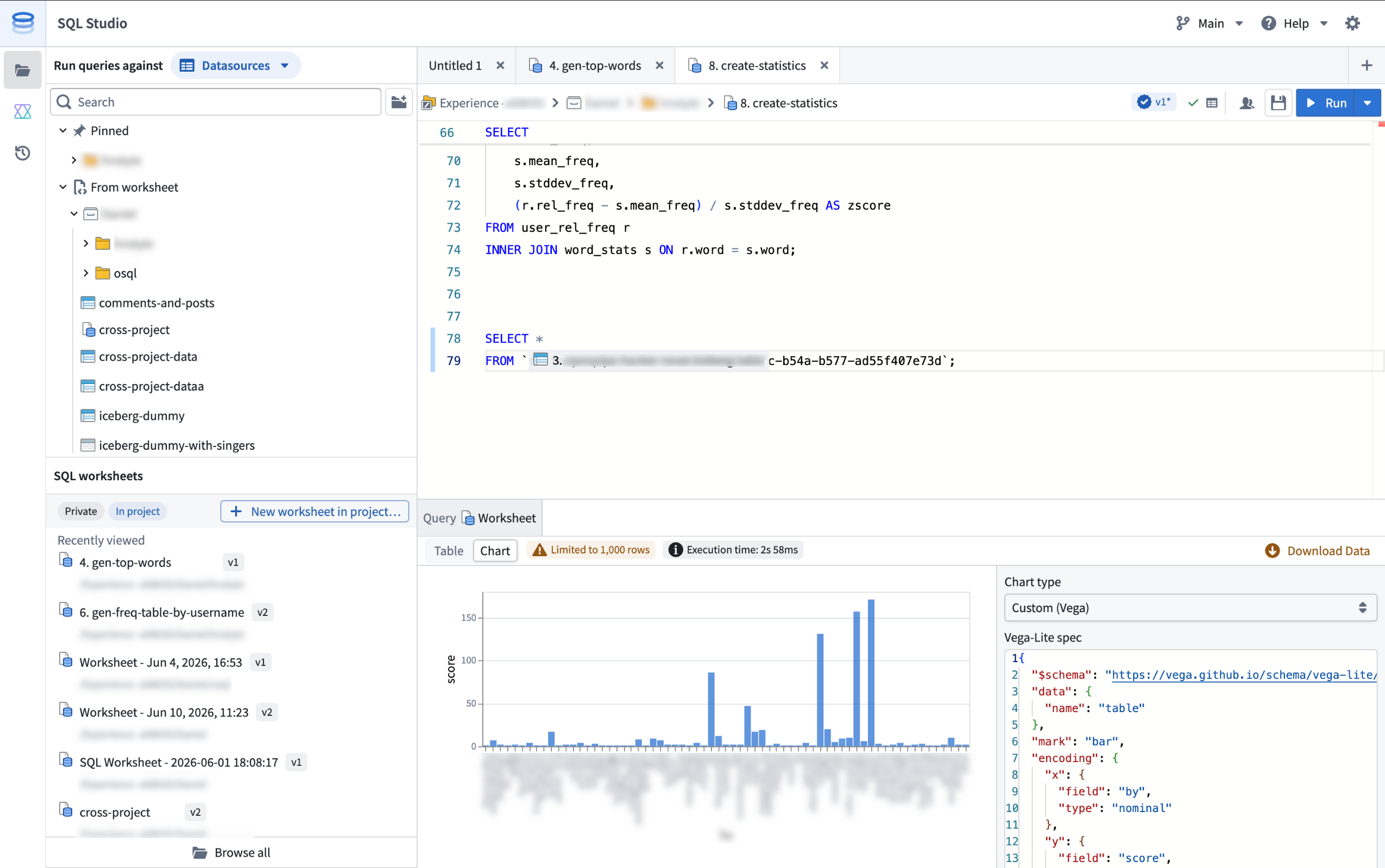
SQL Studio provides an interactive, AI-assisted interface for SQL analysis of tabular data and Ontology objects.
SQL Studio builds on the contextual SQL console embedded in applications such as Dataset Preview, Data Lineage, and Ontology Manager, now providing a dedicated application with read and write SQL support for tabular data, read support for ontology object types, and the ability to publish reusable Ontology SQL functions.
Powered by Ontology SQL and Furnace
SQL Studio is built on two Foundry SQL engines that share a common Spark SQL dialect: Ontology SQL for querying ontology object types, and Furnace for querying tabular data.
Ontology SQL is Foundry's SQL engine for querying ontology object types and many-to-many links. Queries execute directly against object storage using an in-memory compute path for fast response times on supported query shapes, with more complex queries automatically routed to Spark.
Furnace is Foundry's SQL engine for tabular data. It dynamically routes queries between Trino and Spark based on the workload, and supports both read and write operations.
Key features
SQL Studio brings together a complete SQL analysis experience in one place:
- Unified data and object querying: Query tabular data and ontology object types from a single application, switching between data mode and object mode, while using a common Spark SQL dialect.
- Low-latency, interactive analysis: SQL Studio is built for iterative development workflows. Queries are dynamically routed to the most appropriate compute engine, including faster non-Spark options for supported query shapes, and run on warm, fully managed compute.
- AI-assisted code generation: A conversational AIP side panel helps you write, explain, and debug queries. It understands Foundry's supported SQL dialect and has visibility into your editor, including the current code and the schemas of any referenced datasets, tables, and object types.
- Preview results as tables or charts: View query results as tabular output, visualize them with built-in chart types (line, bar, scatter, pie, and histogram), or create a custom chart powered by Vega. Result limits are configurable: queries return a 1,000-row preview by default, and users with the appropriate permissions can return up to 10,000 rows per query.
- Save and share SQL worksheets: Use a scratchpad for one-off analyses, or save your work as a SQL worksheet. Save worksheets privately for personal reuse or in a project to share with colleagues. Each save creates a new version that you can review and restore later, and unsaved changes are auto-staged so your in-progress work persists between sessions. SQL Studio supports multiple editor tabs, so you can work on several worksheets at the same time.
- Read and write support: In addition to
SELECTqueries, SQL Studio supportsCREATE TABLEoperations on datasets;CREATE,INSERT,UPDATE, andDELETEoperations on Iceberg tables; and theSHOW FUNCTIONSmeta-operation, which lists the supported SQL functions and their schemas. - Ontology SQL functions (beta): Define reusable, parameterized SQL queries over object types and publish them as SQL functions. Supported query shapes can execute with low latency on the same in-memory path as Ontology SQL queries. Use them across Foundry, including in Workshop, Actions, Automate, and the Ontology SDK. SQL functions are in beta and are not enabled on all Foundry environments; contact your Palantir representative to enroll.
Getting started
SQL Studio is available from the Applications menu.
For information about SQL Studio features, see the SQL Studio documentation. For syntax guidance, refer to the SQL dialect documentation. To learn more about the underlying engines, see the Furnace and Ontology SQL overviews.
If necessary, enrollment administrators can turn off SQL Studio for an enrollment from the Application access page of Control Panel.
What's coming next
SQL Studio is under active development, and several capabilities are on the near-term roadmap, including:
- Global Branching and Marketplace packaging support for SQL worksheets.
- Integration with Foundry's production pipeline tooling and Git-based CI/CD development workflows.
- Reusable SQL stored procedures that can be shared across queries and worksheets.
We want to hear from you
As we continue to develop SQL Studio, we welcome your feedback about both the SQL Studio application and the broader SQL experience in Foundry. Share your thoughts with Palantir Support channels or our Developer Community ↗.
Package multiple products simultaneously in Foundry DevOps
Date published: 2026-06-16
Foundry DevOps now supports packaging multiple products simultaneously within the same draft group. Previously, teams had to manually sequence each product to resolve cross-product dependencies. DevOps now handles this automatically, guaranteeing linked products are packaged in the correct dependency order.
To get started, navigate to the Products tab of your store. From the Drafts section, select Create new group and choose to add existing products to a draft group or create new products.
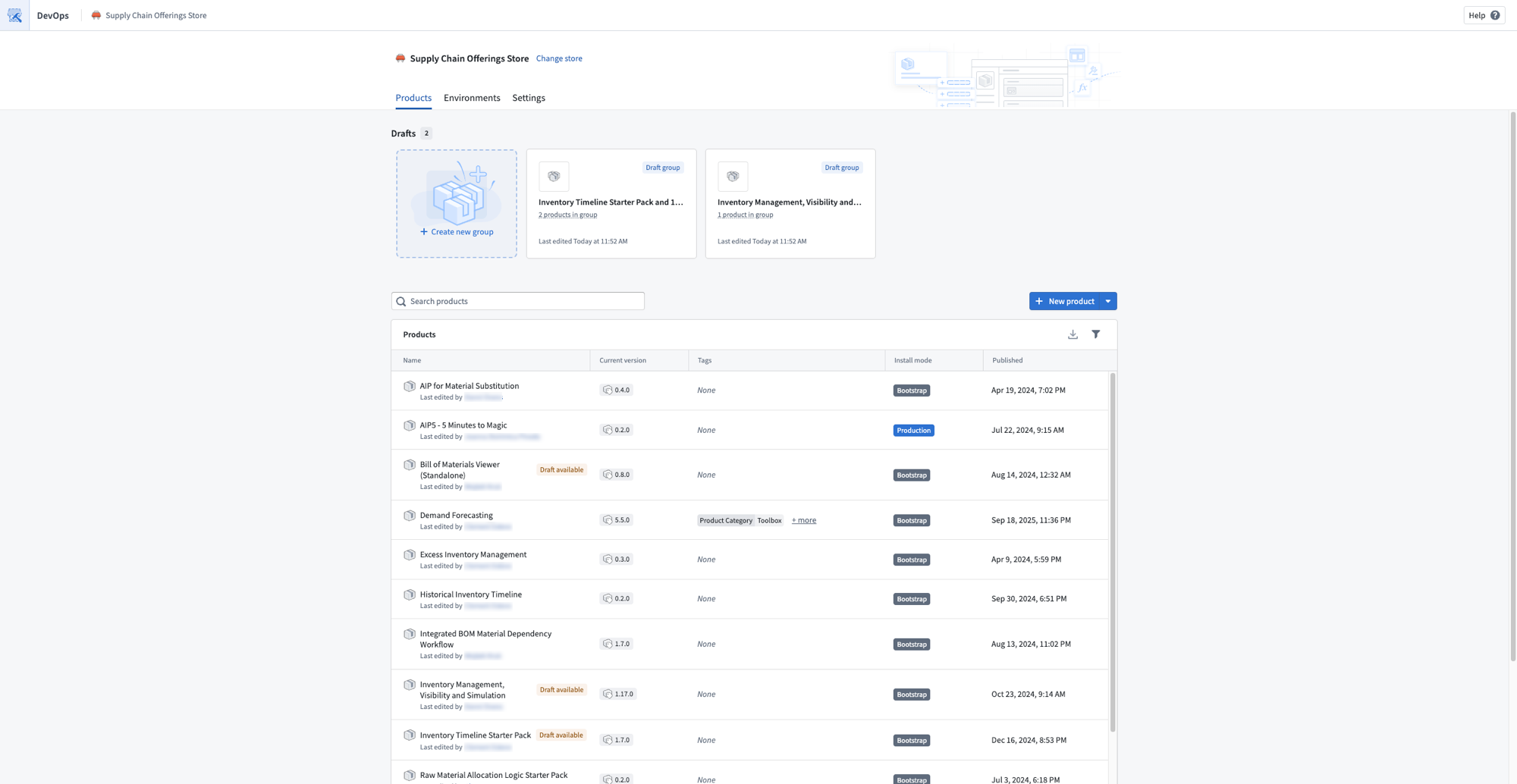
A store Products page showing draft groups that contain multiple products.
The linked products graph on the Overview page visualizes all products in your draft alongside their upstream and downstream dependencies. Select any product to add dependencies, remove it from the graph, or create a new draft. The graph also surfaces warnings for broken linked product relationships so you can resolve them before publishing.
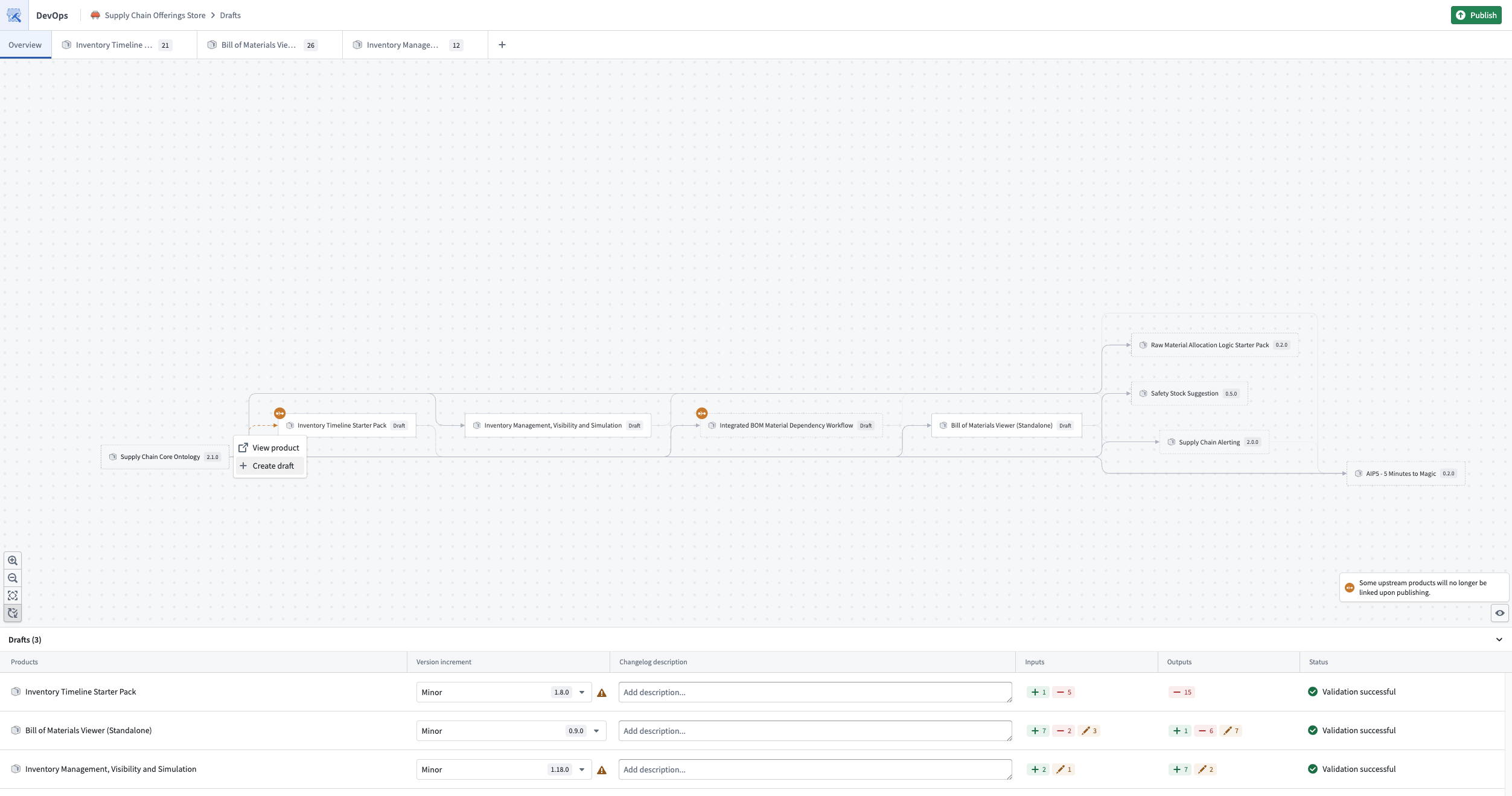
The linked products graph, visualizing all products in the draft and their dependencies.
Use the Add to other draft bulk action to move inputs between drafts within the same group, so one product's outputs can fulfill another product's inputs.
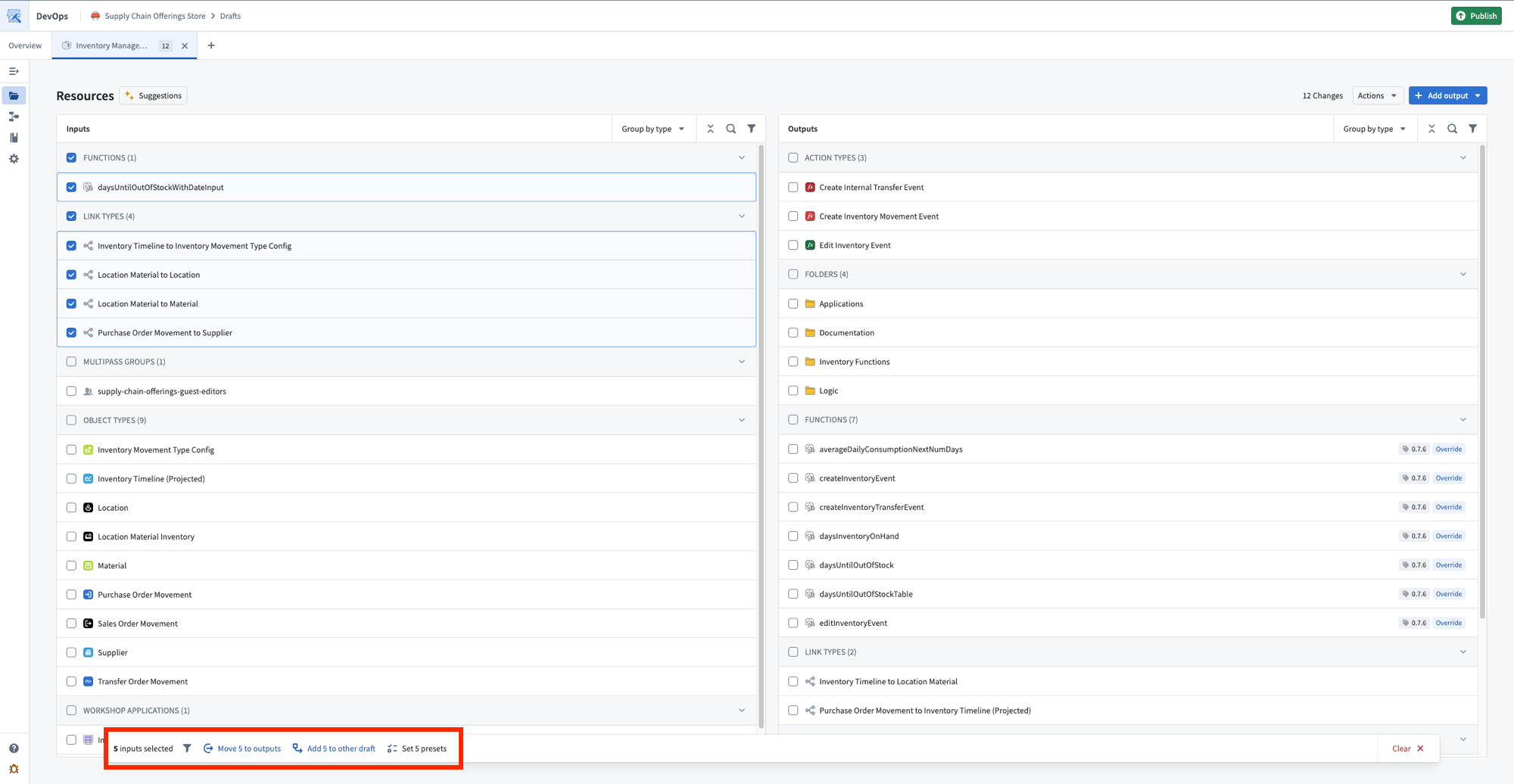
The bulk actions toolbar, with options to move inputs to outputs or add them to another draft.
Select Publish to release all products in dependency order, ensuring linked products are available before any that depend on them.
Share your feedback
We want to hear about your experiences with Foundry DevOps. Share your thoughts with Palantir Support channels or on our Developer Community ↗ using the devops ↗ tag.
Observability for your automation events in Autopilot
Date published: 2026-06-16
The new Automation events tab provides observability into all automation events across your workbench, replacing the previous Object executions tab. Monitor system performance, investigate failures from the automation down to the logic block, and understand how automations are processing objects over time.
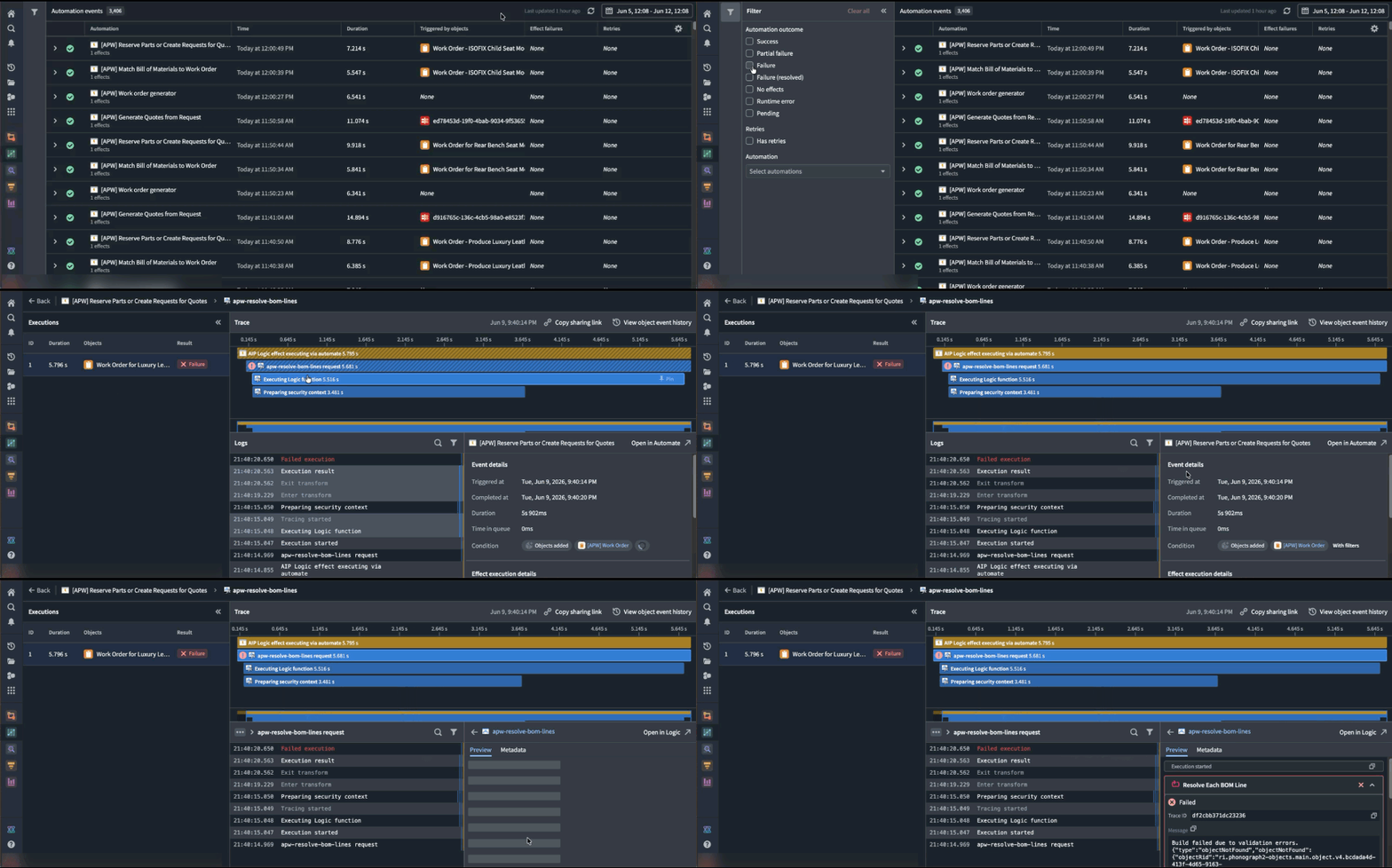
Use the Automation events tab to better understand observability into the automation events across your workbench.
What's in each event
Each event entry displays the automation name, effect and fallback action (if applicable), event details, outcome (success, failure, or fallback triggered), and triggering objects.
Executions are grouped by batches, aligned with the Automate history view, so you can see each execution alongside the individual objects within the run.
Select any event to view trace logs for each object execution, including step-by-step details, inline links to related resources, error messages and stack traces for failures, and timing information to spot performance bottlenecks.
How to troubleshoot failures
- Filter to failed events to find what broke in the automation path.
- Select a failed event to read the trace logs and error messages.
- Go to the affected object to view its full history across all automations.
- Compare failed and successful events of the same automation to spot patterns.
- Follow inline resource links to the automations, functions, and objects involved.
Share your feedback
As we continue to add features to Autopilot, we want to hear about your experiences and welcome your feedback. Share your thoughts with Palantir Support channels or our Developer Community ↗ using the aip-autopilot tag ↗.
Pipeline Builder: Media sets now supported in Faster pipelines
Date published: 2026-06-09
Faster pipelines now accept media sets as inputs. You can process PDFs, images, and audio files in a Faster pipeline and convert them into structured data for downstream extraction, classification, analysis, or review.
For more information, see the media sets documentation.
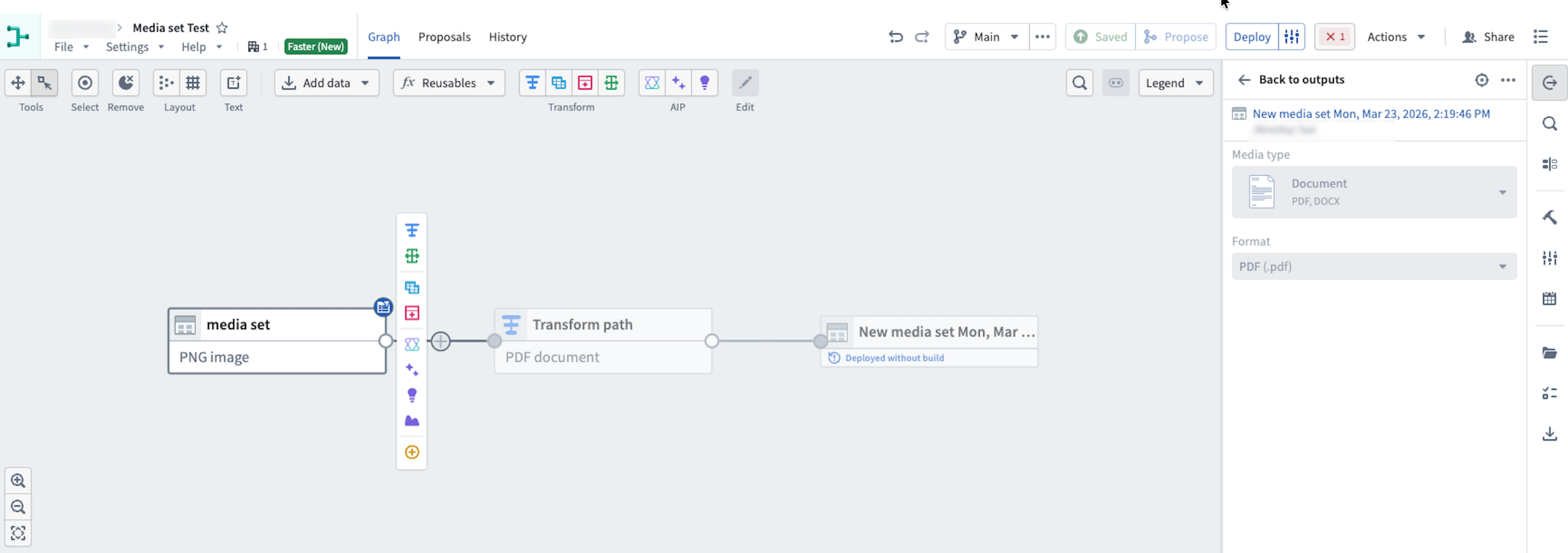
Use media sets in Faster pipelines to transform media file inputs.
Supported inputs
With media set support in Faster pipelines, you can now build pipeline workflows that take PDFs, images, and audio files as direct inputs. Supported use cases include:
- PDF and image OCR: Transform PDF and image files into structured data for further extraction or classification.
- PDF text extraction: Extract key text strings from PDFs to classify, summarize, or validate data.
- Audio transcription: Convert spoken conversations from audio files into structured text data.
Add a media set to a Faster pipeline
- Create a new pipeline and select Faster.
- Add media to your pipeline by selecting existing Foundry media, uploading new media to Foundry, or uploading new media directly to the Faster pipeline from your computer.
- Select the Write mode. You can choose between Transactionless (recommended) and Transactional.
Ensure your media files are uploaded to a new media set.
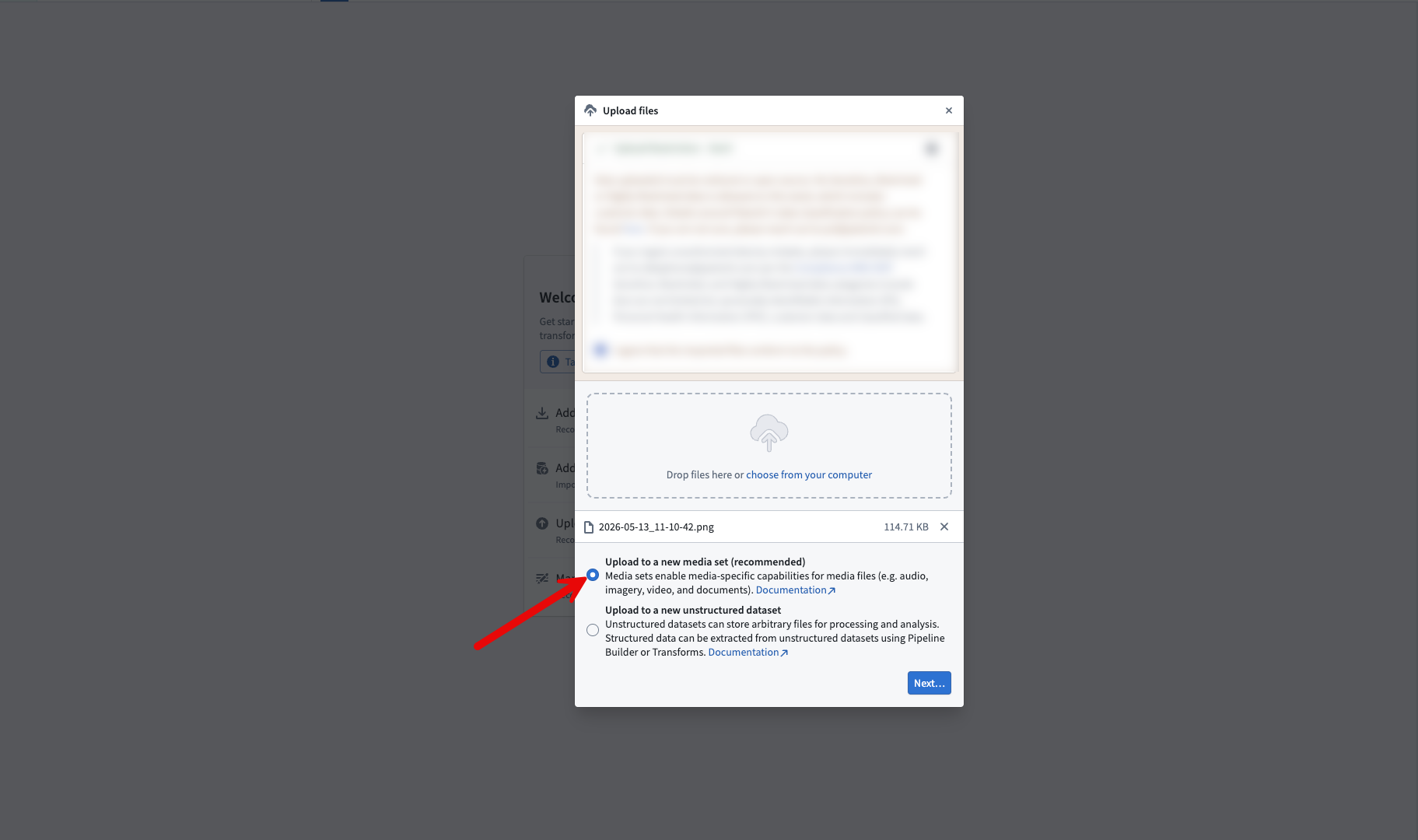
Select the upload to a new media set option when uploading media files
Share your feedback
As we continue to add features to Pipeline Builder, we want to hear about your experiences and welcome your feedback. Share your thoughts with Palantir Support channels or our Developer Community ↗ using the pipeline-builder tag ↗.
Python transform editing in Code Repositories will soon be legacy
Date published: 2026-06-04
Starting the week of June 22, editing Python transforms in Code Repositories will move to the legacy phase of development. VS Code workspaces are the recommended environment for editing Python transforms, offering AI-powered coding assistance, full dataset preview, an optimized language server, and an integrated terminal.
The Code Repositories editor will remain supported and available, with future feature development focused on VS Code workspaces. Code Repositories remains the recommended editor for other repository types, including Java and SQL transforms.
If VS Code workspaces are unavailable on your enrollment, Code Repositories remains the recommended way to author Python transforms.
Getting started
To get started with VS Code workspaces for Python transforms, we recommend reviewing the following documentation:
- VS Code workspaces: Overview
- Reference: VS Code workspaces vs. Code Repositories
- Benefits of VS Code workspaces
Pipeline Builder: GeoExpressions now supported in Faster pipelines
Date published: 2026-06-04
Faster pipelines in Pipeline Builder now support more than 25 built-in GeoExpressions for cleaning, transforming, and visualizing geospatial data without needing to leave the platform or write custom code. Supported operations include geometry intersections, GeoJSON parsing, GeoPoint conversions, and more.
To learn more, see GeoExpressions in Pipeline Builder.
The team is actively adding more GeoExpressions which will automatically become available for your Faster pipelines.
Use GeoExpressions in Faster pipeline
- Create a new Transform board in the graph view.
- In the Transform board menu, search for the expression or select Geospatial from the left panel.
- Select the GeoExpression to apply to your data.
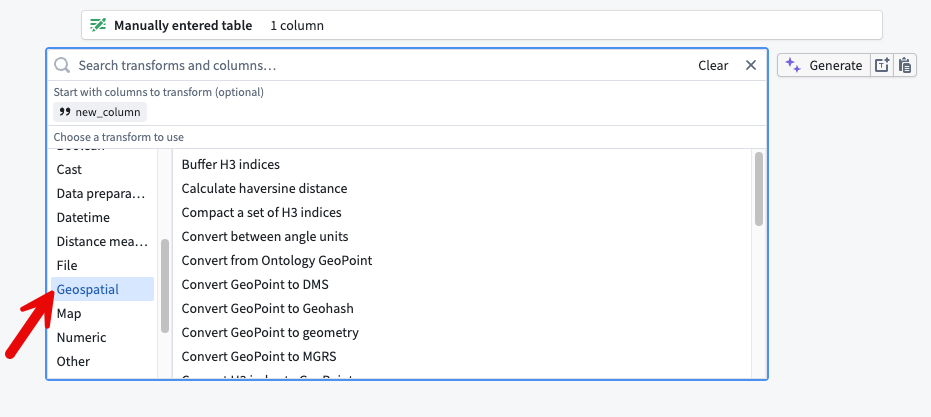
The Geospatial option from the Transform board menu.
Use Geo Preview in a Faster pipeline
- After transforming your data, open the preview pane.
- Select the cells you want to view on a map. The cells must be from columns with a supported geospatial logical type.
- Right-click the selected cells, then choose Open Geo Preview. The selected cells appear plotted on a map in a new tab.
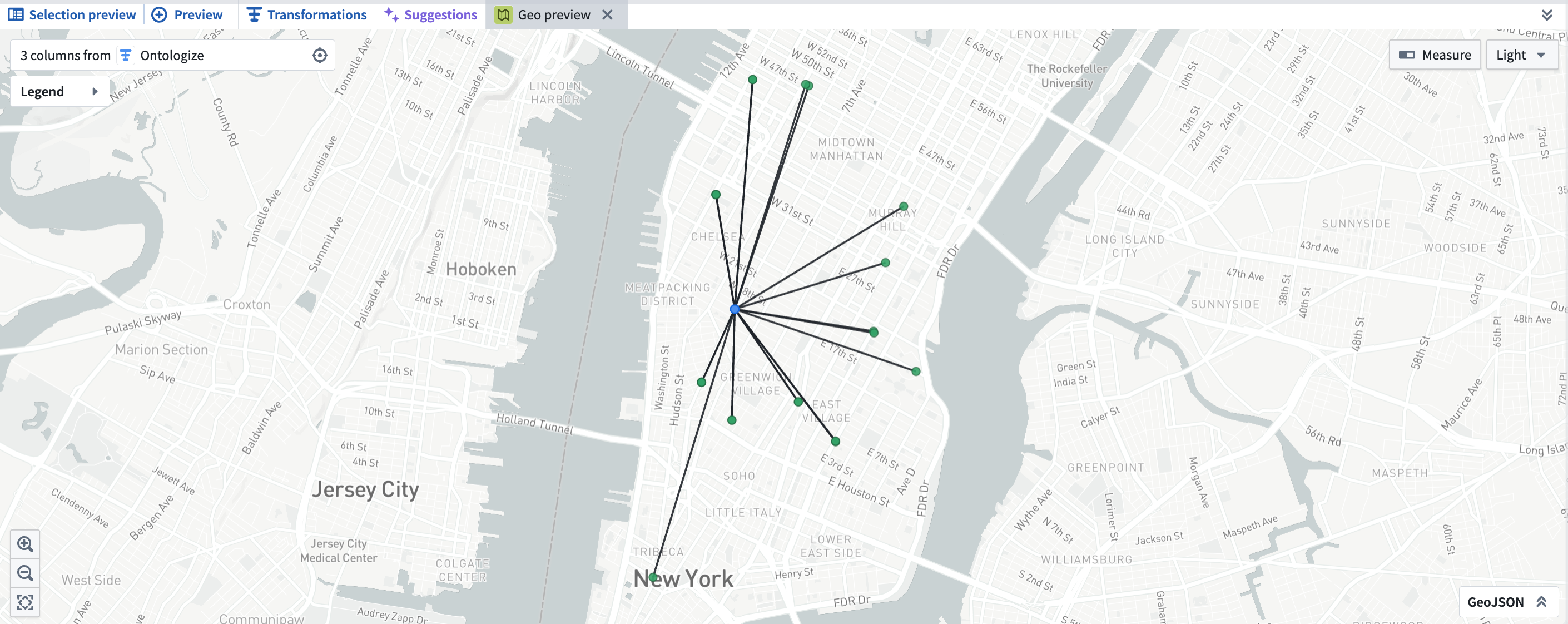
Geo Preview in Pipeline Builder.
Compatibility and downstream behavior
- Builder geometry column types in Faster pipelines are compatible with the Ontology
geoshapetype. To learn more, see using geospatial data with the Ontology. - Geospatial type data is persisted on output datasets from Faster Pipelines. Downstream Builder pipelines created from these datasets will preserve logical and geospatial types.
- GeoPoint and geometry columns can be mapped to a geotemporal series sync output to render points and geometries in downstream applications. To learn more, see using geospatial data with the Ontology.
Commonly used GeoExpressions include:
- Convert MGRS to GeoPoint
- Is valid GeoJSON
- Parse well known text as geometry
- Parse GeoJSON from a non-WGS 84 coordinate system
- Simplify geometry
- Geometries have intersection
- Geometry intersection
- Get the convex hull of a geometry
- Convert linestring to polygon
- Geometry array (unary) union
We want to hear from you
Send feedback through Palantir Support or the Developer Community using the pipeline-builder tag.
Claude Opus 4.8 now available from Anthropic, AWS Bedrock, and Google Vertex
Date published: 2026-06-02
Claude Opus 4.8 is now available on non-georestricted enrollments from Anthropic, AWS Bedrock, and Google Vertex. For US, EU, and non-georestricted enrollments, the model is available from AWS Bedrock and Google Vertex. For JP georestricted enrollments, the model is available from AWS Bedrock.
Model overview
Claude Opus 4.8 adds improvements in coding, long-running autonomous agents, and reasoning on complex enterprise problems. For more information, review Anthropic's model documentation ↗.
- Context window: 1,000,000 tokens
- Modalities: Text, image
- Capabilities: Extended thinking, function calling
Getting started
To use this model:
- Confirm that your enrollment administrator has enabled the relevant model family.
- Review token costs and pricing.
- See the complete list of all available models in AIP.
Your feedback matters
We want to hear about your experiences using language models in the Palantir platform and welcome your feedback. Share your thoughts with Palantir Support channels or on our Developer Community ↗ using the language-model-service tag ↗.
Visualize Workshop modules with the new variable lineage graph
Date published: 2026-06-01
The Variable lineage graph is now generally available in Workshop. The graph replaces the previous variable dependency graph with a redesigned visualization for tracing how variables and widgets in a module depend on one another. Use it to debug recompute behavior, find which widgets read or write a given variable, and better understand complex relationships between your application's components.
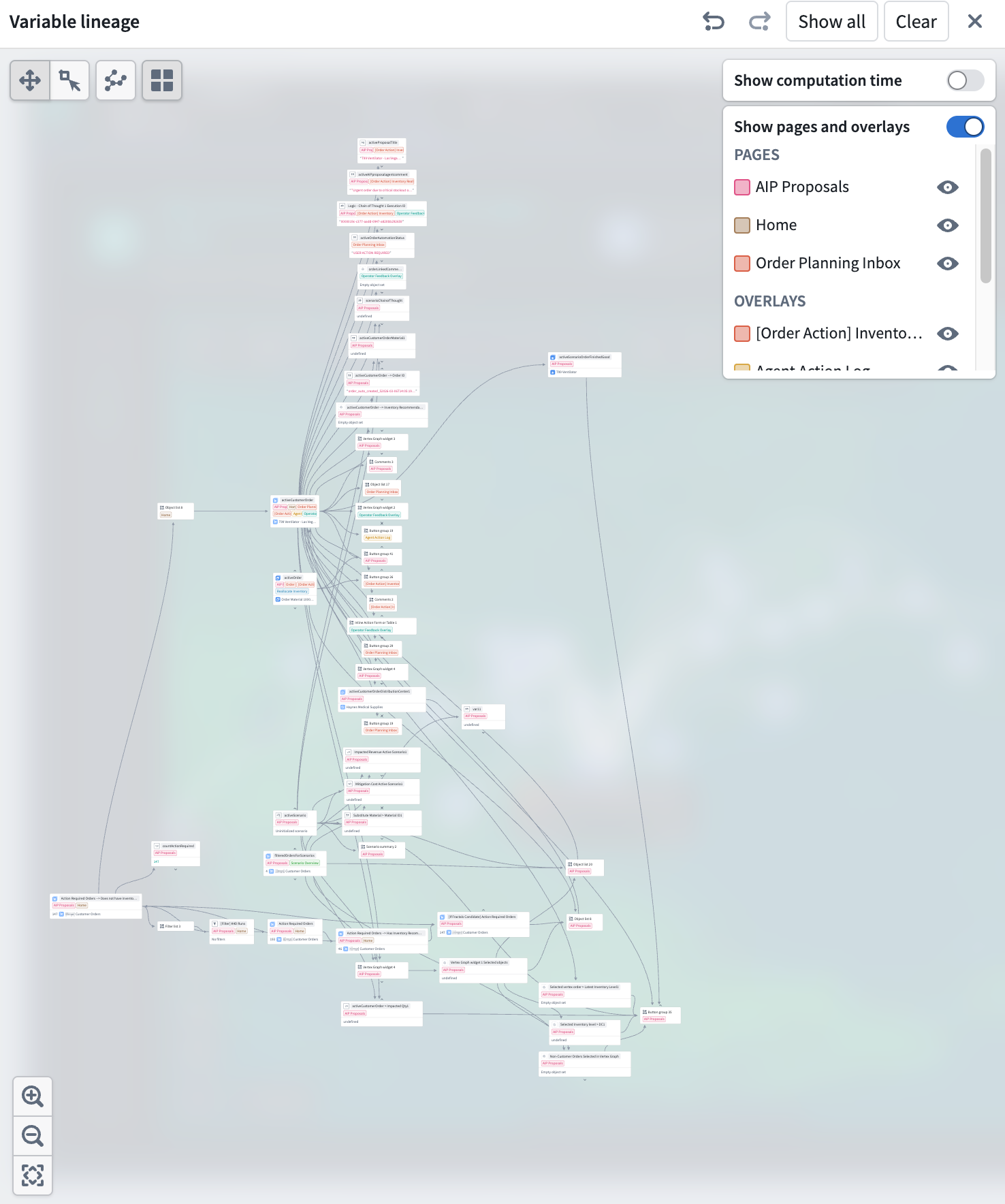
The Variable lineage graph mode shows variables, widgets, and their dependencies.
Expand the graph one node at a time
To open the new variable lineage panel, select the Graph button on the top right of the Variables panel in any Workshop module's edit mode.
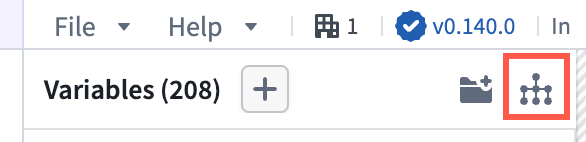
Use the Graph button, highlighted in red, to open the variable lineage panel.
Each node on the graph represents a variable or widget. Nodes with dependencies now have chevron arrows on its top and bottom edges. Selecting an arrow expands a node's parents or children to trace a chain of dependencies through a large module. Show all and Clear actions in the header let you expand to the full application graph or remove all nodes. Undo and redo buttons in the header step backward and forward through expand, collapse, and selection actions.
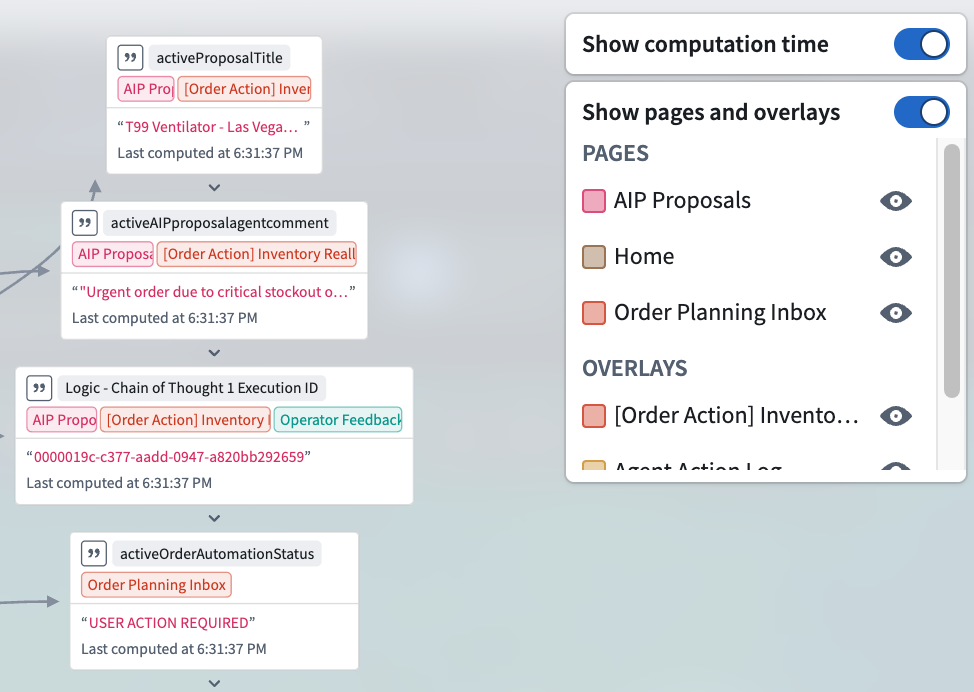
A detailed view of variable usage and computation time.
See where variables are referenced
Variable nodes are tagged with the pages and overlays where they are used. Toggle Show pages and overlays in the header to open a legend that lists each referenced page and overlay, alphabetized and split into separate sections. The legend only includes pages and overlays that appear on visible nodes so the list stays scoped to what you can actually see in the graph.
Identify expensive variables
Toggle Show computation time in the header to display per-variable timing information. Variables that take longer to recompute may be candidates for restructuring: for example, splitting a complex function-backed variable into smaller pieces or changing the recompute behavior on upstream variables to avoid unnecessary work.
To read more about the variable lineage graph, see Workshop's documentation on variables.
Share your feedback
We want to hear about your experiences using Workshop in the Palantir platform and welcome your feedback. Share your thoughts through Palantir Support channels or on our Developer Community ↗ using the workshop tag ↗.