- Capabilities
- Getting started
- Architecture center
- Platform updates
Using custom models to create a semantic search workflow
This tutorial is for those using an embedding model not supplied by Palantir, which is no longer a recommended workflow. See the list of Palantir-provided models and the Palantir-provided model semantic search tutorial.
This page illustrates the process of building a notional end-to-end documentation search service that is capable of retrieving relevant docs when given a prompt. The service will use a Foundry modeling objective to embed documents and extract their features into a vector. These documents and embeddings will be stored in an object type with the vector property.
For this example, we begin by setting up a model in Foundry and creating a pipeline to generate embeddings. Then, we will create a new object type and a function to query it through natural language.
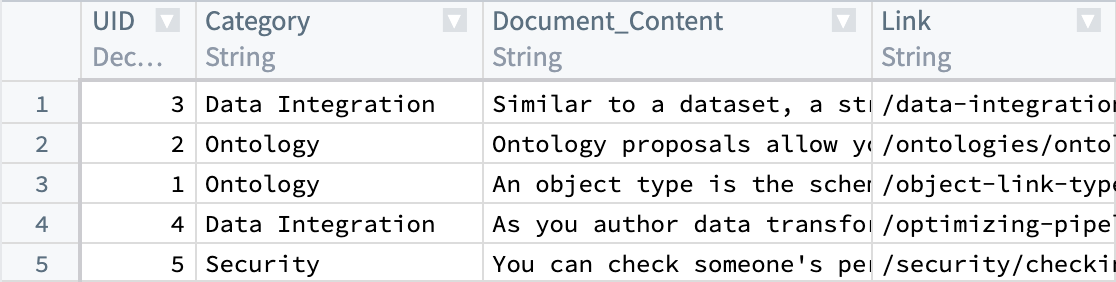
We begin with a dataset that currently has our parsed documents and metadata, such as Document_Content and Link. Next, we will generate embeddings from the Document_Content to enable us to query them via semantic search.
To understand the details of the KNN feature, review the KNN Functions on Objects (TSv1) section in the Foundry documentation.
Throughout this workflow you can substitute a value of your choosing, as long as it is consistent for each instance. For example, every instance of ObjectApiName is always substituted with Document.
The values you must substitute are:
ObjectApiName: identifier for a unique ObjectType, in our caseDocument. NOTE: The identifier may sometimes appear asobjectApiNamewith the first letter lowercased.ModelApiName: identifier for a function wrapping a Model. NOTE: The identifier may sometimes appear asmodelApiNamewith a lowercase first letter.OutputDatasetRid: identifier for the output dataset from the embedding transform.InputDatasetRid: identifier for the input dataset for the embedding transform.ModelRid: identifier for the model used for the embedding transform and in the creation of the Live Modeling Deployment
1. Create embeddings using models in Foundry
There are a few options for creating embeddings from a model in Foundry. In this example, we will create a transform to interact with an imported open-source model. We will use the all-MiniLM-L6-v2 model, a general purpose text-embedding model that will create vectors of dimension (size) 384. This model can be swapped out with any other existing model that outputs vectors compatible with the Foundry Ontology vector type. To import a new open-source model, review our Hugging Face model documentation.
The code below expects the model to expose an API with a tabular input containing a text string column and a column for tabular outputs containing an embedding list of floats. For more details on defining model APIs, refer to the model adapter API documentation.
Copied!1 2 3 4 5 6 7 8 9 10 11 12 13 14 15import palantir_models as pm class EmbeddingModelAdapter(pm.ModelAdapter): ... @classmethod def api(cls): inputs = { "inference_data": pm.Pandas(columns=[("text", str)]) } outputs = { "output_data": pm.Pandas(columns=[("text", str), ("embedding", list[float])]) } return inputs, outputs
The transform below runs the data through the model to return an embedding, then casts the embedding value (double arrays) to floats in order to match the type necessary for vector embeddings.
A couple of points to consider:
- Each
StructFieldin theschemavariable relates to a column that is present in the processed input dataset (InputDatasetRid) plus theembeddingcolumn added by the model. - When working with data at larger scales, the transform might fail if using a Pandas dataframe that is excessively large. In these cases, the transform will have to be performed in Spark.
- Graphics Processing Units (GPUs) can be leveraged to increase the speed at which embeddings are produced by a transform. GPUs can be used by adding the
@configuredecorator to your transform. Contact your Palantir representative if you are interested in enabling this in your environment.
An example transform is shown below:
Copied!1 2 3 4 5 6 7 8 9 10 11 12 13 14 15 16 17 18 19 20 21 22 23 24 25 26 27 28 29 30 31 32 33 34 35 36 37 38 39from transforms.api import configure, transform, Input, Output from palantir_models.transforms import ModelInput from pyspark.sql.functions import pandas_udf, PandasUDFType from pyspark.sql.types import StructType, StructField, IntegerType, StringType, FloatType, ArrayType import numpy as np @configure(profile=["DRIVER_GPU_ENABLED"]) # Remove this line if GPUs have not been enabled in your environment @transform( dataset_out=Output("OutputDatasetRid"), dataset_in=Input("InputDatasetRid"), embedding_model=ModelInput("ModelRid") ) def compute(ctx, dataset_out, dataset_in, embedding_model): # Match input column of model spark_df = dataset_in.dataframe().withColumnRenamed("Document_Content", "text") def embed_df(df): # Create embeddings output_df = embedding_model.transform(df).output_data # Cast to float array output_df["embedding"] = output_df["embedding"].apply(lambda x: np.array(x).astype(float).tolist()) # drop unnecessary column return output_df.drop('inference_device', axis=1) # Updated schema schema = StructType([ StructField("UID", IntegerType(), True), StructField("Category", StringType(), True), StructField("text", StringType(), True), StructField("Link", StringType(), True), StructField("embedding", ArrayType(FloatType()), True) ]) udf = pandas_udf(embed_df, returnType=schema, functionType=PandasUDFType.GROUPED_MAP) output_df = spark_df.groupBy('UID').apply(udf) # Write the output DataFrame dataset_out.write_dataframe(output_df)
Next, we will need a Live Modeling Deployment to create embeddings off of a user query to be used to search against our existing vectors. The model used in this part should be the same as the one used to generate the initial embeddings in this current step.
2. Create object type
By now, we should have a new dataset with a column containing float vector embeddings generated using the batch modeling deployment from our first and previous step. Next, we will create an object type.
We will name the object type Document, and set the embedding property to be of property type Vector. This requires configuring two values:
- Dimension: this is the length of the array produced in the column
embedding. - Similarity Function: the method by which distance between two
embeddingvalues from different objects will be calculated.
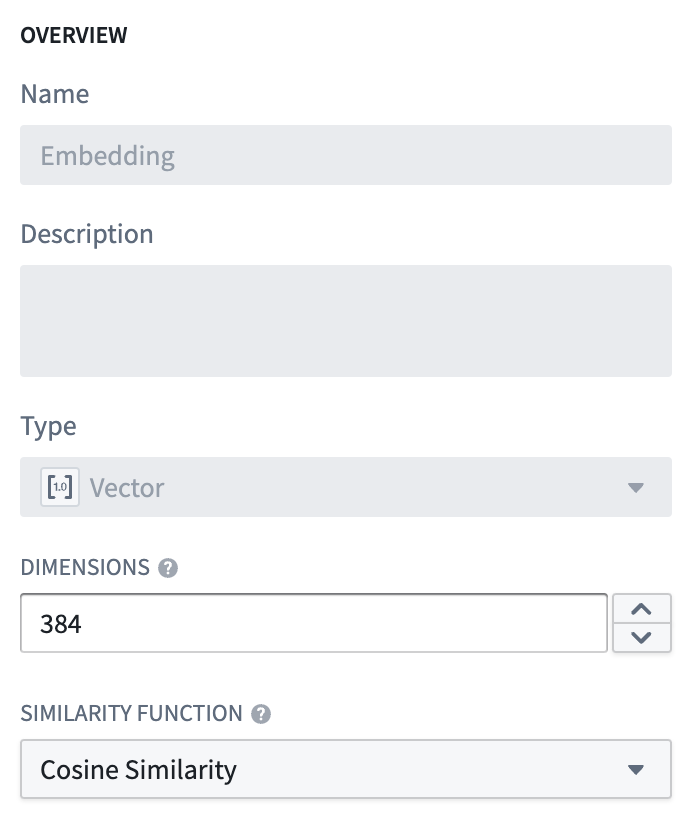
Once this object type is created, we will have a property (embedding) that can be used to semantically search through the Documentation objects.
The value for ObjectApiName will be available after the object type is saved, and can be found on the configuration page for the object type created. More information can be found about this on the Create an object type section of the documentation.
3. Create a Live Modeling Deployment
Now that our objects have embeddings as a property, we need to generate embeddings for user queries with low-latency. These embeddings will be used to find objects with similar embedding values. To do this, create a live model deployment for fast, low-latency access with Functions.
Review the instructions for configuring a live deployment in Modeling Objectives or directly from a model. A Function then needs to be published for that model.
4. Create an embedding with Functions on Models
Before proceeding, ensure that the entries "enableVectorProperties": true, "enableResourceGeneration": true, and "useDeploymentApiNames": true are all present in the functions.json file in your Functions code repository. If these entries are not present, add them to functions.json and commit the change to proceed. Contact your Palantir representative if you need further assistance.
The functions.json configuration file is a TypeScript v1 repository artifact. No equivalent vector property, resource generation, or deployment API name setting is documented for TypeScript v2 repositories, so do not assume these entries carry over. Contact your Palantir representative if a KNN search fails in a TypeScript v2 repository.
The code examples in this section are available in both TypeScript v1 and TypeScript v2 functions, and the accompanying text identifies constructs that exist in only one version. Select the tab that matches your function version. TypeScript v1 defines each function as a method on an exported class, where the method uses the @Function() decorator from @foundry/functions-api and queries the Ontology through Objects.search(). TypeScript v2 defines each function with export default in its own file, imports types from @osdk/functions, and queries the Ontology through an Ontology SDK client received as the first parameter. For a full comparison, review the TypeScript v1 versus TypeScript v2 comparison.
Python functions also support model functions and semantic search, but this tutorial does not include Python examples.
The final step is to create a function that queries this object type. The function takes user input and generates a vector with the live modeling deployment created earlier. It then runs a KNN search (TSv1) over the object type. The TSv2 differences, including the neighbor count bounds, are described alongside the examples below. A sample function for this use case and its file structure are shown below.
Edits to vector properties can be applied by Actions and Functions.
Further information on how to use a model in a Function can be found in the Functions on models documentation.
File structure
The file structure below is for a TypeScript v1 repository.
Copied!1 2 3 4 5 6 7 8 9 10 11 12 13 14|-- functions-typescript | |-- src | | |-- tests | | | |-- index.ts | | |-- index.ts | | |-- semanticSearch.ts | | |-- service.ts | | |-- tsconfig.json | | |-- types.ts | |-- functions.json | |-- jest.config.js | |-- package-lock.json | |-- package.json |-- version.properties
A TypeScript v2 repository is laid out differently. Every function must be the default export of its own file inside typescript-functions/src/functions, and the file name must match the function name, so the two search functions below become typescript-functions/src/functions/fetchSuggestedDocuments.ts and typescript-functions/src/functions/fetchSuggestedDocumentsWithThreshold.ts. The shared types.ts and service.ts modules sit next to the functions directory, in typescript-functions/src. Review Getting started with TypeScript v2 functions for the complete set of requirements.
functions-typescript/src/types.ts
These interfaces are plain TypeScript and carry over to TypeScript v2 unchanged, apart from the Double import, which moves from @foundry/functions-api to @osdk/functions.
Copied!1 2 3 4 5 6 7 8 9 10 11 12 13 14 15import { Double } from "@foundry/functions-api"; export interface IEmbeddingModel { embed: (content: string) => Promise<IEmbeddingResponse>; } export interface IEmbeddingResponse { text: string embedding: Double[] inference_device?: string } export interface IEmbeddingRequest { text: string }
Copied!1 2 3 4 5 6 7 8 9 10 11 12 13 14 15import { Double } from "@osdk/functions"; export interface IEmbeddingModel { embed: (content: string) => Promise<IEmbeddingResponse>; } export interface IEmbeddingResponse { text: string embedding: Double[] inference_device?: string } export interface IEmbeddingRequest { text: string }
functions-typescript/src/service.ts
TypeScript v1 calls the imported model function directly. TypeScript v2 requires an ontology-bound model function, which is imported from the generated Ontology SDK and invoked with client(ModelApiName).executeFunction(). The inference_data and output_data keys match the model API declared in step 1. The Ontology SDK client is not ambient in TypeScript v2, so the service below receives it in its constructor and the IEmbeddingModel interface stays the same.
Copied!1 2 3 4 5 6 7 8 9 10 11 12 13 14// View the Model in the repository's Resource imports sidebar to know which namespace to import it from import { ModelApiName } from "@{YOUR_NAMESPACE_HERE}/models"; import { IEmbeddingRequest, IEmbeddingResponse } from "./types"; // service to hit model export class EmbeddingService { public async embed(content: string): Promise<IEmbeddingResponse> { const request: IEmbeddingRequest = { "text": content, }; return await ModelApiName([request]) .then((output: any) => output[0]) as IEmbeddingResponse; } }
Copied!1 2 3 4 5 6 7 8 9 10 11 12 13 14 15 16 17 18import { Client } from "@osdk/client"; import { ModelApiName } from "@ontology/sdk"; import { IEmbeddingRequest, IEmbeddingResponse } from "./types"; // service to hit model export class EmbeddingService { constructor(private readonly client: Client) {} public async embed(content: string): Promise<IEmbeddingResponse> { const request: IEmbeddingRequest = { "text": content, }; const modelOutput = await this.client(ModelApiName).executeFunction({ "inference_data": [request], }); return modelOutput.output_data[0] as IEmbeddingResponse; } }
functions-typescript/src/semanticSearch.ts
TypeScript v1 groups both search functions as methods on a single exported class, with a shared private static dotProduct helper. TypeScript v2 has no class: each function is the default export of its own file, and the helper becomes a module-level function in the file that uses it.
The k-nearest-neighbors call differs as well. TypeScript v1 passes a callback and reads the k value from an options object, then chains .orderByRelevance() and .take(). TypeScript v2 passes the query vector, the number of neighbors, and the vector property key as three positional arguments to nearestNeighbors, then materializes the results with fetchPage; TypeScript v2 has no .take() method. The two versions also enforce different bounds: TypeScript v1 limits the k value to the range 0 < K <= 100, while the TypeScript v2 nearestNeighbors method accepts between 1 and 500 neighbors. Relevance ordering is omitted from the TypeScript v2 examples because there is no documented way to compose it with nearestNeighbors.
The TypeScript v2 tab below is the contents of typescript-functions/src/functions/fetchSuggestedDocuments.ts.
Copied!1 2 3 4 5 6 7 8 9 10 11 12 13 14 15 16 17 18 19 20 21 22 23 24 25 26 27 28 29 30 31 32 33 34 35 36 37 38 39 40 41 42 43 44 45 46 47 48 49 50import { Function, Integer, Double } from "@foundry/functions-api"; import { Objects, ObjectApiName } from "@foundry/ontology-api"; import { EmbeddingService } from "./service"; import { IEmbeddingResponse, IEmbeddingModel } from './types'; export class SuggestedDocs { embeddingService: IEmbeddingModel = new EmbeddingService; @Function() public async fetchSuggestedDocuments(userQuery: string, kValue: Integer, category: string): Promise<ObjectApiName[]> { const embedding: IEmbeddingResponse = await this.embeddingService.embed(userQuery); const vector: Double[] = embedding.embedding; return Objects.search() .objectApiName() .filter(obj => obj.category.exactMatch(category)) .nearestNeighbors(obj => obj.embedding.near(vector, {kValue: kValue})) .orderByRelevance() .take(kValue); } /** * The following is an alternative to fetchSuggestedDocuments which applies a threshold similarity. * Otherwise, kValue number of documents are always returned, no matter how similar. * The computation of the distance function depends on the distance function defined for the embedding * property. Here we assume it's cosine similarity, which can be computed with a simple vector dot * product if the embedding model produces normalized vectors. */ @Function() public async fetchSuggestedDocumentsWithThreshold(userQuery: string, kValue: Integer, category: string, thresholdSimilarity: Double): Promise<ObjectApiName[]> { const embedding: IEmbeddingResponse = await this.embeddingService.embed(userQuery); const vector: Double[] = embedding.embedding; return Objects.search() .objectApiName() .filter(obj => obj.category.exactMatch(category)) .nearestNeighbors(obj => obj.embedding.near(vector, {kValue: kValue})) .orderByRelevance() .take(kValue) .filter(obj => SuggestedDocs.dotProduct(vector, obj.embedding! as number[]) >= thresholdSimilarity); } private static dotProduct<K extends number>(arr1: K[], arr2: K[]): number { if (arr1.length !== arr2.length) { throw EvalError("Two vectors must be of the same dimensions"); } return arr1.map((_, i) => arr1[i] * arr2[i]).reduce((m, n) => m + n); } }
Copied!1 2 3 4 5 6 7 8 9 10 11 12 13 14 15 16 17 18 19 20 21 22 23 24import { Client, Osdk } from "@osdk/client"; import { Integer, Double } from "@osdk/functions"; import { ObjectApiName } from "@ontology/sdk"; import { EmbeddingService } from "../service"; import { IEmbeddingResponse, IEmbeddingModel } from "../types"; export default async function fetchSuggestedDocuments( client: Client, userQuery: string, kValue: Integer, category: string, ): Promise<Osdk.Instance<ObjectApiName>[]> { const embeddingService: IEmbeddingModel = new EmbeddingService(client); const embedding: IEmbeddingResponse = await embeddingService.embed(userQuery); const vector: Double[] = embedding.embedding; const page = await client(ObjectApiName) .where({ category: { $eq: category } }) .nearestNeighbors(vector, kValue, "embedding") .fetchPage({ $pageSize: kValue, $orderBy: "relevance" }); return page.data; }
In TypeScript v2, the threshold variant becomes a second file: typescript-functions/src/functions/fetchSuggestedDocumentsWithThreshold.ts. TypeScript v1 applies the threshold by chaining a JavaScript .filter() after .take(). TypeScript v2 instead filters the data array returned by fetchPage. This example does not narrow the fetch with $select, so every base property is available to the threshold filter, including embedding. If you add $select to reduce the amount of data loaded, include embedding in the list.
Copied!1 2 3 4 5 6 7 8 9 10 11 12 13 14 15 16 17 18 19 20 21 22 23 24 25 26 27 28 29 30 31 32 33 34 35 36 37 38 39 40 41import { Client, Osdk } from "@osdk/client"; import { Integer, Double } from "@osdk/functions"; import { ObjectApiName } from "@ontology/sdk"; import { EmbeddingService } from "../service"; import { IEmbeddingResponse, IEmbeddingModel } from "../types"; /** * The following is an alternative to fetchSuggestedDocuments which applies a threshold similarity. * Otherwise, kValue number of documents are always returned, no matter how similar. * The computation of the distance function depends on the distance function defined for the embedding * property. Here we assume cosine similarity, which can be computed with a simple vector dot * product if the embedding model produces normalized vectors. */ export default async function fetchSuggestedDocumentsWithThreshold( client: Client, userQuery: string, kValue: Integer, category: string, thresholdSimilarity: Double, ): Promise<Osdk.Instance<ObjectApiName>[]> { const embeddingService: IEmbeddingModel = new EmbeddingService(client); const embedding: IEmbeddingResponse = await embeddingService.embed(userQuery); const vector: Double[] = embedding.embedding; const page = await client(ObjectApiName) .where({ category: { $eq: category } }) .nearestNeighbors(vector, kValue, "embedding") .fetchPage({ $pageSize: kValue, $orderBy: "relevance" }); return page.data.filter( obj => dotProduct(vector, obj.embedding! as number[]) >= thresholdSimilarity, ); } function dotProduct<K extends number>(arr1: K[], arr2: K[]): number { if (arr1.length !== arr2.length) { throw EvalError("Two vectors must be of the same dimensions"); } return arr1.map((_, i) => arr1[i] * arr2[i]).reduce((m, n) => m + n); }
functions-typescript/src/index.ts
This re-export is the mechanism TypeScript v1 uses to register a function class, so it has no TypeScript v2 counterpart, and only a TypeScript v1 tab is shown below. TypeScript v2 discovers each function from the default export of its own file in typescript-functions/src/functions, and no index file is involved.
Copied!1export { SuggestedDocs } from "./semanticSearch";
5. Publish the function and use in an example
At this point, we have a function that can run semantic search to query objects with natural language. The final step is to publish the function and use it in a workflow. To continue building on the documentation search example, we will create a Workshop application to invoke this function with a text input to return the top two matching documentation articles to a user.
The process to creating a semantic search for the documentation service in the example is as follows:
- Start by creating a Workshop application.
- Add a text input and a string selector. The string selector will be used to choose a documentation category with which to filter. Both the text input and string selector will serve as inputs into the published KNN document fetch function.
- Finally, add an object list widget with an input object set generated from the function and the selected inputs as shown below:
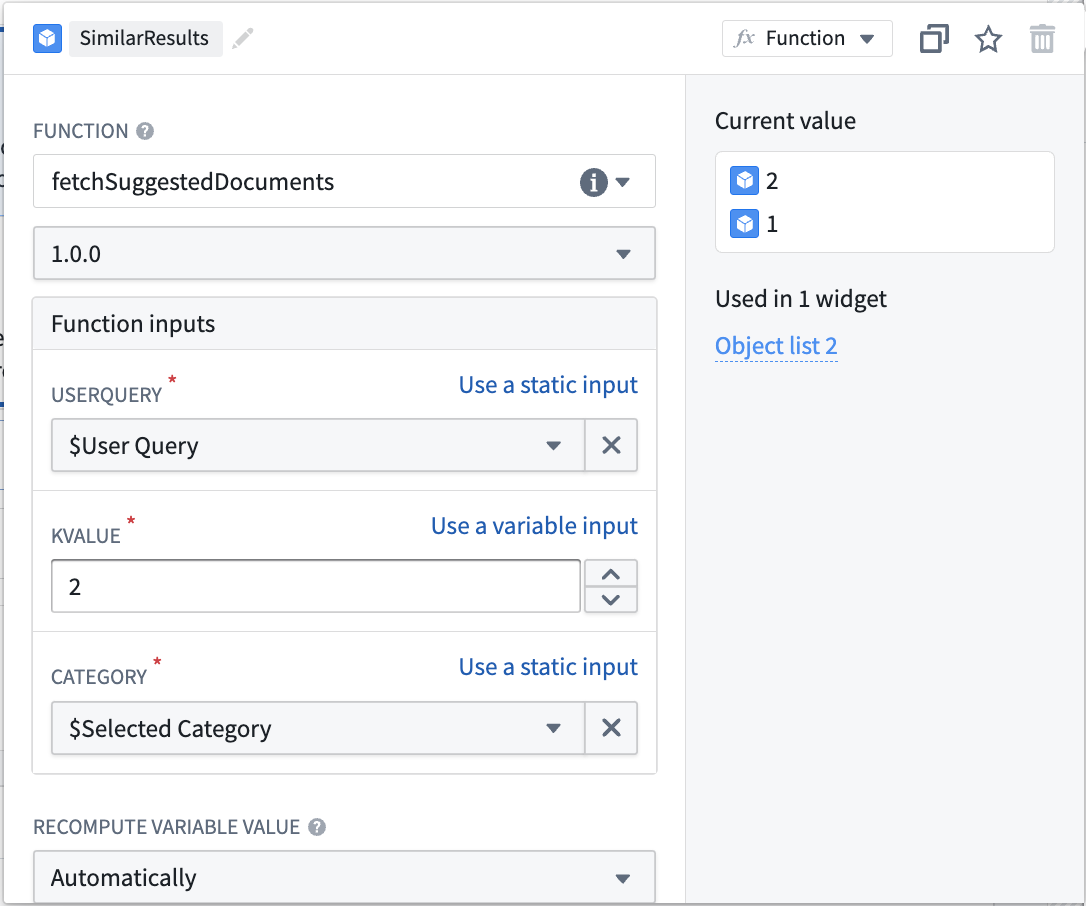
From this point, the inputs will be used to semantically search through documents in the object type and return the two most relevant. This is just one simple use case of vector properties and semantic search. See an example of the resulting Workshop application in the screenshot below: