- Capabilities
- Getting started
- Architecture center
- Platform updates
Inline metrics
Inline metrics provide application builders with a streamlined way to display key data directly in a chart.
- Header metrics are aligned with the timeline (x-axis) of the widget, offering high-level aggregations for the entire schedule.
- Row metrics are aligned with each row, providing insights into the scheduling and assignment of individual resource objects.

The code examples on this page are available in both TypeScript v1 and TypeScript v2 functions. Select the tab that matches your function version. TypeScript v1 defines each function as a method, annotated with the @Function() decorator from @foundry/functions-api, on an exported class, and queries the Ontology through Objects.search(). TypeScript v2 defines functions with export default, imports types from @osdk/functions, and queries the Ontology through an Ontology SDK client or an ObjectSet passed as a parameter. For a full comparison, review the TypeScript v1 versus TypeScript v2 comparison.
Functions signature
Inline metrics require functions that return a list of a custom type that matches the following shape:
Copied!1 2 3 4interface InlineMetricsBucket { range: IRange<Timestamp>; value: Double }
Copied!1 2 3 4 5 6import { Double, Range, TimestampISOString } from "@osdk/functions"; interface InlineMetricsBucket { range: Range<TimestampISOString>; value: Double; }
Inline metrics can support alternative return types as well.
Copied!1 2 3 4 5 6 7 8 9 10// NOTE: The name of the interface is not important - only the names of the keys interface InlineMetricsBucketInteger { range: IRange<Timestamp>; value: Integer } interface InlineMetricsBucketString { range: IRange<LocalDate>; value: string }
Copied!1 2 3 4 5 6 7 8 9 10 11 12import { DateISOString, Integer, Range, TimestampISOString } from "@osdk/functions"; // NOTE: The name of the interface is not important - only the names of the keys interface InlineMetricsBucketInteger { range: Range<TimestampISOString>; value: Integer; } interface InlineMetricsBucketString { range: Range<DateISOString>; value: string; }
The range key can support range types over Timestamp, LocalDate, or Integer (with numerical values representing epoch milliseconds). TypeScript v1 uses the IRange type from @foundry/functions-api, while TypeScript v2 uses the corresponding Range type from @osdk/functions with a TimestampISOString, DateISOString, or Integer inner type. The two types name their endpoints differently: IRange<T> carries min and max, while Range<T> carries startValue and endValue.
The value key can support string, Integer, or Double values.
Sample header metric function
Copied!1 2 3 4 5 6 7 8 9 10 11 12 13 14 15 16 17 18 19 20 21 22 23 24 25 26 27 28 29 30 31 32 33 34 35import { Double, Function, IRange, Timestamp } from "@foundry/functions-api"; import { Objects } from "@foundry/ontology-api"; interface InlineMetricBucketV1Double { range: IRange<Timestamp>; value: Double; } export class MyFunctions { // Counts the number of tasks within the given range bucketed by a step in days @Function() public getInlineMetricsV1WithObjectCounts(startTime: Timestamp, endTime: Timestamp, step: Double): Array<InlineMetricBucketV1Double> { const tasks = Objects.search().schedulingMaintenanceTask().filter(x => x.startTime.range().gte(startTime).lte(endTime) ).all(); const buckets: InlineMetricBucketV1Double[] = []; let current = startTime; let count = 0 while (current < endTime) { const currentEnd: Timestamp = current.plusDays(step); const tasksInRange = tasks.filter(x => x.startTime! >= current && x.startTime! <= currentEnd); buckets.push({ range: { min: current, max: currentEnd }, value: tasksInRange.length }) current = currentEnd; count++; } return buckets } }
Copied!1 2 3 4 5 6 7 8 9 10 11 12 13 14 15 16 17 18 19 20 21 22 23 24 25 26 27 28 29 30 31 32 33 34 35 36 37 38 39 40 41 42 43 44import { Client } from "@osdk/client"; import { Double, Range, TimestampISOString } from "@osdk/functions"; import { SchedulingMaintenanceTask } from "@ontology/sdk"; interface InlineMetricBucketDouble { range: Range<TimestampISOString>; value: Double; } // Counts the number of tasks within the given range bucketed by a step in days export default async function getInlineMetricsWithObjectCounts( client: Client, startTime: TimestampISOString, endTime: TimestampISOString, step: Double ): Promise<Array<InlineMetricBucketDouble>> { const tasks = await Array.fromAsync( client(SchedulingMaintenanceTask) .where({ startTime: { $gte: startTime, $lte: endTime } }) .asyncIter() ); const buckets: InlineMetricBucketDouble[] = []; let current = new Date(startTime); const end = new Date(endTime); while (current < end) { const currentEnd = new Date(current); currentEnd.setUTCDate(currentEnd.getUTCDate() + step); const tasksInRange = tasks.filter(t => t.startTime != null && new Date(t.startTime) >= current && new Date(t.startTime) <= currentEnd ); buckets.push({ range: { startValue: current.toISOString(), endValue: currentEnd.toISOString(), }, value: tasksInRange.length, }); current = currentEnd; } return buckets; }
Since header metrics are displayed as a header alongside the x-axis, these functions are not necessarily tied to any specific objects as inputs.
Sample row metric function
Copied!1 2 3 4 5 6 7 8 9 10 11 12 13 14 15 16 17 18 19 20 21 22 23 24 25 26 27 28 29 30 31 32import { Double, Function, IRange, Timestamp } from "@foundry/functions-api"; import { ObjectSet, SchedulingTechnician_1 } from "@foundry/ontology-api"; interface InlineMetricBucketV1String { range: IRange<Timestamp>; value: string; } export class MyFunctions { // Returns the name of the row alongside the number bucket to which it belongs @Function() public getInlineMetricsV1StringWithObject(techs: ObjectSet<SchedulingTechnician_1>, startTime: Timestamp, endTime: Timestamp, step: Double): Array<InlineMetricBucketV1String> { const techName = techs.all()[0].fullName; const buckets: Array<InlineMetricBucketV1String> = []; let current = startTime; let count = 0; while (current < endTime) { const currentEnd: Timestamp = current.plusDays(step); buckets.push({ range: { min: current, max: currentEnd }, value: `${techName}-${count}`, }) current = currentEnd; count++; } return buckets } }
Copied!1 2 3 4 5 6 7 8 9 10 11 12 13 14 15 16 17 18 19 20 21 22 23 24 25 26 27 28 29 30 31 32 33 34 35 36 37 38import { ObjectSet } from "@osdk/client"; import { Double, Range, TimestampISOString } from "@osdk/functions"; import { SchedulingTechnician } from "@ontology/sdk"; interface InlineMetricBucketString { range: Range<TimestampISOString>; value: string; } // Returns the name of the row alongside the number bucket to which it belongs export default async function getInlineMetricsStringWithObject( techs: ObjectSet<SchedulingTechnician>, startTime: TimestampISOString, endTime: TimestampISOString, step: Double ): Promise<Array<InlineMetricBucketString>> { const firstPage = await techs.fetchPage({ $pageSize: 1 }); const techName = firstPage.data[0].fullName; const buckets: Array<InlineMetricBucketString> = []; let current = new Date(startTime); const end = new Date(endTime); let count = 0; while (current < end) { const currentEnd = new Date(current); currentEnd.setUTCDate(currentEnd.getUTCDate() + step); buckets.push({ range: { startValue: current.toISOString(), endValue: currentEnd.toISOString(), }, value: `${techName}-${count}`, }); current = currentEnd; count++; } return buckets; }
Row metrics accept the corresponding row object as runtime input. When specifying your function in the configuration, you can specify the object parameter as runtime input and the widget will automatically pass the corresponding row through to the function for you.

Widget configuration
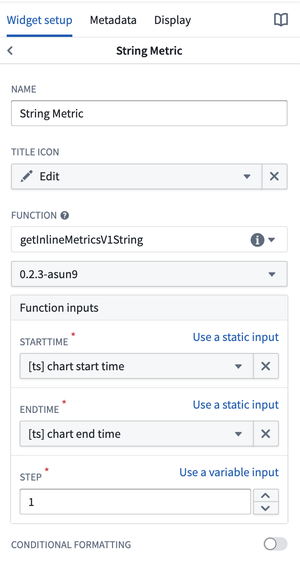
The Scheduling Gantt Chart widget config has a Metrics section which includes options for header-level and row-level metrics.

Within the metric configuration setup, you can provide a display title, select an icon, and/or set up conditional coloring.