- Capabilities
- Getting started
- Architecture center
- Platform updates
User-facing errors
When a function runs in other parts of the platform, such as Workshop or actions, throw a UserFacingError to show users a specific message that explains what went wrong and how to fix it. For example:
Copied!1 2 3 4 5 6 7 8 9 10 11 12 13import { Function, UserFacingError } from "@foundry/functions-api"; import { Employee } from "@foundry/ontology-api"; export class MyFunctions { @Function() public async searchExactlyFiveEmployees(employees: Employee[]): Promise<string> { if (employees.length != 5) { throw new UserFacingError(`Pass in exactly 5 employees. Received ${employees.length}.`); } // search employees } }
Copied!1 2 3 4 5 6 7 8 9 10 11import { Osdk } from "@osdk/client"; import { Employee } from "@ontology/sdk"; import { UserFacingError } from "@osdk/functions"; export default async function searchExactlyFiveEmployees(employees: Array<Osdk.Instance<Employee>>): Promise<string> { if (employees.length != 5) { throw new UserFacingError(`Pass in exactly 5 employees. Received ${employees.length}.`); } // search employees }
Copied!1 2 3 4 5 6 7 8 9 10 11from functions.api import function, UserFacingError from ontology_sdk.ontology.objects import Employee @function() def search_exactly_five_employees( employees: list[Employee] ) -> str: if len(employees) != 5: raise UserFacingError(f"Pass in exactly 5 employees. Received {len(employees)}.") # search employees
When running this as a function-backed action in a Workshop application with an incorrect number of employees, users will see the following error:
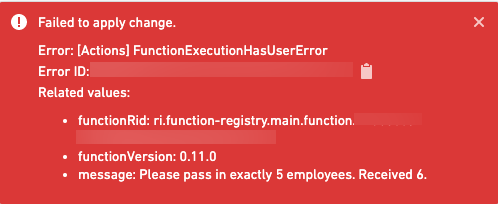
When a function used in a function-backed export throws a UserFacingError, the export failure toast displays the error message.
Write messages that users can act on: state what was wrong and what to change, as in Pass in exactly 5 employees. Received 3.
If you see a user-facing error in an application, the function's author wrote the message. Follow its instructions, for example by changing your selection or input values, and try again. If the message does not explain how to resolve the issue, contact the application owner.