- Capabilities
- Getting started
- Architecture center
- Platform updates
Migrate from TypeScript v1 to TypeScript v2
This guide describes the syntax and structure differences you may encounter while migrating existing TypeScript functions from v1 to v2. Refer to the feature support documentation to learn about v2 enhancements and what each version supports.
Declare a function
To publish a function to the platform in TypeScript v1, you must annotate it with the @Function() decorator from the @foundry/functions-api package. Additionally, the function must be a method of a class that is exported from the root index.ts file of the repository.
Copied!1 2 3 4 5 6 7 8 9 10 11// src/index.ts import { Function } from "@foundry/functions-api"; export class MyFunctions { @Function() public reverseStringArray(arr: string[]): string[] { return arr.reverse(); } }
To publish a function to the platform in TypeScript v2, you must write it in a file in the src/functions directory and export it using export default. Each file can export a single function.
Copied!1 2 3 4 5 6 7// src/functions/reverseStringArray.ts export default function reverseStringArray( arr: string[] ): string[] { return arr.reverse(); }
To keep your repository organized, we recommend grouping related functions into subdirectories within the src/functions directory. For example, the following folder structure organizes functions into payroll and staffing subdirectories to make the separation of responsibilities clearer.
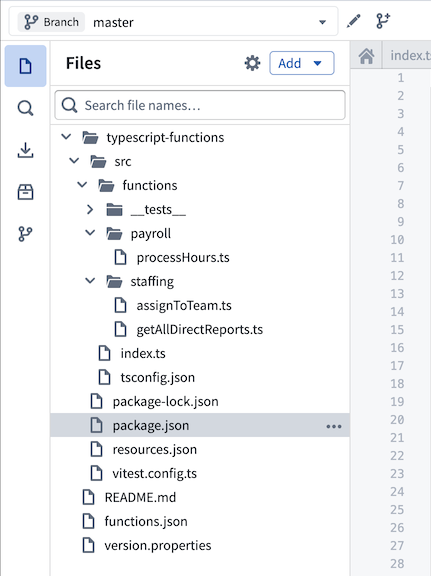
Refer to our documentation on getting started with TypeScript v2 functions for more information.
Use the @osdk/functions package
In TypeScript v1, you must import primitive types like Integer and Double from the @foundry/functions-api package to use them in the signature. In TypeScript v2, however, you must instead use the @osdk/functions package.
The following example imports the Integer type from the @foundry/functions-api package and uses it in the signature of a TypeScript v1 function to calculate the greatest common divisor of two integers:
Copied!1 2 3 4 5 6 7 8 9 10 11 12import { Function, Integer } from "@foundry/functions-api"; export class MyFunctions { @Function() public gcd(a: Integer, b: Integer): Integer { if (b === 0) { return a; } return gcd(b, a % b); } }
In TypeScript v2, the core TypeScript logic is identical, but you must use the Integer type from the @osdk/functions package:
Copied!1 2 3 4 5 6 7 8import { Integer } from "@osdk/functions"; export default function gcd(a: Integer, b: Integer): Integer { if (b === 0) { return a; } return gcd(b, a % b); }
Refer to the types reference for examples of how to import and use types in the signature across both TypeScript v1 and TypeScript v2 functions.
Dates and timestamps
TypeScript v1 uses the LocalDate and Timestamp types from the @foundry/functions-api package for working with temporal data. TypeScript v2 replaces these with the DateISOString and TimestampISOString types from the @osdk/functions package, which represent dates and timestamps as ISO 8601 ↗ strings.
TypeScript v2 functions can use any date and timestamp library available in the NPM ecosystem, such as dayjs ↗, date-fns ↗, and luxon ↗.
Generate the Ontology SDK
TypeScript v2 functions provide first-class support for querying and editing the Ontology through the Ontology SDK. Like in TypeScript v1, TypeScript v2 repositories allow you to import Ontology entities through the Resource imports sidebar. Once you add your object types and link types, you are prompted to create an initial version of the Ontology SDK.
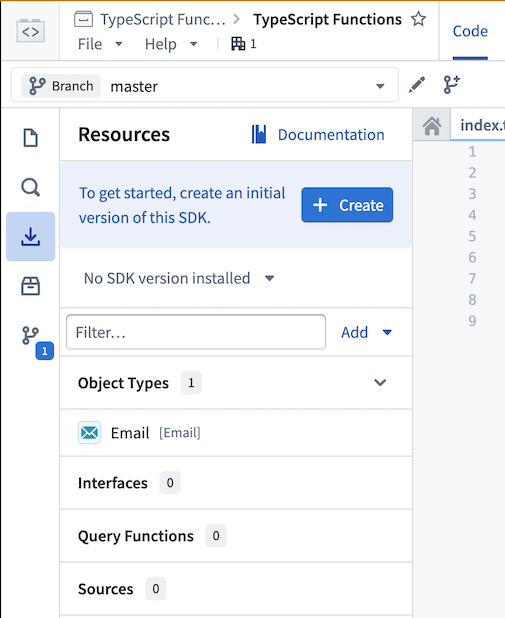
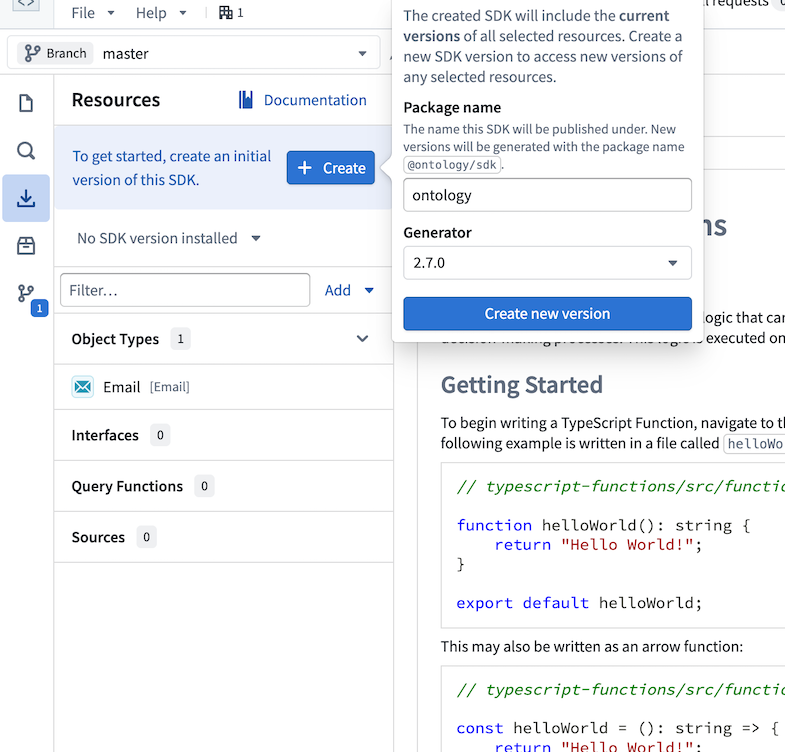
Select Create, then choose a name for the Ontology SDK. This name cannot be changed after the first version is generated. Select Create new version to generate the Ontology SDK.
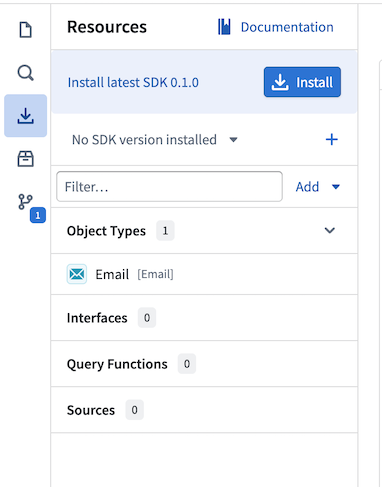
Once the Ontology SDK is created, you will see an option to install it into the workspace. Selecting Install will add the Ontology SDK as a dependency in the package.json file and make it available to use in TypeScript code.
View the Documentation tab in the sidebar for comprehensive examples of working with your Ontology in TypeScript.
Query the Ontology
In TypeScript v1, you must import Objects from the @foundry/ontology-api package to perform searches against your Ontology:
Copied!1 2 3 4 5 6 7 8 9 10 11 12import { Function, Integer } from "@foundry/functions-api"; import { Objects } from "@foundry/ontology-api"; export class MyFunctions { @Function() public async countAircraft(): Promise<Integer> { const count = await Objects.search().aircraft().count() ?? 0; return count; } }
In TypeScript v2, you must access an Ontology SDK client by specifying it as the first argument in the function signature:
Copied!1 2 3 4 5 6 7 8 9 10 11 12 13import { Aircraft } from "@ontology/sdk"; import { Client } from "@osdk/client"; import { Integer } from "@osdk/functions"; export default async function countAircraft(client: Client): Promise<Integer> { const aircraft = await client(Aircraft).aggregate({ $select: { $count: "unordered" } }); return aircraft.$count; }
Edit the Ontology
To write an Ontology edit function in TypeScript v1, you must annotate it with the @OntologyEditFunction() decorator from the @foundry/functions-api package and give it a void return type. You must also apply the @Edits decorator to declare all edited object types up front, allowing permissions on those object types to be enforced before the function-backed action is called.
Copied!1 2 3 4 5 6 7 8 9 10 11 12import { Edits, OntologyEditFunction } from "@foundry/functions-api"; import { Aircraft, Employee } from "@foundry/ontology-api"; export class MyOntologyEditFunctions { @Edits(Aircraft, Employee) @OntologyEditFunction() public myFunction(aircraft: Aircraft, employee: Employee): void { aircraft.businessCapacity = 3; employee.department = "HR"; } }
In TypeScript v2, you must import the createEditBatch function from the @osdk/functions package to construct a store of edits that is used for the duration of the execution. You must use the Edits type to declare which entities your function is permitted to edit. This enforces type safety at compile time; if you attempt to edit an object or link of a type not covered by your Edits type, the TypeScript compiler will return an error.
Copied!1 2 3 4 5 6 7 8 9 10 11 12 13 14 15 16 17 18 19import { createEditBatch, Edits } from "@osdk/functions"; import { Aircraft, Employee } from "@ontology/sdk"; import { Client, Osdk } from "@osdk/client"; type OntologyEdit = Edits.Object<Aircraft> | Edits.Object<Employee>; export default function myFunction( client: Client, aircraft: Osdk.Instance<Aircraft>, employee: Osdk.Instance<Employee> ): OntologyEdit[] { const batch = createEditBatch<OntologyEdit>(client); batch.update(aircraft, { businessCapacity: 3 }); batch.update(employee, { department: "HR" }); return batch.getEdits(); }
In TypeScript v1, edits are not applied to the Ontology during function execution. As described in our edits and object search documentation, changes to objects and links are only propagated after the function finishes executing, and only when called within a function-backed action.
TypeScript v2 makes this behavior more explicit. Rather than implicitly accumulating edits, your function must track them using an edit batch and return them upon completion.
Refer to the Ontology edits section in the TypeScript v2 documentation for the full list of supported operations.
Generate unique IDs for objects
To generate unique IDs for newly created objects in TypeScript v1, use the Uuid utility from the @foundry/functions-utils package.
Copied!1 2 3 4 5 6 7 8 9 10 11 12 13import { Edits, OntologyEditFunction } from "@foundry/functions-api"; import { Uuid } from "@foundry/functions-utils"; import { FlightScenario, Objects } from "@foundry/ontology-api"; export class ExampleEditFunctions { @Edits(FlightScenario) @OntologyEditFunction() public createFlightScenario(): void { const scenario = Objects.create().flightScenarios(Uuid.random()); scenario.scenarioName = "New scenario"; } }
TypeScript v2 runs in a full Node.js environment, so you can use the node:crypto core module instead:
Copied!1 2 3 4 5 6 7 8 9 10 11 12 13 14 15 16 17 18import { FlightScenario } from "@ontology/sdk"; import { Client } from "@osdk/client"; import { createEditBatch, Edits } from "@osdk/functions"; import { randomUUID } from "node:crypto"; type OntologyEdit = Edits.Object<FlightScenario>; export default function createFlightScenario(client: Client): OntologyEdit[] { const batch = createEditBatch<OntologyEdit>(client); batch.create(FlightScenario, { id: randomUUID(), scenarioName: "New scenario", }); return batch.getEdits(); }
Load objects into memory
TypeScript v1 functions expose the .all() and .allAsync() APIs to load all objects of a particular type into memory for processing. However, this approach can lead to high memory usage and slower performance as the number of objects in your Ontology grows.
Copied!1 2 3 4 5 6 7 8 9 10 11 12 13 14 15 16import { Edits, OntologyEditFunction } from "@foundry/functions-api"; import { Aircraft, Objects } from "@foundry/ontology-api"; export class MyFunctions { @Edits(Aircraft) @OntologyEditFunction() public editAircraft(): void { const aircraft = Objects.search().aircraft().all(); aircraft.forEach(a => { a.arrived = true; }); } }
TypeScript v2 functions support streaming object processing via the Ontology SDK, avoiding the need to hold the entire set of objects in memory at once. We recommend this approach where possible.
Copied!1 2 3 4 5 6 7 8 9 10 11 12 13 14 15 16import { Aircraft } from "@ontology/sdk"; import { Client } from "@osdk/client"; import { createEditBatch, Edits } from "@osdk/functions"; type OntologyEdit = Edits.Object<Aircraft>; export default async function editAircraft(client: Client): Promise<OntologyEdit[]> { const batch = createEditBatch<OntologyEdit>(client); for await (const a of client(Aircraft).asyncIter()) { batch.update(a, { arrived: true }); } return batch.getEdits(); }
If data scale is not a concern, the following alternative loads all objects of a particular type:
Copied!1 2 3 4 5 6 7 8 9 10 11 12 13 14 15 16 17 18import { Aircraft } from "@ontology/sdk"; import { Client } from "@osdk/client"; import { createEditBatch, Edits } from "@osdk/functions"; type OntologyEdit = Edits.Object<Aircraft>; export default async function editAircraft(client: Client): Promise<OntologyEdit[]> { const batch = createEditBatch<OntologyEdit>(client); const aircraft = await Array.fromAsync(client(Aircraft).asyncIter()); aircraft.forEach(a => { batch.update(a, { arrived: true }); }); return batch.getEdits(); }