注: 以下の翻訳の正確性は検証されていません。AIPを利用して英語版の原文から機械的に翻訳されたものです。
Python OSDK 移行ガイド(1.x から 2.x)
このガイドは、Python OSDK 1.x を使用するアプリケーションを Python OSDK 2.x に移行するためのものです。以下のセクションでは、2つのバージョンの差異を説明し、構文と構造に関する主な変更点を取り上げます。
Python OSDK のドキュメントは、プラットフォーム内の Developer Console(/workspace/developer-console/)でも利用できます。Python OSDK 2.x のドキュメントを参照するには、バージョンピッカーで 2.x を選択します。
Python OSDK 1.x から 2.x にアップグレードする理由は何ですか?
Python OSDK 1.x から 2.x にアップグレードする主な理由は4つあります。
Python プラットフォーム SDK と OSDK で共通のクライアントを使用
OSDK とプラットフォーム SDK の両方を使った開発で、2つの別々のクライアントを管理する必要がなくなりました。両方の SDK に単一のクライアントからアクセスできるようになりました。
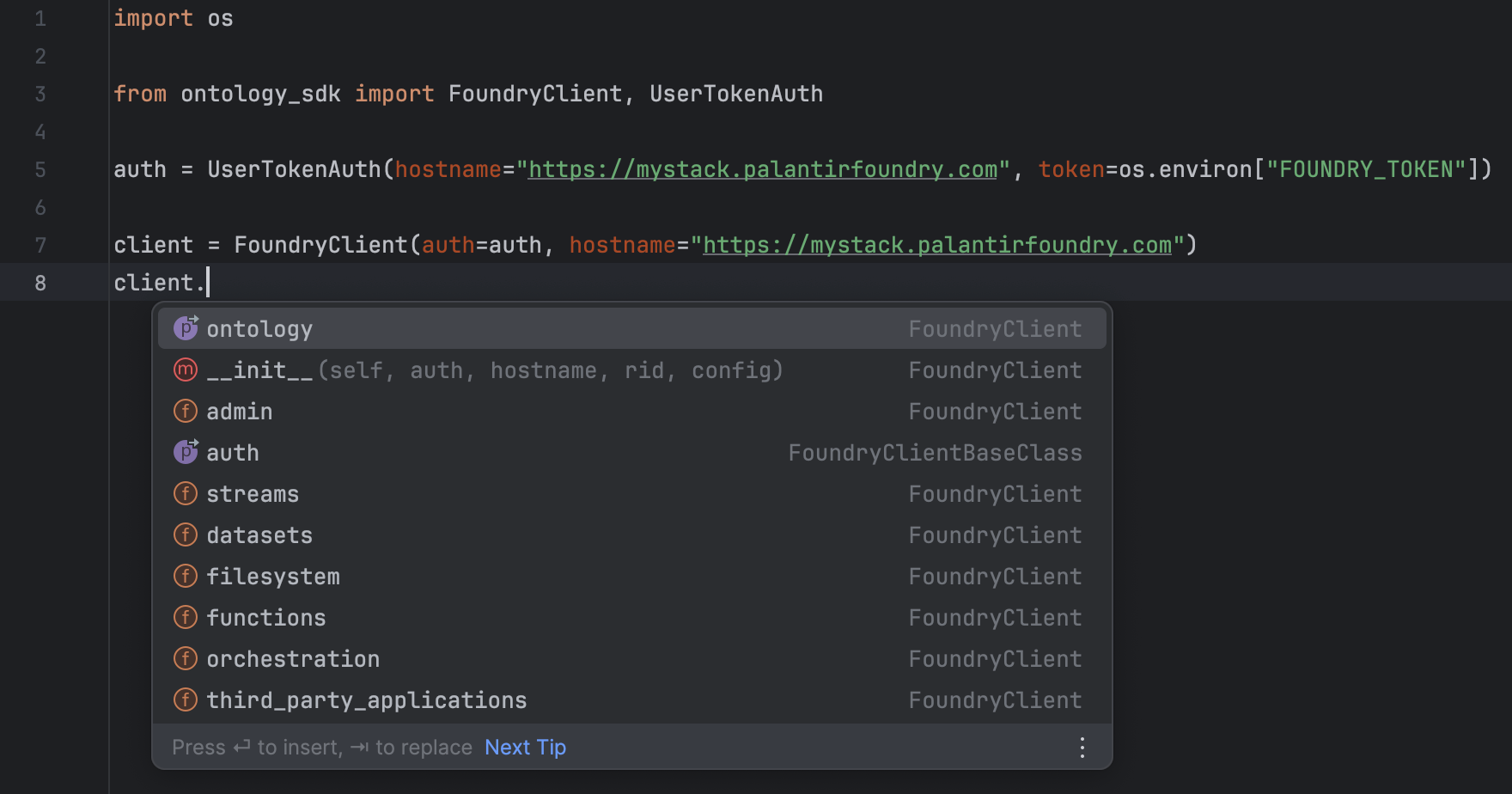
クエリ、リンク、集計、添付ファイルのアップロードの戻り値の型を改善
- クエリは、オブジェクト、オブジェクトセット、添付ファイル、2次元集計、3次元集計、マップ型を返すことができます。
- Python OSDK V1 では、戻り値の型がオブジェクト、オブジェクトセット、添付ファイルである関数クエリは、これらの型のそれぞれに対応するオブジェクト識別子を返していました。たとえば、オブジェクトを返すクエリの場合、V1 では、オブジェクトのインスタンスではなく、実際にはオブジェクトの主キーを返していました。現在は、その型のインスタンスを返します。
- Python OSDK V1 は、2次元集計、3次元集計、マップ型をサポートしていませんでした。OSDK V2 では、これらがサポートされるようになりました。
- リンクはオブジェクトセットまたは
Optional[Objects]を返します。- 一対多 / 多対多のリンクはオブジェクトセットを返し、一対一 / 多対一のリンクは
Optional[Objects]を返すようになりました。 - 一対一 / 多対一のリンクでは、リンクされたオブジェクトを取得するために
.getを使用する必要がなくなりました。リンク自体がオブジェクトになります。 - 一対多 / 多対多のリンクでは、オブジェクトセットで利用可能なすべてのメソッド(
.page、.where、.group_byなど)が、これらのリンクでも利用可能になりました。Python OSDK V1 では、.iterateと.getメソッドのみが利用可能でした。
- 一対多 / 多対多のリンクはオブジェクトセットを返し、一対一 / 多対一のリンクは
- 集計は
AggregateObjectsResponseを返します。- Python OSDK V1 では、集計レスポンスの型は
dict[str, Any]で、キーは除かれた項目、精度、データなどのフィールドでした。Python OSDK V2 では、集計はAggregateObjectsResponseのインスタンスを返すようになりました。そのフィールドは V1 の dict 型と同じですが、型安全性が向上しています。Python OSDK V2 のAggregateObjectsResponseには.to_dictメソッドがあり、V1 と同じレスポンスを返します。 - Python OSDK V1 で「範囲でグループ化」を行うには、辞書のリストを入力する必要がありました。各辞書のキーは
start_valueとend_valueで、値は範囲の開始と終了でした。V2 では、入力のデータ型はタプルの集合になり、タプルの最初の要素がstart_value、2番目の要素がend_valueと推論されます。
- Python OSDK V1 では、集計レスポンスの型は
- 添付ファイルのアップロードは
Attachmentを返します。- Python OSDK V1 では、
client.ontology.attachments.upload(...)はAttachmentMetadataを返していました。V2 では、添付ファイルのアップロードはAttachmentを返します。
- Python OSDK V1 では、
クライアント設定の編集が可能
Python OSDK V1 では、リクエストの送信時にクライアント設定を簡単に編集する方法がありませんでした。たとえば、リクエストの user-agent を編集するには、クライアントの予約済みメソッド ._session にアクセスする必要がありました。この問題を避けるため、Python OSDK V2 には、インポートしてクライアントに渡すことができる Config クラスが用意されています。
この新しい Config クラスの構造は次のとおりです。
Copied!1 2 3 4 5 6 7 8 9 10 11 12 13 14 15 16 17 18 19 20 21 22class Config: # HTTP セッションの設定。 default_headers: Optional[Dict[str, str]] = ... # すべてのリクエストに含める HTTP ヘッダー。 proxies: Optional[Dict[Literal["http", "https"], str]] = None # HTTP および HTTPS リクエストに使用するプロキシ。 timeout: Optional[Union[int, float]] = None # すべてのリクエストのデフォルトのタイムアウト(秒)。 verify: Optional[Union[bool, str]] = True # SSL 検証。ブール値または CA バンドルへのパスを指定できます。 default_params: Optional[Dict[str, Any]] = None # すべてのリクエストに含める URL クエリパラメーター。 scheme: Literal["http", "https"] = "https" # 使用する URL スキーム('http' または 'https')。デフォルトは 'https' です。
Python OSDK 1.x(レガシー)
Copied!1 2 3 4from ontology_sdk import FoundryClient client = FoundryClient() client._session._user_agent += "something_new"
Python OSDK 2.x
Copied!1 2 3 4from ontology_sdk import FoundryClient, Config config = Config(default_headers={"Content-Type": "application/json"}) client = FoundryClient(config=config)
ベータ機能
ベータ機能は変更される可能性があり、構文、安定性、機能の存続は保証されません。Python OSDK V2 の安定版リリースにはベータ機能が含まれているため、試してフィードバックを提供できます。ベータ機能を使用するには、foundry_sdk_runtime から AllowBetaFeatures をインポートし、そのコンテキスト内にコードを記述するか、コードに @AllowBetaFeatures() デコレーターを付ける必要があります。Foundry Python 関数を使用する場合、@function デコレーターには beta ブール値が含まれています。
AllowBetaFeatures でベータ機能を使用する
Copied!1 2 3 4from foundry_sdk_runtime.decorators import AllowBetaFeatures with AllowBetaFeatures(): <your code>
メソッドに AllowBetaFeatures デコレーターを付けてベータ機能を使用する
Copied!1 2 3 4 5from foundry_sdk_runtime.decorators import AllowBetaFeatures @AllowBetaFeatures() my_func(): <your code>
Foundry Python 関数でベータ機能を使用する
ベータ版のプロパティを持つオントロジーのオブジェクトを Python 関数が受け取るには、次のコードが必要です。
Copied!1 2 3 4 5from functions.api import function @function(beta=True) def my_function(): <your code>
Python OSDK V2 のベータ機能には、次のものが含まれます。
- 派生プロパティ
- 最近傍によるオブジェクトセットの絞り込み
- マーキングおよびベクトルのオブジェクトプロパティ
- 新しいオブジェクトのプロパティタイプ:構造体
派生プロパティ
派生プロパティは、オブジェクトのほかのプロパティの値やリンクに基づいて実行時に計算されるプロパティです。OSDK V2 では、オブジェクトセットに派生プロパティを作成できます。
Copied!1 2 3 4 5 6 7 8 9 10 11 12 13 14 15 16from foundry_sdk_runtime import AllowBetaFeatures from ontology_sdk.ontology.objects import Object with AllowBetaFeatures(): derived_object_type = Object.object_type.derived my_object_set = client.ontology.object.with_properties( my_new_property=derived_object_type.linked_object.id.count() ) result = my_object_set.take(1) print(result) # 出力例: # Object(id=1, my_new_property=3.0)
最近傍によるオブジェクトセットの絞り込み
OSDK V2 では、nearest_neighbors を使用してオブジェクトセットを絞り込み、指定したベクトルプロパティが、与えられたクエリベクトルまたはテキストに最も近いオブジェクトの集合を見つけることができます。
Copied!1 2 3 4 5 6 7 8 9 10 11 12 13 14 15 16 17 18 19 20from foundry_sdk_runtime import AllowBetaFeatures from ontology_sdk.ontology.objects import Object my_object_set = client.ontology.objects.Object with AllowBetaFeatures(): closest_objects = my_object_set.nearest_neighbors( query="my query", num_neighbors=3, vector_property=Object.object_type.vector_property ) print(list(closest_objects)) # 出力例: # [ # Object(rid=None, _score=None, id=1, embedding=None), # Object(rid=None, _score=None, id=2, embedding=None), # Object(rid=None, _score=None, id=3, embedding=None) # ]
新しいオブジェクトのプロパティタイプ
Python OSDK 2.x では、マーキング、メディア、ベクトルのオブジェクトプロパティが追加されています。マーキングプロパティとベクトルプロパティはベータ機能のため、AllowBetaFeatures コンテキスト内で読み取ります。メディアプロパティは直接読み取ります。それぞれの読み取り方法については、Python OSDK リファレンスのオブジェクトのプロパティタイプを参照してください。
Python OSDK 1.x から 2.x にアップグレードする方法
既存の Developer Console アプリケーションに対して新しい SDK バージョンを生成するには、アプリケーションの SDK バージョンタブで、新しいバージョンを生成するオプションからアクセスできる Python OSDK 2.x ジェネレーターを使用します。
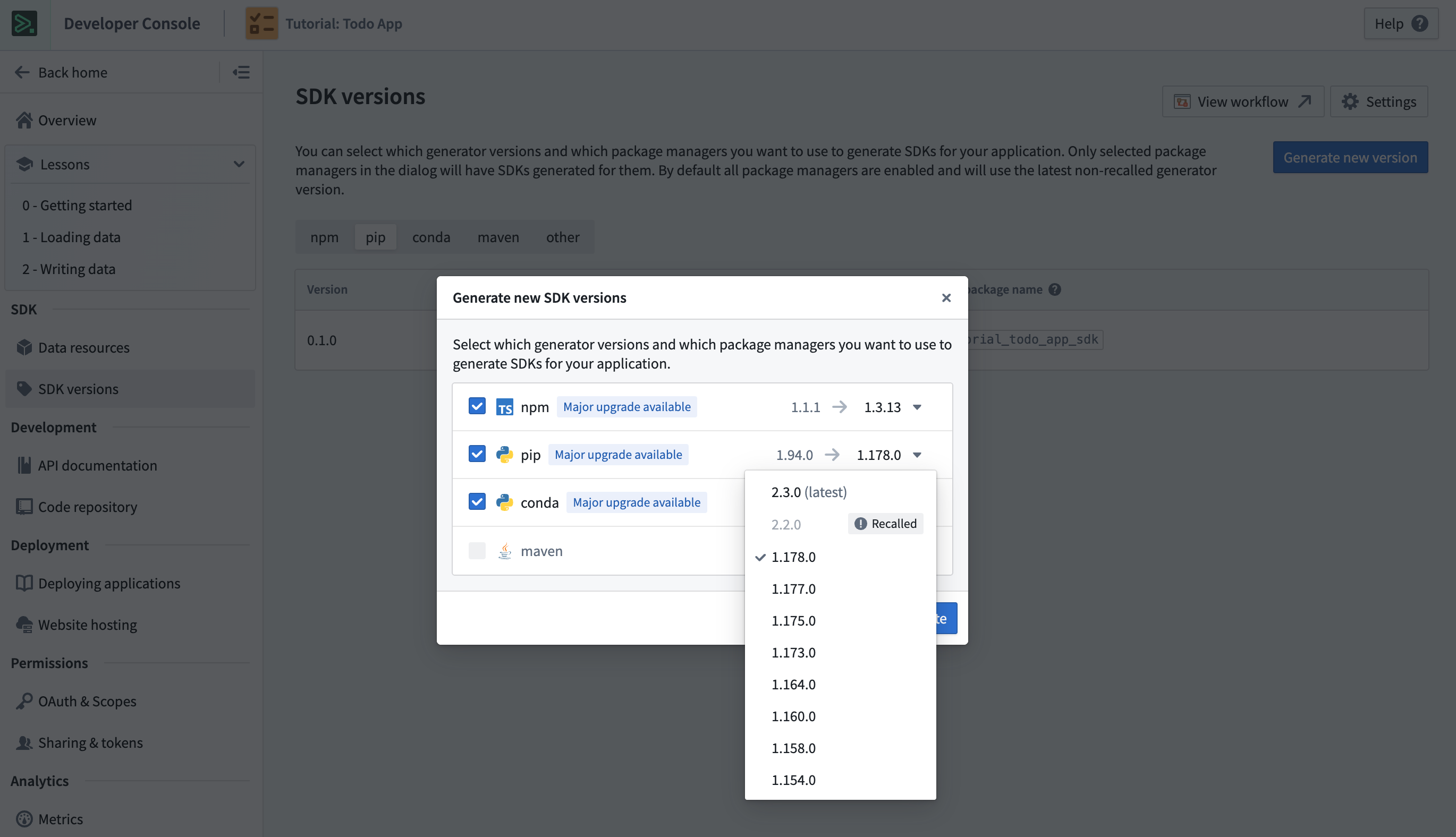
既存のアプリケーションで新しく生成された SDK を使用するには、必要な依存関係も備えている必要があります。Developer Console で作成する新しいアプリケーションでは、デフォルトで Python OSDK 2.x ジェネレーターを使用して SDK が生成されます。開発を始めるタブの手順に沿って進めると、すぐにはじめられます。
Python OSDK 1.x から 2.x への構文の変換と戻り値の型の変更
このセクションでは、Python OSDK 1.x と 2.x の対応関係を示す簡単な例を紹介します。
絞り込み
- 絞り込み対象のプロパティを参照する場合は、
where式に.object_typeを含める必要があります。 .is_member_ofは.in_に名前が変更されました。- Python OSDK 2.x の文字列の絞り込みでは、文字列プロパティで次のメソッドを使用できます。
.contains_any_term(...).contains_all_terms(...).contains_all_terms_in_order(...)
starts_withメソッドは Python OSDK 2.75.0 で削除されました。前方一致には、prefix_last_term=Trueを指定してcontains_all_terms_in_orderを使用します。
Python OSDK 1.x(レガシー)での絞り込み
Copied!1client.ontology.object.where(Object.id.is_member_of([1, 2, 3])).take(1)
Python OSDK 2.x での絞り込み
Copied!1client.ontology.object.where(Object.object_type.id.in_([1, 2, 3])).take(1)
リンク
戻り値の型の変更
| リンクタイプ | V1 レスポンス | V2 レスポンス |
|---|---|---|
| 一対一 / 多対一 | ObjectLinkClass インスタンス | Optional[Object] |
| 一対多 / 多対多 | ObjectLinkClass インスタンス | ObjectSet インスタンス |
Python OSDK 1.x(レガシー)での一対一または多対一のリンク
Python OSDK V1 では、.get を使用してリンクされたオブジェクトを取得します。
Copied!1linked_obj: Optional[LinkedObject] = client.ontology.object.linked_object.get()
Python OSDK 2.x での一対一または多対一のリンク
Python OSDK V2 では、オブジェクトを読み込んでから、そのオブジェクトのリンクメソッドを呼び出します。メソッド名はリンクのAPI名をスネークケースにしたもので、リンクされたオブジェクトを返します。リンクされたオブジェクトがない場合は None を返します。
Copied!1 2 3obj = client.ontology.objects.Object.get("primaryKey") linked_obj: Optional[LinkedObject] = obj.linked_object()
Python OSDK 1.x(レガシー)での一対多または多対多のリンク
Python OSDK V1 で利用可能なメソッドは、.iterate と .get のみです。
Copied!1 2 3 4linked_obj: ObjectLinkType = client.ontology.object.linked_object linked_obj.iterate() → Iterable[LinkedObject] linked_obj.get(1) → Optional[LinkedObject]
Python OSDK 2.x での一対多または多対多のリンク
Python OSDK V2 では、オブジェクトセットで利用可能なすべてのメソッドを、一対多または多対多のリンクでも使用できます。これには .take、.where、.group_by が含まれ、リンクの絞り込み、集計、反復処理が容易になります。また、V2 は、オブジェクトセットからリンクをたどるための search_around_<link_name>() メソッドも生成します。
Copied!1 2 3 4 5 6 7 8 9 10from ontology_sdk.ontology.objects import LinkedObject obj = client.ontology.objects.Object.get("primaryKey") linked_obj_set: LinkedObjectSet = obj.linked_objects() for linked_obj in linked_obj_set.iterate(): ... result: float = linked_obj_set.where(LinkedObject.object_type.id > 5).count().compute()
リンクをたどる例については、Python OSDK リファレンスのリンクを参照してください。
クエリ
OSDK V2 のクエリでは戻り値の型が変更されており、V2 のクエリに渡す引数はすべてキーワード引数です。
戻り値の型の変更
| 戻り値の型 | V1 レスポンス | V2 レスポンス |
|---|---|---|
Object | オブジェクトの主キー(float、string) | Object インスタンス |
ObjectSet | オブジェクトセット RID(string) | ObjectSet インスタンス |
Attachment | 添付ファイル RID(string) | Attachment インスタンス |
Python OSDK 1.x(レガシー)でのオブジェクトクエリ
Copied!1 2 3 4 5result: float = client.ontology.queries.query_object_output(1) print(result) # 出力例: # 1.0
Python OSDK 2.x でのオブジェクトクエリ
Copied!1 2 3 4 5result: Object = client.ontology.queries.query_object_output(object_id = 1) print(result) # 出力例: # Object(id = 1)
Python OSDK 1.x(レガシー)でのオブジェクトセットクエリ
Copied!1 2 3 4 5result: str = client.ontology.queries.query_object_set_output(1) print(result) # 出力例: # "ri.object-set.main.object-set.e5c05475-8766-4804-9be0-66cf7854de5c"
Python OSDK 2.x でのオブジェクトセットクエリ
Copied!1 2 3 4 5result: ObjectSet = client.ontology.queries.query_object_set_output(object_id = 1) print(result) # 出力例: # ObjectSet(object_set_definition=...)
Python OSDK 1.x(レガシー)での添付ファイルクエリ
Copied!1 2 3 4 5result: str = client.ontology.queries.query_attachment_output(1) print(result) # 出力例: # "ri.attachments.main.attachment.2c1432f8-0378-45f2-8280-55d858cb71fc"
Python OSDK 2.x での添付ファイルクエリ
Copied!1 2 3 4 5result: Attachment = client.ontology.queries.query_attachment_output(object_id = 1) print(result) # 出力例: # Attachment(rid="ri.attachments.main.attachment.2c1432f8-0378-45f2-8280-55d858cb71fc")
Python OSDK 2.x は、1.x では対応していなかった2次元集計、3次元集計、およびマップのクエリ戻り値の型にも対応しています。これらの追加された戻り値の型の例については、Python OSDK リファレンスのクエリを参照してください。
集計
複数の値を返す集計(つまり、.group_by と .aggregate から派生する集計)は、Dict[str, Any] ではなく AggregateObjectsResponse を返します。Python OSDK V1 のレスポンスを返したい場合は、AggregateObjectsResponse の .to_dict メソッドを使用すると、レスポンスの辞書表現が返されます。
| V1 レスポンス | V2 レスポンス |
|---|---|
Dict[str, Any] | AggregateObjectsResponse |
Python OSDK 1.x(レガシー)での集計
Copied!1 2 3 4 5 6 7 8 9 10 11 12 13 14 15 16 17 18 19result: dict[str, Any] = client.ontology.objects.Object.aggregate({ "min_id": Object.object_type.id.min(), "max_id": Object.object_type.id.max() }).compute() print(result) # 出力例: # { # 'accuracy': 'ACCURATE', # 'data': [ # { # 'group': {}, # 'metrics': [ # {'name': 'min_id', 'value': 1.0}, # {'name': 'max_id', 'value': 99.0} # ] # } # ] # }
Python OSDK 2.x での集計
Copied!1 2 3 4 5 6 7 8 9 10 11 12 13 14 15 16 17 18 19 20result: AggregateObjectsResponse = client.ontology.objects.Object.aggregate({ "min_id": Object.object_type.id.min(), "max_id": Object.object_type.id.max() }).compute() print(result) # 出力例: # AggregateObjectsResponse( # excluded_items=None, # accuracy='ACCURATE', # data=[ # AggregateObjectsResponseItem( # group={}, # metrics=[ # AggregationMetricResult(name='min_id', value=1.0), # AggregationMetricResult(name='max_id', value=99.0) # ] # ) # ] # )
添付ファイル
OSDK V1 では、添付ファイルをアップロードすると、戻り値の型は AttachmentMetadata です。V2 では、戻り値の型は Attachment です。
Python OSDK 1.x(レガシー)で添付ファイルをアップロードする
Copied!1 2 3 4 5 6 7 8 9 10 11 12 13result: AttachmentMetadata = client.ontology.attachments.upload( file_path="file.json", attachment_name="myFile" ) print(result) # 出力例: # AttachmentMetadata( # rid='ri.attachments.main.attachment.00000000-0000-0000-0000-000000000000', # filename='myFile', # size_bytes=20, # media_type='*/*', # type='single' # )
Python OSDK 2.x で添付ファイルをアップロードする
Copied!1 2 3 4 5 6 7 8 9 10 11 12 13 14 15 16 17 18 19 20 21result: Attachment = client.ontology.attachments.upload( file_path="file.json", attachment_name="myFile" ) print(result) # Example output: # Attachment(rid=ri.attachments.main.attachment.00000000-0000-0000-0000-000000000000) print(result.get_metadata()) # Example output: # AttachmentMetadata( # rid='ri.attachments.main.attachment.00000000-0000-0000-0000-000000000000', # filename='myFile', # size_bytes=20, # media_type='*/*', # type='single' # ) print(result.read().getvalue()) # Example output: # b'My example file.\n'
アップロードされた添付ファイルは、適用されたアクションによってオブジェクトのプロパティに書き込まれない限り、1時間後に削除されます。このルールと Attachment の全機能については、Python OSDK リファレンスの添付ファイルを参照してください。
グループ化
OSDK V1 では、範囲でグループ化する際に受け付ける入力は辞書のリストで、各辞書のキーは start_value と end_value、値は各範囲の開始値と終了値です。V2 では、新しい入力のデータ型はタプルの集合で、タプルの最初の要素が各範囲の start_value、2番目の要素が end_value です。
Python OSDK 1.x(レガシー)で範囲によってグループ化する
Copied!1 2 3 4 5 6 7from ontology_sdk.ontology.objects import Object client.ontology.objects.Object.group_by( Object.object_type.int_property.ranges( [{"start_value": 1, "end_value": 2}, {"start_value": 3, "end_value": 4}] ) )
Python OSDK 2.x で範囲によってグループ化する
Copied!1 2 3 4 5from ontology_sdk.ontology.objects import Object client.ontology.objects.Object.group_by( Object.object_type.int_property.ranges({(1, 2), (3, 4)}) )
Python OSDK 1.x から 2.x へのプロパティタイプの変更
- GeoTypes:
PointはGeoPointに名前が変更されました。
エラー処理
リクエストの例外は、foundry_sdk_runtime.errors ではなく、foundry_sdk から直接インポートするようになりました。これには次の例外が含まれます。
PalantirRPCExceptionNotAuthenticatedEnvironmentNotConfigured
Python OSDK 1.x(レガシー)でのエラー処理
Copied!1from foundry_sdk_runtime.errors import PalantirRPCException
Python OSDK 2.x でのエラー処理
Copied!1from foundry_sdk import PalantirRPCException
その他の差異
ActionResponse
ActionResponseはSyncApplyActionResponseに変更されました。BatchActionResponseはBatchApplyActionResponseに変更されました。ValidationResultはenumとしては削除されました。Literalとして存在し、foundry_sdk.v2.ontologies.modelsからインポートできます。
Python OSDK 1.x(レガシー)でのアクション
Copied!1 2 3 4 5 6 7 8 9 10 11 12 13 14 15 16 17 18 19 20 21 22 23 24 25 26 27 28 29 30 31 32 33 34 35 36 37 38 39 40 41from ontology_sdk.types import ( ActionConfig, ActionMode, ReturnEditsMode, ValidationResult ) from foundry_sdk_runtime.types import ActionResponse response: ActionResponse = client.ontology.actions.action_example( action_config=ActionConfig( mode=ActionMode.VALIDATE_AND_EXECUTE, return_edits=ReturnEditsMode.ALL), parameter_example="value" ) if response.validation.validation_result == ValidationResult.VALID: ... print(response) # 出力例: # ActionResponse( # validation=ValidateActionResponse( # result='VALID', # submission_criteria=[], # parameters={} # ), # edits=EditsActionResponse( # type='edits', # edits=[ # EditObjectResponse( # type='addObject', # primary_key='value', # object_type='ExampleObjectType' # ) # ], # added_objects_count=1, # modified_objects_count=0, # deleted_objects_count=0, # added_links_count=0, # deleted_links_count=0 # ) # )
Python OSDK 2.x でのアクション
アクションの設定のデータ型を foundry_sdk_runtime.types からインポートします。response.validation.result は、ValidationResult 列挙型ではなく文字列 "VALID" と比較します。
Copied!1 2 3 4 5 6 7 8 9 10 11 12 13 14 15 16 17 18 19 20 21 22 23 24 25 26 27 28 29 30 31 32 33 34 35 36 37 38 39 40from foundry_sdk_runtime.types import ( ActionConfig, ActionMode, ReturnEditsMode, SyncApplyActionResponse ) response: SyncApplyActionResponse = client.ontology.actions.action_example( action_config=ActionConfig( mode=ActionMode.VALIDATE_AND_EXECUTE, return_edits=ReturnEditsMode.ALL), parameter_example="value" ) if response.validation.result == "VALID": ... print(response) # 出力例: # SyncApplyActionResponse( # validation=ValidateActionResponse( # result='VALID', # submission_criteria=[], # parameters={} # ), # edits=ObjectEdits( # type='edits', # edits=[ # AddObject( # primary_key='value', # object_type='ExampleObjectType', # type='addObject' # ) # ], # added_object_count=1, # modified_objects_count=0, # deleted_objects_count=0, # added_links_count=0, # deleted_links_count=0 # ) # )
詳細については、Python OSDK リファレンスのオントロジーに対するアクションを参照してください。
Python OSDK 1.x(レガシー)でのバッチアクション
Copied!1 2 3 4 5 6 7 8 9 10 11 12 13 14 15 16 17 18 19 20 21 22 23 24 25 26 27 28 29 30 31 32 33 34 35 36 37 38 39 40from ontology_sdk.types import BatchActionConfig, ReturnEditsMode from ontology_sdk.ontology.action_types import ActionExampleBatchRequest from foundry_sdk_runtime.types import BatchActionResponse response: BatchActionResponse = client.ontology.batch_actions.action_example( batch_action_config=BatchActionConfig(return_edits=ReturnEditsMode.ALL), requests=[ ActionExampleBatchRequest( parameter_example="value_1" ), ActionExampleBatchRequest( parameter_example="value_2" ) ] ) print(response) # 出力例: # BatchActionResponse( # edits=EditsActionResponse( # type='edits', # edits=[ # EditObjectResponse( # type='addObject', # primary_key='value_1', # object_type='ExampleObjectType' # ), # EditObjectResponse( # type='addObject', # primary_key='value_2', # object_type='ExampleObjectType' # ) # ], # added_objects_count=2, # modified_objects_count=0, # deleted_objects_count=0, # added_links_count=0, # deleted_links_count=0 # ) # )
Python OSDK 2.x でのバッチアクション
BatchActionConfig と ReturnEditsMode を foundry_sdk_runtime.types からインポートします。レスポンスは BatchApplyActionResponse になりました。
Copied!1 2 3 4 5 6 7 8 9 10 11 12 13 14 15 16 17 18 19 20 21 22 23 24 25 26 27 28 29 30 31 32 33 34 35 36 37 38 39from foundry_sdk_runtime.types import BatchActionConfig, BatchApplyActionResponse, ReturnEditsMode from ontology_sdk.ontology.action_types import ActionExampleBatchRequest response: BatchApplyActionResponse = client.ontology.batch_actions.action_example( batch_action_config=BatchActionConfig(return_edits=ReturnEditsMode.ALL), requests=[ ActionExampleBatchRequest( parameter_example="value_1" ), ActionExampleBatchRequest( parameter_example="value_2" ) ] ) print(response) # 出力例: # BatchApplyActionResponse( # edits=BatchActionObjectEdits( # type='edits', # edits=[ # AddObject( # primary_key='value_1', # object_type='ExampleObjectType', # type='addObject' # ), # AddObject( # primary_key='value_2', # object_type='ExampleObjectType', # type='addObject' # ) # ], # added_object_count=2, # modified_objects_count=0, # deleted_objects_count=0, # added_links_count=0, # deleted_links_count=0 # ) # )
詳細については、Python OSDK リファレンスのバッチアクションを適用するを参照してください。