- Capabilities
- Getting started
- Architecture center
- Platform updates
Python OSDK migration guide (1.x to 2.x)
This guide is intended to help you migrate applications using Python OSDK 1.x to Python OSDK 2.x. The sections below explain the differences between the two versions and highlight relevant changes in syntax and structure.
Python OSDK documentation is also available in-platform in the Developer Console at /workspace/developer-console/. Use the version picker to select 2.x for documentation on Python OSDK 2.x.
Why upgrade from Python OSDK 1.x to 2.x?
There are four main reasons to upgrade from Python OSDK 1.x to 2.x:
- Shared client used for both Python Platform SDK and OSDK
- Improved return types for queries, links, aggregations, and attachment uploads
- Ability to edit your client configuration
- Beta features
Shared client used for both Python Platform SDK and OSDK
Developing with both the OSDK and Platform SDK no longer requires users to manage two separate clients. Both SDKs can now be accessed through a single client.
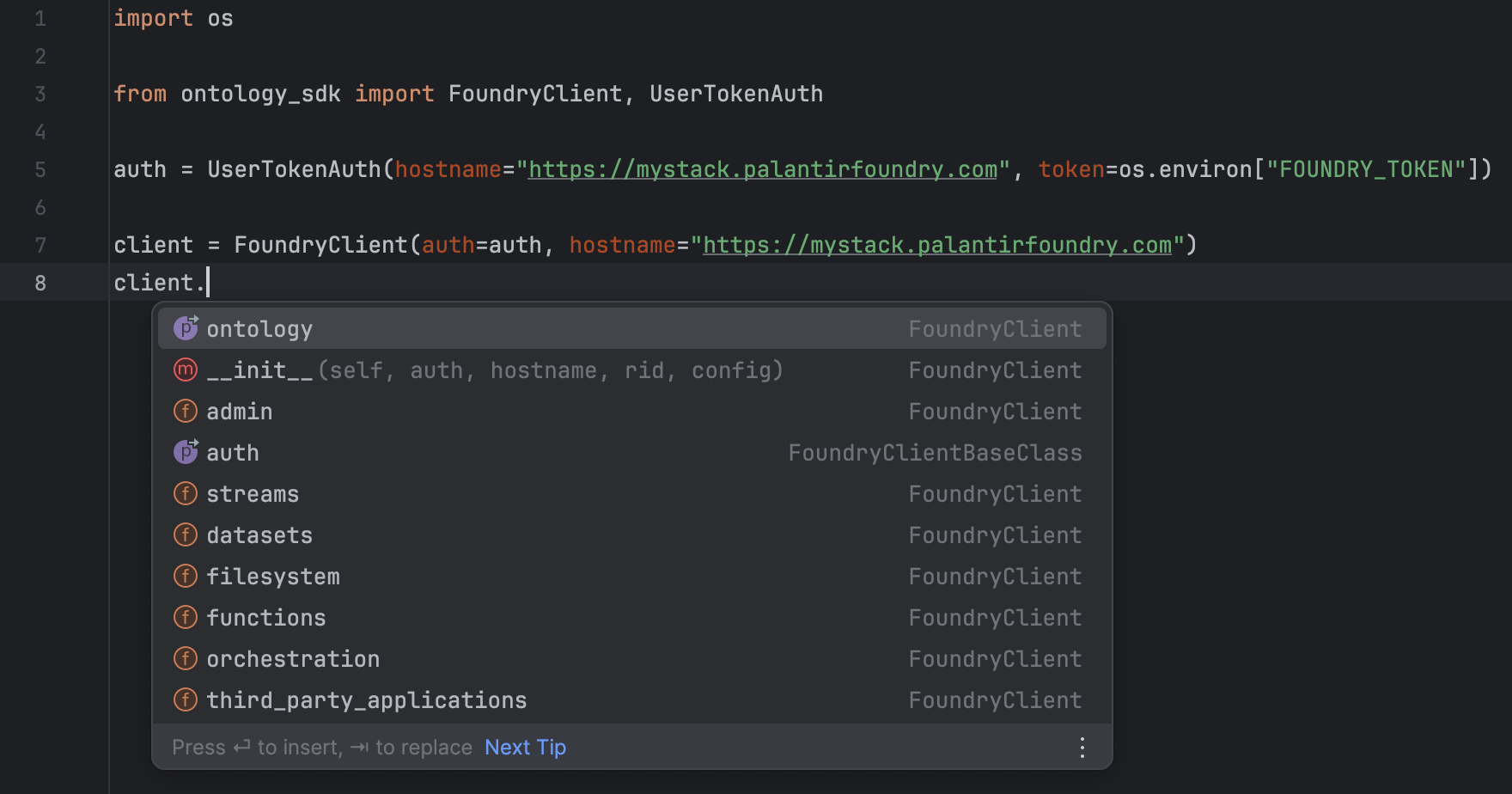
Improved return types for queries, links, aggregations, and attachment uploads
- Queries can return objects, object sets, attachments, two-dimensional aggregations, three-dimensional aggregations, and map types.
- In Python OSDK V1, function queries whose return types were objects, object sets, and attachments would return the object identifiers for each of these types. For example, if a query returns an object, in V1, the query would actually return the object primary key as opposed to an instance of the object. Now, queries return an instance of the type.
- Python OSDK V1 did not support two-dimensional aggregations, three-dimensional aggregations, or map types. These are now supported in OSDK V2.
- Links return object sets or
Optional[Objects]- One-to-many / many-to-many type links now return object sets and one-to-one / many-to-one type links return
Optional[Objects]. - For one-to-one / many-to-one type links, users no longer need to use
.getto retrieve the linked object. The link itself will be the object. - For one-to-many / many-to-many type links, all methods available to object sets (such as
.page,.where, or.group_by) are now available to these links. In Python OSDK V1, only the methods.iterateand.getwere available.
- One-to-many / many-to-many type links now return object sets and one-to-one / many-to-one type links return
- Aggregations return an
AggregateObjectsResponse- In Python OSDK V1, aggregation responses were of type
dict[str, Any], where the keys were fields such as excluded items, accuracy, data, and so on. With Python OSDK V2, aggregations now return an instance ofAggregateObjectsResponse, whose fields are the same as the V1 dict type, but with improved type safety. TheAggregateObjectsResponsein Python OSDK V2 has a.to_dictmethod, which will return the same response as in V1. - To perform a "group by range" in Python OSDK V1, you would need to input a list of dicts, where the keys of each dict were "start_value" and "end_value", and the values of each dict were the start and end of the range. In V2, the input type is now a set of tuples, where the first element of the tuple is inferred to be the "start_value" and the second element the "end_value".
- In Python OSDK V1, aggregation responses were of type
- Attachment upload returns an
Attachment- In Python OSDK V1,
client.ontology.attachments.upload(...)returned anAttachmentMetadata. In V2, uploading an attachment returns anAttachment.
- In Python OSDK V1,
Ability to edit your client configuration
In Python OSDK V1, there was no easy way to edit the client configuration when sending requests. For example, if a user wanted to edit the user-agent of their requests, they would have to access the reserved ._session method on their client in order to do so. To avoid this issue, Python OSDK V2 provides a Config class that users can import and pass into their clients.
This new Config class has the following structure:
Copied!1 2 3 4 5 6 7 8 9 10 11 12 13 14 15 16 17 18 19 20 21 22class Config: # Configuration for the HTTP session. default_headers: Optional[Dict[str, str]] = ... # HTTP headers to include with all requests. proxies: Optional[Dict[Literal["http", "https"], str]] = None # Proxies to use for HTTP and HTTPS requests. timeout: Optional[Union[int, float]] = None # The default timeout for all requests in seconds. verify: Optional[Union[bool, str]] = True # SSL verification, can be a boolean or a path to a CA bundle. default_params: Optional[Dict[str, Any]] = None # URL query parameters to include with all requests. scheme: Literal["http", "https"] = "https" # URL scheme to use ('http' or 'https'). Defaults to 'https'.
Python OSDK 1.x (legacy)
Copied!1 2 3 4from ontology_sdk import FoundryClient client = FoundryClient() client._session._user_agent += "something_new"
Python OSDK 2.x
Copied!1 2 3 4from ontology_sdk import FoundryClient, Config config = Config(default_headers={"Content-Type": "application/json"}) client = FoundryClient(config=config)
Beta features
Beta features have the potential to change, and their syntax, stability, and existence are not guaranteed. Stable releases of the Python OSDK V2 contain beta features, allowing you to try them out and provide feedback. To use a beta feature, you must import AllowBetaFeatures from foundry_sdk_runtime and either write your code within its context, or decorate your code with @AllowBetaFeatures(). When using Foundry Python functions, the @function decorator contains a beta boolean.
Use beta features with AllowBetaFeatures
Copied!1 2 3 4from foundry_sdk_runtime.decorators import AllowBetaFeatures with AllowBetaFeatures(): <your code>
Use beta features by decorating methods with AllowBetaFeatures
Copied!1 2 3 4 5from foundry_sdk_runtime.decorators import AllowBetaFeatures @AllowBetaFeatures() my_func(): <your code>
Use beta features in Foundry Python functions
The following code is required for Python functions to accept ontology objects with beta properties.
Copied!1 2 3 4 5from functions.api import function @function(beta=True) def my_function(): <your code>
Beta features in Python OSDK V2 include the following:
- Derived properties
- Nearest neighbor object set filtering
- Markings and vector object properties
- New object property type: Struct
Derived properties
Derived properties are properties calculated at runtime based on the values of other properties or links on objects. With OSDK V2, you can create derived properties on your object sets.
Copied!1 2 3 4 5 6 7 8 9 10 11 12 13 14 15 16from foundry_sdk_runtime import AllowBetaFeatures from ontology_sdk.ontology.objects import Object with AllowBetaFeatures(): derived_object_type = Object.object_type.derived my_object_set = client.ontology.object.with_properties( my_new_property=derived_object_type.linked_object.id.count() ) result = my_object_set.take(1) print(result) # Example output: # Object(id=1, my_new_property=3.0)
Nearest neighbor object set filtering
In OSDK V2, you can filter object sets using nearest_neighbors to find the set of objects whose specified vector property is nearest to a provided query vector or text.
Copied!1 2 3 4 5 6 7 8 9 10 11 12 13 14 15 16 17 18 19 20from foundry_sdk_runtime import AllowBetaFeatures from ontology_sdk.ontology.objects import Object my_object_set = client.ontology.objects.Object with AllowBetaFeatures(): closest_objects = my_object_set.nearest_neighbors( query="my query", num_neighbors=3, vector_property=Object.object_type.vector_property ) print(list(closest_objects)) # Example output: # [ # Object(rid=None, _score=None, id=1, embedding=None), # Object(rid=None, _score=None, id=2, embedding=None), # Object(rid=None, _score=None, id=3, embedding=None) # ]
New object property types
Python OSDK 2.x adds markings, media, and vector object properties. Markings and vector properties are beta features, so read them inside the AllowBetaFeatures context. Media properties are read directly. For how to read each, review Object property types in the Python OSDK reference.
How to upgrade from Python OSDK 1.x to 2.x
You can generate a new SDK version for an existing Developer Console application using the Python OSDK 2.x generator (accessed through the Generate new version option) in the SDK versions tab of your application.
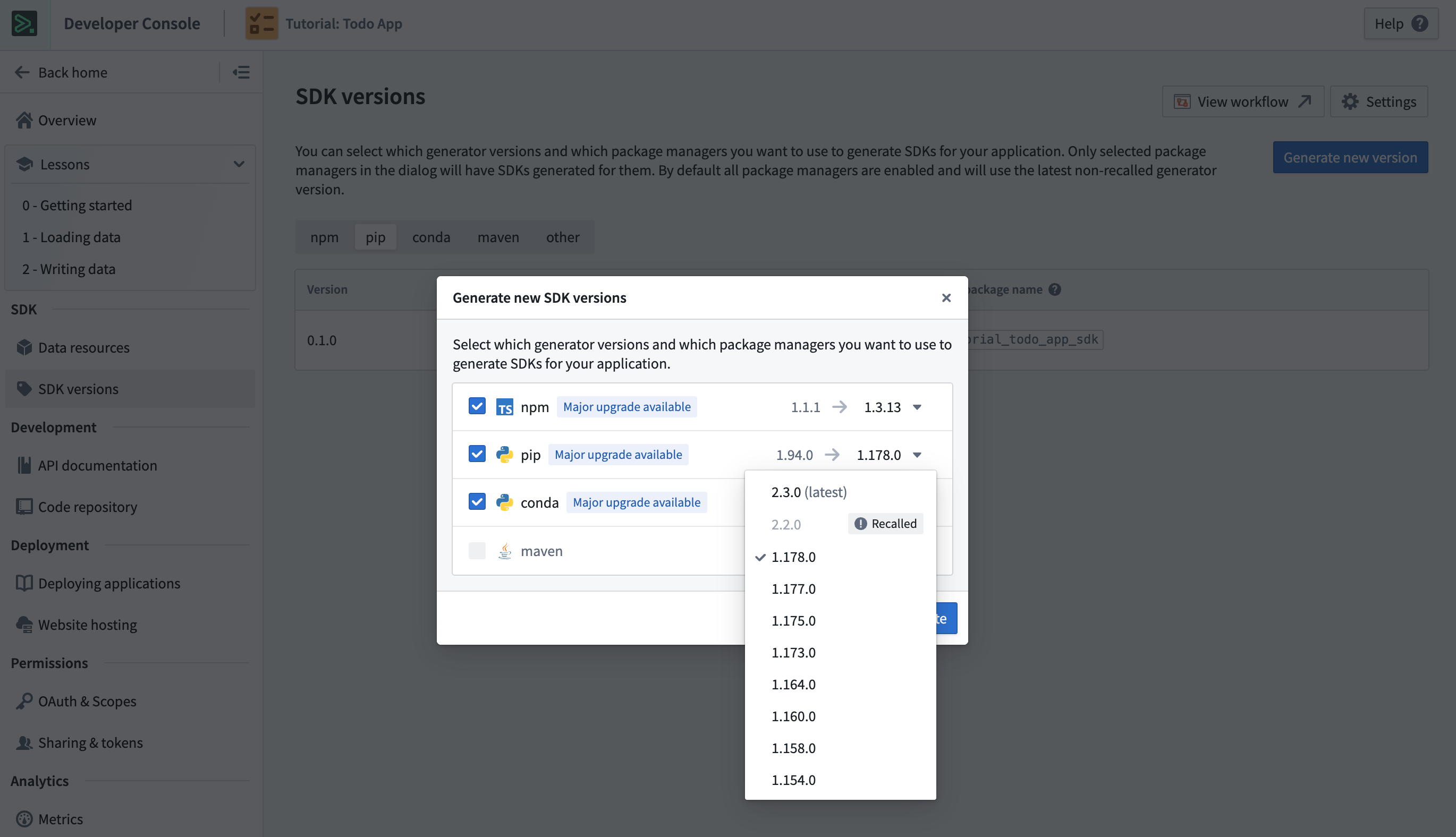
Existing applications must also have the required dependencies to use the newly generated SDK. New applications created in Developer Console will generate SDKs using the Python OSDK 2.x generator by default. You can quickly get started by following the instructions in the Start developing tab.
Syntax translations and return type changes from Python OSDK 1.x to 2.x
This section contains simple examples that illustrate how to map between Python OSDK 1.x and 2.x.
Filtering
- You must include
.object_typein thewhereexpression when referencing the property that is being filtered on. .is_member_ofhas been renamed to.in_.- String filtering in Python OSDK 2.x supports the following methods on string properties:
.contains_any_term(...).contains_all_terms(...).contains_all_terms_in_order(...)
- The
starts_withmethod was removed in Python OSDK 2.75.0. Usecontains_all_terms_in_orderwithprefix_last_term=Truefor prefix matching.
Filtering with Python OSDK 1.x (legacy)
Copied!1client.ontology.object.where(Object.id.is_member_of([1, 2, 3])).take(1)
Filtering with Python OSDK 2.x
Copied!1client.ontology.object.where(Object.object_type.id.in_([1, 2, 3])).take(1)
Links
Return type changes
| Link type | V1 response | V2 response |
|---|---|---|
| One-to-one / many-to-one | ObjectLinkClass instance | Optional[Object] |
| One-to-many / many-to-many | ObjectLinkClass instance | ObjectSet instance |
One-to-one or many-to-one links with Python OSDK 1.x (legacy)
In Python OSDK V1, use .get to retrieve the linked object.
Copied!1linked_obj: Optional[LinkedObject] = client.ontology.object.linked_object.get()
One-to-one or many-to-one links with Python OSDK 2.x
In Python OSDK V2, load the object, then call the link method on it. The method is named after the link API name in snake case, and returns the linked object or None if there is no linked object.
Copied!1 2 3obj = client.ontology.objects.Object.get("primaryKey") linked_obj: Optional[LinkedObject] = obj.linked_object()
One-to-many or many-to-many links with Python OSDK 1.x (legacy)
In Python OSDK V1, the only methods available are .iterate and .get.
Copied!1 2 3 4linked_obj: ObjectLinkType = client.ontology.object.linked_object linked_obj.iterate() → Iterable[LinkedObject] linked_obj.get(1) → Optional[LinkedObject]
One-to-many or many-to-many links with Python OSDK 2.x
In Python OSDK V2, any method available to object sets is also available on a one-to-many or many-to-many link, including .take, .where, and .group_by, which makes it easier to filter, aggregate, and iterate over links. V2 also generates search_around_<link_name>() methods for traversing a link from an object set.
Copied!1 2 3 4 5 6 7 8 9 10from ontology_sdk.ontology.objects import LinkedObject obj = client.ontology.objects.Object.get("primaryKey") linked_obj_set: LinkedObjectSet = obj.linked_objects() for linked_obj in linked_obj_set.iterate(): ... result: float = linked_obj_set.where(LinkedObject.object_type.id > 5).count().compute()
For more link traversal examples, review Links in the Python OSDK reference.
Queries
Queries in OSDK V2 have changes to their return types, and all arguments to queries in V2 are keyword arguments.
Return type changes
| Return type | V1 response | V2 response |
|---|---|---|
| Object | Object primary key (float, string) | Object instance |
| ObjectSet | ObjectSet RID (string) | ObjectSet instance |
| Attachment | Attachment RID (string) | Attachment instance |
Object queries with Python OSDK 1.x (legacy)
Copied!1 2 3 4 5result: float = client.ontology.queries.query_object_output(1) print(result) # Example output: # 1.0
Object queries with Python OSDK 2.x
Copied!1 2 3 4 5result: Object = client.ontology.queries.query_object_output(object_id = 1) print(result) # Example output: # Object(id = 1)
Object set queries with Python OSDK 1.x (legacy)
Copied!1 2 3 4 5result: str = client.ontology.queries.query_object_set_output(1) print(result) # Example output: # "ri.object-set.main.object-set.e5c05475-8766-4804-9be0-66cf7854de5c"
Object set queries with Python OSDK 2.x
Copied!1 2 3 4 5result: ObjectSet = client.ontology.queries.query_object_set_output(object_id = 1) print(result) # Example output: # ObjectSet(object_set_definition=...)
Attachment queries with Python OSDK 1.x (legacy)
Copied!1 2 3 4 5result: str = client.ontology.queries.query_attachment_output(1) print(result) # Example output: # "ri.attachments.main.attachment.2c1432f8-0378-45f2-8280-55d858cb71fc"
Attachment queries with Python OSDK 2.x
Copied!1 2 3 4 5result: Attachment = client.ontology.queries.query_attachment_output(object_id = 1) print(result) # Example output: # Attachment(rid="ri.attachments.main.attachment.2c1432f8-0378-45f2-8280-55d858cb71fc")
Python OSDK 2.x also supports two-dimensional aggregation, three-dimensional aggregation, and map query return types, which were not supported in 1.x. For examples of these additional return types, review Queries in the Python OSDK reference.
Aggregations
Aggregations that return more than a single value (that is, those derived from .group_by and .aggregate) return AggregateObjectsResponse as opposed to Dict[str, Any]. If you would like to return the Python OSDK V1 response, the AggregateObjectsResponse has a .to_dict method on it, which returns a dictionary representation of the response.
| V1 response | V2 response |
|---|---|
| Dict[str, Any] | AggregateObjectsResponse |
Aggregations with Python OSDK 1.x (legacy)
Copied!1 2 3 4 5 6 7 8 9 10 11 12 13 14 15 16 17 18 19result: dict[str, Any] = client.ontology.objects.Object.aggregate({ "min_id": Object.object_type.id.min(), "max_id": Object.object_type.id.max() }).compute() print(result) # Example output: # { # 'accuracy': 'ACCURATE', # 'data': [ # { # 'group': {}, # 'metrics': [ # {'name': 'min_id', 'value': 1.0}, # {'name': 'max_id', 'value': 99.0} # ] # } # ] # }
Aggregations with Python OSDK 2.x
Copied!1 2 3 4 5 6 7 8 9 10 11 12 13 14 15 16 17 18 19 20result: AggregateObjectsResponse = client.ontology.objects.Object.aggregate({ "min_id": Object.object_type.id.min(), "max_id": Object.object_type.id.max() }).compute() print(result) # Example output: # AggregateObjectsResponse( # excluded_items=None, # accuracy='ACCURATE', # data=[ # AggregateObjectsResponseItem( # group={}, # metrics=[ # AggregationMetricResult(name='min_id', value=1.0), # AggregationMetricResult(name='max_id', value=99.0) # ] # ) # ] # )
Attachments
In OSDK V1, when uploading an attachment, the return type is an AttachmentMetadata. In V2, the return type is an Attachment.
Upload attachment with Python OSDK 1.x (legacy)
Copied!1 2 3 4 5 6 7 8 9 10 11 12 13result: AttachmentMetadata = client.ontology.attachments.upload( file_path="file.json", attachment_name="myFile" ) print(result) # Example output: # AttachmentMetadata( # rid='ri.attachments.main.attachment.00000000-0000-0000-0000-000000000000', # filename='myFile', # size_bytes=20, # media_type='*/*', # type='single' # )
Upload attachment with Python OSDK 2.x
Copied!1 2 3 4 5 6 7 8 9 10 11 12 13 14 15 16 17 18 19 20 21result: Attachment = client.ontology.attachments.upload( file_path="file.json", attachment_name="myFile" ) print(result) # Example output: # Attachment(rid=ri.attachments.main.attachment.00000000-0000-0000-0000-000000000000) print(result.get_metadata()) # Example output: # AttachmentMetadata( # rid='ri.attachments.main.attachment.00000000-0000-0000-0000-000000000000', # filename='myFile', # size_bytes=20, # media_type='*/*', # type='single' # ) print(result.read().getvalue()) # Example output: # b'My example file.\n'
An uploaded attachment is deleted after one hour unless an applied action writes it to an object property. For that rule and the full Attachment surface, review Attachments in the Python OSDK reference.
Group by
In OSDK V1, when grouping by ranges, the accepted input is a list of dicts, where the keys of each dict are start_value and end_value, and the values are the start and end of each range. In V2, the new input type is a set of tuples, where the first element of the tuple is the start_value and the second element is the end_value for each range.
Group by ranges with Python OSDK 1.x (legacy)
Copied!1 2 3 4 5 6 7from ontology_sdk.ontology.objects import Object client.ontology.objects.Object.group_by( Object.object_type.int_property.ranges( [{"start_value": 1, "end_value": 2}, {"start_value": 3, "end_value": 4}] ) )
Group by ranges with Python OSDK 2.x
Copied!1 2 3 4 5from ontology_sdk.ontology.objects import Object client.ontology.objects.Object.group_by( Object.object_type.int_property.ranges({(1, 2), (3, 4)}) )
Property type changes from Python OSDK 1.x to 2.x
- GeoTypes:
Pointis renamed toGeoPoint.
Error handling
Request exceptions are now imported directly from foundry_sdk instead of foundry_sdk_runtime.errors. This includes the following exceptions:
- PalantirRPCException
- NotAuthenticated
- EnvironmentNotConfigured
Error handling with Python OSDK 1.x (legacy)
Copied!1from foundry_sdk_runtime.errors import PalantirRPCException
Error handling with Python OSDK 2.x
Copied!1from foundry_sdk import PalantirRPCException
Other differences
ActionResponse
ActionResponsehas been changed toSyncApplyActionResponse.BatchActionResponsehas been changed toBatchApplyActionResponse.ValidationResulthas been removed as anenum. It exists as aLiteraland can be imported fromfoundry_sdk.v2.ontologies.models.
Actions with Python OSDK 1.x (legacy)
Copied!1 2 3 4 5 6 7 8 9 10 11 12 13 14 15 16 17 18 19 20 21 22 23 24 25 26 27 28 29 30 31 32 33 34 35 36 37 38 39 40 41from ontology_sdk.types import ( ActionConfig, ActionMode, ReturnEditsMode, ValidationResult ) from foundry_sdk_runtime.types import ActionResponse response: ActionResponse = client.ontology.actions.action_example( action_config=ActionConfig( mode=ActionMode.VALIDATE_AND_EXECUTE, return_edits=ReturnEditsMode.ALL), parameter_example="value" ) if response.validation.validation_result == ValidationResult.VALID: ... print(response) # Example output: # ActionResponse( # validation=ValidateActionResponse( # result='VALID', # submission_criteria=[], # parameters={} # ), # edits=EditsActionResponse( # type='edits', # edits=[ # EditObjectResponse( # type='addObject', # primary_key='value', # object_type='ExampleObjectType' # ) # ], # added_objects_count=1, # modified_objects_count=0, # deleted_objects_count=0, # added_links_count=0, # deleted_links_count=0 # ) # )
Actions with Python OSDK 2.x
Import the action configuration types from foundry_sdk_runtime.types. Check response.validation.result against the string "VALID" instead of the ValidationResult enum.
Copied!1 2 3 4 5 6 7 8 9 10 11 12 13 14 15 16 17 18 19 20 21 22 23 24 25 26 27 28 29 30 31 32 33 34 35 36 37 38 39 40from foundry_sdk_runtime.types import ( ActionConfig, ActionMode, ReturnEditsMode, SyncApplyActionResponse ) response: SyncApplyActionResponse = client.ontology.actions.action_example( action_config=ActionConfig( mode=ActionMode.VALIDATE_AND_EXECUTE, return_edits=ReturnEditsMode.ALL), parameter_example="value" ) if response.validation.result == "VALID": ... print(response) # Example output: # SyncApplyActionResponse( # validation=ValidateActionResponse( # result='VALID', # submission_criteria=[], # parameters={} # ), # edits=ObjectEdits( # type='edits', # edits=[ # AddObject( # primary_key='value', # object_type='ExampleObjectType', # type='addObject' # ) # ], # added_object_count=1, # modified_objects_count=0, # deleted_objects_count=0, # added_links_count=0, # deleted_links_count=0 # ) # )
For more details, review Actions on the Ontology in the Python OSDK reference.
Batch actions with Python OSDK 1.x (legacy)
Copied!1 2 3 4 5 6 7 8 9 10 11 12 13 14 15 16 17 18 19 20 21 22 23 24 25 26 27 28 29 30 31 32 33 34 35 36 37 38 39 40from ontology_sdk.types import BatchActionConfig, ReturnEditsMode from ontology_sdk.ontology.action_types import ActionExampleBatchRequest from foundry_sdk_runtime.types import BatchActionResponse response: BatchActionResponse = client.ontology.batch_actions.action_example( batch_action_config=BatchActionConfig(return_edits=ReturnEditsMode.ALL), requests=[ ActionExampleBatchRequest( parameter_example="value_1" ), ActionExampleBatchRequest( parameter_example="value_2" ) ] ) print(response) # Example output: # BatchActionResponse( # edits=EditsActionResponse( # type='edits', # edits=[ # EditObjectResponse( # type='addObject', # primary_key='value_1', # object_type='ExampleObjectType' # ), # EditObjectResponse( # type='addObject', # primary_key='value_2', # object_type='ExampleObjectType' # ) # ], # added_objects_count=2, # modified_objects_count=0, # deleted_objects_count=0, # added_links_count=0, # deleted_links_count=0 # ) # )
Batch actions with Python OSDK 2.x
Import BatchActionConfig and ReturnEditsMode from foundry_sdk_runtime.types. The response is now a BatchApplyActionResponse.
Copied!1 2 3 4 5 6 7 8 9 10 11 12 13 14 15 16 17 18 19 20 21 22 23 24 25 26 27 28 29 30 31 32 33 34 35 36 37 38 39from foundry_sdk_runtime.types import BatchActionConfig, BatchApplyActionResponse, ReturnEditsMode from ontology_sdk.ontology.action_types import ActionExampleBatchRequest response: BatchApplyActionResponse = client.ontology.batch_actions.action_example( batch_action_config=BatchActionConfig(return_edits=ReturnEditsMode.ALL), requests=[ ActionExampleBatchRequest( parameter_example="value_1" ), ActionExampleBatchRequest( parameter_example="value_2" ) ] ) print(response) # Example output: # BatchApplyActionResponse( # edits=BatchActionObjectEdits( # type='edits', # edits=[ # AddObject( # primary_key='value_1', # object_type='ExampleObjectType', # type='addObject' # ), # AddObject( # primary_key='value_2', # object_type='ExampleObjectType', # type='addObject' # ) # ], # added_object_count=2, # modified_objects_count=0, # deleted_objects_count=0, # added_links_count=0, # deleted_links_count=0 # ) # )
For more details, review Apply batch action in the Python OSDK reference.