- Capabilities
- Getting started
- Architecture center
- Platform updates
Sample architecture
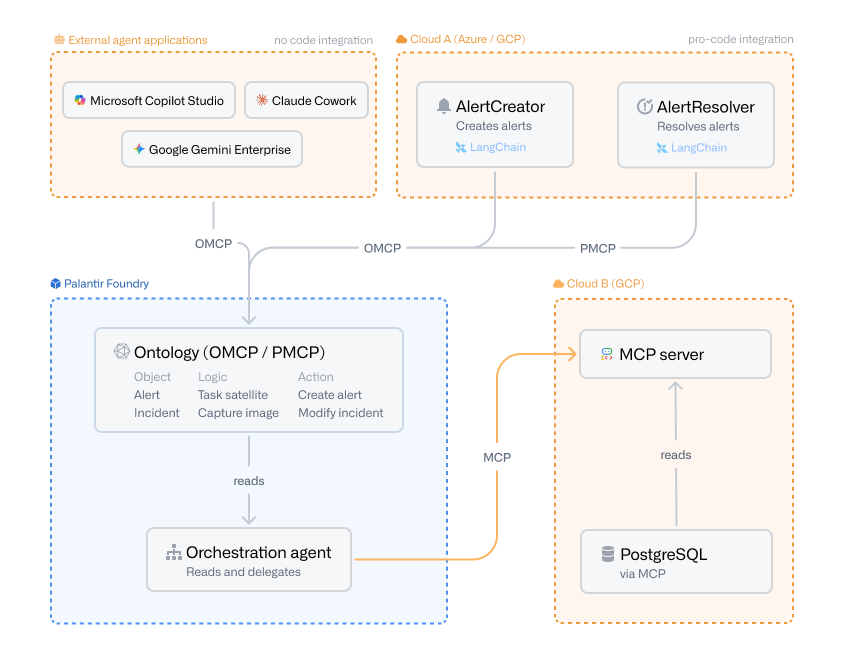
The diagram below illustrates how Ontology MCP (OMCP) and Palantir MCP (PMCP) fit into a broader agentic architecture that spans Palantir Foundry and external clouds.
Agents consuming the ontology
The diagram shows two integration paths into the Foundry ontology.
The first is a no-code integration from the External agent applications section. Platforms such as Microsoft Copilot Studio, Claude Cowork ↗, and Google Gemini Enterprise connect to the ontology directly through Ontology MCP (OMCP), without requiring any custom agent code. This makes OMCP a practical entry point for teams that want to expose ontology data and actions to existing enterprise AI assistants.
The second is a pro-code integration from Cloud A (Azure / GCP). Two agents, AlertCreator and AlertResolver, run outside of Foundry and are built with a framework such as LangChain ↗. They could also be hosted inside Foundry as a compute module. Regardless of where they run, each agent connects to the Foundry ontology through one of two MCP servers:
- Ontology MCP (OMCP):
AlertCreatoruses Ontology MCP to write data into the ontology, executing predefined actions to create newAlertobjects. Ontology MCP exposes object types, action types, and query functions defined for the Developer Console application, which makes it well suited for agents that must safely write data through controlled, restricted actions. - Palantir MCP (PMCP):
AlertResolveruses Palantir MCP to interact with the platform itself, for example, to update ontology types or work with datasets, transforms, and other platform resources during development workflows.
Inside Foundry, an orchestration agent runs in a container, reads from the ontology, and delegates work to other agents. This pattern lets you keep the ontology as the system of record while letting specialized agents handle individual tasks.
Foundry-hosted agents consuming external MCP servers
The orchestration agent illustrates the outgoing direction of MCP. Rather than exposing Foundry resources to an external client, the Foundry-hosted agent acts as an MCP client and connects out to an MCP server running in Cloud B (GCP). The MCP server in turn reads from a PostgreSQL database that is itself exposed through an MCP server. This pattern lets Foundry-hosted agents reach external systems and remote agents through a standardized MCP interface, without requiring custom connectors for each backend.
Tools exposed through Ontology MCP
Ontology MCP turns the resources you have configured in your Developer Console application into MCP tools that an agent can call:
- Object types: Every object type included in the Developer Console application is reachable through a SQL tool, which lets agents read ontology data by issuing SQL queries against the exposed object types.
- Action types: Each action type included in the application becomes its own MCP tool, so agents can invoke a specific, predefined action to write data into the ontology.
- Query functions: Individual query functions can be exposed as their own MCP tools, giving agents access to bespoke read or compute logic that you have authored.
Agents as tools
Ontology MCP also supports exposing other agents as tools. When you build agentic logic with AIP Logic or an AIP chatbot, you can save that logic as a function and then expose it through MCP. From the perspective of the calling agent, the AIP Logic function or chatbot is just another tool it can invoke, letting you compose higher-level agents on top of agents you have already built in Foundry.
For a side-by-side comparison of Ontology MCP and Palantir MCP, see the overview.