- Capabilities
- Getting started
- Architecture center
- Platform updates
Write run results to a dataset
Depending on the evaluated function and workflow, evaluation suite run results may need to be surfaced in other parts of the platform. For example, subject matter experts may not be technical enough to analyze results in AIP Evals, and may want the run data displayed alongside other information in a dedicated Workshop application.
To address this need, AIP Evals supports writing run results to a dataset.
AIP Evals automatically writes run results to the configured dataset when you run the evaluation suite with project-scoped execution. This includes function outputs, evaluator results, user-specified and auto-captured metadata, and errors. passed and failed results for each metric based on your configured objectives are not yet supported. A tested function that edits the Ontology will not produce a function output. Evaluator debug outputs, such as the reasoning of the LLM-as-a-judge evaluator, are not written to the dataset. Only full evaluation suite runs are recorded; single test case runs are not. Targets that do not support project-scoped execution, such as AIP Chatbot functions, cannot write results to the dataset.
Run result datasets offer maximum flexibility on what can be done with generated data. Using existing Foundry tooling, data can be used for more complex calculations, for example by writing it to objects and surfacing them in Workshop, or by performing deeper analyses in Contour.
To write run results to a dataset, the evaluation suite needs to be run in project-scoped execution mode, and the run results dataset needs to be in the same project as the evaluation suite. Otherwise, AIP Evals will not be able to write data to the dataset.
Configure a run results dataset
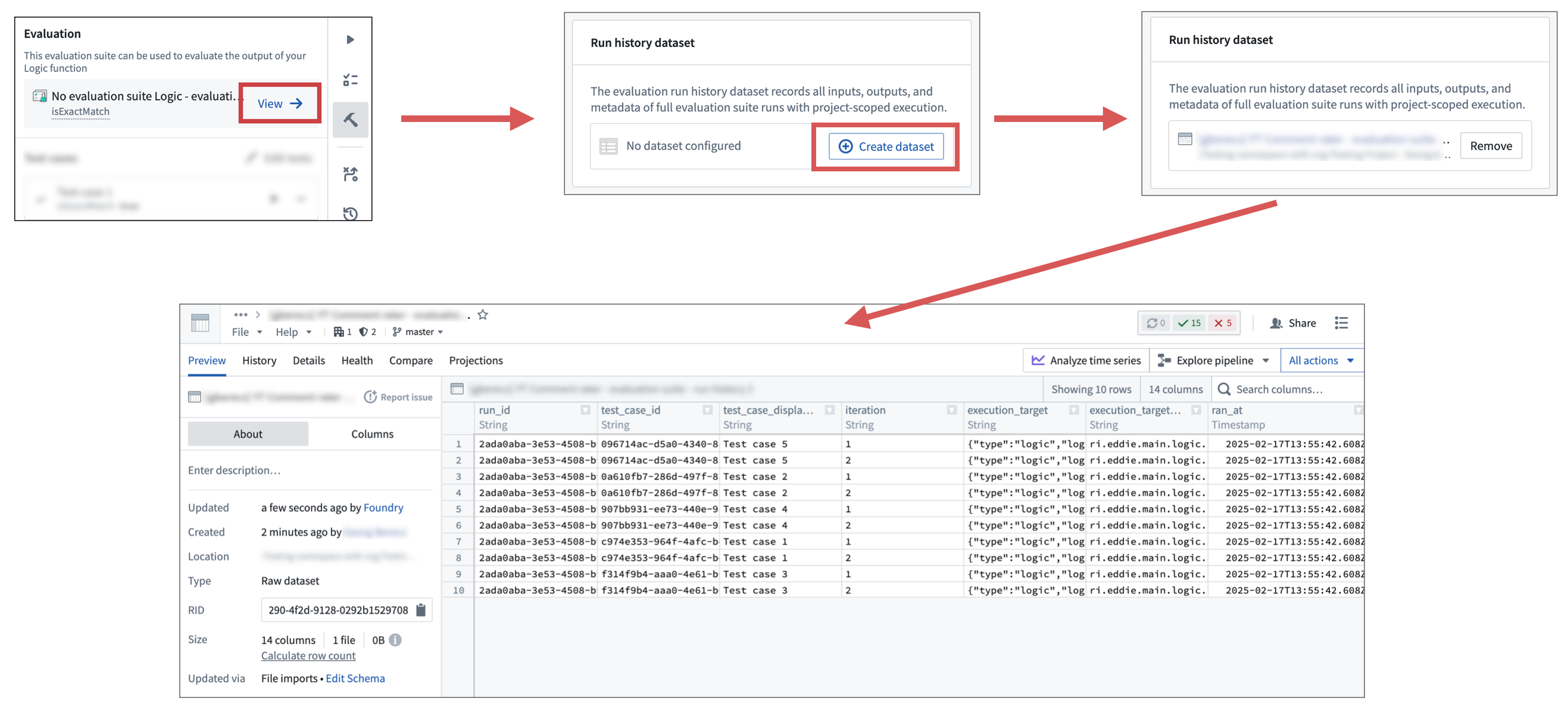
To configure a run results dataset, follow these steps:
- Open the evaluation suite page.
- From AIP Logic, select the evaluation suite name in the AIP Logic sidebar.
- Alternatively, open the evaluation suite from the file system.
- In the Run history dataset section of the Details panel, select Create dataset.
- Define the name and save location of the dataset, and confirm.
After these steps, the dataset will be ready for use, and running the evaluation suite in project-scoped execution mode will write results to the dataset.
If you remove a run results dataset, you will not be able to select it again. You will need to create a new dataset.