- Capabilities
- Getting started
- Architecture center
- Platform updates
Code-defined input filtering
Apart from the Sampled and Full dataset input strategy configurations discussed in the preview transforms documentation, VS Code preview also supports a Code-defined filters option. This allows you to write custom Python functions that control exactly what data gets loaded during transform preview. Instead of relying on random sampling or full dataset loading, you define the precise logic for what subset of data should be used.
When applicable, these filters leverage pushdown predicates ↗ to ensure that only the most relevant data samples are loaded. The Palantir extension for Visual Studio Code automatically discovers all eligible functions that can be used as filters in your repository and displays them in a dropdown menu when configuring your preview.
Why use code-defined filters?
Test specific scenarios: Focus on edge cases or specific data conditions that matter for your development without sorting through irrelevant data.
Create reusable logic: Write a filter once and use it across multiple preview sessions, making your development workflow more consistent.
Fine-tune performance: For large datasets where even full dataset loading is slow, you can optimize exactly what data gets filtered.
Combine multiple filters: Select and chain multiple filters in any order to create sophisticated sampling strategies.
How to use code-defined filters
Select filters for preview
- Select Configure input strategy in the Preview panel.
- Choose the
Code-defined filtersoption. - Select from a list of built-in filters, or choose a filter authored by you.
- Arrange filters in your preferred order; they will be applied sequentially.
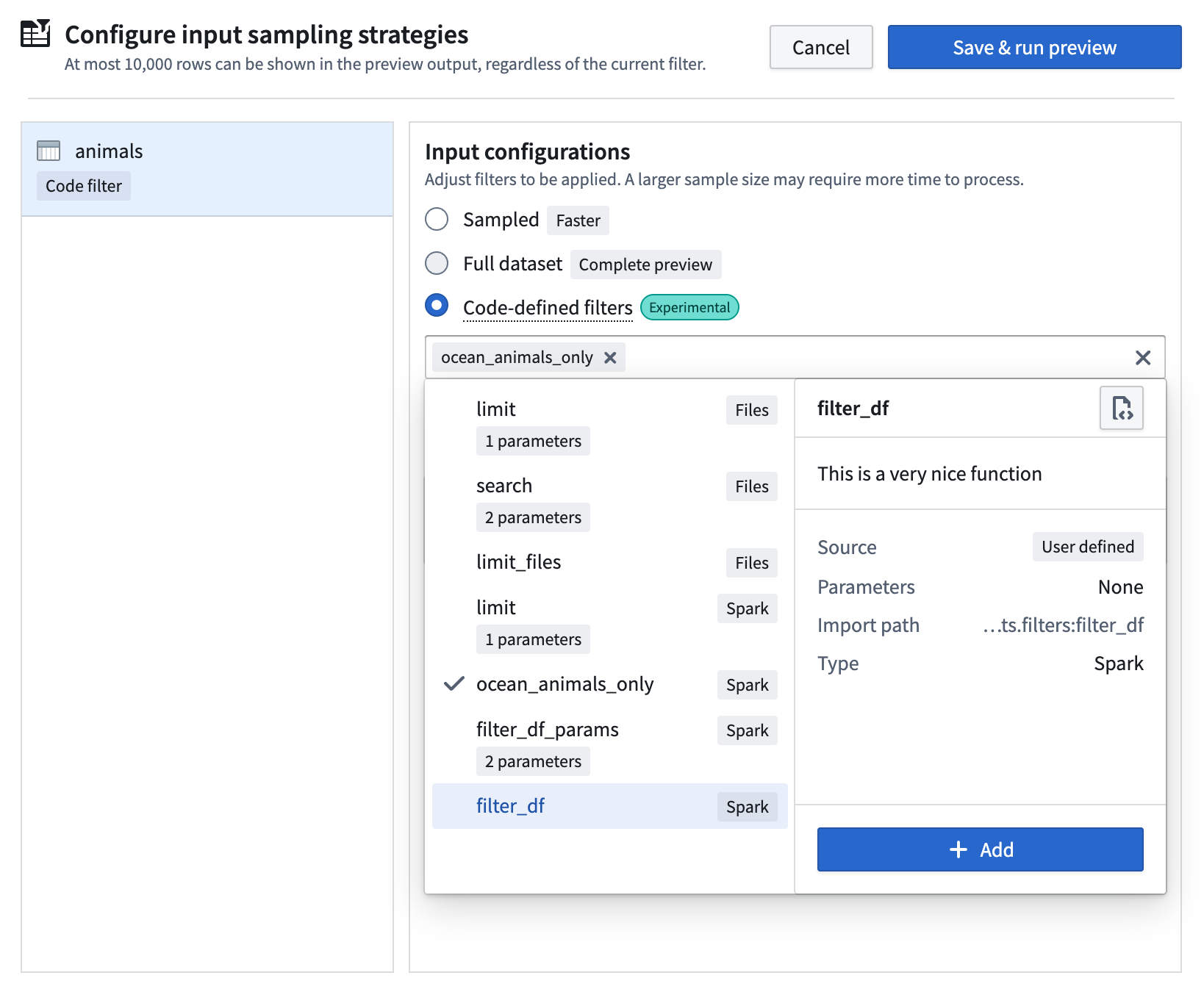
The extension automatically discovers all eligible filters anywhere in your project codebase and displays them in the selection dropdown menu.
Create filter functions
To create an eligible preview filter from a Python function, the rules listed below must be followed.
Function requirements
The function must be
- directly defined in the global scope of its module
- fully type-annotated with one of the following signatures:
- For Spark transforms:
(pyspark.sql.DataFrame) -> pyspark.sql.DataFrame - For lightweight transforms:
(polars.LazyFrame) -> polars.LazyFrame - For raw files:
(collections.abc.Iterator[transforms.api.FileStatus]) -> collections.abc.Iterator[transforms.api.FileStatus]
- For Spark transforms:
The function should NOT
- be nested
- be guarded by
if,with,foror other statements - be part of a class
- be imported from somewhere else
- be a variable assigned to a function
- be an
asyncor private function (function names cannot start with_) - have any decorators applied
Example filter functions
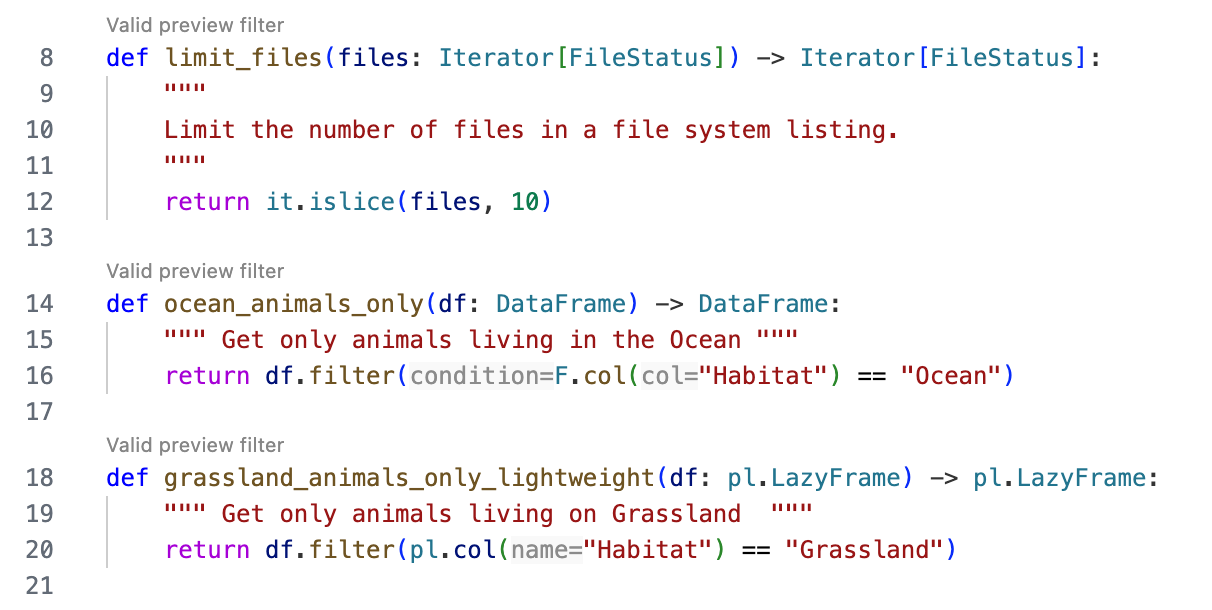
The following example lists some valid preview filter functions:
Copied!1 2 3 4 5 6 7 8 9 10 11 12 13 14 15 16 17 18 19from pyspark.sql import DataFrame from pyspark.sql import functions as F from collections.abc import Iterator from transforms.api import FileStatus import itertools as it import polars as pl def limit_files(files: Iterator[FileStatus]) -> Iterator[FileStatus]: """ Limit the number of files in a file system listing.""" return it.islice(files, 10) def ocean_animals_only(df: DataFrame) -> DataFrame: """ Get only animals living in the Ocean """ return df.filter(F.col("Habitat") == "Ocean") def grassland_animals_only_lightweight(df: pl.LazyFrame) -> pl.LazyFrame: """ Get only animals living on Grassland """ return df.filter(pl.col("Habitat") == "Grassland")
You will receive immediate feedback on whether your functions are eligible for use through the CodeLens hint that appears above the filter functions:
Add parameters to filters
You can make your filters more flexible by adding parameters. This allows you to create generic, reusable filter functions that adapt to different scenarios.
How to add parameters
- Define parameters in the function signature with type annotations.
- Mark them as keyword-only arguments by adding a
*symbol before the parameters. - The extension will automatically detect these parameters and prompt for values when you select the filter.
The following is an example with a parameter:
Copied!1 2 3 4 5 6from pyspark.sql import DataFrame from pyspark.sql import functions as F def filter_animals_by_habitat(df: DataFrame, *, habitat: str) -> DataFrame: """ Get only animals living in the Ocean """ return df.filter(F.col("Habitat") == habitat)
Note the * symbol before the habitat parameter; this classifies it as a keyword-only argument.
Supported parameter types
Currently supported parameter types are the following:
strintfloatbool
Provide default values
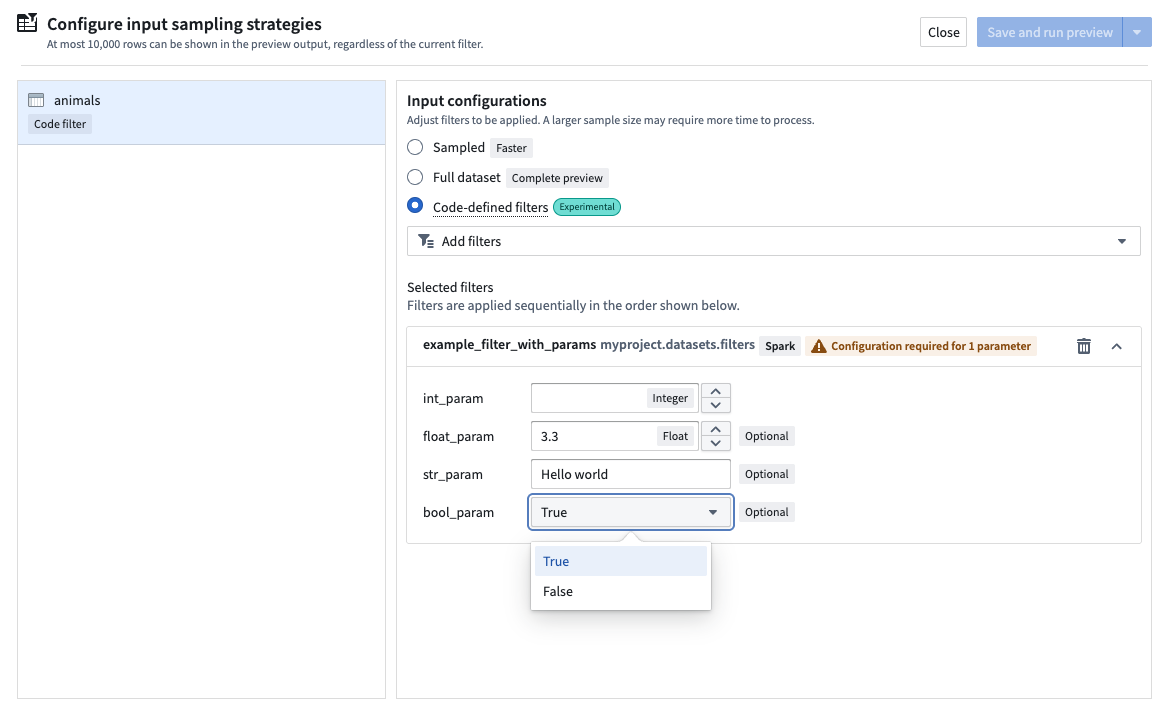
You can provide default values for parameters in the function signature. If a default value is provided, the parameter becomes optional, and the default value will be used if you do not enter a value at configuration time:
Copied!1 2 3 4 5 6 7 8 9from pyspark.sql import DataFrame from pyspark.sql import functions as F def example_filter_with_params( df: DataFrame, *, int_param: int, float_param: float = 3.3, str_param: str = "Hello world", bool_param: bool = True ) -> DataFrame: """This is an example function with many parameters of different types""" print(f"int_param: {int_param}, float_param: {float_param}, str_param: {str_param}, bool_param: {bool_param}") return df.limit(int_param)
When you select a filter with parameters for preview, a prompt will appear for each parameter:
Supported input types
The filter selection dropdown menu will show filters available for use; however, based on your transforms context, selecting a specific filter type might be more suitable.
- When working with structured inputs in Spark transforms: Use
DataFramefilters. - When working with structured inputs in lightweight transforms: Use
LazyFramefilters. - When working with unstructured inputs (raw files) in Spark or lightweight: Use
Iterator[FileStatus]filters.