- Capabilities
- Getting started
- Architecture center
- Platform updates
Branching AIP Logic
AIP Logic integrates with Global Branching to enable safe, isolated development of Logic functions. This documentation covers how to work with Logic on branches, including adding and modifying resources, cross-application compatibility, rebasing, and the approval process.
For general information on Global Branching concepts and workflows, refer to the Global Branching documentation.
Adding, removing, and modifying resources
Add Logic functions to a branch
To add a Logic function to a branch:
- Navigate to the Logic file on a branch or select the designated branch using the branch selector in the top right of the page.
- Make an edit and save the Logic file. The Logic function is now a saved resource on the branch.
Remove Logic functions
To remove a Logic function from a branch, use the bottom right sidebar and select Remove from branch.

Modify Logic functions
To modify a Logic function on a branch, make any change and save, just as you would on the main branch.
Publish on a branch
You can publish a Logic function on a branch by following the same process as on main. Once you have successfully published your function on the branch, you can use the new function version on your branch in Workshop and function-backed actions. This function version is labeled with the Branched pre-release tag. Note that functions published on your branch will not be accessible from other branches, including main.
Cross-application compatibility
Using branched Logic functions
Branched Logic functions can be used with:
- Ontology objects: Functions can interact with ontology objects on the same branch.
- Other branch-aware applications: Any Foundry application that uses Logic functions and supports branching (for example, Workshop).
Merge requirements
Deployability checks
Before a Logic function can be deployed, it must:
- Be up to date with main (no rebase required)
- Be published on the branch
- Be in a publishable state (no errors)
- Have no pending approvals
Approvals and reviewer flow
Protected main branch
You can protect your main branch to disable direct edits to Logic functions on main. When protection is enabled, all changes must be made on a branch, reviewed, and merged through the proposal process.
To protect a branch, navigate to the resource in Compass and select Branch protection > Protect with project policy.

To protect all Logic files in a project by default, enable protection at the project level. Any new Logic file created in that project will automatically be protected.
Reviewer experience
Once a proposal is created, reviewers can be added to the Logic file in the Global Branching application. Users who are added as reviewers will get an email requesting their review with a link to the proposal.
From there, reviewers can:
- Access the review page by selecting the Review option at the top right of the file. This option is visible when a Logic function requires review.
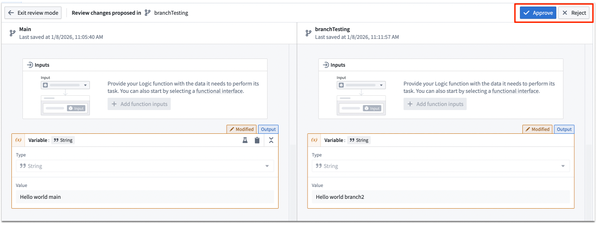
- View a side-by-side comparison of
mainvs. branch changes. - See all modifications to Logic functions.
- Approve or reject the changes.
- Edit their review.
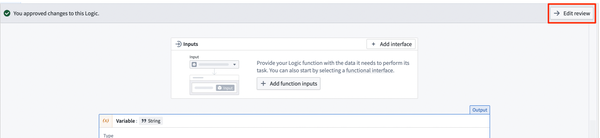
Rebasing and conflict resolution
Rebasing is required when the main branch has been modified since your branch was created or was last rebased. If your Logic function requires rebasing, you will see a notification at the top of the Logic file.

How to rebase
-
Navigate to the Logic function that needs rebasing and select the Rebase option.
-
Review the changes in the split-screen comparison view. The left side shows the current
mainversion, and the right shows your branch version.
-
Make necessary changes to your branch, potentially incorporating changes from
mainif there are merge conflicts. -
Finish rebasing by selecting Finish.
Known limitations
- Branches can only be created from
main. You cannot create branches from other branches. - API names cannot be changed on a branch. All Logic functions across branches share the same API name.
- Published Logic functions cannot be deleted while on a branch.
- Merge conflict resolution requires manual intervention. When conflicts occur during rebasing, you must use the split-screen comparison view to manually incorporate changes from
maininto your branch version, resolving any conflicting modifications before completing the rebase.