- Capabilities
- Getting started
- Architecture center
- Platform updates
Branching direct model deployments
Direct model deployments integrate with Global Branching, allowing you to change and test a deployment configuration and its model function on a branch before merging the changes into main.
For general information about branches, proposals, and rebasing, see Global Branching core concepts.
Build and modify a deployment configuration
Before you begin, create a direct model deployment for the model on main.
To configure a direct model deployment on a global branch:
- Create or open a global branch and build a model version on that branch.
- After the build completes, open the model on the same global branch and select the Live deployment tab. Foundry automatically creates a disabled branch deployment by copying the configuration from
mainand adds the deployment configuration to the global branch. - Edit and save the deployment configuration.
- To test the branch deployment, select Start deployment.
Changes to the deployment configuration are isolated to the global branch. The configuration on main and other branches is unchanged until the proposal is merged.
To remove the deployment configuration from a global branch, open the modified resource panel in the branch taskbar, open the resource menu, and select Remove from branch. This removes the deployment configuration from the branch proposal.
Publish and use a model function on a branch
You can publish or update a model function from a direct model deployment on a global branch. Foundry publishes a branch-local function version with a version suffix in the format -branch-YYYYMMDD-HHMMSS. To view this version, open the model and select Live deployment, then Overview. The version appears in the Function section. You can use the function version in supported applications on the same global branch, but it is not available from main or other branches.
Foundry only supports branch-local model function versions on global branches. A model branch that is not associated with a global branch cannot publish a branch-local function version.
For more information about branched function versions, see Branching functions.
Protect the deployment configuration
You can protect the deployment configuration by requiring changes on main to be made through a global branch and proposal. When the deployment configuration is protected, build the model on a global branch, make the deployment changes on that branch, and create a proposal to update main.
Review and approve changes
After you create a proposal, the approval banner in the Live deployment tab shows the approval status and required reviewers. Reviewers can open a side-by-side comparison of the deployment configuration on main and the global branch, then approve or reject the changes. The comparison includes runtime configuration and model function settings.
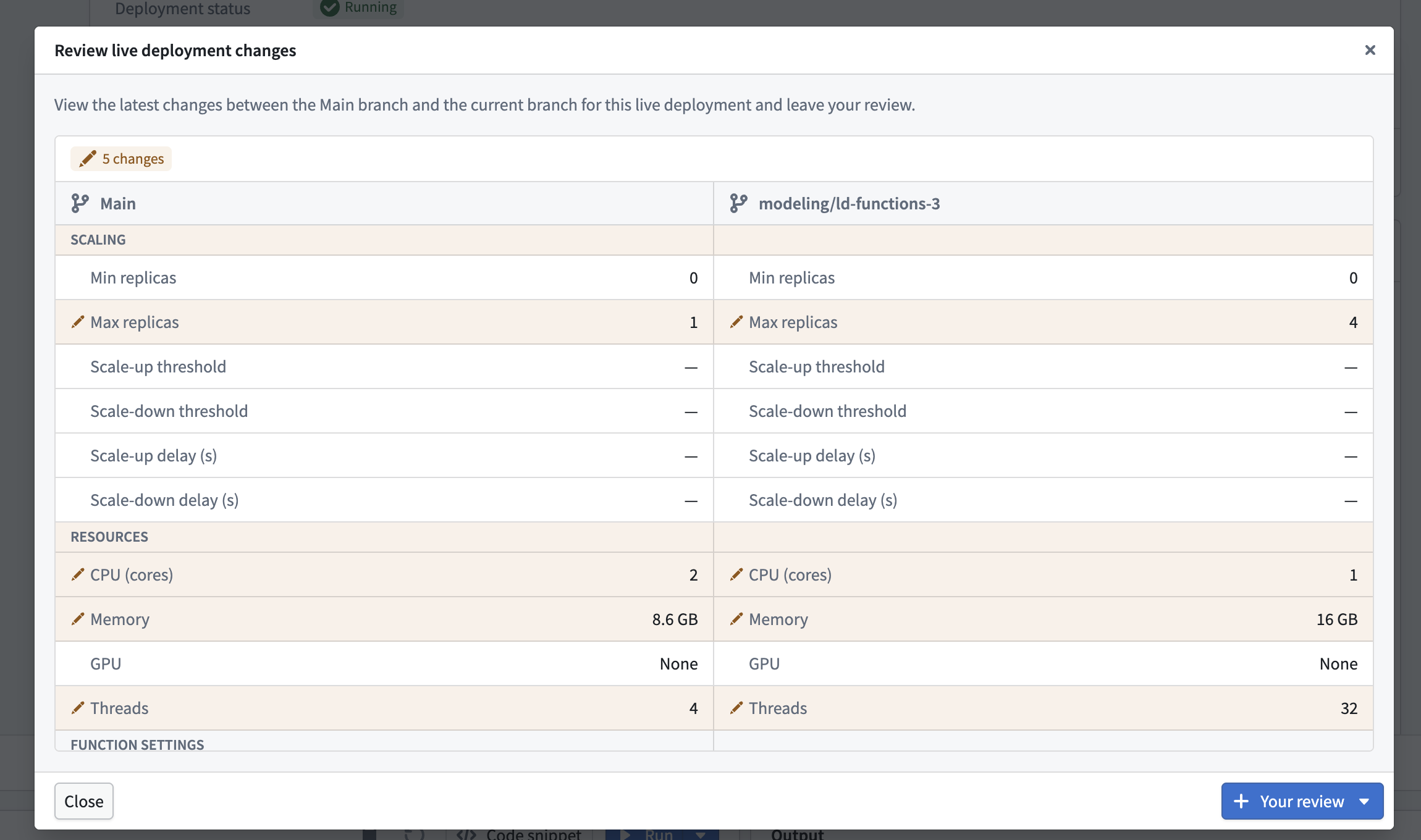
The following checks must succeed before you can merge the proposal:
- Required approvals are satisfied.
- The deployment configuration is up to date with
main. - The model has been built on the global branch.
- If a model function is published, its target stable version has not already been published on
main.
Rebase the deployment configuration
If the deployment configuration on main changes after you create or rebase the global branch, the Live deployment tab prompts you to rebase.
To rebase the deployment configuration:
- Select Start rebase.
- Review the side-by-side comparison of the configurations on
mainand the global branch. - Select Use Main branch changes or Keep current branch changes.
- Select Finish rebase.
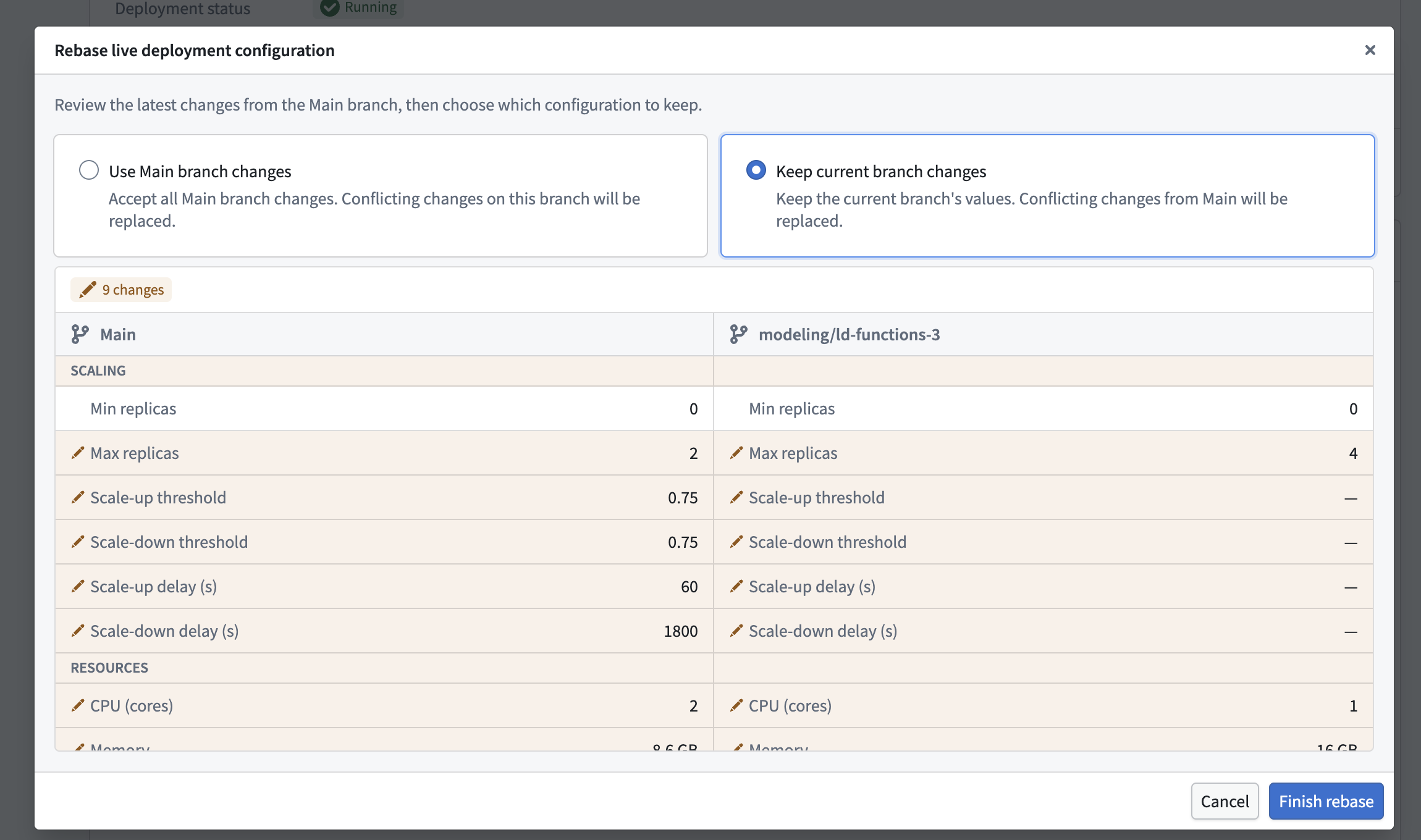
Rebasing keeps one complete configuration; you cannot resolve individual fields separately. If you use changes from main that modify deployment sources while the branch deployment is running, select Restart and rebase to restart the deployment with the updated sources.
You must also rebase if the target stable version for a branch-local model function has already been published on main.
Merge changes into the main branch
Merging the proposal applies the selected deployment configuration to main. If the model does not already have a direct deployment on main, Foundry creates one in a disabled state. Start the deployment when you are ready to use it.
If the global branch includes a model function, merging publishes the selected branch-local function configuration as a stable function version on main.