- Capabilities
- Getting started
- Architecture center
- Platform updates
Filter card
With the Filter card, you can perform a keyword search across all properties of the object types in the analysis path.
The available search and filter types are described below:
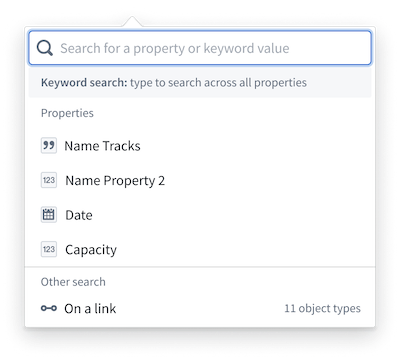
Keyword search: Type directly into the search bar and press Enter to search for a particular value across all data in the analysis.
Property search: Enter or choose a property from the dropdown menu to further define in the filter card. The default for each property is an exact match search type (is), but you can change this to a different parameter depending on the property type. For example, you could change a filter from Project Start Date is May 15, 2023 to Project Start Date is between Jan 1, 2023 and Dec 31, 2024.
Filter on linked property: Filter on the properties of a linked object type without traversing to those object types. Select the On a link option at the bottom of the filter property dropdown menu to choose an object type linked to one or all object types in your analysis. Then choose whether to search for properties of an object type in your analysis that is linked to or is not linked to the selected linked object type.
Special property types: Additional property types, such as vector, leading wildcard, and regex properties, appear at the bottom of the filter card when present in your analysis. For more information about regex searchable properties and syntax, review the search syntax documentation.
Search matching
When a search query is entered, it is broken into individual units called tokens. For example, The Quick Brown Fox produces four tokens: the, quick, brown, and fox. Note that tokenization is case-insensitive.
Search types
-
is: Signals an exact match against non-analyzed text. For example,The Quick Brown Foxwill only matchThe Quick Brown Fox. -
starts with: Appends*to the lowercase search term and matches against non-analyzed, raw field values. -
contains: Uses partial matching on the final token. All tokens in the query are matched exactly against the target field, except for the final token, which is matched as a prefix. This allows results to appear before the final word is fully entered.
Example:The search term
The Quick Brown Fsearches for records containingthe,quick, andbrownas exact matches, and any word beginning withfas a prefix match. This would return a record containingthe brown fox reached the quick rabbit, as all tokens are present andfoxsatisfies the prefix match onf. It would not, however, matchthe fox quickly jumped over the brown fence. Whilefencesatisfies the prefix match onf, the tokenquickis not present, asquicklyis not considered an exact match forquick.
The order of tokens is not considered when evaluating matches. All tokens must be present in the target field but may appear in any position. This search behavior applies to text-based properties only. -
contains any word from: Uses the multi-match filter. An object matches if the search tokens exactly match any token from values in the given property.
Example:For the search term
The Quick Brown Fox, queries fortheORquickORbrownORfox.
This search will match:brown vehicle,fox hole,the quick fox ran through the forest
This search will not match:brownie,foxtrot,Many foxes move quickly -
contains phrase: Uses a phrase filter that requires tokens to appear consecutively in the exact order entered.
Example:A query of
The Quick Brown Foxwould matchThe quick brown fox is climbing the tree, as the four tokens appear consecutively in the correct order.
This search will not match:The Quick brown foxy bear: The tokenfoxis not present as a standalone word.the brown rabbit met the quick fox near the river: The tokens are present, but not in the correct order.the quick smart and fast brown fox: Additional words appear between the tokens.