- Capabilities
- Getting started
- Architecture center
- Platform updates
Announcements
REMINDER: Sign up for the Foundry Newsletter to receive a summary of new products, features, and improvements across the platform directly to your inbox. For more information on how to subscribe, see the Foundry Newsletter and Product Feedback channels announcement.
Share your thoughts about these announcements in our Developer Community Forum ↗.
AIP Analyst is generally available
Date published: 2026-03-31
AIP Analyst will be generally available the week of April 13, 2026 for users with AIP enabled. AIP Analyst is a conversational AI interface for exploring your ontology that enables both technical and non-technical users to explore and generate insights from ontology data. With AIP Analyst, you can ask questions, visualize results, and understand every step of your analysis with complete transparency.
Key features
AIP Analyst can use a wide range of tools to traverse and investigate your ontology data:
- Searching and understanding your ontology.
- Filtering object sets with search-arounds and semantic search.
- Performing group-by aggregations for segmentation, analysis, and reporting.
- Writing SQL queries against object sets and datasets.
- Creating visualizations with Vega charts and Maps.
- Executing Foundry actions and functions directly within conversations.
- Analyzing manually added files such as images, PDFs, and spreadsheets.
AIP Analyst was designed to provide users with transparency and control. You can review each step of an analysis, validate logic, make manual adjustments when needed, and view the analysis lineage in an interactive graph view.
Example use case
For example, an operations manager can ask AIP Analyst "what equipment in my facility requires attention?" - to answer this question, AIP Analyst will automatically traverse the ontology, following relationships across relevant objects (such as inspection logs and maintenance records) to generate a prioritized summary of items needing action.
In the process of exploring ontology data, AIP Analyst can also reveal and surface data quality issues, such as outdated records. This helps teams identify gaps without needing to wait for perfectly clean data before starting. From there, AIP Analyst can help formulate a plan to improve the ontology, which AI FDE can then execute.
Intelligent analysis with full transparency
AIP Analyst "shows its work" when responding to your questions in order to provide you with full transparency.
- Every analysis creates an interactive dependency graph showing the flow from question to answer.
- Users can see exactly how the agent reasoned through their request, inspect intermediate results, and manually adjust steps.
- Final summary messages include inline citations linked to the specific tool results that informed each part of the response, and these cited summaries appear directly in the analysis graph.
- Code blocks within summaries can also be copied independently.
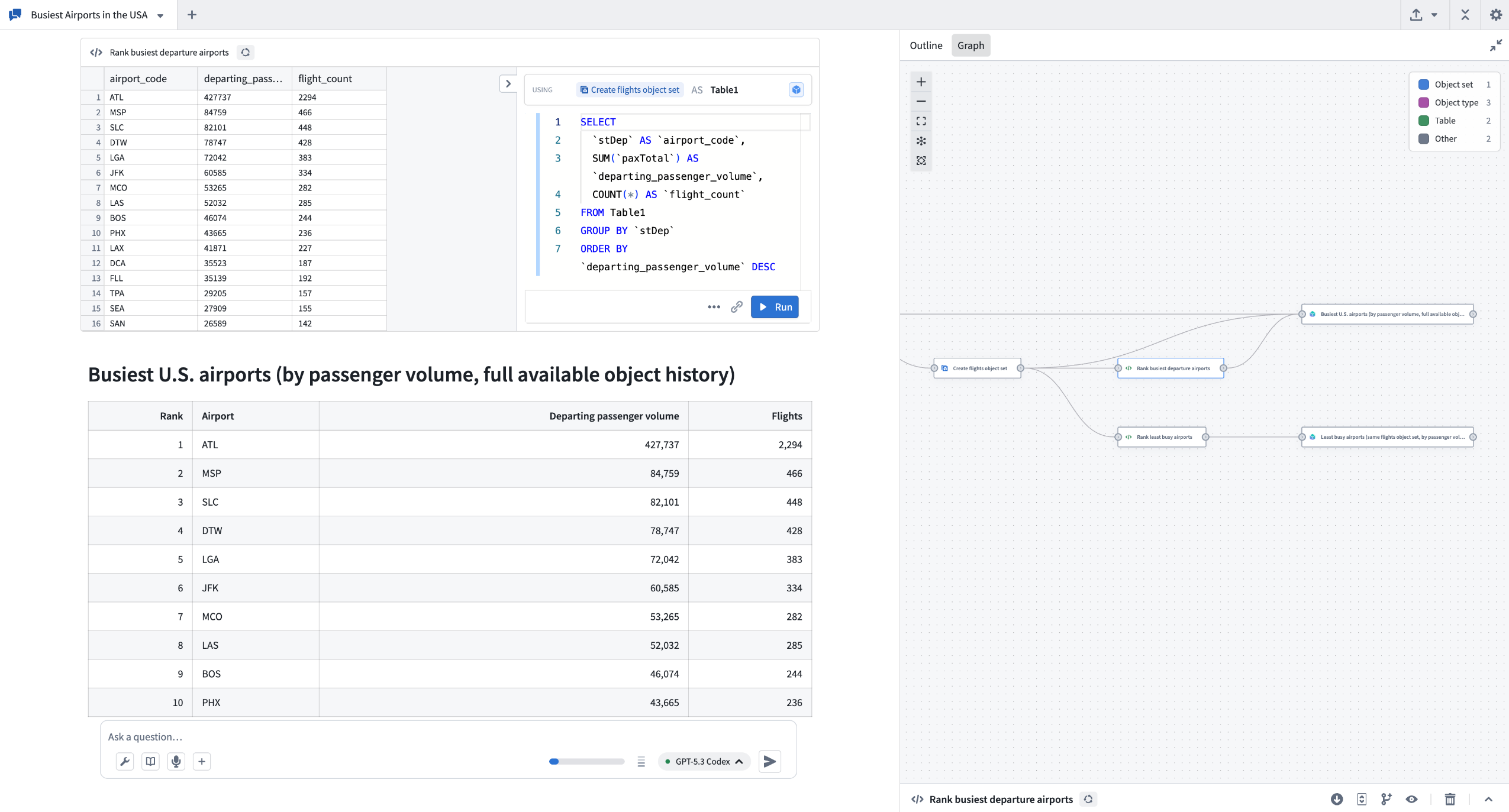
The example above shows AIP Analyst exploring data about airports to understand which airports are busiest.
Workshop integration
AIP Analyst can be embedded as a Workshop widget to provide AI-powered analysis capabilities directly in Workshop modules. The Workshop widget supports triggering actions on message send for logging and tracking user interactions, persists conversation state when users switch tabs or close sections, and offers extensive configuration options to control data access, tool availability, and user interface customization.
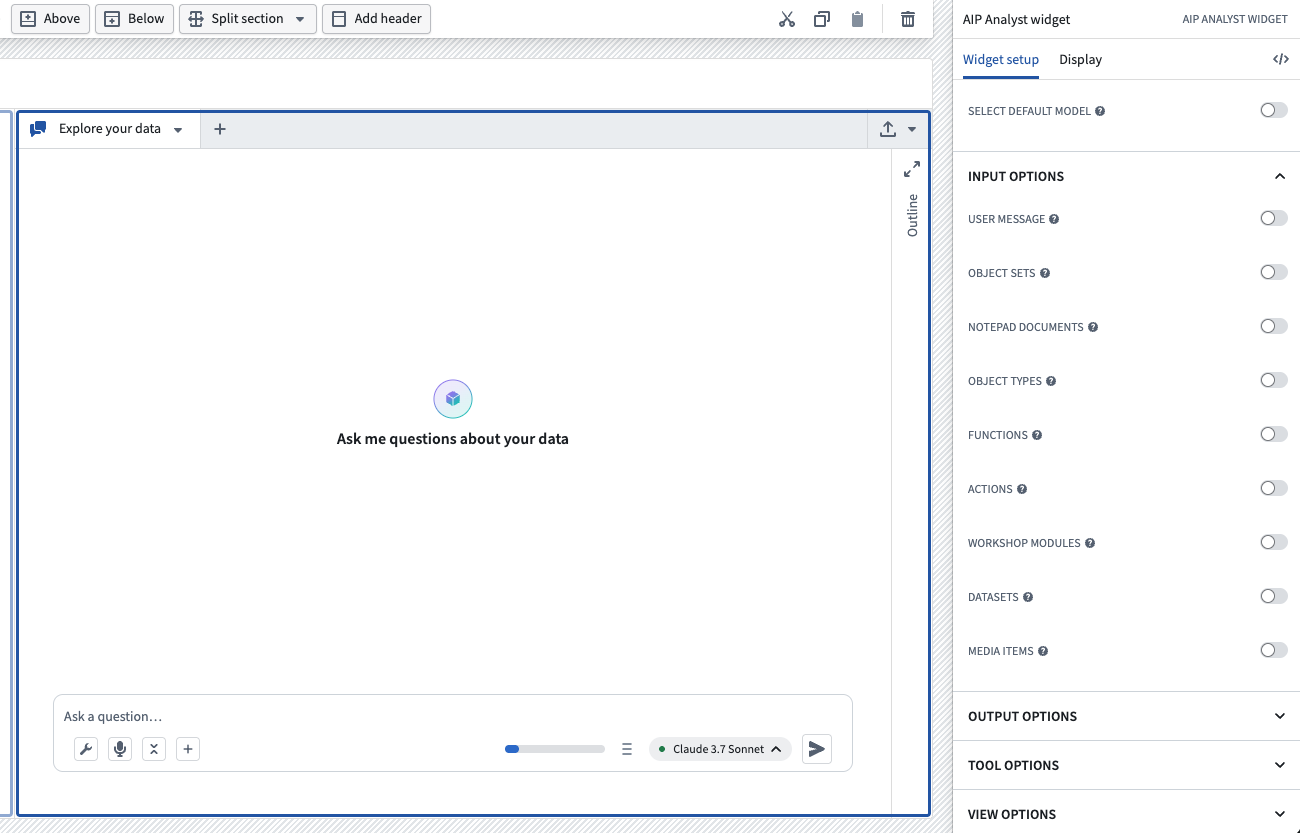
Interface for setting up the AIP Analyst Workshop widget.
Requirements
To use AIP Analyst, ensure that AIP is enabled on your enrollment. Once enabled, you can access AIP Analyst at /workspace/aip-analyst to begin asking questions about your ontology.
Learn more about AIP Analyst in our documentation.
Your feedback matters
We want to hear about your experience with AIP Analyst and welcome your feedback. Share your thoughts with Palantir Support channels or using the #aip-analyst tag in our Developer Community ↗.
Comment on nodes in proposal in Pipeline Builder
Date published: 2026-03-31
You can now comment directly on individual nodes within your proposals in Pipeline Builder. Previously, comments were limited to the pipeline level.
Available across all enrollments, node-level commenting lets you:
- Add, view, and manage comments at the node level: Target your feedback, ask questions, or flag issues exactly where they matter—right on the relevant node.
- Resolve and unresolve comments: Mark feedback as addressed, or reopen discussions as needed. Toggle the visibility of resolved comments from the Comments panel to focus on active discussions.
- Tag teammates with @mentions: Bring the right people into the conversation, exactly where their input is needed.
- Use rich formatting: All node comments support Markdown: add bold, italics, links, and
code blocksfor clearer communication.
Learn more from the Comments documentation.
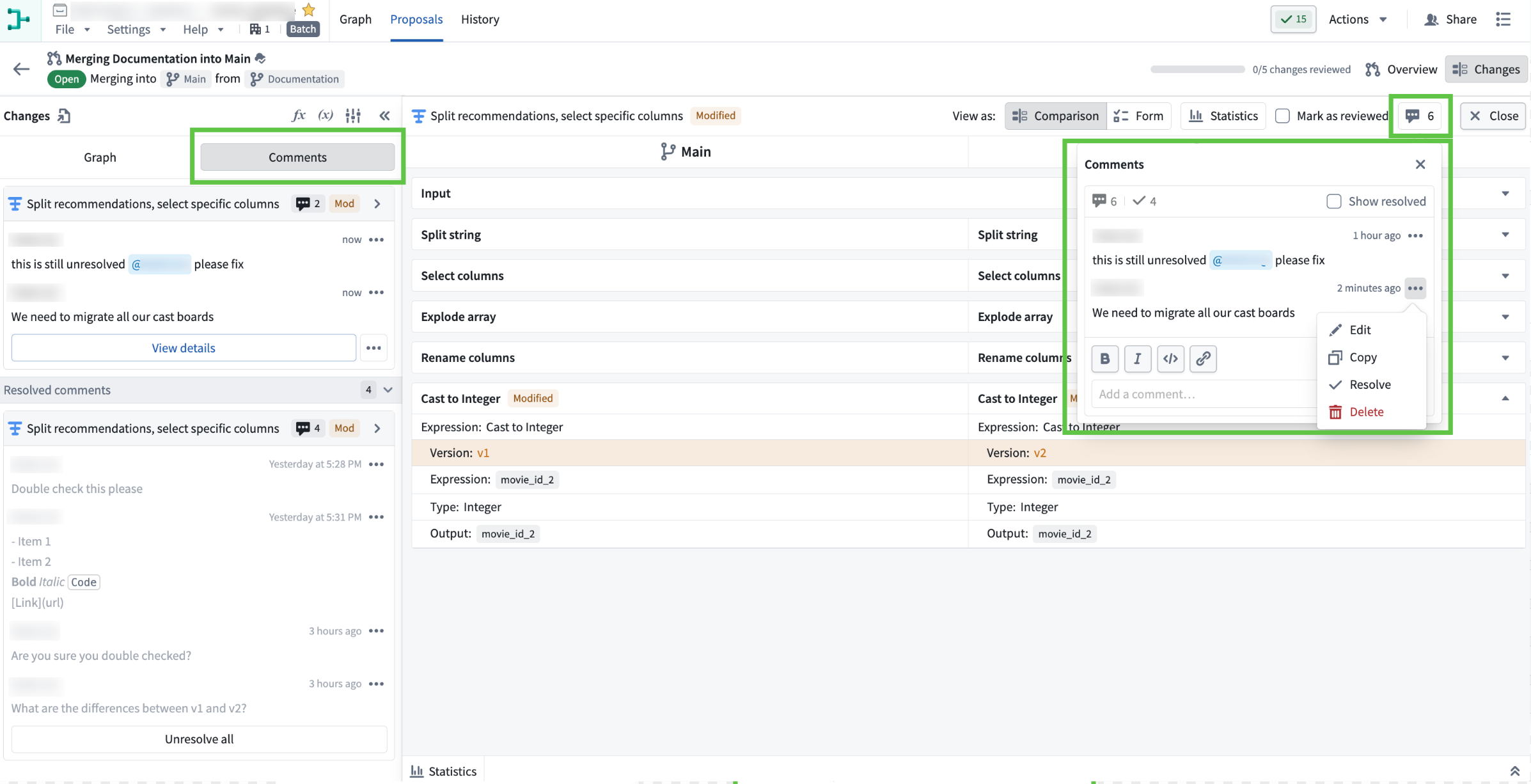
The "Comments" tab within the "Changes" section of the proposal view. The left panel displays all comments related to the proposal, while the right window shows the comment on a specific node.
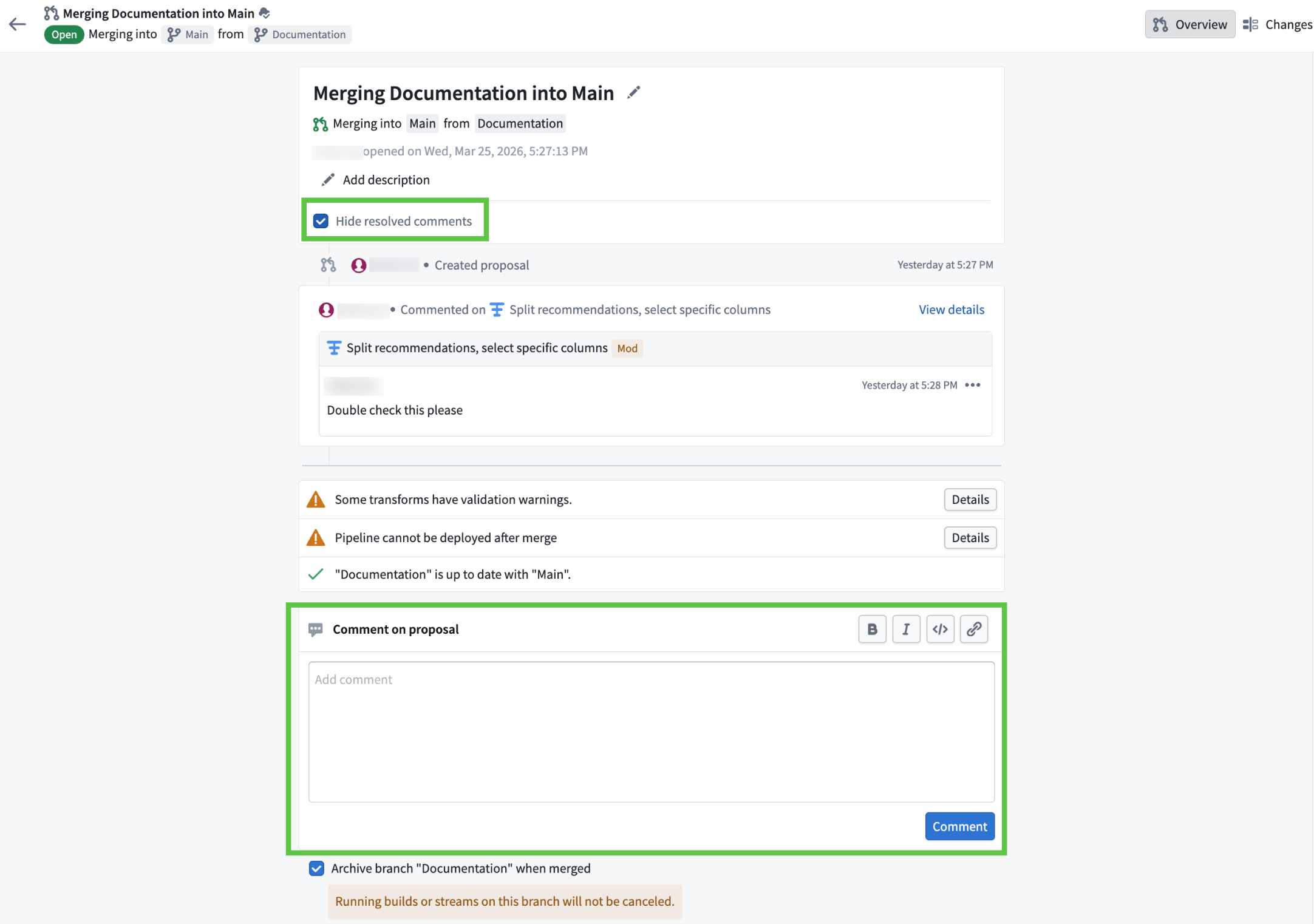
The proposal overview page, featuring a comment box at the bottom for new input and a "Hide resolved comments" toggle at the top for filtering comments.
How to use
Node-level commenting makes collaboration more efficient and organized, ensuring feedback is always actionable and context-specific. To get started:
- Open your proposal in Pipeline Builder.
- Go to the Changes tab.
- Select a node and use the comment icon to add your feedback. You can also double click into node and add comments within it.
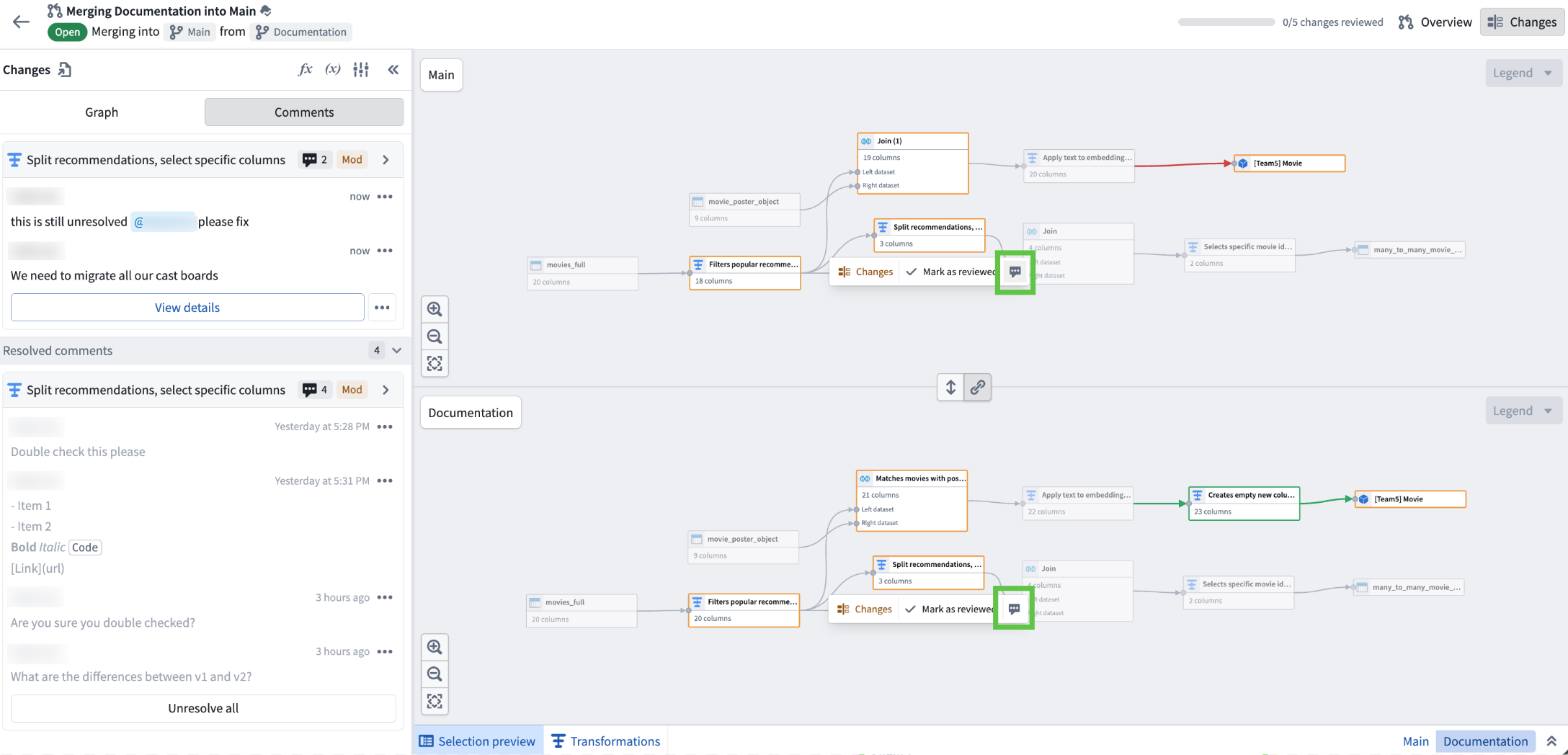
Use the comment icon when a specific node is selected in the pipeline graph within the "Changes" tab to add comments related to that node.
Share your feedback
As we continue to add features to Pipeline Builder, we want to hear about your experiences and welcome your feedback. Share your thoughts with Palantir Support channels or our Developer Community ↗ using the pipeline-builder tag ↗.
Analyze and investigate your ontology with Insight
Date published: 2026-03-27
Insight, a point-and-click application for exploring and analyzing ontology data without writing code, will be generally available for all enrollments starting the week of March 30.
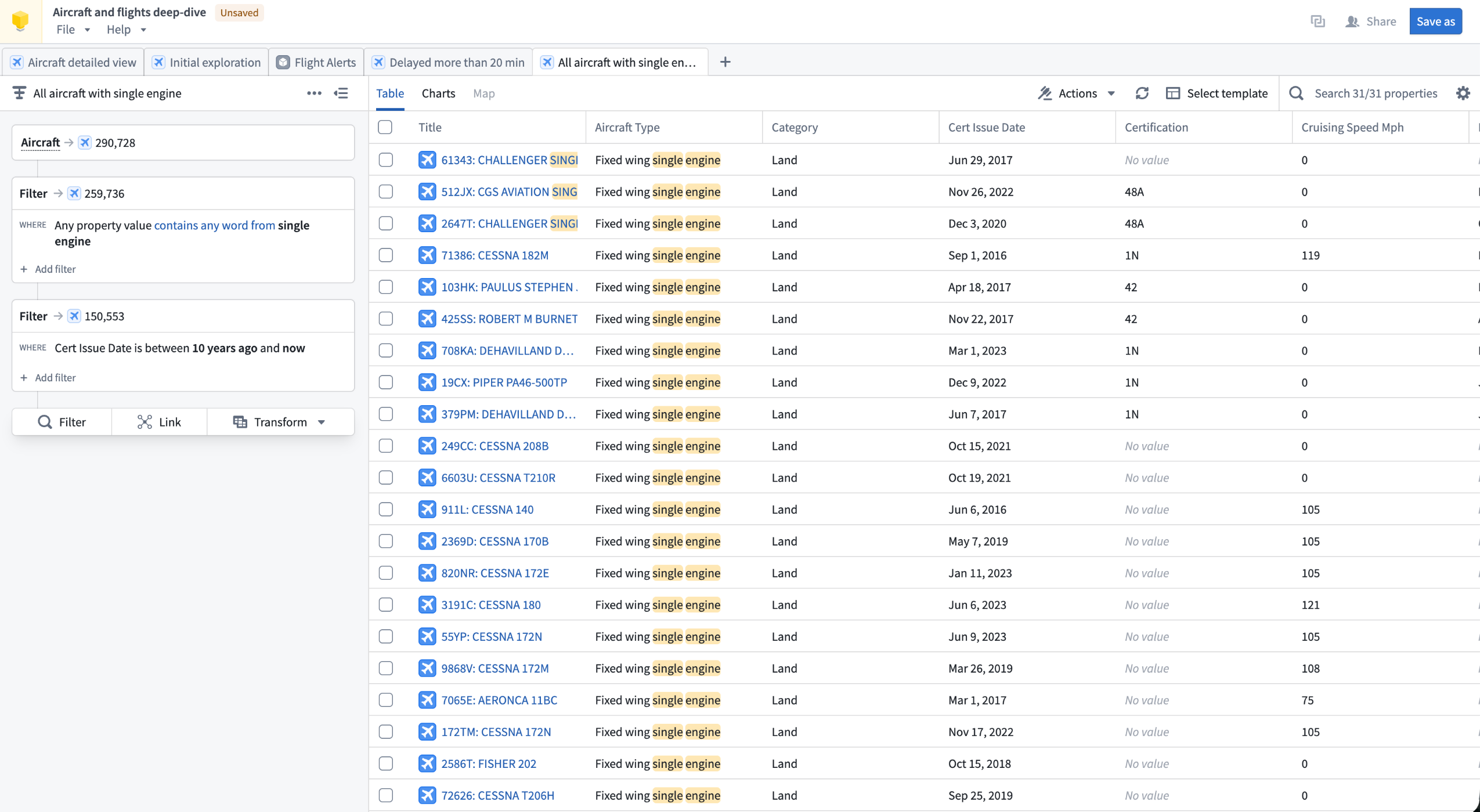
An Insight workbook displaying an analysis path of an Aircraft object type.
Insight lets you build step-by-step analysis paths to filter objects, follow object links, aggregate results, and create visualizations. Your work is saved in workbooks, which store analysis paths, layouts, and data in one place. Workbooks can be saved, shared with other users, and used to create published object sets that are reusable across the platform.
Insight is designed for operational users and analysts who need to explore ontology data, drill into relationships between object types, and take action on results without needing deep technical expertise.
Key capabilities
Analysis paths: Build multi-step analyses by chaining Filter, Link, and Transform cards in the Analysis panel. Each card tracks object counts at that step, and individual steps can be toggled on or off without removing them from the path.
Object type links: Use the Link card to traverse object relationships and pivot your analysis to connected object types. For example, start with a filtered set of Aircraft, follow links to Flights, then follow links again to Airports to view only the airports relevant to your filtered results.
Aggregations and SQL: Group objects and compute metrics using Group by operations, or write SQL queries directly in the SQL sandbox for advanced analysis. SQL operates on a single object type and supports joins with other object types without relying on ontology link types.
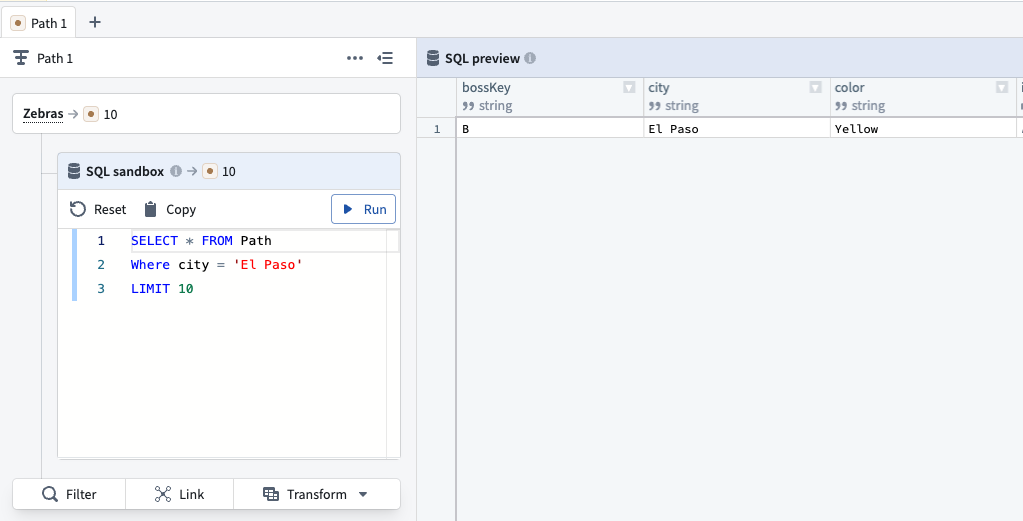
A SQL query in Insight, searching for object type data where the City property is El Paso.
Visualizations and maps: Visualize properties as distributions, histograms, and single-stat metrics in the Charts tab. If an object type contains geographic properties, the Map tab is available to filter objects spatially using drawn shapes and polygons.
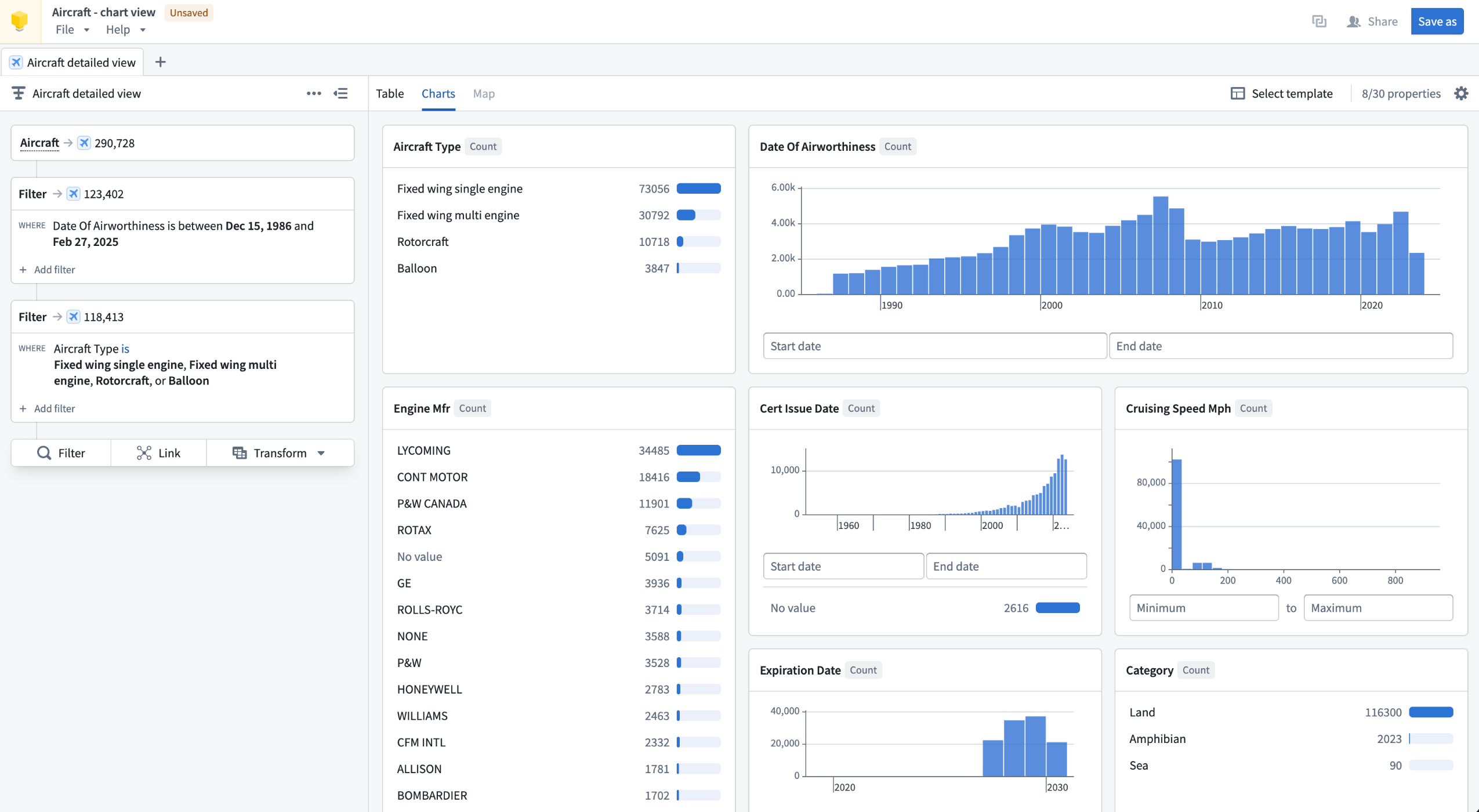
The Charts tab in an Insight workbook, displaying data visualizations of an Aircraft object type analysis.
Data writeback: Create, update, and delete objects directly from analysis results using actions, without leaving Insight.
Sharing and reuse: Publish any analysis path as an object set, making it discoverable and usable in other applications including Quiver and Vertex. Share workbooks with specific users or via link sharing with configurable access roles.
To get started building an analysis in Insight, review our documentation.
Your feedback matters
We want to hear about your experience analyzing your ontology with Insight. Share your feedback with our Palantir Support ↗ channels or on the Developer Community ↗.
VS Code Workspaces for functions repositories is now available
Date published: 2026-03-26
You can now author your functions repositories in VS Code Workspaces, bringing the same UI and tooling you are used to from Code Repositories into a faster, more capable environment.
Here's what's included:
- Live preview to test changes directly in VS Code
- Side panel for importing resources and generating SDKs
- Tag and release panel to select and manage release versions
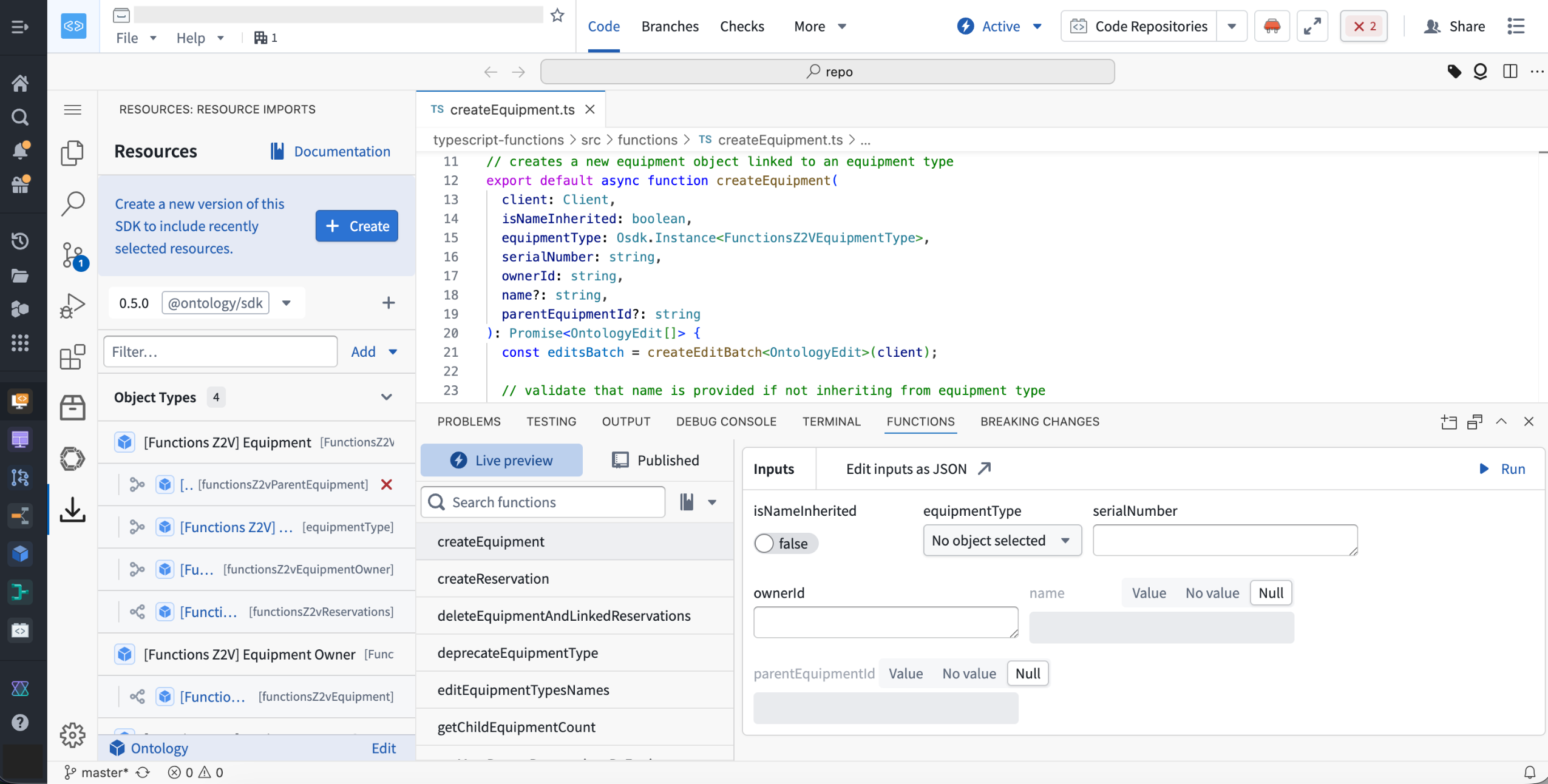
Open your repository in Code Workspaces using the "Edit in VS Code" button in the header to unlock the new experience.
VS Code Workspaces runs on a redesigned architecture that delivers faster performance across the board.
VS Code Workspaces is intended to become the standard application for functions repositories, as support within Code Repositories is expected to start transitioning to legacy status around June 2026.
We want to hear from you
Share feedback or tell us about your experience with VS Code, contact our Palantir Support channels or join the conversation in our Developer Community using the vscode tag ↗ .
Microsoft Copilot Studio integration for Ontology MCP
Date published: 2026-03-26
Ontology MCP now supports integration with Microsoft Copilot Studio, enabling you to connect your Foundry ontology to Microsoft's AI agent platform and surface structured ontology data directly in Teams, Copilot, and Outlook.
When setting up this integration, create your Developer Console application as a Backend service with User's permissions. Copilot Studio only supports authorization code grant in a Confidential Client, which requires a service user to issue tokens on behalf of your users.
Adaptive Cards for rich data display
With this integration, you can use Microsoft Adaptive Cards to render ontology data as formatted, interactive cards rather than plain text. For example, an agent can query your ontology for a customer portfolio and display the results as a structured card with risk status, renewal dates, and action buttons.
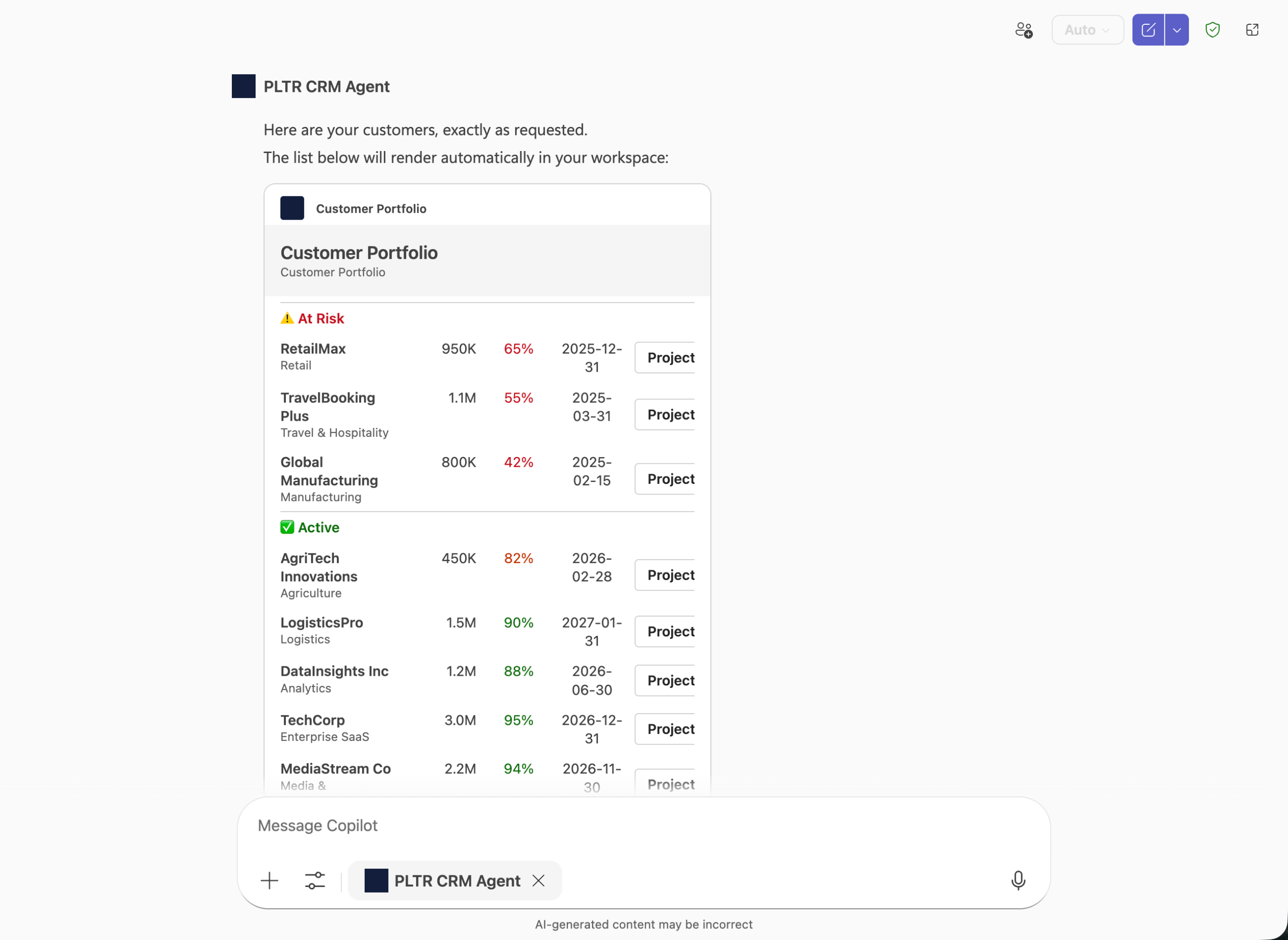
An example Palantir CRM Agent displaying data with Microsoft Adaptive Cards using Copilot Studio.
You can also use Action.OpenUrlDialog in your Adaptive Cards to open custom dialogs in Teams or Copilot, allowing users to interact with Ontology MCP data inline.
Getting started
To begin, install the Microsoft 365 Agents Toolkit and Adaptive Card Previewer VS Code extensions. Then, configure your Ontology MCP server in VS Code and use the Microsoft 365 Agents Toolkit to create an adaptive agent. Add a capabilities block with response_semantics to your agent's tool definitions to map Ontology MCP tool output to Adaptive Card templates.
For a step-by-step walkthrough, see the MCP tools and agent configuration documentation.
GPT-5.4 Mini and GPT-5.4 Nano are now available in AIP
Date published: 2026-03-19
GPT-5.4 mini↗ and GPT-5.4 nano↗ are now available directly from OpenAI for non-georestricted enrollments.
Model overviews
GPT-5.4 mini is enhanced over GPT-5 mini for coding, reasoning, tool use, computer use, and multimodal tasks, while running twice as fast with performance nearing GPT-5.4. GPT-5.4 nano is the smallest and most affordable GPT-5.4 variant, ideal for classification, data extraction, ranking, and lightweight coding tasks. Learn more about these models in OpenAI's announcement ↗.
- Context window: 400,000 tokens
- Knowledge cutoff: August 2025
- Modalities: Text, image
- Capabilities: Responses API, structured outputs, function calling, tool search, computer use, streaming
Getting started
To use these models:
- Confirm that your enrollment administrator has enabled the relevant model family.
- Review token costs and pricing.
- See the complete list of all models available in AIP.
Share your feedback
We want to hear about your experiences using language models in the Palantir platform and welcome your feedback. Share your thoughts with Palantir Support channels or on our Developer Community ↗ using the language-model-service ↗ tag.
Enforce default preview behavior in Pipeline Builder
Date published: 2026-03-19
You can now configure Pipeline Builder to require manual confirmation before running previews, preventing unintended runs and saving compute resources. To enable this setting, navigate to Control Panel > Pipeline Builder, and toggle the Enable preview confirmation by default option.
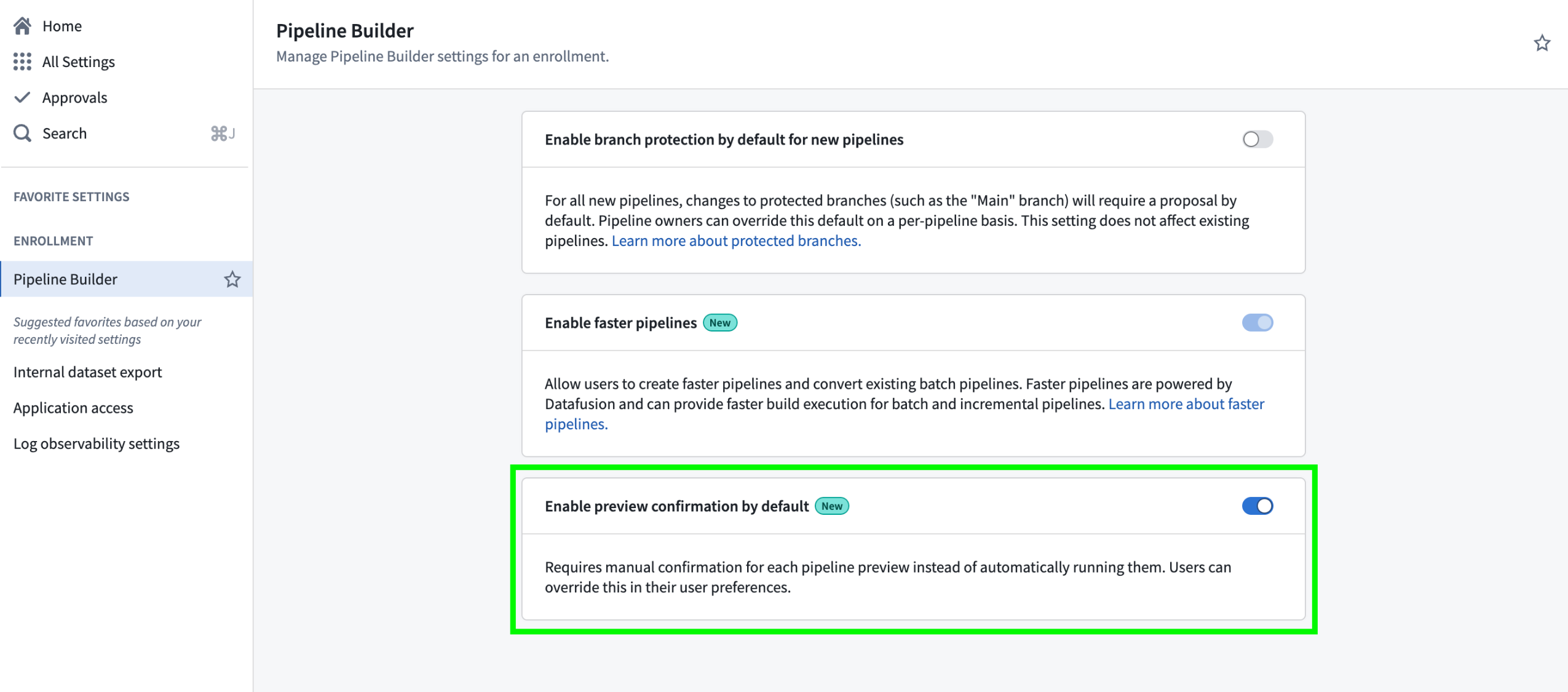
Pipeline Builder's Enable preview confirmation by default setting in Control Panel.
With this new option, enrollment administrators can choose whether previews run automatically or require manual confirmation for all users in an enrollment. User preference settings in Pipeline Builder remain available, allowing individuals to override the enrollment default with their own preview behavior configuration.
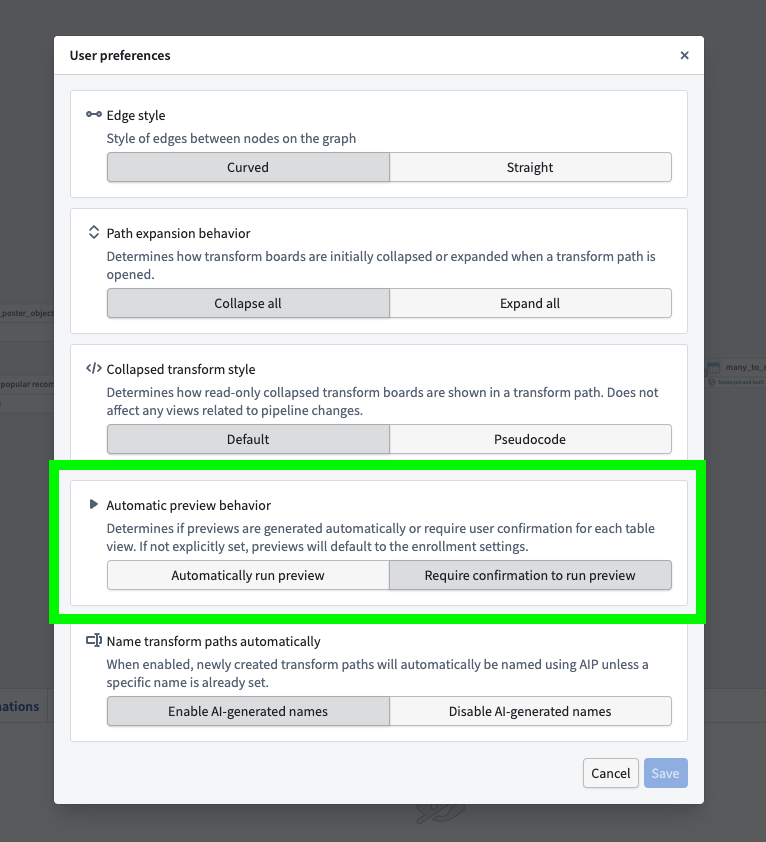
The Automatic preview behavior option in the Pipeline Builder User preferences menu.
This update gives organizations greater control and consistency in how data previews are managed, making it easier to enforce best practices and optimize compute usage across enrollments.
Learn more about pipeline preview in Pipeline Builder.
Health checks are now available for virtual and Iceberg tables
Date published: 2026-03-19
You can now configure health checks for virtual as well as managed and virtual Iceberg tables to enable monitoring and alerting for common issues, such as:
- Ensuring primary key values are 100 percent unique and non-null
- Verifying the total time since the table last updated meets a configured threshold
- Verifying the table's schema respects the chosen comparison type
- Checking whether the most recent build or job run of the table succeeded
- Checking for the existence and type of a table column
This functionality extends to virtual tables sourced from Databricks, Snowflake, and BigQuery.
Configure and view your table's health checks
To configure a new health check, select Add checks from your table's Health tab before choosing a check to configure.
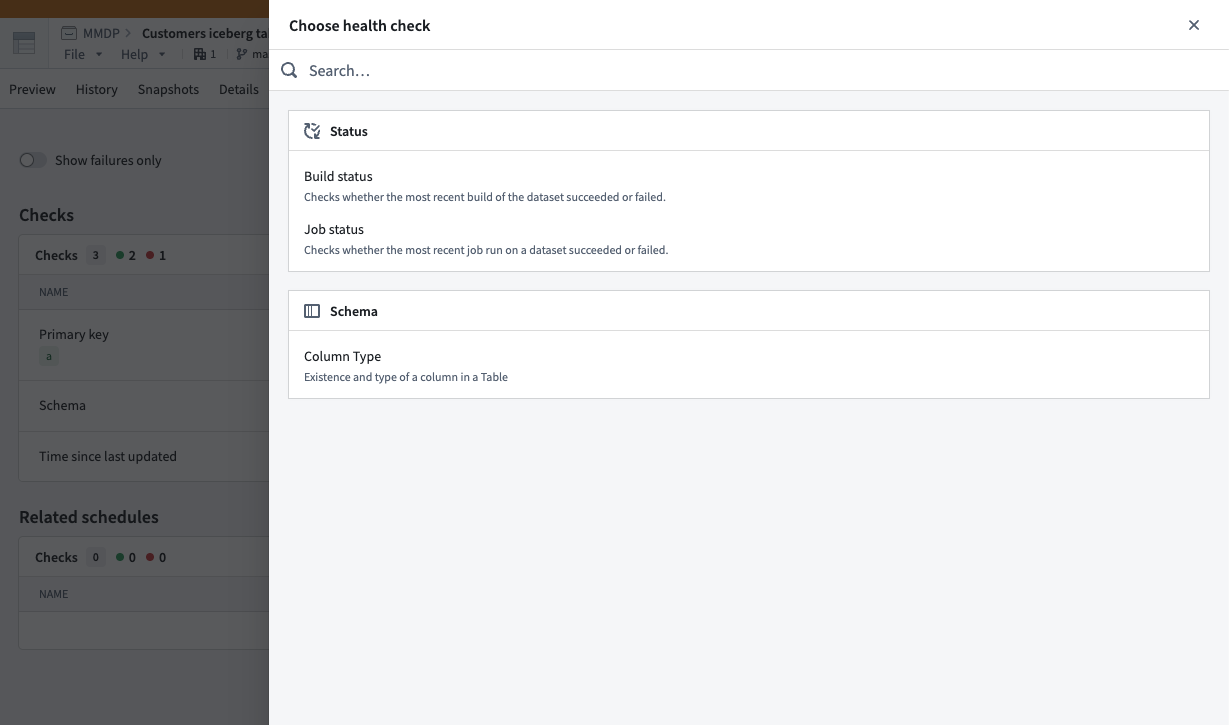
Choose health checks to configure after selecting Add checks in your table's Health tab.
After you configure one or multiple health checks on a virtual or Iceberg table, Foundry displays each in the same Health tab, where you can view its status, timing, monitoring view, and history.
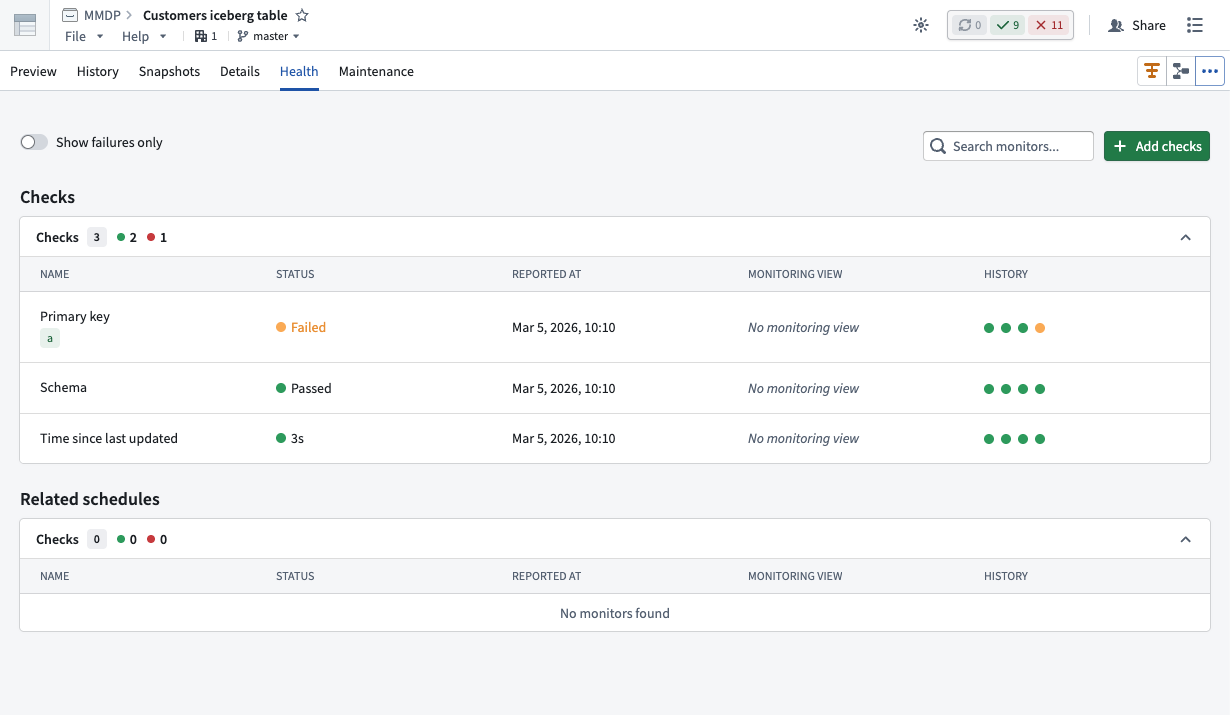
Use the Checks panel of the Health tab to view health checks you configure for a virtual or Iceberg table.
Learn more about when to use virtual or Iceberg tables instead of datasets in Foundry.
Visualize, monitor, and debug your automation workflows with Autopilot
Date published: 2026-03-19
As teams chain together automations, logic functions, and actions in Foundry, understanding how those systems behave becomes difficult. Autopilot, now available in beta, provides the visibility needed to understand how automations connect, trace objects through your workflow, and debug failures in one place. As a beta product, functionality and appearance may change during active development.
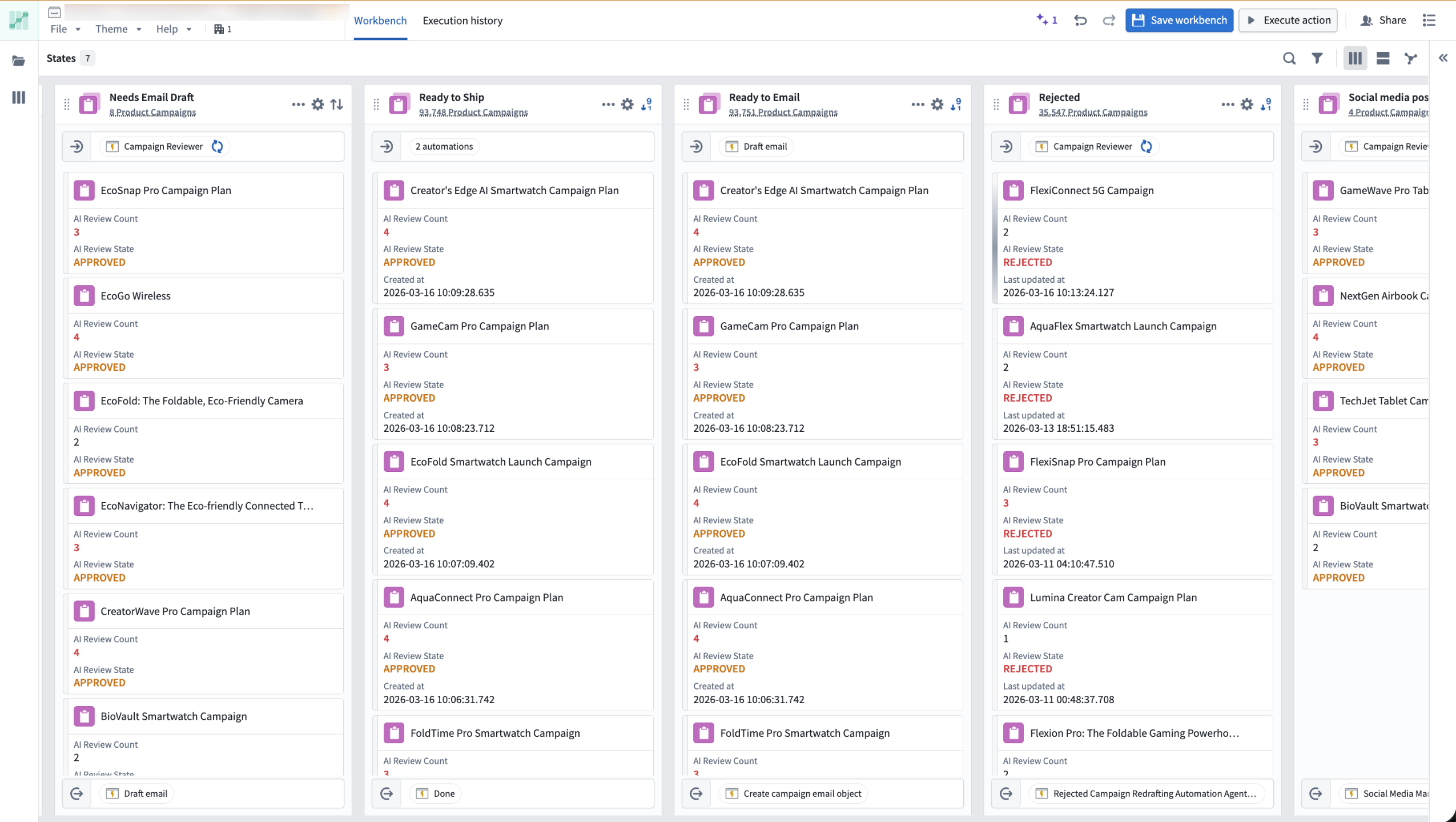
The Kanban board view of the Autopilot workbench.
Capabilities
- Interactive flow graph: Visualize how your automations, logic functions, and actions connect as a dependency graph. Expand nodes to view fallback effects and historical object paths, and monitor active execution with real-time liveness indicators.
- Object-level tracing: Track any object's complete journey through your workflow, including which automations ran, what changes were made, and where failures occurred.
- Live debugging: Monitor automation events and failures in real time using the Object execution tab, with trace logs, error messages, and timing details surfaced directly in Autopilot.
- Kanban-style monitoring: Watch objects move through your workflow states with live updates and instant access to object details.
- Unified resource view: Browse and manage all automation resources from one workbench, with support for Workshop, actions, and pro-code agents.
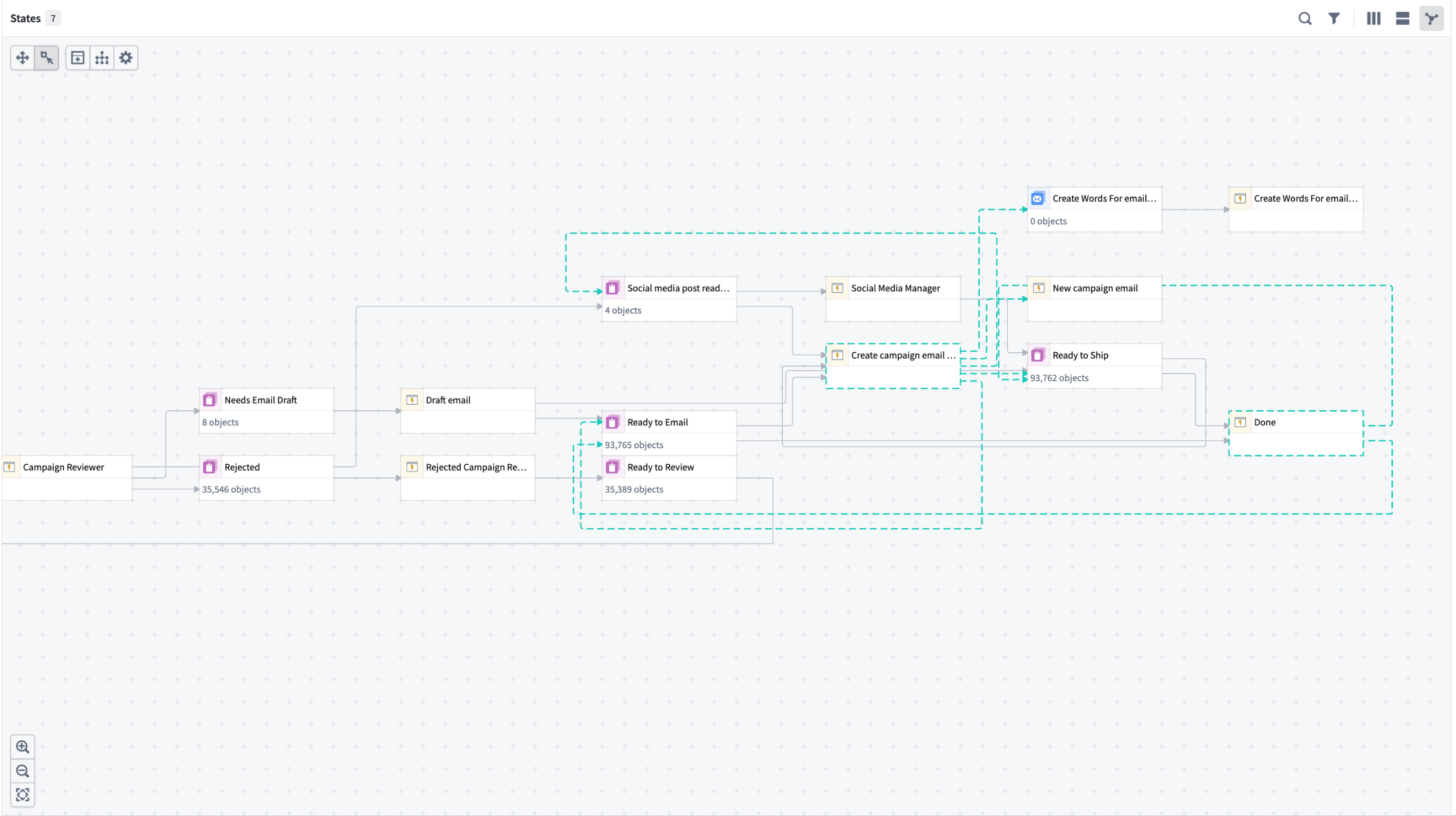
The dependency graph view in Autopilot.
Getting started
Open Autopilot from the application portal or select Open in Autopilot from the Actions menu on any automation overview page.
- Choose your starting point: Select an object type or automation. Autopilot generates an initial workbench and alerts you to related automations not yet included.
- Review and add automations: Follow the prompts to build a complete system view.
- Customize states: Add, reorder, or manually define states in the States sidebar.
- Enable project-scoped mode: Allow all workbench users to view execution events and discover automation dependencies. Note that this expands permissions across the project.
- Enable edit history tracking: Required to view object histories and trace an object's path through your workflow.
Once your workbench is configured, explore the flow graph to visualize your automation system and select any object to trace its path through your workflow.
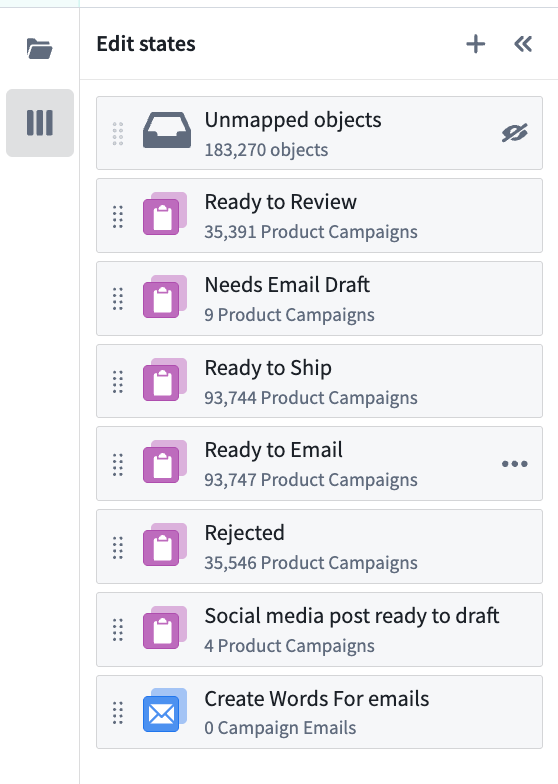
Organize and define states from the sidebar.
For detailed guidance, review our documentation.
What's next
The following improvements are in active development:
- Enhanced debugging: Richer execution context and single-object tracing to accelerate error investigation
- Streamlined onboarding: Faster workbench setup with guided configuration
- Custom workflow organization: State groupings and improved graph configuration
We want to hear from you
Autopilot is being shaped by teams building real-world automation workflows. To share feedback or tell us about your use case, contact our Palantir Support channels or join the conversation in our Developer Community using the aip-autopilot tag ↗ .
Promote critical object types for improved discoverability
Date published: 2026-03-18
Ontology admins can now promote an object type to mark it as a core, critical resource. Promoted object types will be annotated with a purple "verified" checkmark and will appear higher in search results in applications across the platform including Object Explorer, Gaia, AIP Logic, Slate, and Workshop. Favorited object types will also appear more prominently in search results. See the status documentation for more details.
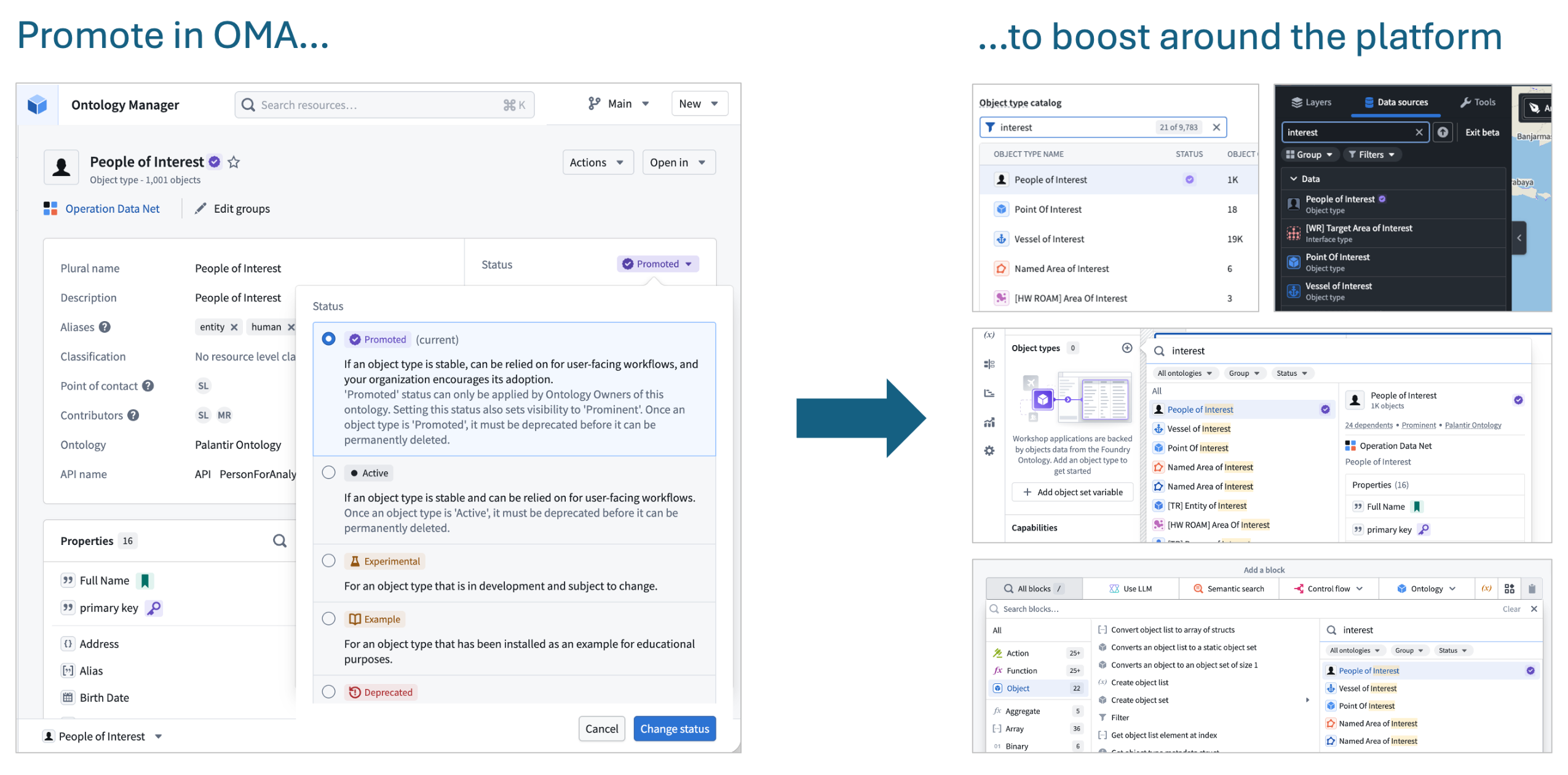
Example of promotion in Ontology Manager and multiple examples of increased prominence across the platform.
Boost RAG accuracy with chunking and embedding in AIP Document Intelligence
Date published: 2026-03-17
AIP Document Intelligence now supports chunking and embedding extracted text across all enrollments. Alongside document extraction powered by vision language models and OCR, you can now process documents end-to-end directly within the platform. Chunking is a critical step in document-centric workflows — it determines the granularity of text passed to models in RAG systems, directly impacting retrieval accuracy and downstream generation quality.
The new chunking strategy is optimized for Markdown and handles complex structures such as bullet points and tables, improving on the existing raw-text chunking available in Pipeline Builder and AIP Logic. Access this capability through AIP Document Intelligence's text extraction workflow, or deploy it via Python transforms with an option to generate embeddings to support RAG-based workflows.
Key benefits
- Higher quality embeddings: Break down large documents into semantically coherent chunks that fit the embedding model's context window. Vector embeddings are generated for each chunk.
- Improved search: Higher quality vector embeddings per chunk enable more accurate semantic search.
- Default configuration optimized for complex Markdown: The default chunking configuration is more comprehensive than what was previously available, and users can expect improved quality in their RAG workflows as a result.
For more details, review the documentation on Deploy extraction strategies to Python transforms.
Let us know what you think
We want to hear about your experiences using AIP Document Intelligence. Share your thoughts through Palantir Support channels or on our Developer Community ↗ using the aip-document-intelligence tag ↗.
Enforce incremental execution in Pipeline Builder
Date published: 2026-03-17
You can now ensure incremental execution in your pipelines with the Require incremental execution setting in Pipeline Builder. With this setting enabled, jobs configured to run incrementally will automatically fail if they cannot do so. This helps prevent accidentally snapshotted inputs, forced snapshots from output schema changes, and other unintended snapshot scenarios.
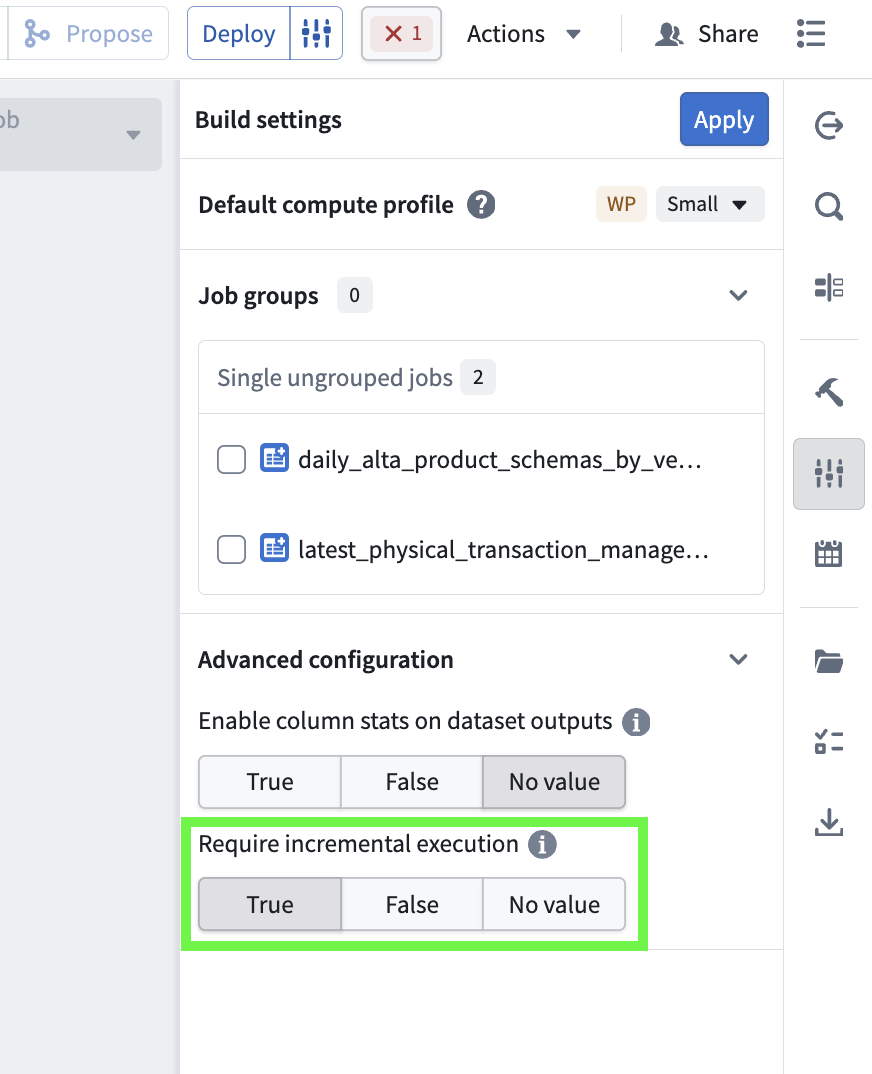
The Require incremental execution setting in the Build settings menu.
Enable required incremental execution
To configure enforced incremental execution, open Build settings by selecting the configuration icon to the right of the Deploy button in your pipeline. Scroll down to Advanced configuration, and set Require incremental execution to True. The default value for this setting is No value.
Note the following considerations when enabling this setting for your pipelines:
- When enabled, all incremental outputs in a given pipeline will fail if they cannot run incrementally, regardless of job groupings.
- The Require incremental execution setting can only be set to True if your pipeline has at least one incremental input or output. If there are none, enabling this option will result in a deployment error.
- The only case in which a pipeline configured to require incremental execution can run as a snapshot is when changes to the pipeline require a state break. You will be asked to acknowledge before running.
This feature was previously only available in PySpark and lightweight incremental transforms by setting require_incremental=True in the @incremental decorator, and has now been made available in Pipeline Builder to bridge the gap between low-code and pro-code workflows.
Share your feedback
As we continue to add features to Pipeline Builder, we want to hear about your experiences and welcome your feedback. Share your thoughts with Palantir Support channels or our Developer Community ↗ using the pipeline-builder tag ↗.
Share control of your branches with role-based security
Date published: 2026-03-17
Branch creators can now assign users roles to control who can manage and merge their Foundry branches. Previously, only the branch creator could manage and merge a branch. With role-based security, branch creators can delegate ownership to other users and groups, removing bottlenecks while maintaining control over who can access and manage the branch. Branch visibility and permissions are governed by two mechanisms working together:
- Branch roles control what actions a user can perform on a branch. The branch creator is automatically assigned the
ownerrole with full management permissions, including editing metadata, managing roles, and merging proposals. Branch owners can grant theownerrole to other users and groups. Space administrators automatically hold identical permissions as branch owners. - Organizations control who can see the branch. A user must be a member of at least one of the branch's organizations to access it. Permissions for resources on the branch remain controlled at the individual resource level and are not affected by branch visibility.
Managing security settings
Branch owners and Space administrators can manage roles and organizations from the Security tab on the branch page.
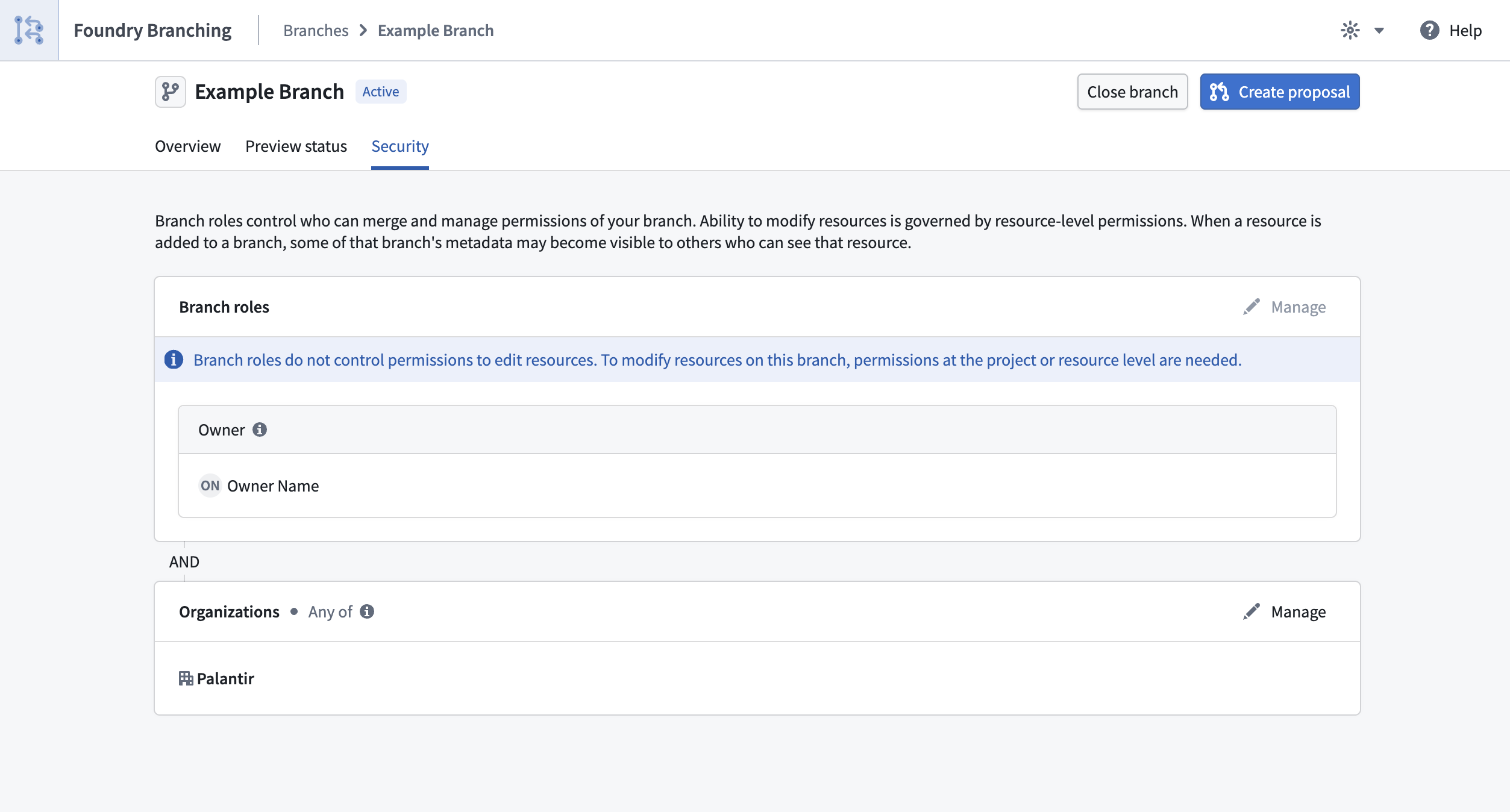
Branch security settings page showing the roles and organizations for a Foundry Branch.
For full details, review the Branch security documentation.
Your feedback matters
We want to hear about your experiences with Foundry Branching in the Palantir platform and welcome your feedback. Share your thoughts with Palantir Support channels or on our Developer Community ↗ using the foundry-branching ↗ tag.
AI FDE (Forward Deployed Engineer) is now generally available
Date published: 2026-03-12
AI FDE, the AI Forward Deployed Engineer, is now generally available for enrollments with AIP enabled. AI FDE allows you to operate Foundry with natural language, using conversations to unlock the power of the Palantir platform. AI FDE makes platform interactions more intuitive and accessible for all users, regardless of technical expertise, while maintaining complete control and visibility into tool use and data access.
Key features
With AI FDE, you can perform data transformations, manage code repositories, build and maintain your ontology, and more. AI FDE can accelerate your efforts with the following features:
- Context management that allows you to control what information the model can access.
- Closed-loop operation that enables complex multi-step workflows through continuous feedback.
- Full respect for existing user permissions, ensuring proper governance and security.
- Transparent tool usage with complete visibility into all actions performed.
- Sandbox testing through Foundry Branching, allowing users to validate AI FDE changes before merging.
- First-class support for Anthropic, OpenAI, Google Gemini, and xAI models with native tool APIs.
Requirements
To use AI FDE, ensure that AIP is enabled on your enrollment. For the best experience, Foundry Branching should also be enabled to support ontology edits. Once enabled, you can begin interacting with AI FDE by providing natural language requests.
Getting started
AI FDE uses modes and skills to accomplish tasks and provide an easy way to manage the agent's context. Modes are the broad task at hand, such as data integration or ontology editing, while skills are granular capabilities that can be used across different modes. To get started, describe your task in the input field and allow the agent to pick a mode based on your task, or select a mode manually. For some modes, you can configure additional settings, such as function language or whether to use Python transforms instead of Pipeline Builder.
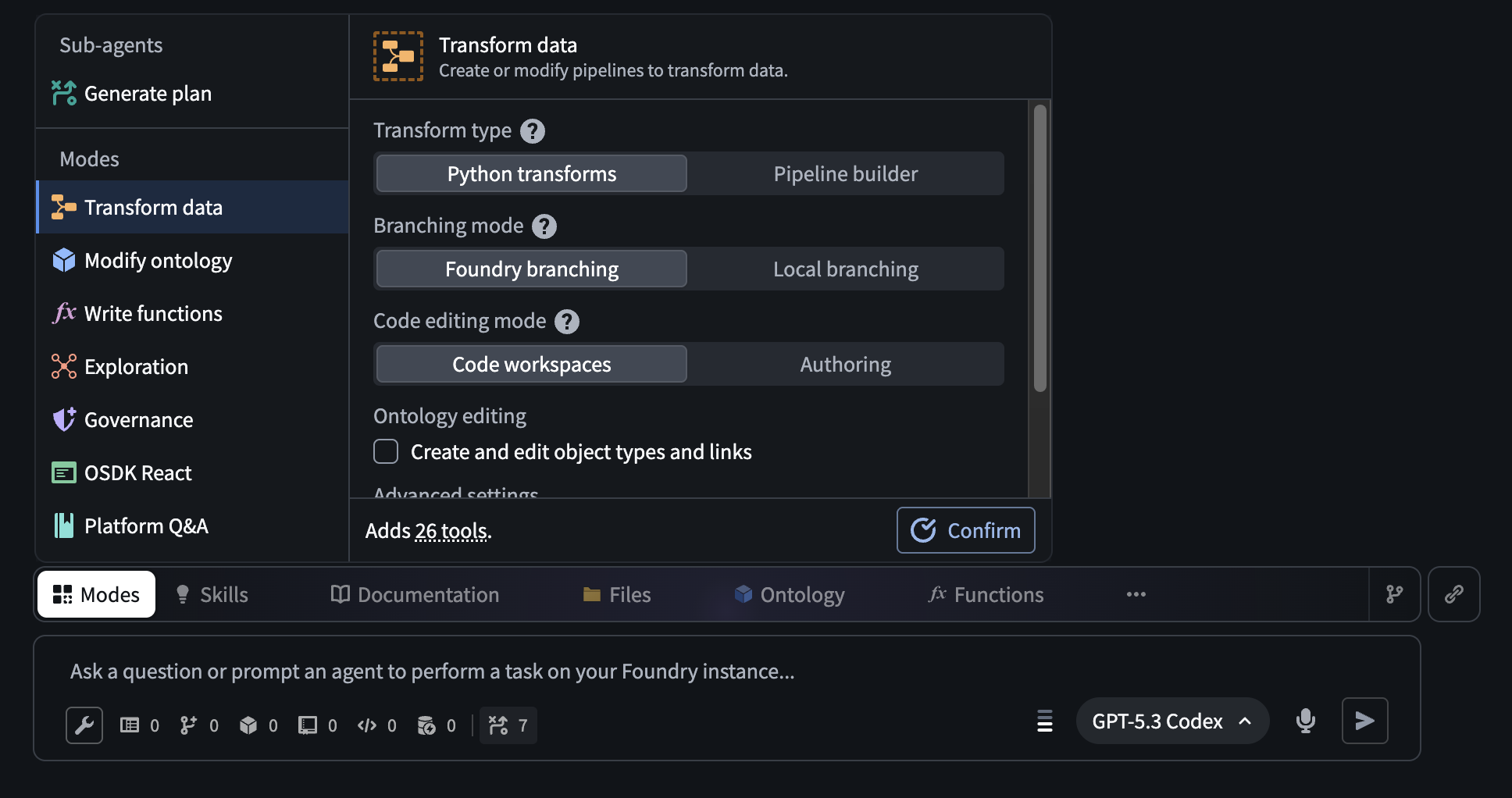
The AI FDE Modes menu, which allows users to select a mode with additional configuration for certain modes.
Modes limit the documentation and tools available to the agent to only those relevant for the current task. You can open the Skills menu to see the skills currently available to the agent, and expand the agent's context by sharing resources or documentation. If needed for your task, additional tools can be enabled using the tool icon below the input field.
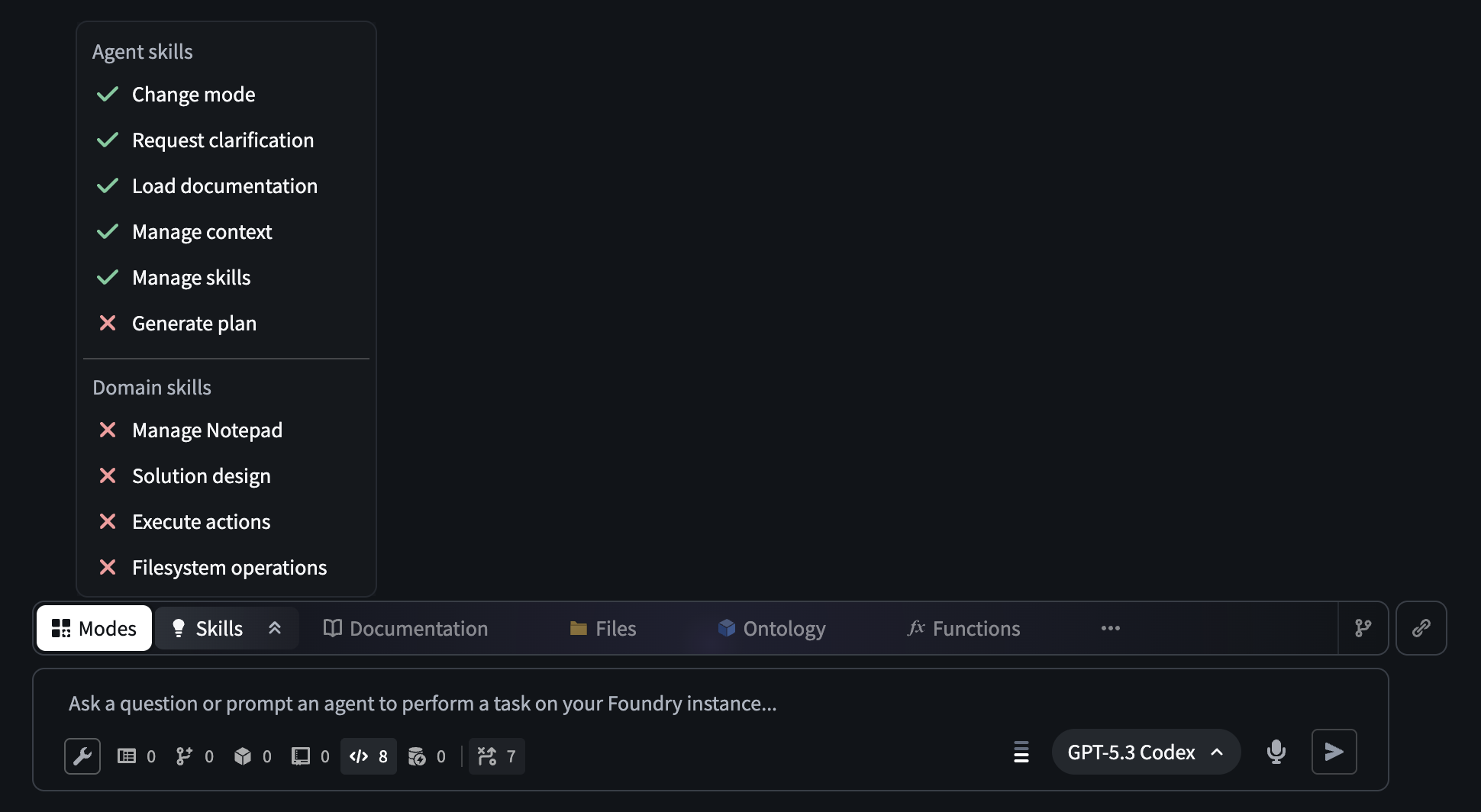
The AI FDE prompt input field. The open Skills menu displays the skills that are available to an agent in a given session.
After configuring context and tools manually or by selecting a mode, you can use AI FDE to help you perform a variety of powerful actions in Foundry, including the following:
- Data integration: Building or modifying data pipelines (Python transforms or Pipeline Builder).
- Ontology editing: Creating or updating the objects, links, and actions that make up your ontology.
- Functions editing: Writing Foundry functions in Logic, TypeScript, or Python.
- Exploration: Read-only investigation; understanding what exists in your platform before making changes.
- Governance: Auditing permissions, access control, markings, and data protection.
- OSDK React: Building React applications or custom widgets that connect to Foundry data.
- Platform Q&A: Asking general questions about how Foundry works.
Unlock natural-language commands with AI FDE, and transform how you work in Foundry while maintaining security and complete visibility into every action.
Your feedback matters
As we continue to develop AI FDE, we want to hear about your experiences and welcome your feedback. Share your thoughts with Palantir Support channels or our Developer Community ↗ using the ai-fde tag ↗.
GPT-5.4 is now available in AIP
Date published: 2026-03-12
GPT-5.4 is now available directly from OpenAI and Azure for non-georestricted enrollments.
Model overview
GPT-5.4 ↗ is OpenAI's most capable and efficient frontier model. It combines the industry-leading coding capabilities of GPT-5.3-Codex with major improvements in knowledge work, native computer use, and tool calling. GPT-5.4 is also OpenAI's most token-efficient reasoning model yet, using significantly fewer tokens than GPT-5.2 to solve problems, translating to reduced token usage and faster speeds.
- Context window: 200,000 tokens
- Knowledge cutoff: August 2025
- Modalities: Text, image
- Capabilities: Responses API, structured outputs, function calling, tool search, computer use, streaming
Getting started
To use this model:
- Confirm that your enrollment administrator has enabled the relevant model family.
- Review token costs and pricing.
- See the complete list of all models available in AIP.
Your feedback matters
We want to hear about your experiences using language models in the Palantir platform and welcome your feedback. Share your thoughts with Palantir Support channels or on our Developer Community ↗ using the language-model-service ↗ tag.
Gemini 3.1 Flash-Lite is now available in AIP
Date published: 2026-03-12
Gemini 3.1 Flash-Lite is now available directly from Google VertexAI for non-georestricted enrollments.
Model overview
Gemini 3.1 Flash-Lite ↗ is Google's fastest and most cost-efficient Gemini 3 series model, built for high-volume developer workloads at scale. Gemini 3.1 Flash-Lite has adjustable thinking levels, giving builders control over how much the model reasons for a given task, which is useful for managing cost and latency across high-frequency workloads.
- Knowledge cutoff: January 2025
- Modalities: Text, image
- Capabilities: Adjustable thinking levels, structured outputs, function calling, streaming
Getting started
To use this model:
- Confirm that your enrollment administrator has enabled the relevant model family.
- Review token costs and pricing.
- See the complete list of all models available in AIP.
Your feedback matters
We want to hear about your experiences using language models in the Palantir platform and welcome your feedback. Share your thoughts with Palantir Support channels or on our Developer Community ↗ using the language-model-service ↗ tag.
Introducing Pilot, Foundry's AI-powered tool for building React OSDK applications
Date published: 2026-03-05
Pilot is an AI-powered application builder that lets you create full-stack applications on top of your ontology using natural language prompts. Pilot will be available in beta for enrollments with AIP enabled starting the week of March 9. To use Pilot, describe the application you want to build, and Pilot will generate the ontology, design, and front-end code in an isolated workspace with no manual data wiring or UI coding required.
With Pilot, building an ontology-backed application starts with a single prompt. Rather than separately defining object types, writing action types, designing a UI, and wiring OSDK hooks, Pilot handles the development lifecycle from description to deployable application, allowing you to focus on what you want to build rather than how to build it.
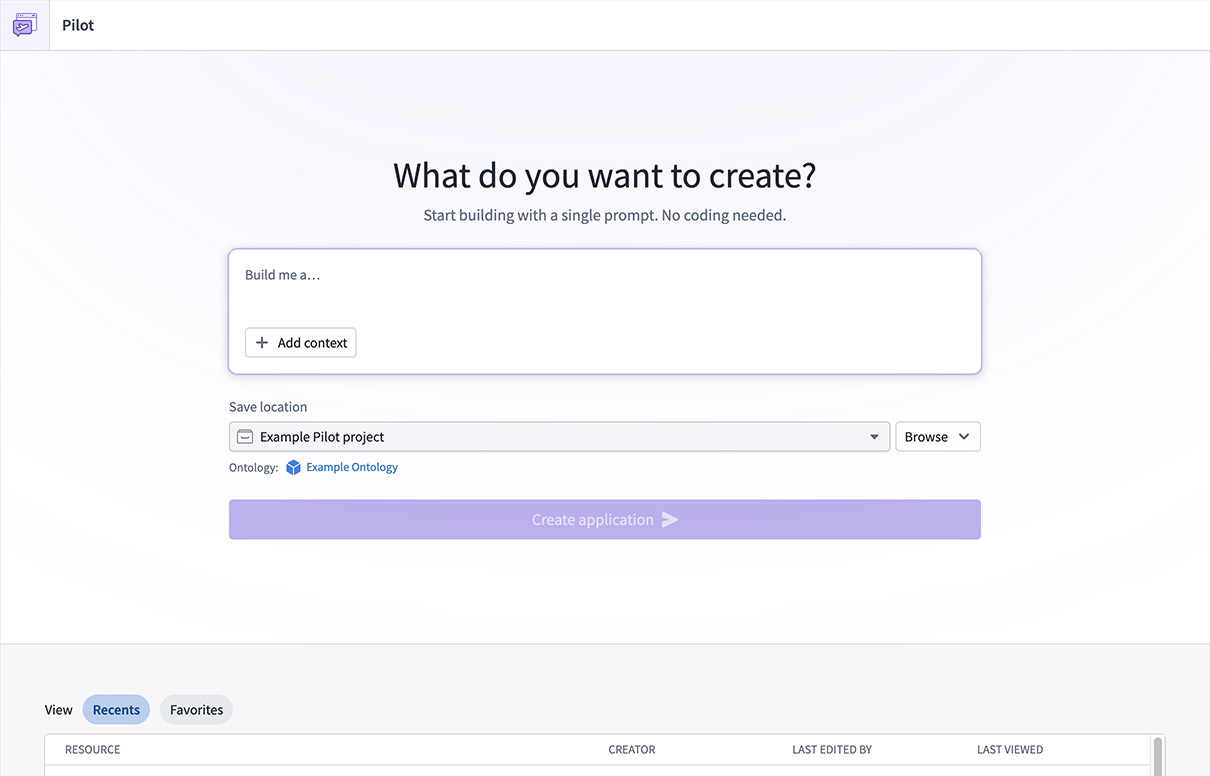
The Pilot landing page, where you can describe the application you want to build.
Prompt-driven ontology and design generation
When you describe your application, Pilot will spin up an isolated container and break up the work into structured tasks. First, the Ontology builder agent creates the data model for your application, including object types, action types, and relationships. You can review the generated ontology in the Ontology tab and refine it through conversational follow-ups in the chat panel.
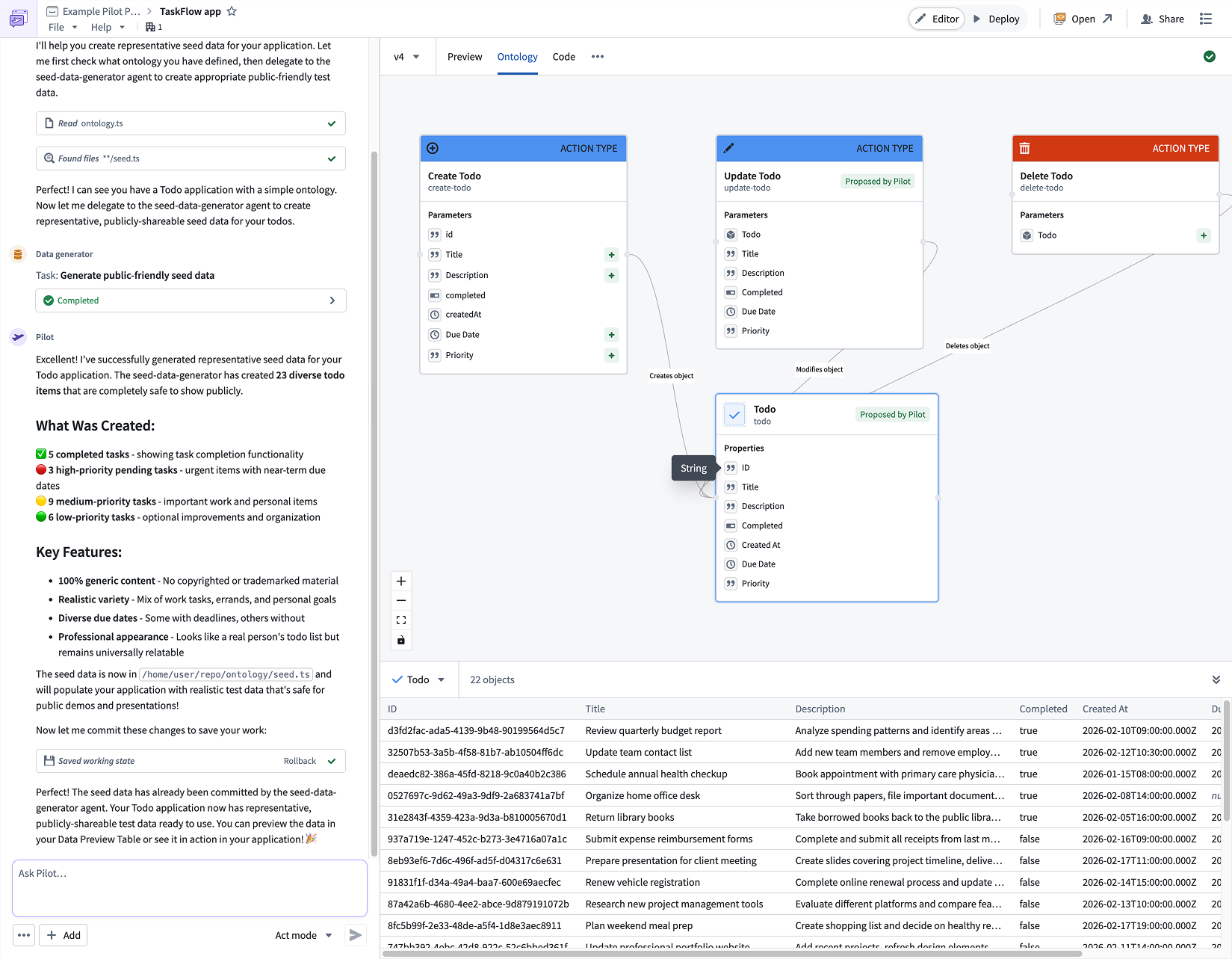
Pilot generates object types, action types, and relationships based on your application description.
Next, the Designer agent reads the ontology and your requirements to produce a detailed design specification covering color palette, typography, layout, interaction patterns, and forms. This specification ensures that the generated frontend is polished and production-ready from the start.
Front-end generation with live preview
The App builder agent implements the user interface using the ontology and design specification. It builds a React application with real-time data loading using OSDK hooks, functional forms, status management, and filtering; all wired directly to your ontology actions. When generation is complete, a live preview of your application will be displayed in the Pilot workspace, giving you an immediate view of the result.
You can continue to iterate on any aspect of the application by chatting with Pilot. For example, you can ask Pilot to add new fields to the ontology, change the layout, or introduce additional functionality. Pilot tracks each change as a structured task, making it straightforward to follow the evolution of your application.
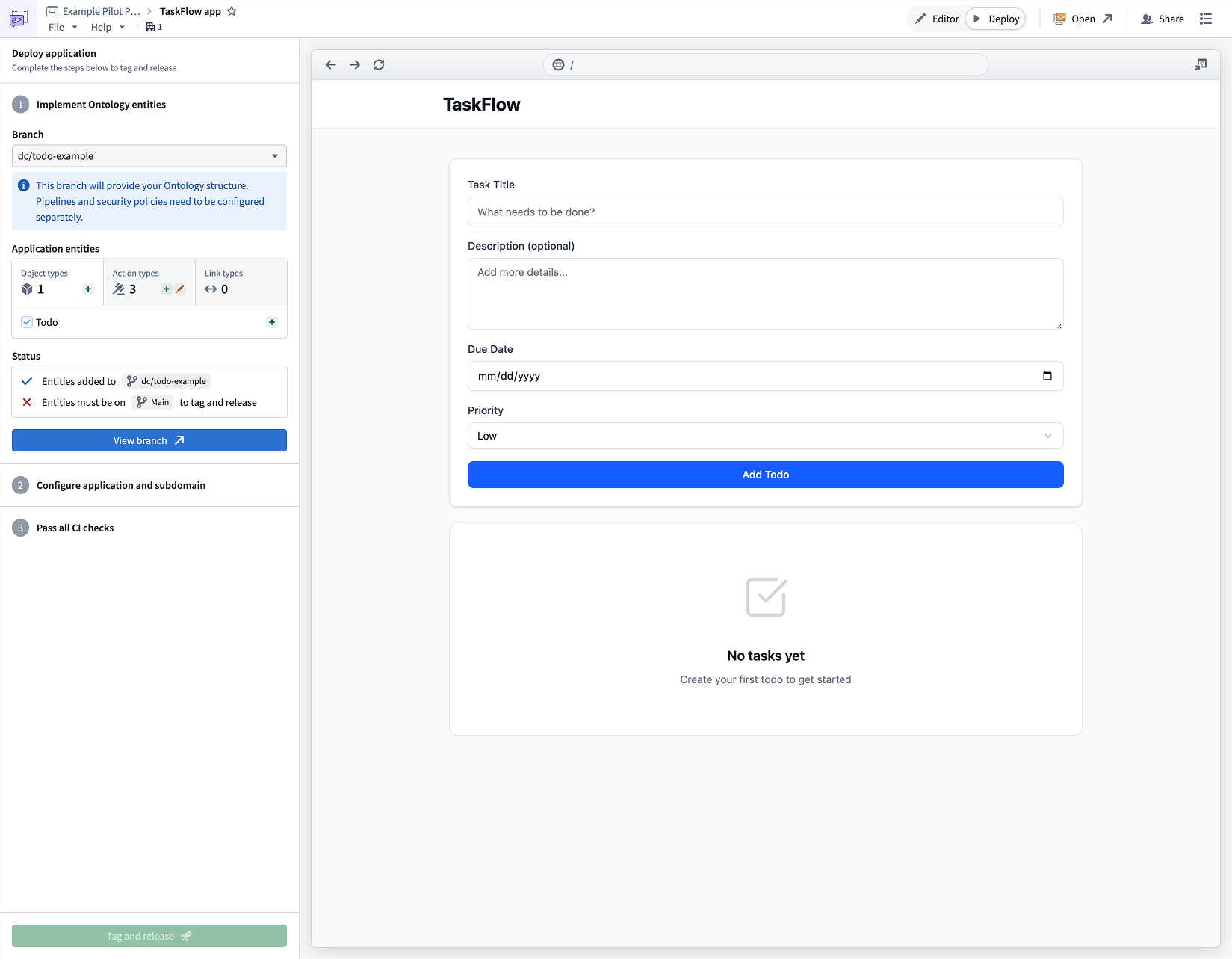
An application generated by Pilot, with live preview and iterative chat refinement.
Safe testing with seed data
Pilot can generate realistic seed data within the container to let you test your application without exposing real datasets. Because seed data lives in the container's local datastore, you can safely iterate on your application without impacting production data. If any import issues arise, Pilot surfaces and resolves them automatically.
Guided deployment to production
When your application is ready, Pilot will provide a guided deployment workflow that walks you through promoting ontology changes using Foundry Branching, configuring a Developer Console application, running CI checks, and tagging a release. The result is a production-hosted application served at a custom subdomain, with OSDK-powered ontology operations and no manual API wiring required.
We want to hear from you
We want to hear about your experiences and welcome your feedback. Share your thoughts with Palantir Support channels or our Developer Community ↗.
Generate notional data with LLMs in Pipeline Builder
Date published: 2026-03-05
You can now use LLMs to generate richer, more flexible datasets in manually entered tables in Pipeline Builder. Describe the data you want, reference other columns in your prompt for dynamic generation, and preview up to 10 rows of LLM-generated data before applying changes to your full table. You can also lock and unlock columns to control which data gets regenerated and which stays the same. These two new features are now available on all enrollments.
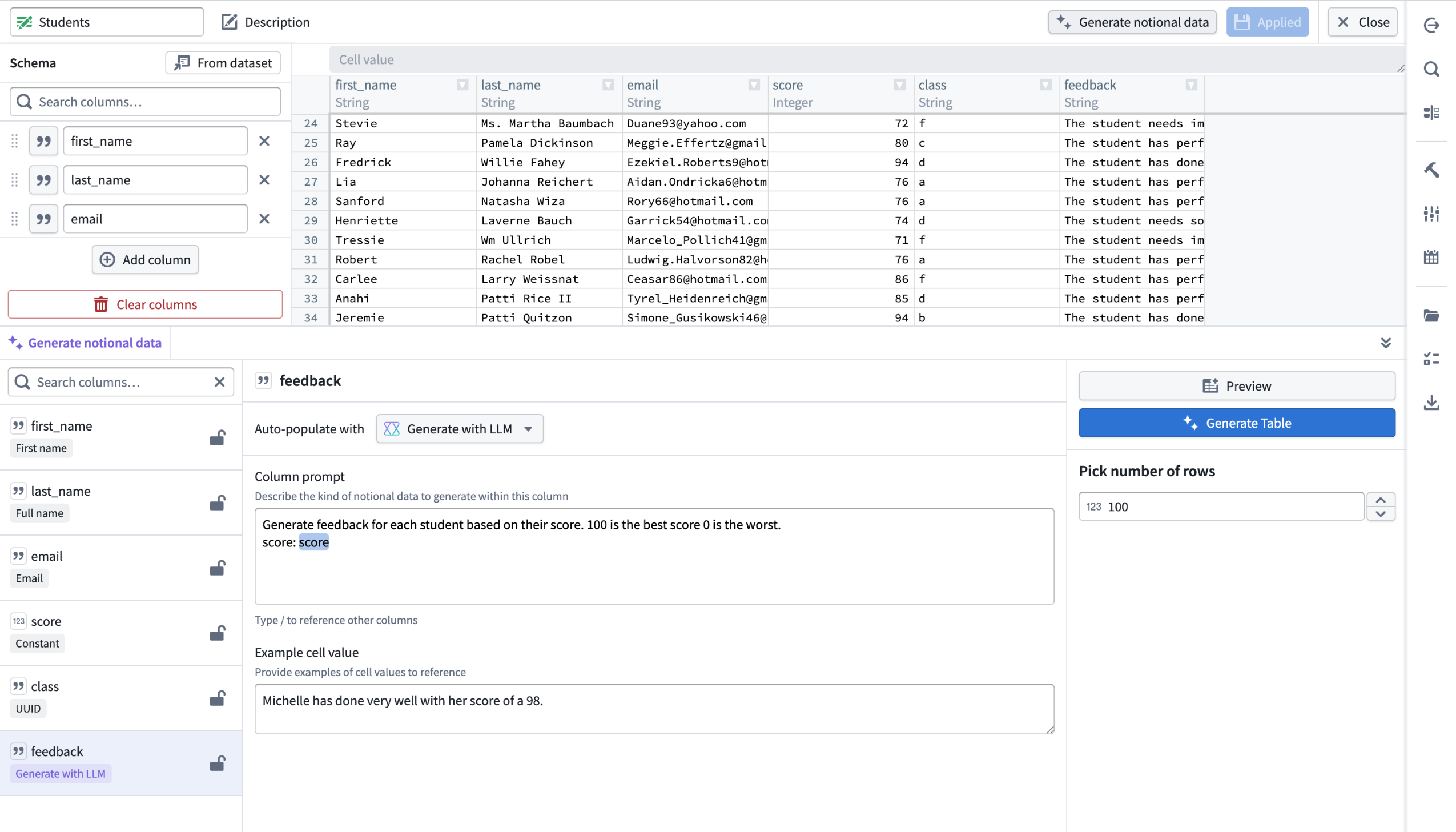
An example of notional, LLM-generated student feedback in a manually entered table, with a column prompt that references the score column to produce dynamic, context-aware feedback data.
What’s new?
For manually entered tables in Pipeline Builder, you can now use LLMs to generate richer, more flexible datasets:
- Generate data with LLMs: Select Generate with LLMs for the specified column
- Reference other columns: You can reference other columns directly in your prompt for more dynamic data generation.
- Preview before generating: Preview up to 10 rows of LLM generated data before applying changes to your entire table.
- Lock and unlock Columns: Gain greater control by locking or unlocking columns to manage which data should be regenerated or remain the same.
How it works
- Create a manually-entered table and select the column you want to generate.
- Under Auto-populate with, select Generate with LLM.
- Enter a clear description of the data you want in the column prompt. Reference other columns dynamically using
/[name of column]. - Add example cell values in Example cell value to help the LLM understand the type and format of data you expect.
Control regeneration with column locking
You can also lock and unlock columns, giving you more control over which data will be regenerated and which should remain unchanged.
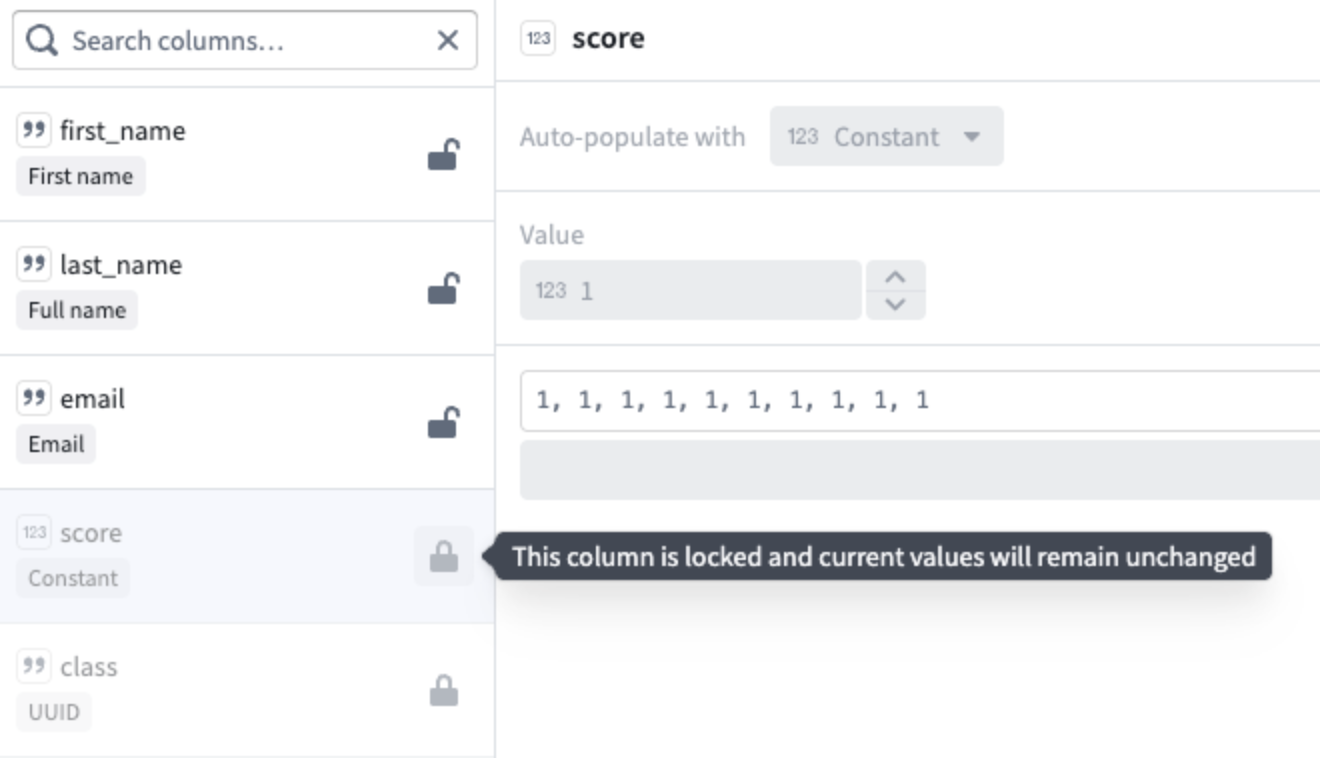
The score and class columns are locked, ensuring their current values remain unchanged when other columns get regenerated.
Learn more about generating notional data using LLMs.
Your feedback matters
We want to hear about your experiences using Pipeline Builder and welcome your feedback. Share your thoughts with Palantir Support channels or our Developer Community ↗ using the pipeline-builder tag ↗.
Track your Workshop applications with usage metrics
Date published: 2026-03-05
Workshop now includes a built-in Metrics tab in the editor sidebar, giving module builders direct visibility into how their applications are being used. Usage metrics track two categories of data—action submissions and layout views—so builders can understand which parts of their module are most active and identify trends over time. All metrics are aggregate counts and are not attributable to any specific user.
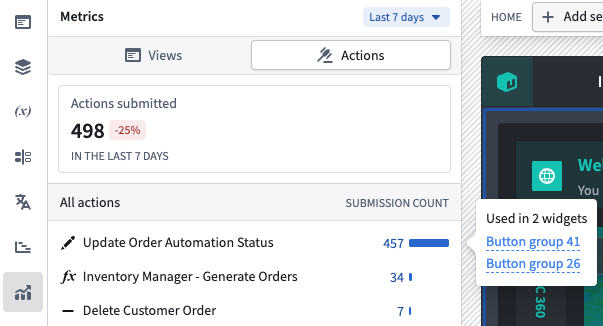
The Metrics tab in the editor sidebar showing action submission counts over the selected time period.
Track action submissions with action metrics
The Metrics panel displays the total number of successful action submissions across the module, along with the percentage change compared to the previous equivalent period. Individual actions are listed with their submission count and a proportional bar showing relative usage. Selecting an action reveals which widgets in the module reference it, making it straightforward to trace how actions are connected to the module's interface.
Action metrics are available by default for all modules and require no additional setup.
Monitor layout views with layout view metrics
Builders can also track how many times each page, tab, and overlay in their module has been viewed. The layout views overview shows the total view count with a per-layout breakdown listing individual pages, overlays, and tabs. Select a layout item to navigate directly to it in the editor.
To start collecting layout view data, open Module settings, navigate to the Metrics tab and toggle on Enable granular metrics. After enabling, it may take up to 24 hours before view data begins to appear. Views are only recorded when users interact with the module in view mode on the main branch.
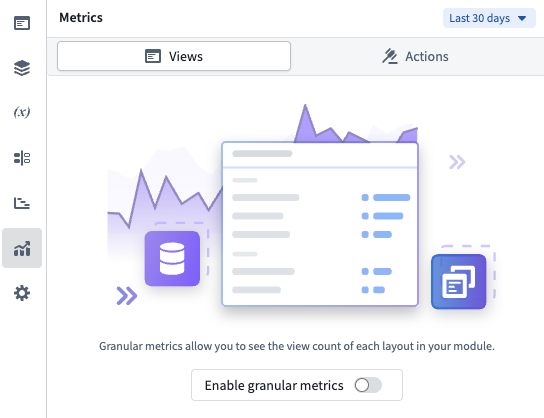
Enable granular layout metrics by toggling on usage metrics tracking.
Compare usage over time with configurable time periods
Both action and view metrics support a configurable time window of 7, 30, or 90 days, selectable from the period picker at the top of the panel. Each overview card compares the current period against the previous equivalent period, displaying the percentage change so you can spot usage trends at a glance.
Learn more about tracking your Workshop applications with usage metrics in the documentation.
Share your feedback
We want to hear about your experiences using Workshop in the Palantir platform and welcome your feedback. Share your thoughts through Palantir Support channels or on our Developer Community ↗ using the workshop tag ↗.
GPT-5.3 Codex now available in AIP
Date published: 2026-03-03
GPT-5.3 Codex is now available directly from OpenAI for non-georestricted enrollments.
Model overview
GPT-5.3 Codex ↗ is OpenAI's best coding model, optimized for agentic coding tasks, an attention to detail without sacrificing speed. GPT-5.3-Codex supports low, medium, high, and xhigh reasoning effort values for all types of agentic tasks.
- Context window: 400,000 tokens
- Knowledge cutoff: August 2025
- Modalities: Text, image
- Capabilities: Responses API, structured outputs, function calling, streaming
Getting started
To use these models:
- Confirm that your enrollment administrator has enabled the relevant model family.
- Review token costs and pricing.
- See the complete list of all models available in AIP.
Your feedback matters
We want to hear about your experiences using language models in the Palantir platform and welcome your feedback. Share your thoughts with Palantir Support channels or on our Developer Community ↗ using the language-model-service ↗ tag.
Perform time series analysis with a dedicated workspace in Quiver
Date published: 2026-03-03
Quiver now includes a redesigned analysis creation experience, making it easier to choose the right workspace for your task. When creating a new analysis, you can now select from three analysis types: Quiver analysis, time series analysis, and object set path analysis.
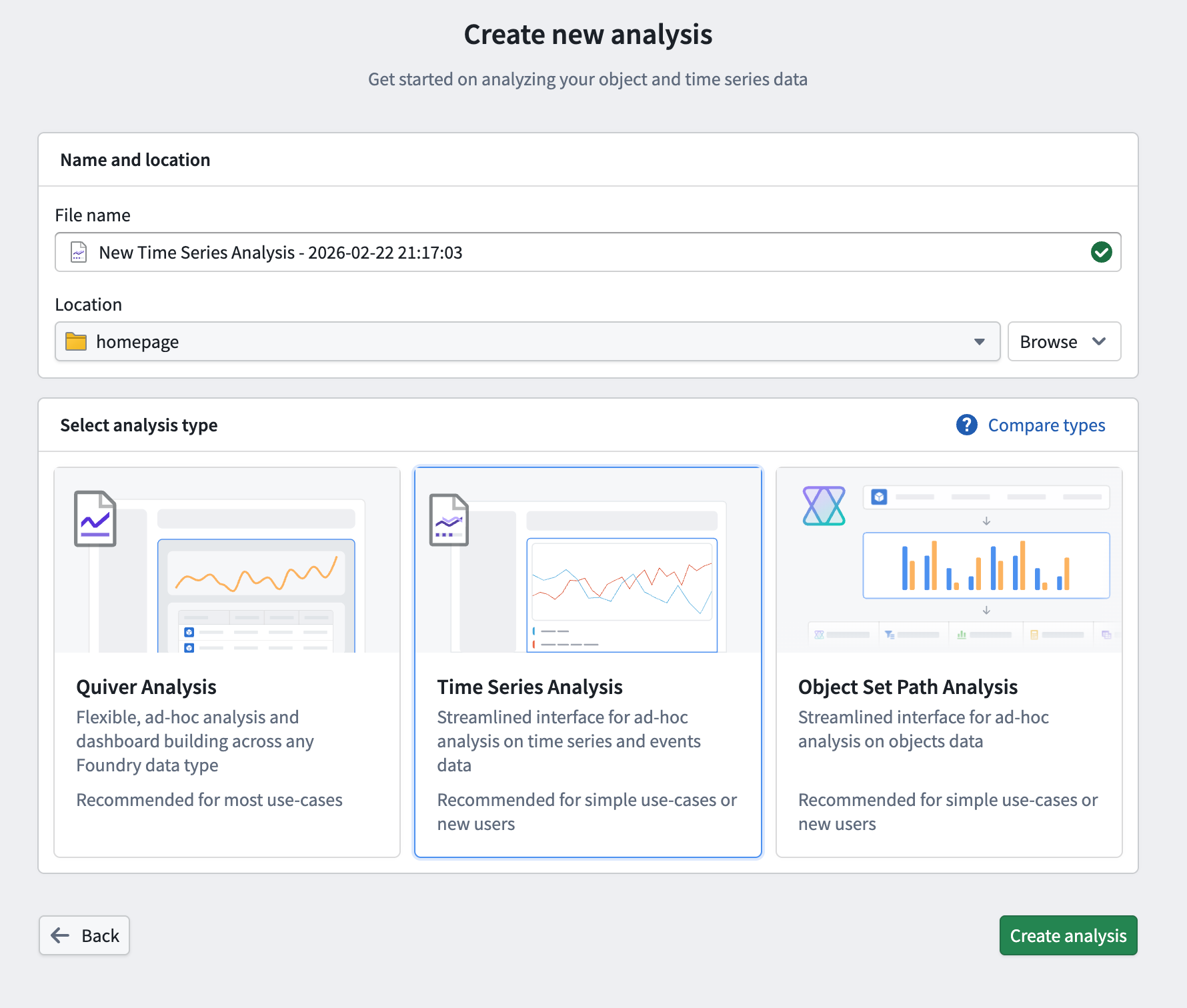
The updated Create new analysis page in Quiver, allowing you to choose from three available analysis workspaces.
As part of this update, we are introducing the time series analysis workspace, a dedicated interface purpose-built for ad-hoc time series analysis. It provides a streamlined environment for visualizing and comparing time series data without the full complexity of a Quiver analysis, making it accessible to a wider range of users. When a more advanced workspace is needed, a time series analysis can be opened directly in Quiver.
Key features
- Add and explore time series data: Add time series from the Ontology using a familiar search experience, then view and configure plot properties such as axis assignment, units, root object, interpolation, and statistics from the details panel.
- Perform time series operations: Apply operations such as rolling aggregates, formulas, filters, and event statistics directly to plots without leaving the analysis context.
- Visualize event sets: Overlay events from linked objects or configurable conditions on charts alongside time series data.
- Organize across multiple canvases: Work across multiple chart canvases with synchronized or independent x-axes. Reorder, move, and hide plots as needed, with automatic axis grouping by unit.
- Save and share analyses: Save analyses as Foundry resources for later use, and open them in a dedicated resource viewer or load them into a Workshop widget using the analysis RID.
Build a guided time series analysis experience in Workshop
The Time Series Analysis widget brings the same interface and tooling to Workshop, allowing application builders to embed time series analysis directly in their applications. The widget includes fine-grained configuration options to tailor the experience for operational users:
- Filter which Ontology series are available for users to add to their analysis
- Control initial time series and event sets using object set variables
- Customize which plot types and event set types are available
- Set chart display options including default view range, tooltip display, and x-axis syncing behavior across canvases
- Configure how analyses are saved and loaded, including default save location and autoloading
Users can also open their analysis in Quiver directly from the widget for more advanced workflows. Note that changes made in Quiver are not reflected back in the Workshop widget.
Getting started
To create a new time series analysis, navigate to the New Analysis button on the Quiver splash page or Foundry side panel. Choose a name and location for your file and select Time Series Analysis before saving.
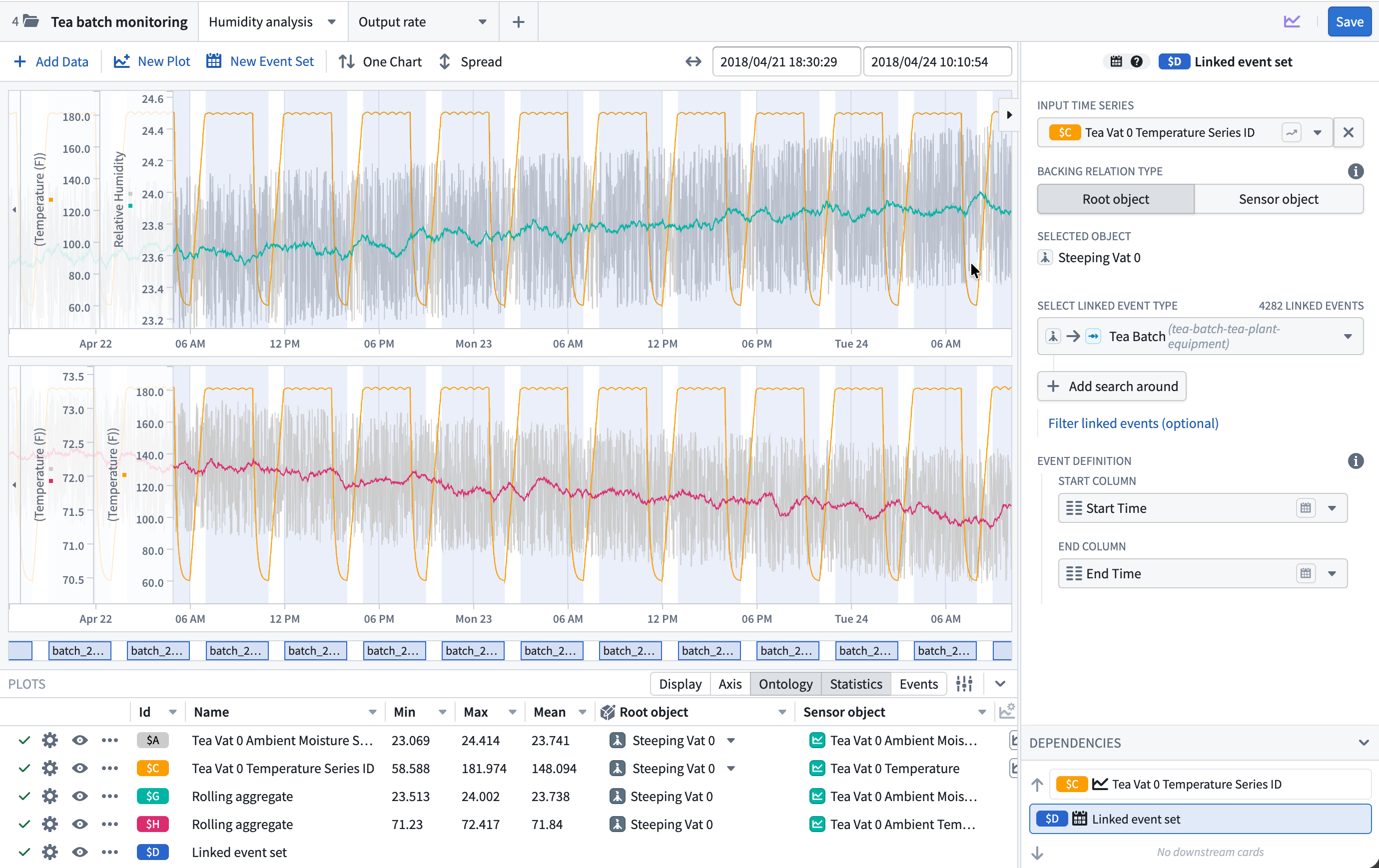
The new time series analysis view in Quiver.
For more information, review the Quiver analysis types documentation and the Time Series Analysis widget documentation.
Share your feedback
We want to hear about your experiences creating time series analyses in Quiver and Workshop. Share your thoughts with our Palantir Support channels or Developer Community ↗ using the quiver ↗ or workshop ↗ tags.
Expanded Workflow Lineage access across the Palantir platform
Date published: 2026-03-03
You can now open Workflow Lineage graphs from more locations across the platform using the Cmd+i (macOS) or Ctrl+i (Windows) shortcut, as well as a dedicated navigation option available on various resource types.
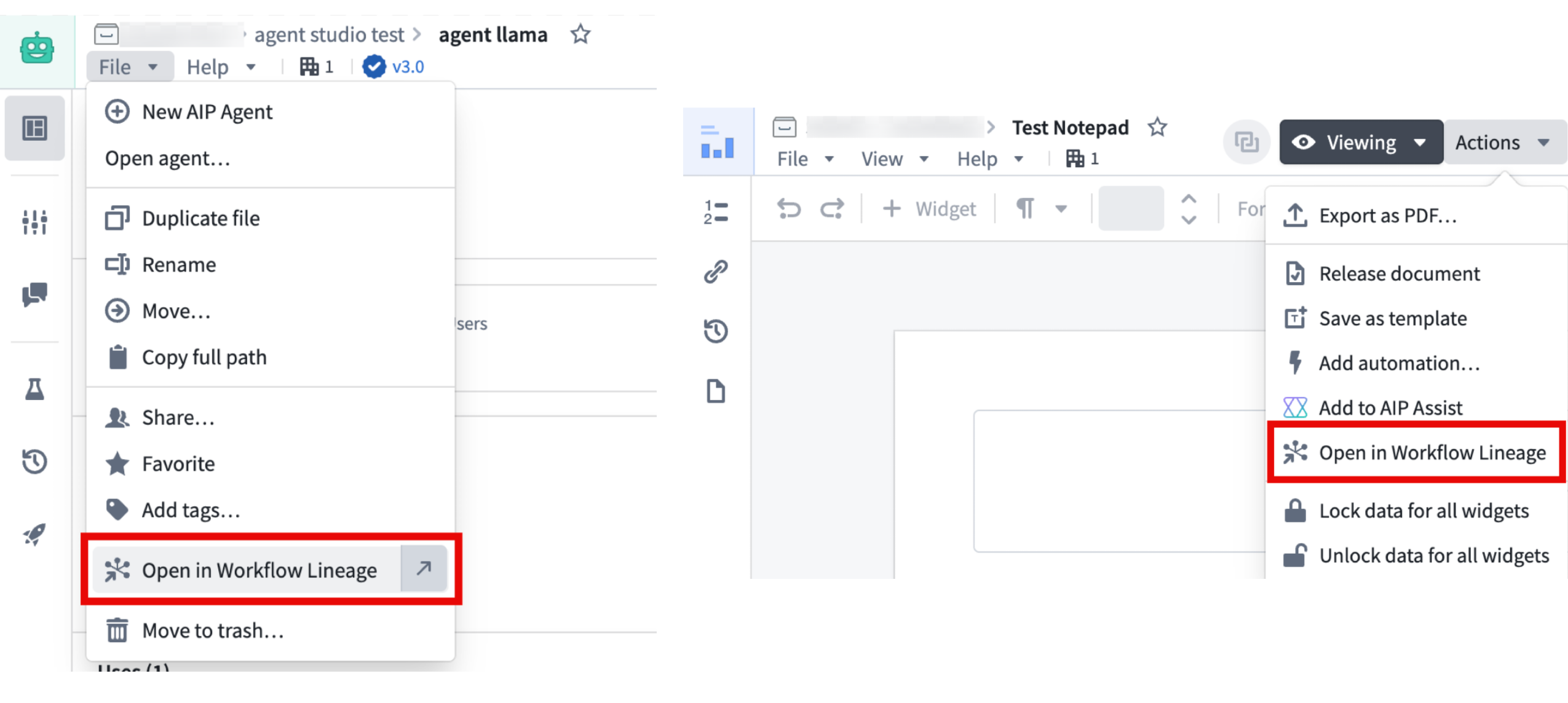
Examples of the Open in Workflow Lineage option in Agent Studio and Notepad, often found under File or Actions in the top navigation bar.
Access Workflow Lineage
- Use the
Cmd+i(macOS) orCtrl+i(Windows) keyboard shortcuts to open Workflow Lineage, or select the Open in Workflow Lineage option on a resource where available. - You will be redirected to the resource's Workflow Lineage graph displaying the selected node, plus any direct upstream and downstream nodes. Note that some resources may not display actions, functions, or objects if those concepts do not apply.
The following applications support these navigation features:
- Workshop
- Objects in Ontology Manager
- Function repositories
- Quiver dashboards
- Machinery
- Slate
- Agent Studio
- Automate
- Third-party applications
- Developer Console (Keyboard shortcut only)
- Marketplace (Keyboard shortcut only, in a draft resource's overview tab.)
- Notepad (Navigation option only)
- Object types in Pipeline Builder (Navigation option only)
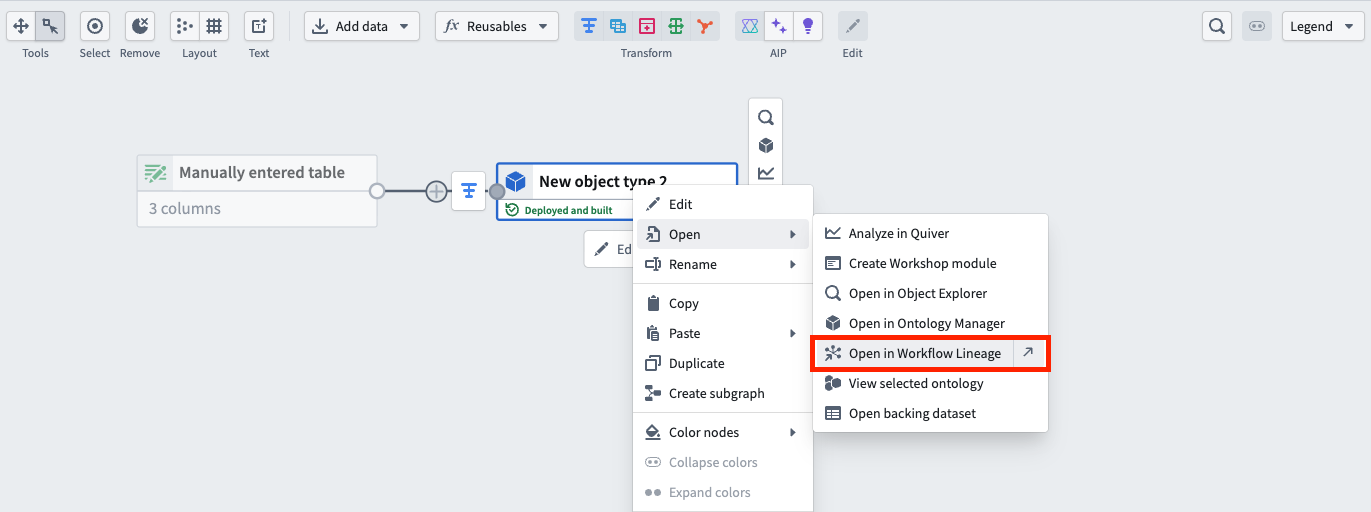
The dedicated navigation option in Pipeline Builder.
Leverage this feature to better explore and understand your workflows from different applications across the Palantir ecosystem.
We want to hear from you
As we continue to develop Workflow Lineage, we want to hear about your experiences and welcome your feedback. Share your thoughts with Palantir Support channels or our Developer Community ↗ using the Workflow-lineage ↗ tag.