- Capabilities
- Getting started
- Architecture center
- Platform updates
Announcements
REMINDER: Sign up for the Foundry Newsletter to receive a summary of new products, features, and improvements across the platform directly to your inbox. For more information on how to subscribe, see the Foundry Newsletter and Product Feedback channels announcement.
Share your thoughts about these announcements in our Developer Community Forum ↗.
Claude Sonnet 4.6 now available for UK enrollments
Date published: 2026-02-26
Claude Sonnet 4.6 is now available from AWS Bedrock on UK georestricted enrollments.
Model overview
Anthropic's newest model, Claude Sonnet 4.6, delivers significant improvements over Sonnet 4.5 across coding, agentic workflows, visual reasoning, and tool use. It operates more efficiently than Opus models with faster performance and lower costs, making it ideal for a wide range of use cases. For more information, review Anthropic's model documentation ↗.
- Context window: 200,000 tokens
- Modalities: Text, image
- Capabilities: Extended thinking, function calling, adaptive thinking
Getting started
To use this model:
- Confirm that your enrollment administrator has enabled the relevant model family or families.
- Review token costs and pricing.
- See the complete list of all available models in AIP.
Your feedback matters
We want to hear about your experiences using language models in the Palantir platform and welcome your feedback. Share your thoughts with Palantir Support channels or on our Developer Community ↗ using the language-model-service tag ↗.
Compass-managed permissions for Developer Console applications
Date published: 2026-02-26
Developer Console applications now use Compass-managed user permissions, giving you a more consistent and scalable way to manage access to your applications. This change will begin rolling out to enrollments the week starting February 23 and aligns Developer Console with the same permission model used across Foundry. Support for CBAC enrollments is in active development and expected to roll out at the end of March.
Prior to this change, Developer Console users were automatically set as the Owner of the applications they created and had to manually share each application with other users and groups from the Sharing & tokens section of their application. This legacy model requires per-application permission management.
What's new?
Developer Console applications will now behave like any other project resource:
- Inherited permissions: Applications inherit roles, organizations, and markings from the project they reside in and no longer need to be shared manually upon creation.
- Standard Compass operations: You can move, share, and trash applications using the same workflows available for other Foundry resources.
- Marketplace alignment: New applications installed through Marketplace are created in the location you provide during installation.
For more information on these changes, review the Developer Console documentation.
How to create a Compass-managed application
If this feature has been made available for your enrollment, all new Developer Console applications will be created with Compass-managed permissions by default. You will be prompted to select a location for your application during creation:
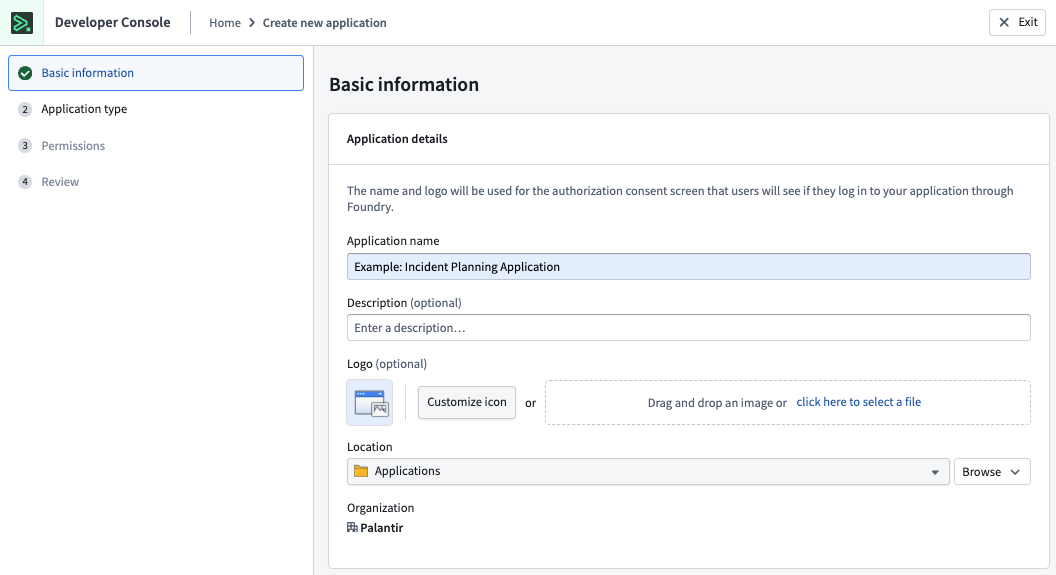
The first step of the creation wizard prompts you to select a location for your Developer Console application.
How to migrate existing applications
To migrate existing applications to Compass-managed permissions, follow our step-by-step guide.
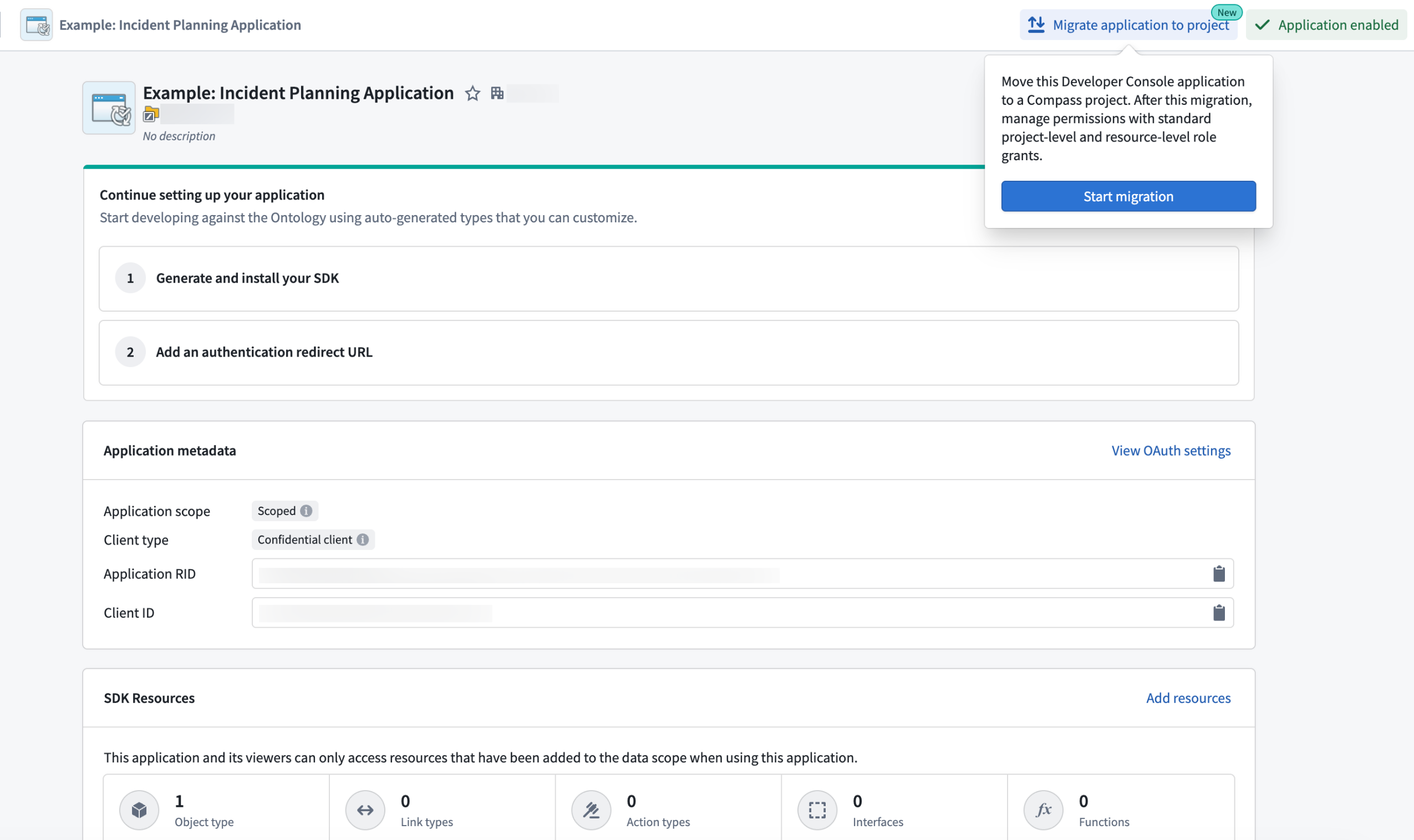
The migration callout for legacy Developer Console applications.
Your feedback matters
We want to hear about your experiences using Developer Console and welcome your feedback. Share your thoughts through Palantir Support channels or on our Developer Community ↗.
New files landing page and the ability to promote files
Date published: 2026-02-26
Starting the week of February 23, a redesigned Files landing page, along with the introduction of a Promoted status, will be available across all enrollments. These changes are designed to help users find relevant content as the volume of resources on the platform increases.
The redesigned files landing page provides a centralized view of all files a user has access to, making it easier to browse and discover relevant content. At the top of the page, quick-filter cards highlight Portfolios, Projects, and Promoted items, explaining each resource type and offering one-click filtering. A unified search function offers the ability to search across all files, and the filter side-panel lets users refine results by resource type, status, portfolio, project, and tag.
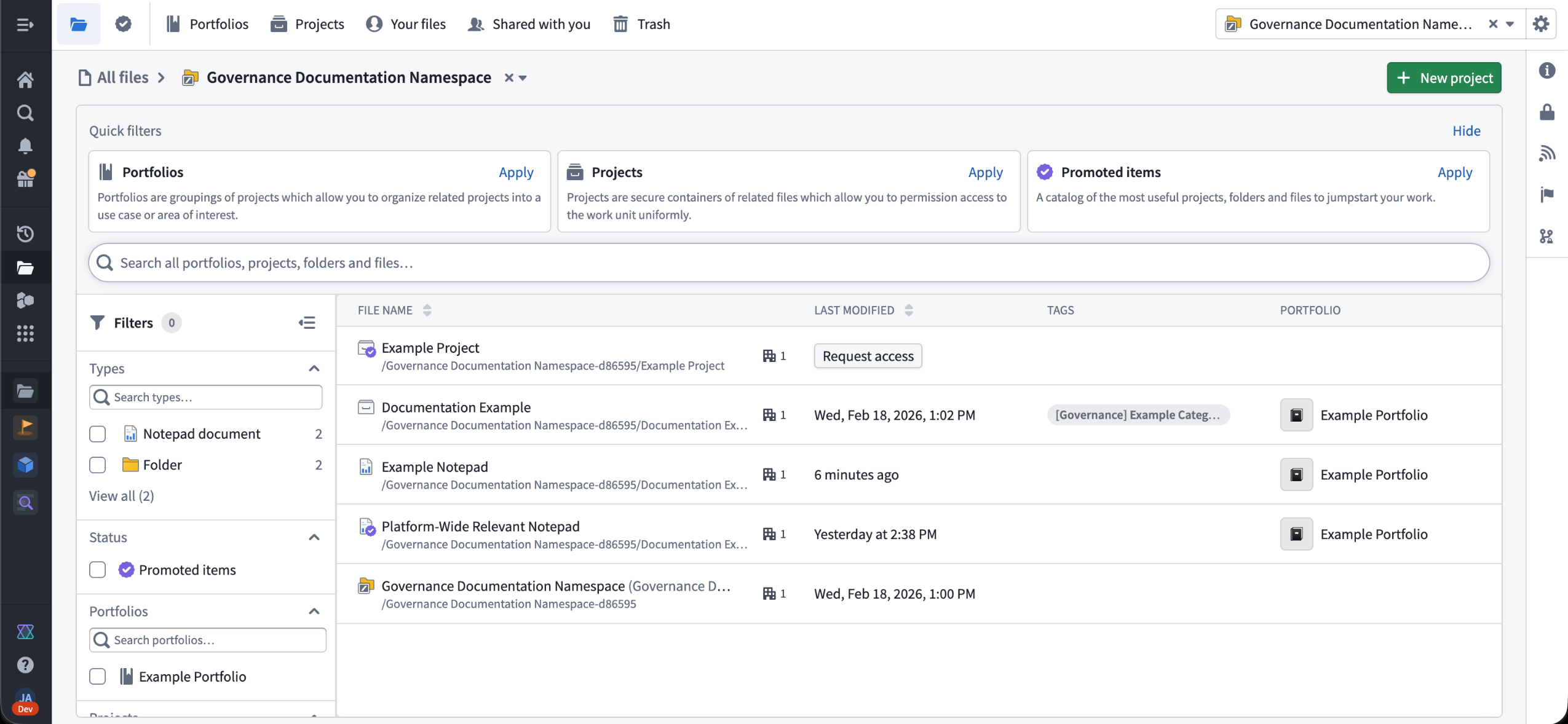
The new landing pages for files, accessible through the navigation bar on the left.
Additionally, all resources can now be marked as Promoted, giving them a visibility boost across the platform. Promoted resources will display a purple badge, rank higher in search results, and be featured prominently in resource pickers and landing pages. This is useful for broadly relevant resources, such as onboarding documentation, canonical datasets, or frequently referenced reports that should be highlighted to users.
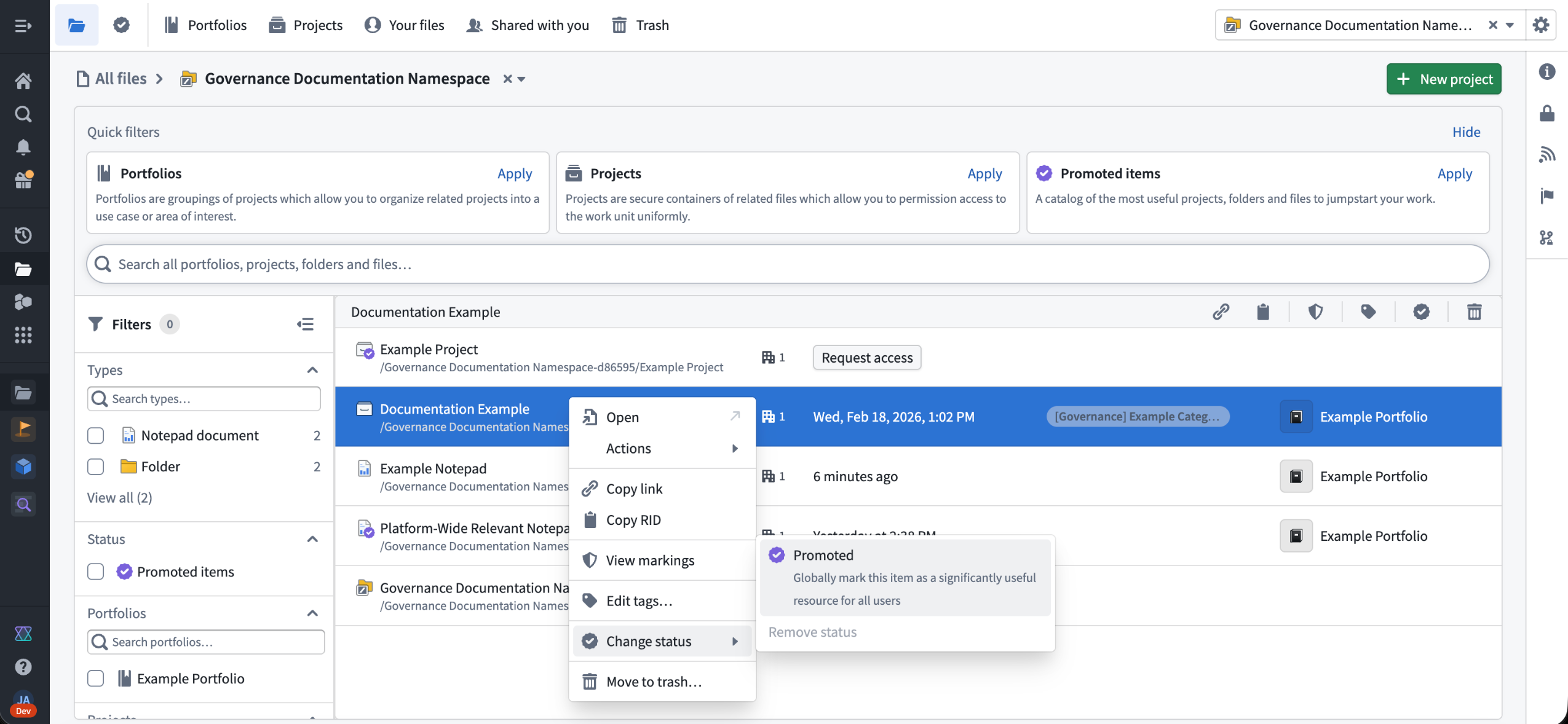
Promoting a resource in the files homepage.
To promote a resource, right-click it and select Change status > Promoted.
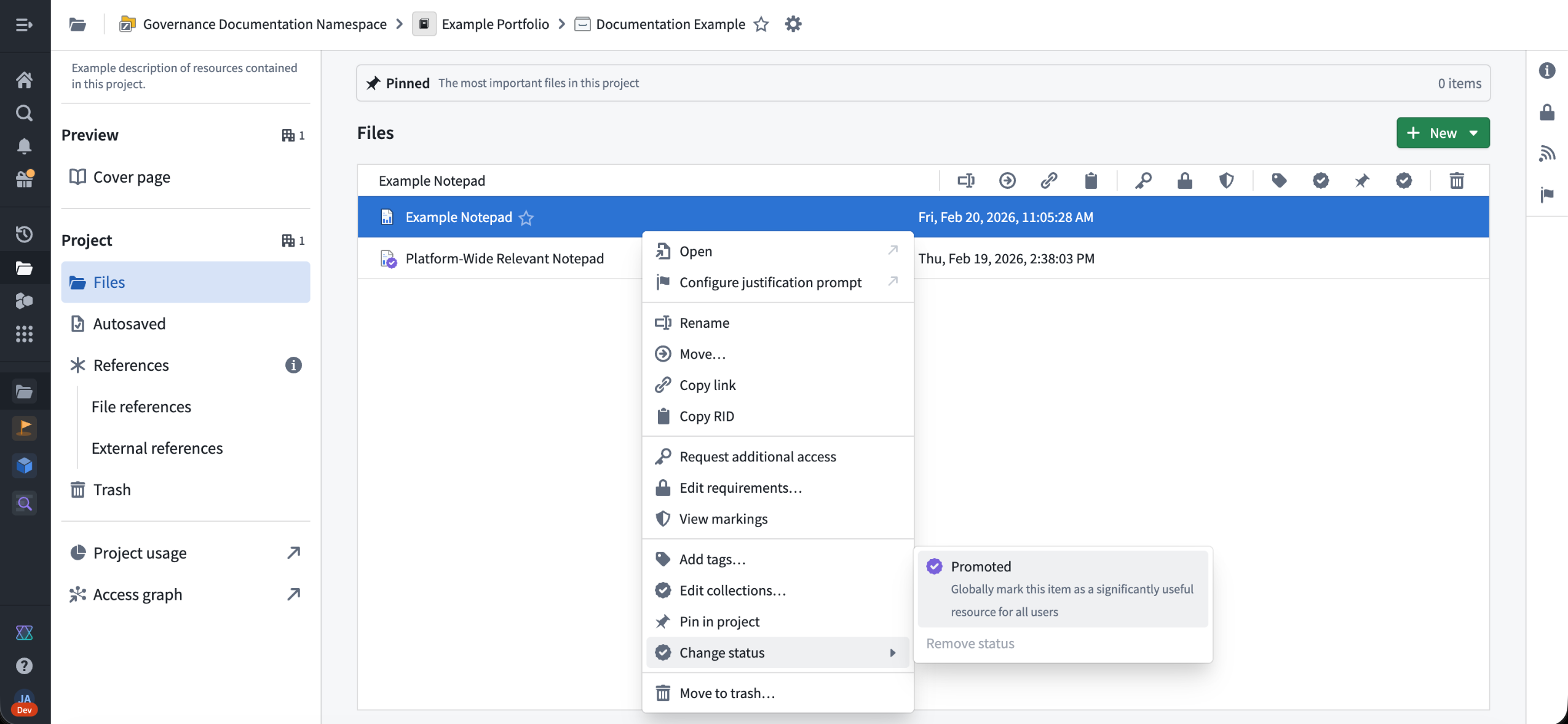
Promoting a resource through a project view.
By default, users with the Editor role on a resource can promote it, but platform administrators can restrict this action on a per-space basis in Control Panel with the Resource Curator space role. If this role is restricted, users will need to be an Editor on the resource and the Resource Curator role to mark it as promoted.
Learn more about Compass and the promoted resource status.
Custom background colors for Workshop sections and pages
Date published: 2026-02-26
Workshop sections and pages now support custom background colors, giving application builders better control over the visual design of their modules. In addition to the existing preset shades, you can now apply any hex color or Blueprint color to section and page backgrounds. Saved colors defined at the module level are also available as section and page background options, making it straightforward to maintain a consistent color palette across an application.
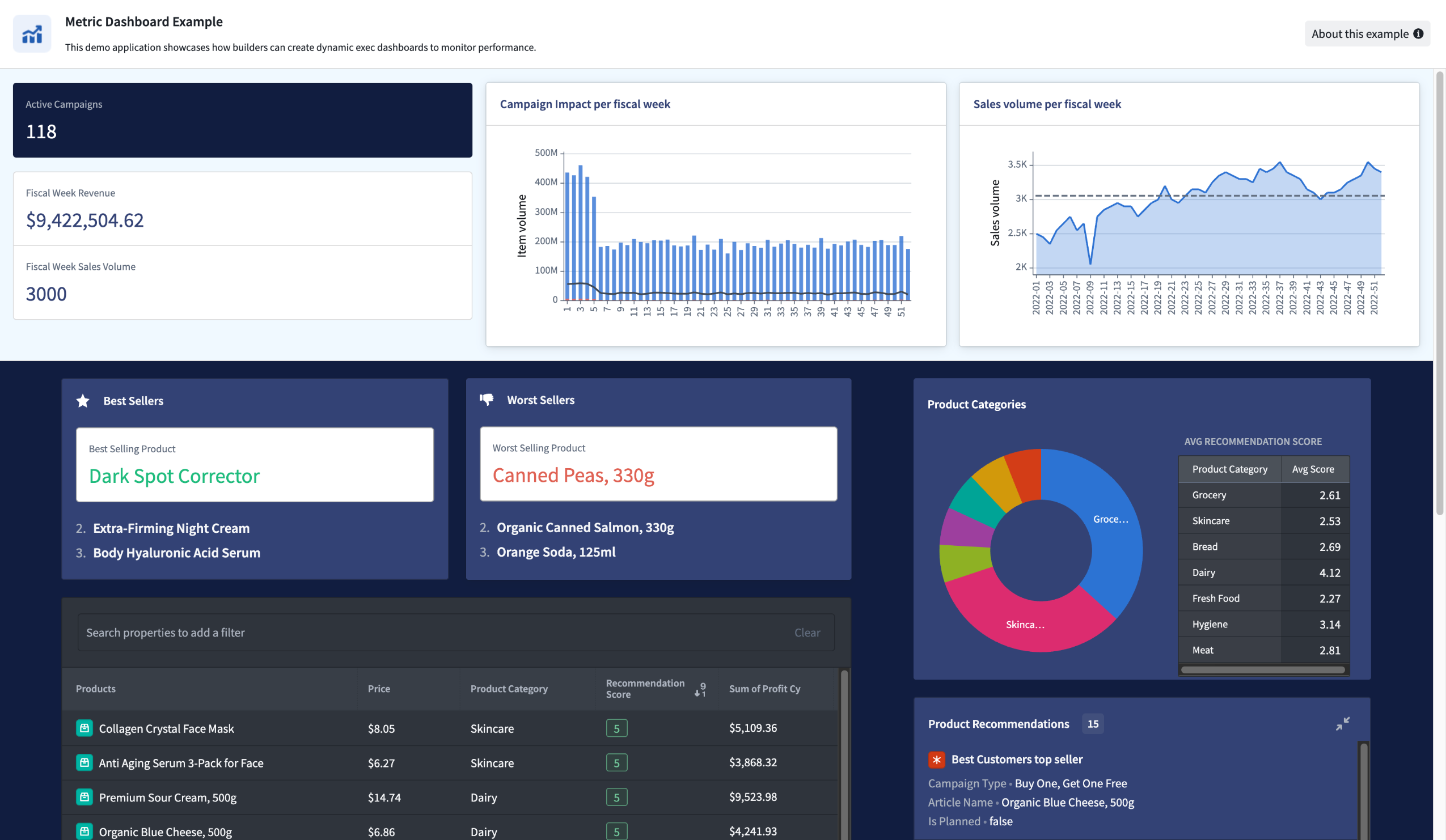
A Workshop application page showing custom background colors.
What's included
- Custom hex colors for sections and pages: Set any color as the background for a section or page using a hex code, or select from Blueprint color shortcuts to quickly apply a standard color value.
- Saved color support: Use saved colors as section and page backgrounds. Editing a saved color automatically updates all sections and pages that reference it.
- Automatic theme adaptation: When a custom background color is applied, widgets within the section automatically switch between light and dark mode based on the brightness of the background color, ensuring text and controls remain legible.
- Consistent behavior across layouts: Custom background colors work with section padding, section headers, and split sections. When splitting a section that has a custom background color, both resulting sections inherit the original color.
How to use custom background colors
To set a custom background color, select a section or page in edit mode, open the Style configuration, and choose a color from the background color options. Select the custom color tile to open the color picker, where you can enter a hex code or choose from Blueprint color shortcuts.
Learn more about background colors and other style formatting options in Workshop.
Let us know what you think
We want to hear about your experiences using Workshop in the Palantir platform and welcome your feedback. Share your thoughts through Palantir Support channels or on our Developer Community ↗ using the workshop tag ↗.
Log search available in Workflow Lineage
Date published: 2026-02-25
The new Search logs tab in Workflow Lineage allows you to search across all service logs produced by a selected source executor over the past seven days. A source executor is the first executable resource in the call chain and can be a function, action, automation, AIP logic, or AIP agent.
Unlike the per-execution service logs view, which shows logs for a single run, log search aggregates logs from every execution originating from a given resource. This makes it easier to investigate recurring errors, track down intermittent issues, or find specific log messages across multiple runs.
To get started, select any executable resource node in Workflow Lineage and open the Search logs tab in the bottom panel.
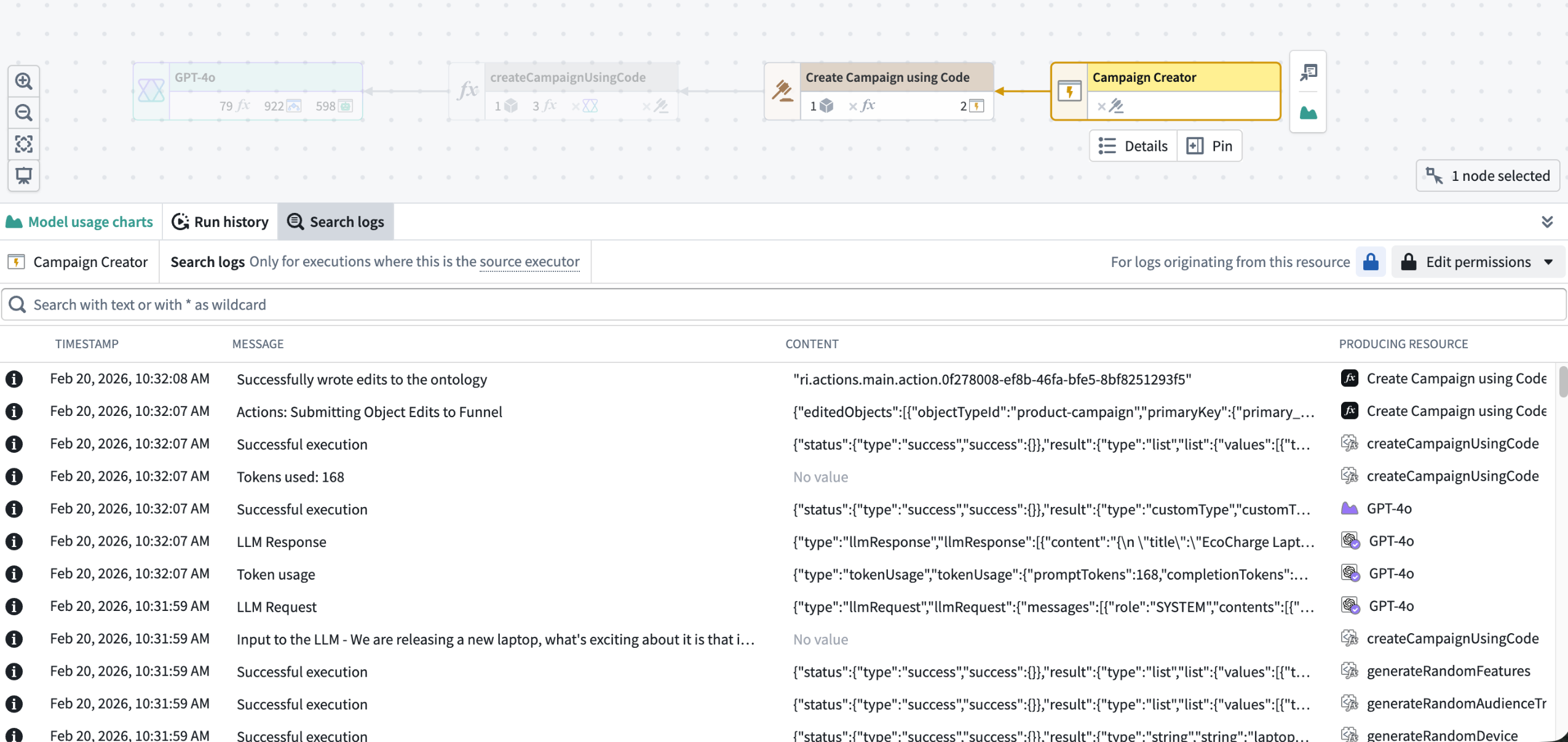
Log search in Workflow Lineage
The search bar accepts case-sensitive text queries and supports * as a wildcard character to match any sequence of characters. Results are displayed in a table sorted by most recent, with matching text highlighted in the Message and Content columns. Select any cell to open a detail dialog with full JSON formatting and in-dialog text search.
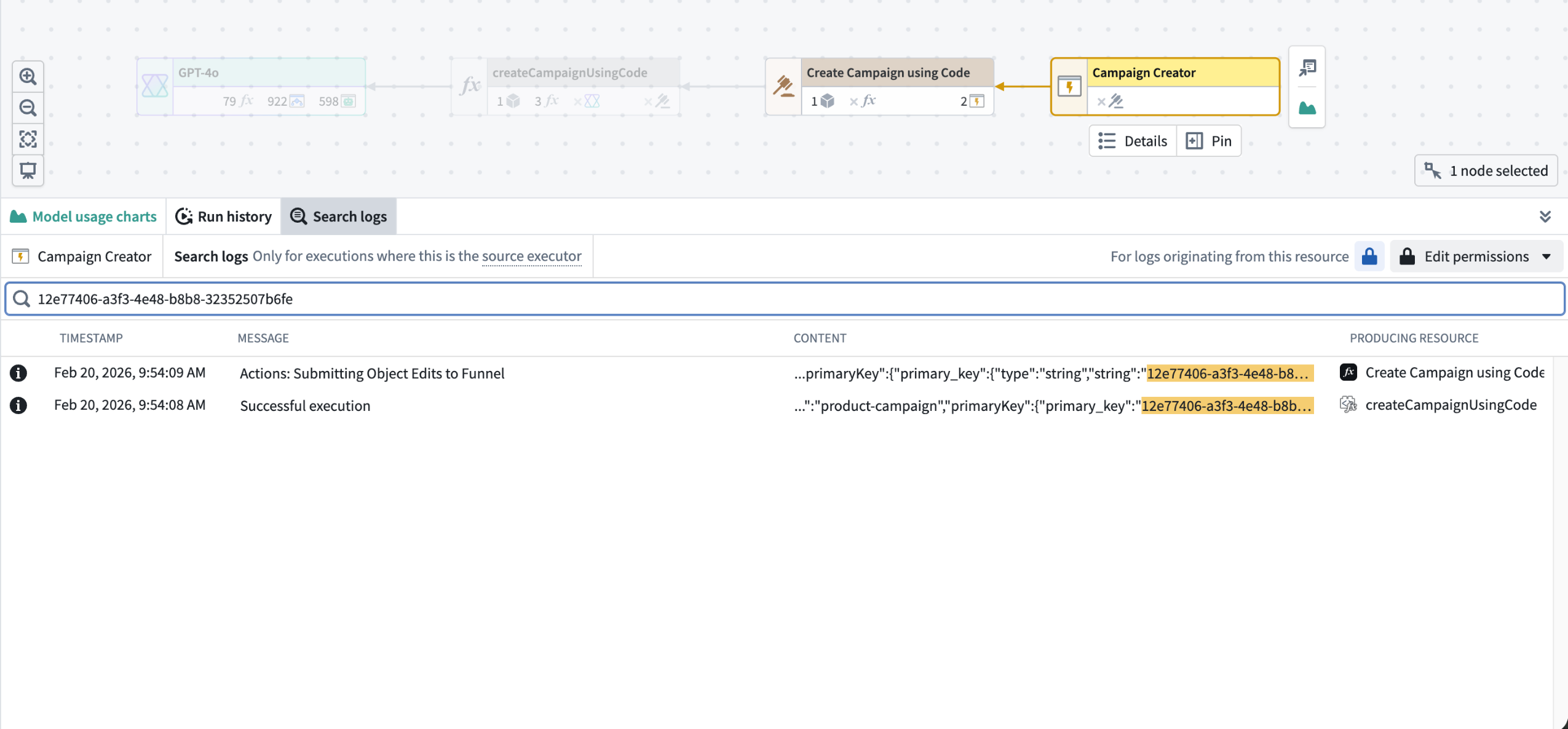
Results of sample log search
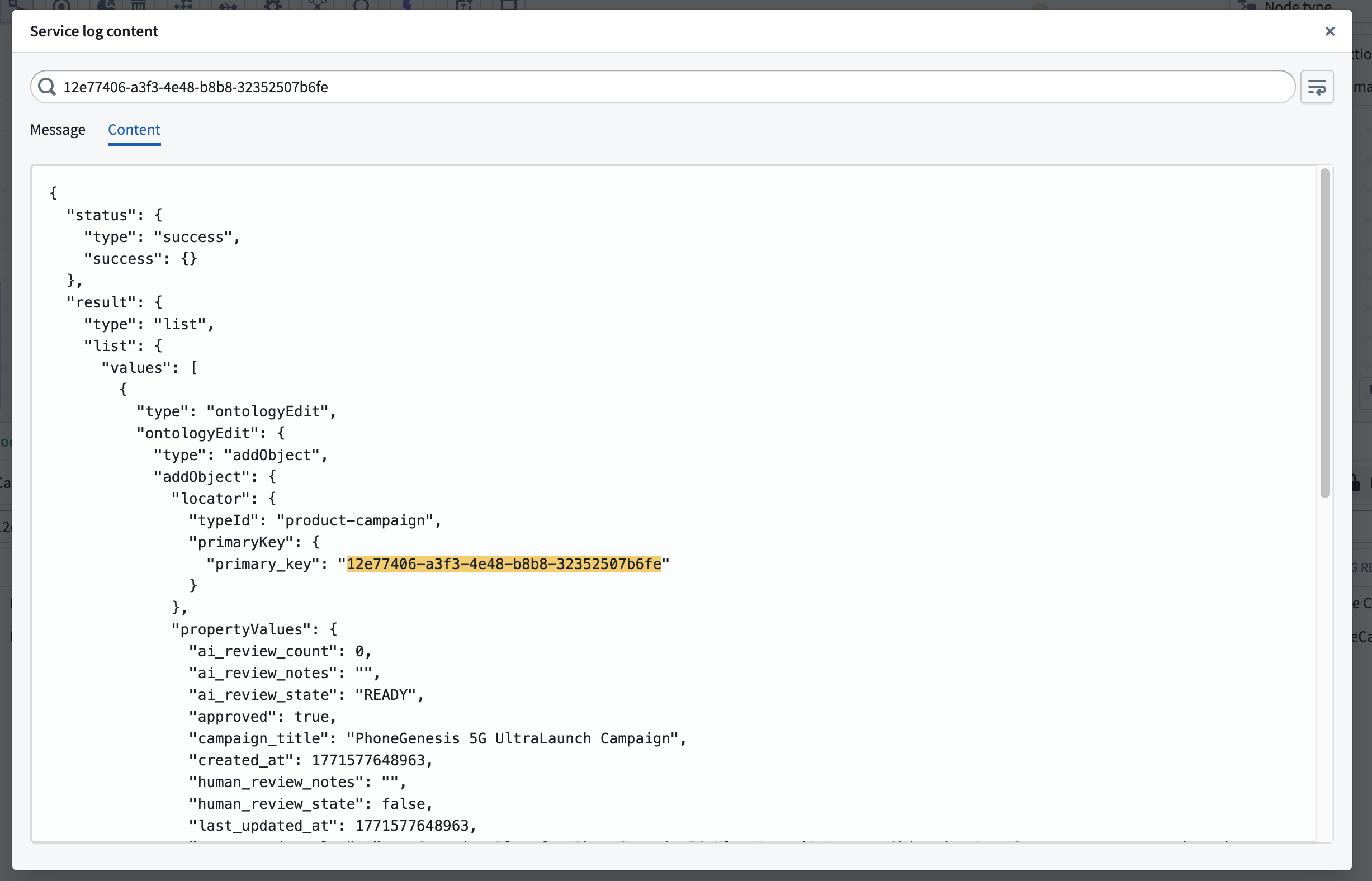
Detailed view of sample log search
Log search requires edit permission on the resource. If log access has been enabled for the source executor's project, you can search across all executions; otherwise, only your own executions from the past 24 hours are searchable.
For full details, see the log search and log permissions documentation.
Your feedback matters
We want to hear about your experiences using Workflow Lineage and welcome your feedback. Share your thoughts with Palantir Support channels or on our Developer Community ↗ using the workflow-lineage tag ↗.
Gemini 3.1 Pro now available via VertexAI
Date published: 2026-02-24
Gemini 3.1 Pro model is now available from VertexAI on commercial, non-georestricted enrollments.
Model overview
Gemini 3.1 Pro ↗ is Google’s newest and most advanced model for complex tasks. It is particularly well-suited for applications that require agentic performance, advanced coding, long context and/or multimodal understanding, and/or algorithmic development.
- Context window: 1,000,000 tokens
- Knowledge cutoff: January 2025
- Modalities: Text, image
- Capabilities: Function calling, structured output
Note that Gemini 3.1 Pro is still in preview status from Google Cloud Platform. Within AIP, Gemini 3.1 Pro has all of the characteristics and behavior of a generally-available AIP model.
Getting started
To use these models:
- Confirm that your enrollment administrator has enabled the relevant model family.
- Review token costs and pricing.
- See the complete list of all models available in AIP.
Your feedback matters
We want to hear about your experiences using language models in the Palantir platform and welcome your feedback. Share your thoughts with Palantir Support channels or on our Developer Community ↗ using the language-model-service tag ↗.
Claude Sonnet 4.6 now available from Anthropic, AWS Bedrock, and Google Vertex
Date published: 2026-02-24
Claude Sonnet 4.6 is now available from Anthropic, AWS Bedrock, and Google Vertex on non-georestricted enrollments. For US and EU georestricted enrollments, this model is available from AWS Bedrock and Google Vertex.
Model overview
Anthropic's newest model, Claude Sonnet 4.6, delivers significant improvements over Sonnet 4.5 across coding, agentic workflows, visual reasoning, and tool use. It operates more efficiently than Opus models with faster performance and lower costs, making it ideal for a wide range of use cases. This model is now available on US and EU non-georestricted enrollments with Direct Anthropic, AWS Bedrock, or Google VertexAI enabled. For more information, review Anthropic's model documentation ↗.
- Context window: 200,000 tokens
- Modalities: Text, image
- Capabilities: Extended thinking, function calling, adaptive thinking
Getting started
To use this model:
- Confirm that your enrollment administrator has enabled the relevant model family or families.
- Review token costs and pricing.
- See the complete list of all available models in AIP.
Your feedback matters
We want to hear about your experiences using language models in the Palantir platform and welcome your feedback. Share your thoughts with Palantir Support channels or on our Developer Community ↗ using the language-model-service tag ↗.
Automatically obfuscate sensitive data in Sensitive Data Scanner using Cipher
Date published: 2026-02-24
Sensitive Data Scanner (SDS) is a data governance tool that detects potentially sensitive data in Foundry, such as phone numbers, Social Security Numbers, or user-defined patterns, and automatically performs a Match Action whenever a match is detected. SDS now supports a new Match Action type, Obfuscate Data, allowing you to automatically encrypt or hash matched sensitive data using Cipher. This addition joins the existing Match Action types, Apply Markings and Create Issues, giving data governance users more direct control over how sensitive data is handled when a match is detected.
Set up an Obfuscate Data Match Action
To use this Match Action, you will need a Cipher Channel and a Cipher License. The Cipher Channel determines the cryptographic algorithm SDS will use to obfuscate matched data. The following algorithms are supported:
- Deterministic encryption (AES SIV)
- Probabilistic encryption (AES GCM SIV)
- Hashing (SHA512 and SHA256)
A Cipher License grants the permissions needed to interact with a Cipher Channel. SDS specifically requires an Admin License, as cryptographic key access is needed to perform the obfuscation. If you do not already have a Cipher Channel or Cipher License, you can create these in Cipher.
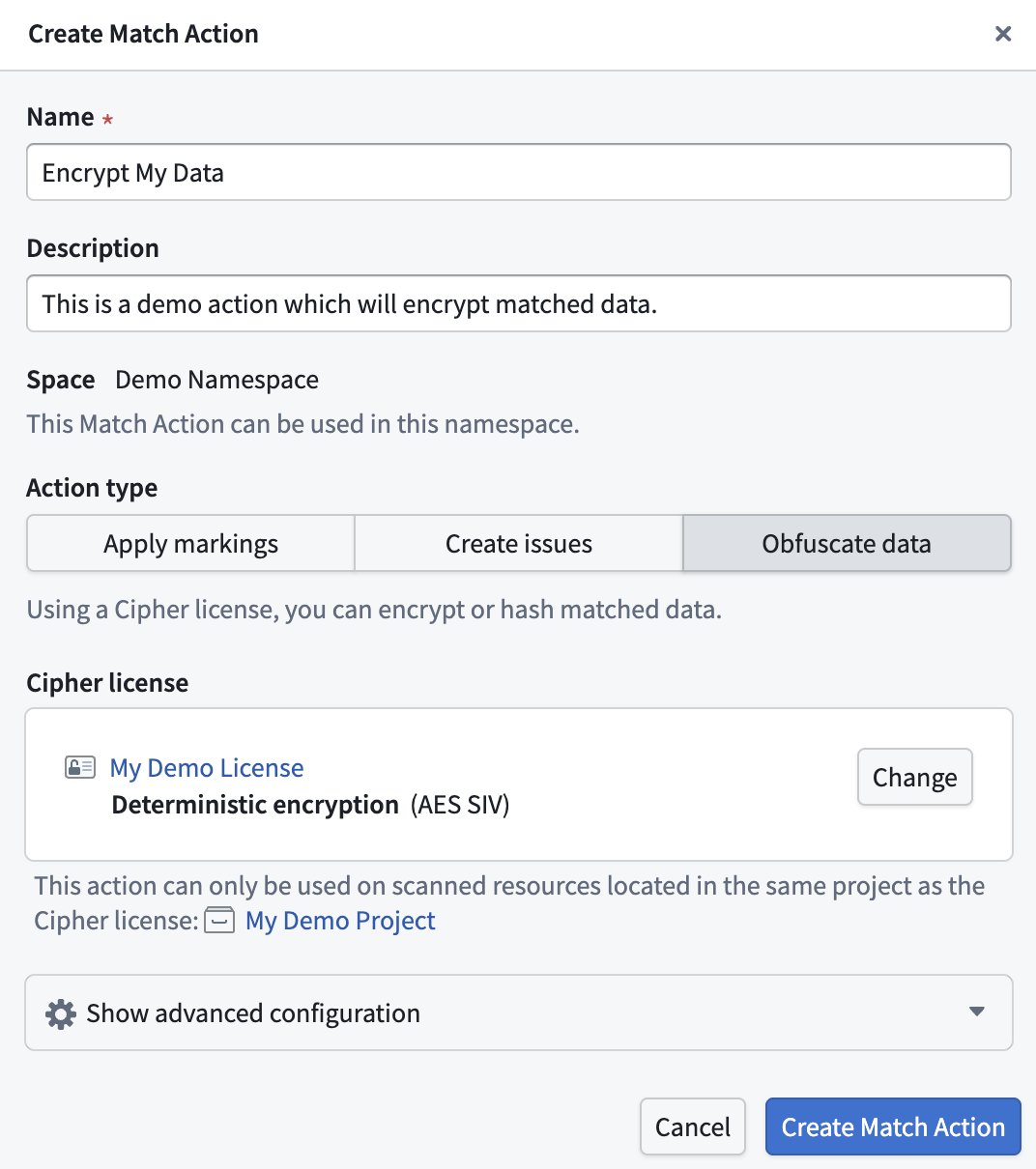
The Create Match Action dialog for creating a new Obfuscate Data Match Action.
Obfuscation modes
By default, SDS will obfuscate the entire column when a match is found. You can customize this behavior by expanding Show advanced configuration in the Create Match Action dialog to select from four obfuscation modes:
- Entire column (default): Obfuscates the entire column if a match is found.
- Entire row: Obfuscates the entire row if a match is found.
- Matched cell only: Obfuscates only the cells in which a match is found.
- Matched segments only: Obfuscates only the text segments that match the match condition.
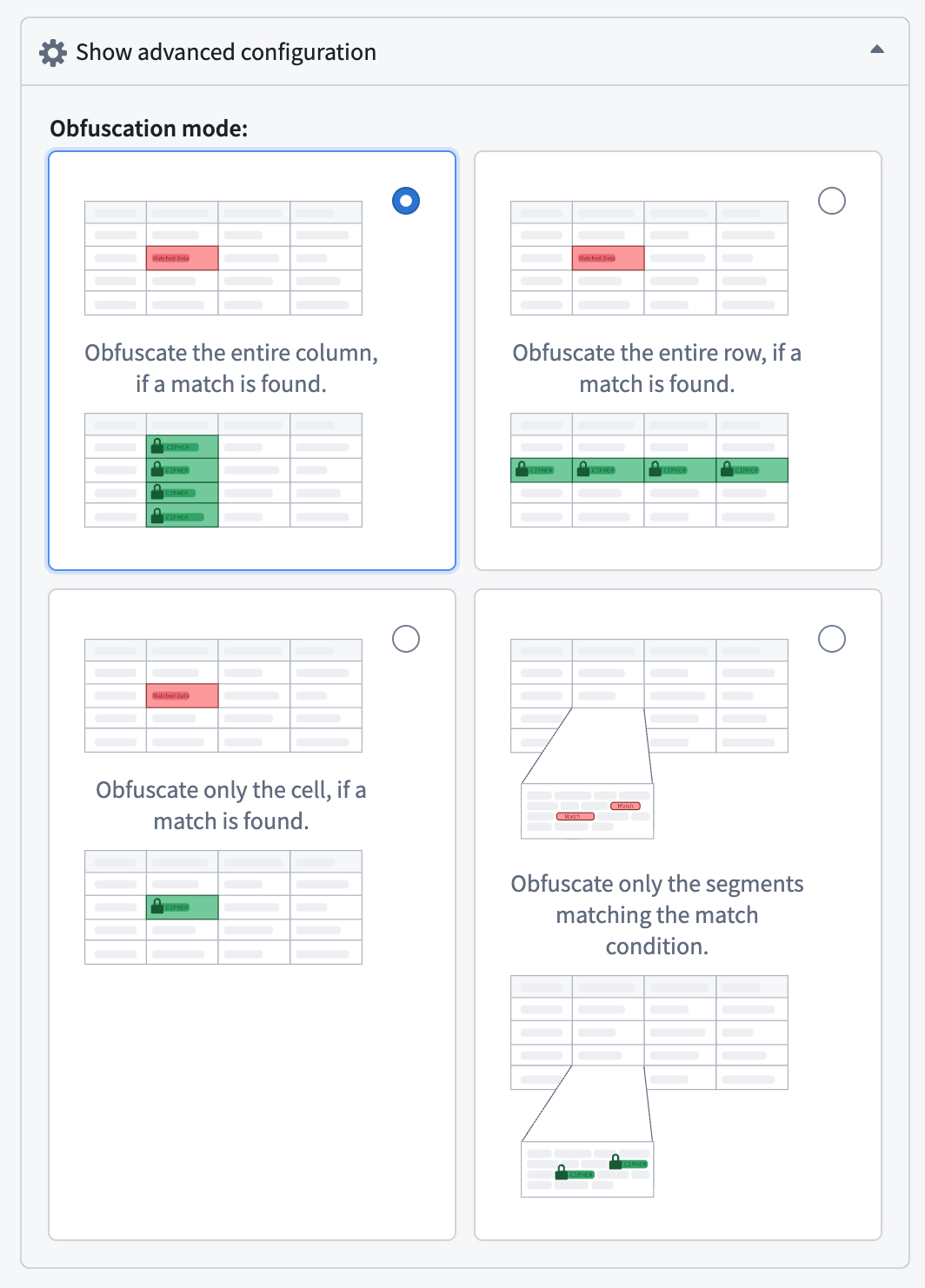
The four available obfuscation mode options in the setup dialog.
For each scanned resource, SDS will create an obfuscated output dataset. These output datasets are linked directly in the SDS scan results interface.
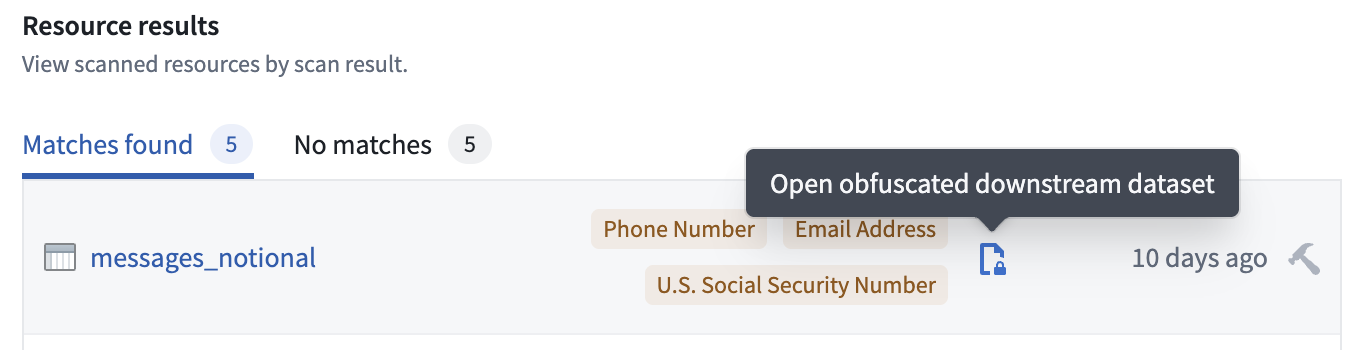
The SDS scan results, displaying the link to the obfuscated output data set.
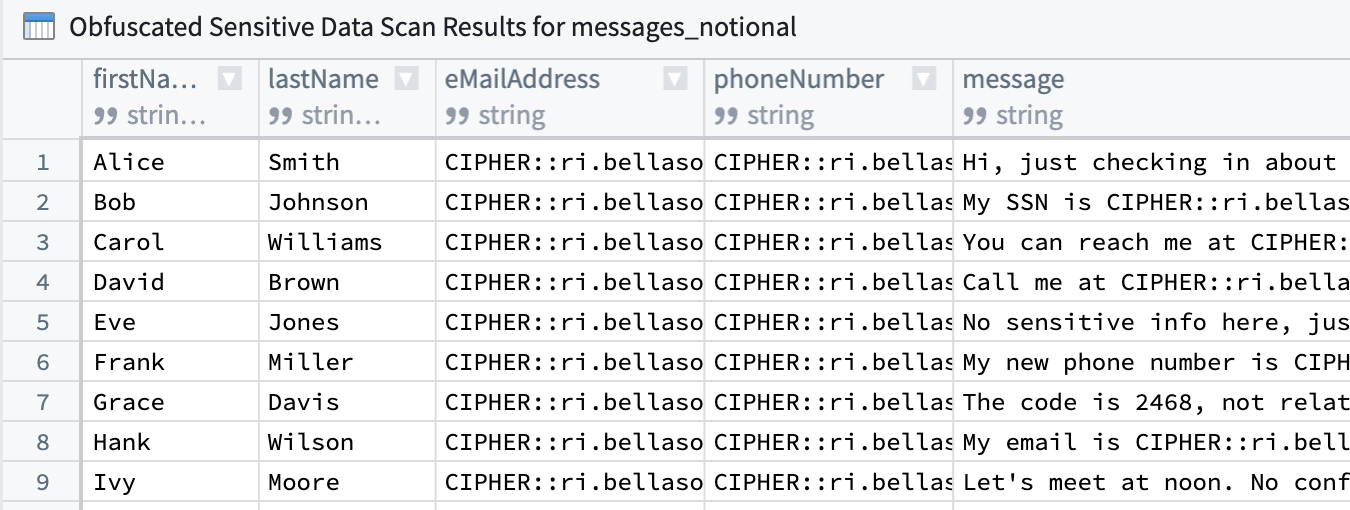
An example obfuscated output dataset, encrypting detected email addresses and phone numbers.
For more information, review the Match Actions documentation for Sensitive Data Scanner.
Share your thoughts
We want to hear about your experiences using Match Actions with Sensitive Data Scanner. Share your feedback with Palantir Support channels or on our Developer Community ↗ using the sensitive-data-scanner tag ↗.
Core Object Views are now generally available
Date published: 2026-02-19
When you create and configure an object type in your Ontology, Foundry automatically creates a core Object View to provide a standardized representation of all its objects, ensuring other users have a holistic understanding of its schema and links without requiring additional configuration. Core Object Views provide a consistent, complete display of object data after object type creation, and they are now generally available across Foundry enrollments.
Why does Foundry configure core Object Views after you create an object type?
Providing a default Object View that displays an object's prominent and standard properties saves Ontology builders time while ensuring other users gain maximum value from their interaction with the automatically created core representation. With Foundry handling the core Object View's creation, builders gain back time to create their own workflow-specific custom Object Views configured for a wider range of use cases, as needed. Learn more about building custom Object Views using Foundry Branching.
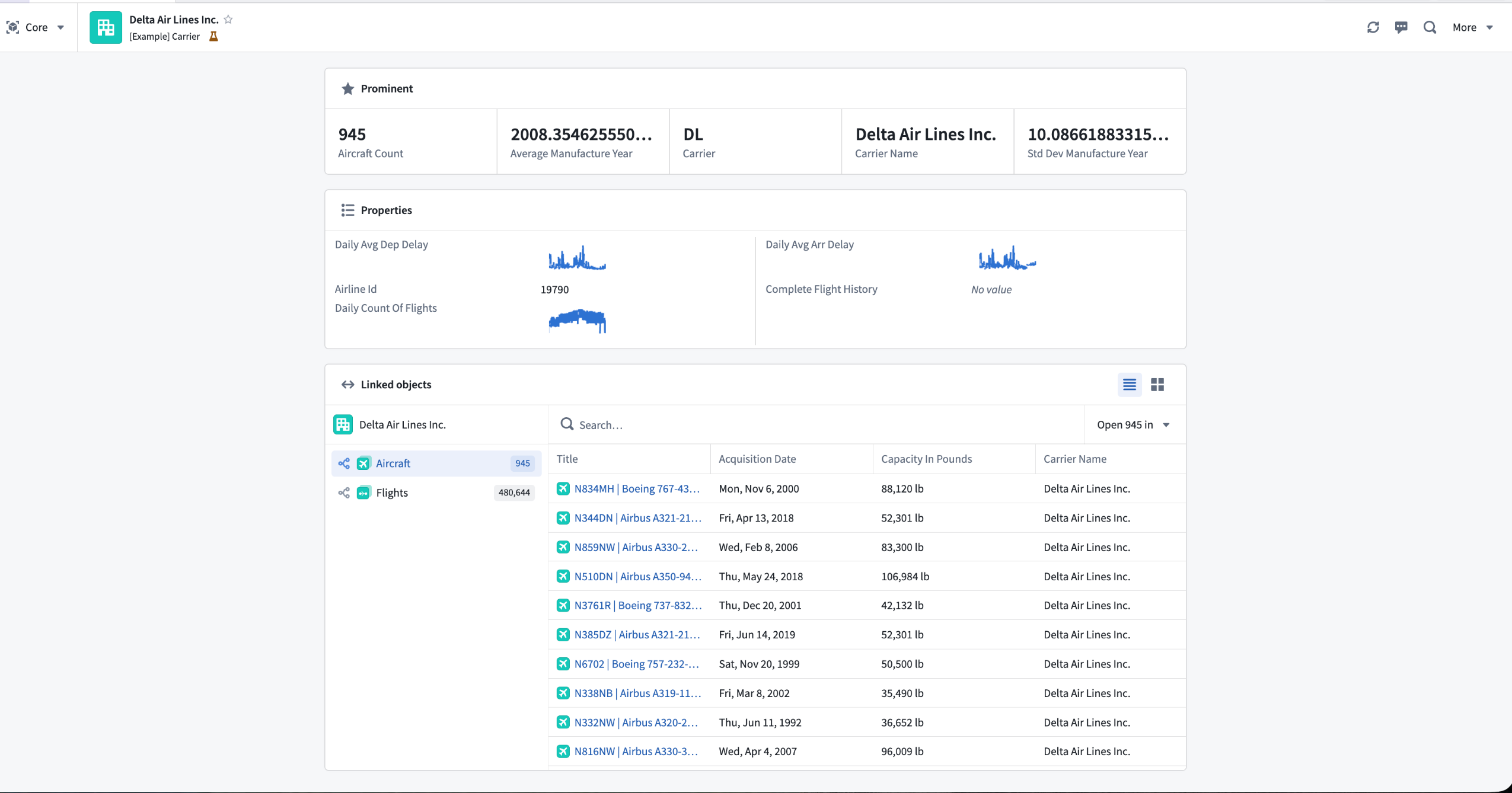
A core Object View displays prominent and standard object properties as well as linked objects.
View prominent properties in base type-specific components
Foundry surfaces prominent properties at the top of the core Object View to provide immediate context about an object's most important information.
Properties marked as prominent receive enhanced visual treatment based on their type:
- Media reference properties render in a dedicated media viewer.
- Time series properties display as interactive Quiver charts showing temporal data patterns.
- Geospatial properties automatically render on a Foundry map.
All other prominent properties are displayed using a larger, card-style format elevated above a table displaying the remaining standard properties.
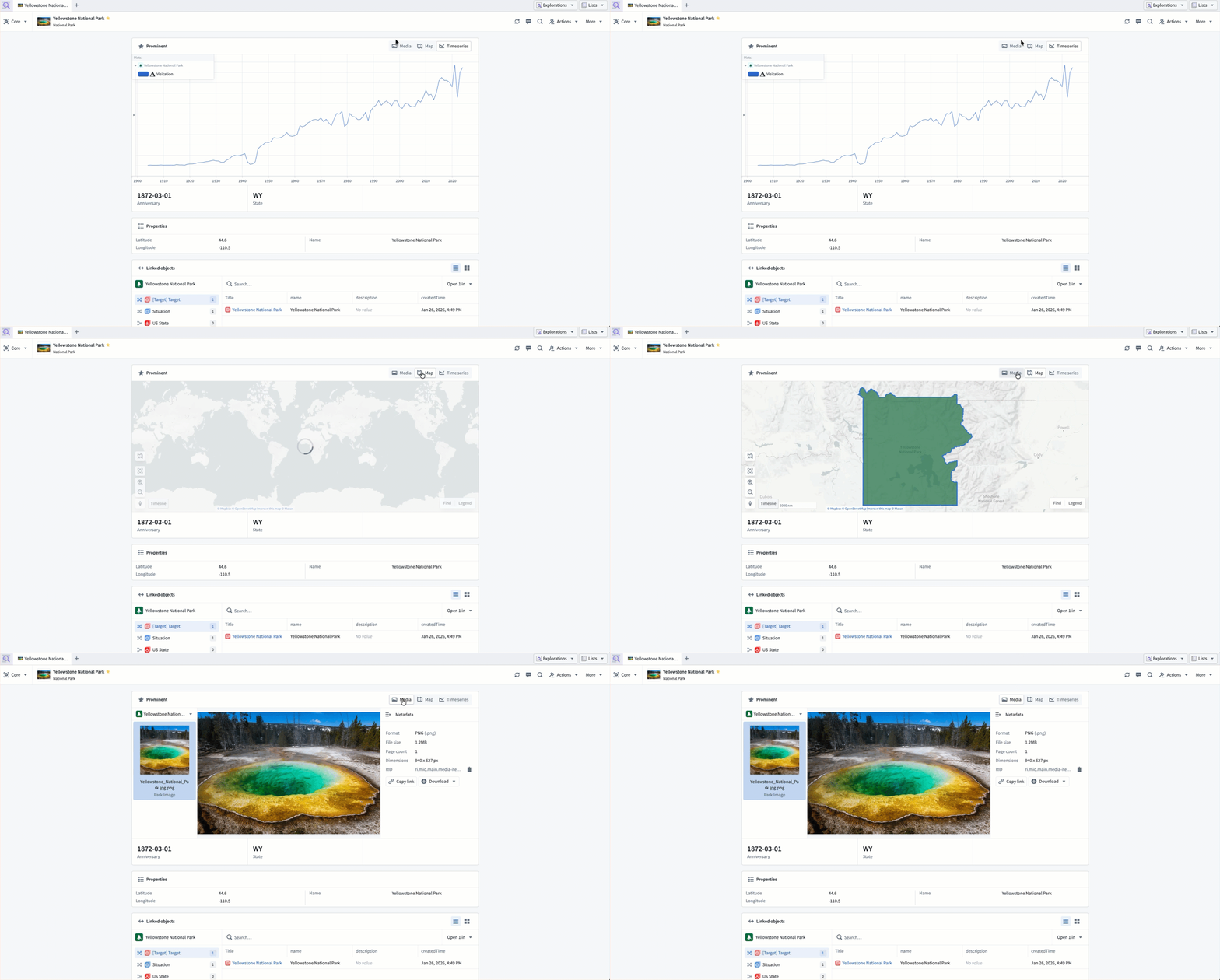
A core Object View displays prominent properties using different components derived from their base type.
View linked object types
The Linked objects component enables you to traverse between related objects directly within the core Object View. You can view linked objects grouped by link type, preview properties inline, and open linked objects in the side panel for further exploration.
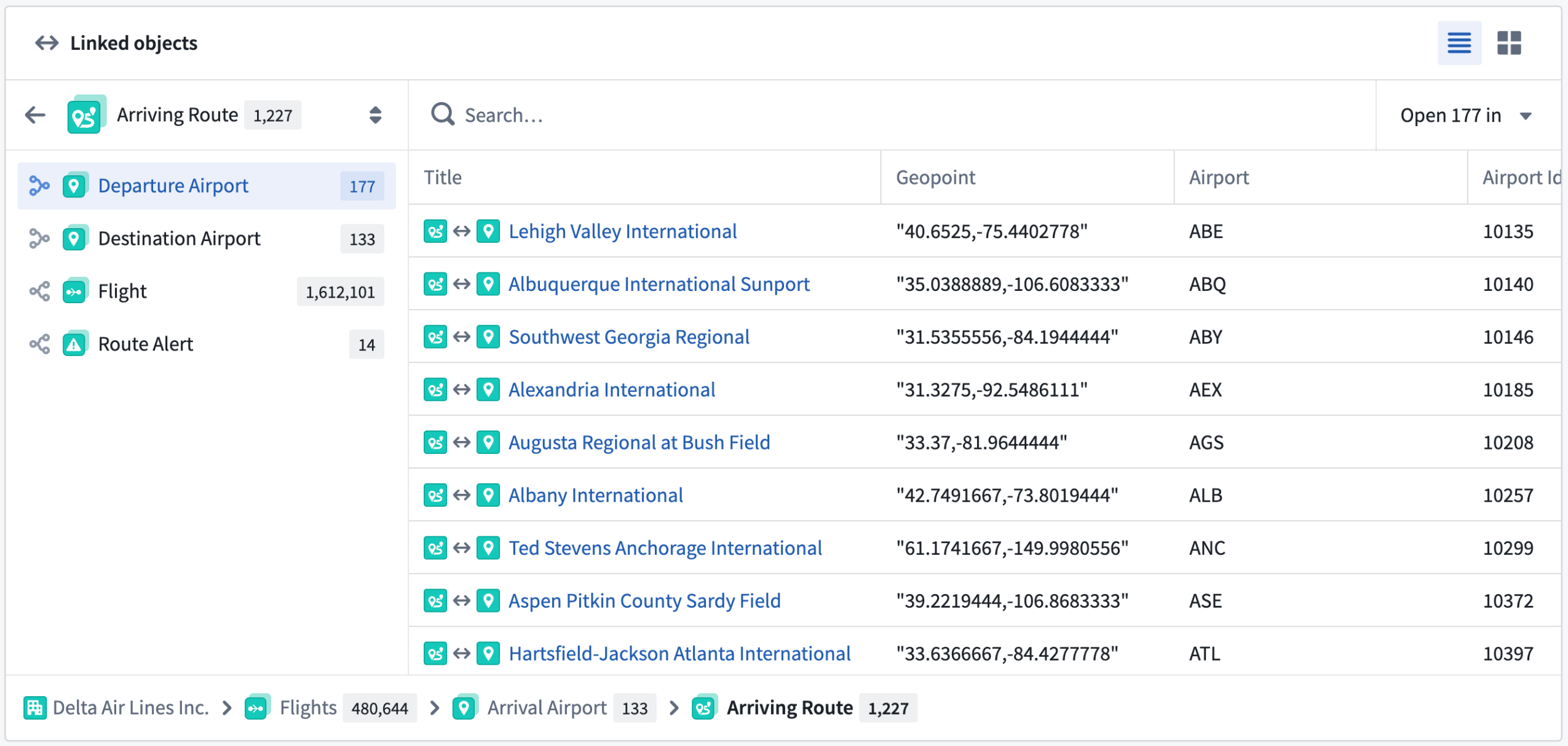
The Linked objects component displays related objects grouped by their link type.
Core Object Views exist alongside custom Object Views built in Workshop. While core Object Views display by default when no custom Object View is configured, they remain accessible even after you or another user build a custom Object View. You can toggle between core and custom Object Views at any time based on your specific workflow needs.
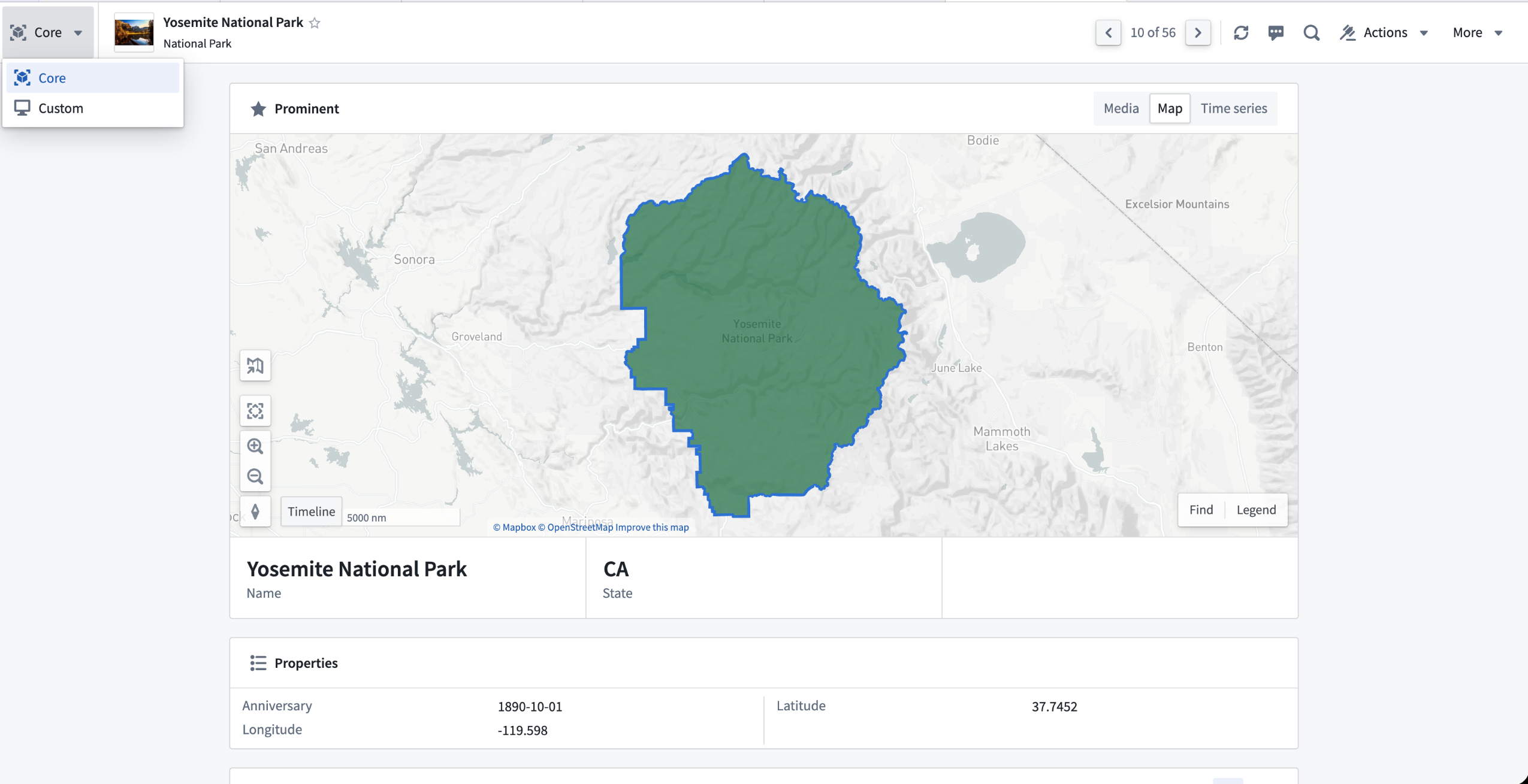
You can switch between core and custom Object Views using the view toggle.
You can view a core Object View in both full and panel object form factors.
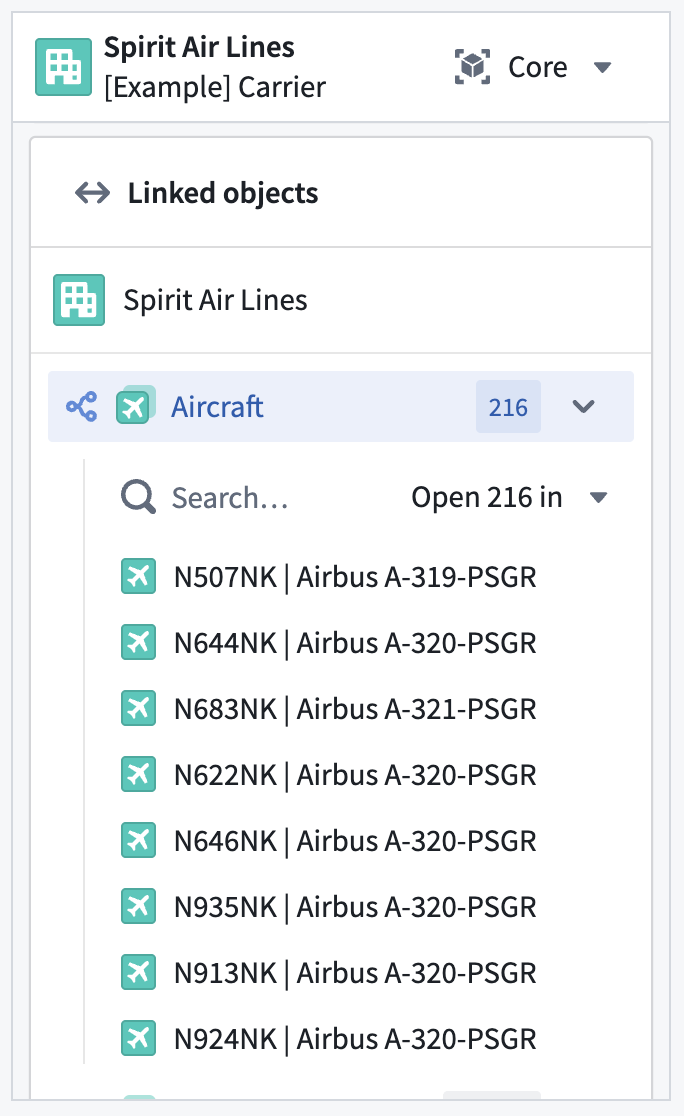
The Linked objects component is available in the panel form factor of an Object View.
Learn more about how to use core and configure custom Object Views in Foundry.
Markdown editing mode now available in the text input widget
Date published: 2026-02-19
You can now configure the text input widget in Workshop with Markdown formatting. Specifically, you can:
- Format text using a toolbar: Apply bold, italic, code, and other formatting without needing to know Markdown syntax.
- Toggle between rich text and raw Markdown: Switch between a formatted rich text view and a raw Markdown view to edit the underlying syntax directly.
- Enter placeholder text: Configure placeholder text that appears when the editor is empty, guiding users on what to enter.
The output string variable stores content as a Markdown string, which can be consumed by other widgets such as the Markdown widget for formatted display.
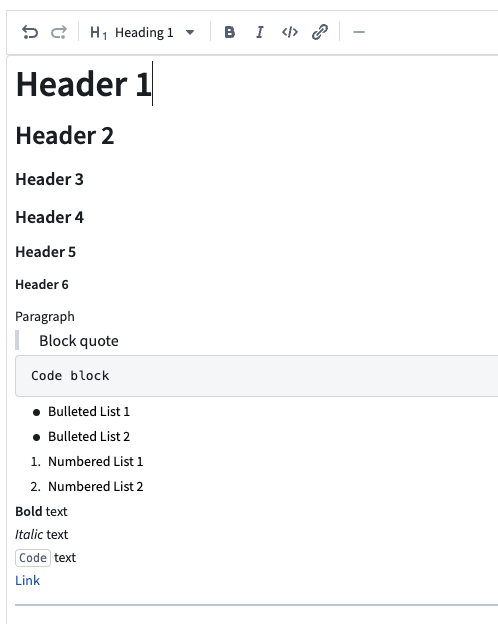
Text input widget in rich text mode showing the formatting toolbar and formatted text.
To try out this new mode, add a text input widget to your module and set the Format option to Markdown in the configuration panel.
Learn more about the text input widget.
Let us know what you think
We want to hear about your experiences using Workshop in the Palantir platform and welcome your feedback. Share your thoughts with Palantir Support channels or on our Developer Community ↗ using the workshop tag ↗.
Monitoring views now support project scopes for ontology resources
Date published: 2026-02-17
As of the week of Feburary 16, Monitoring views now support project scopes for ontology resources, allowing you to dynamically monitor ontology resources across one or multiple projects. Resources are monitored automatically when added to a project and stop being monitored when removed—no manual configuration required.
Supported resource types include object types, many-to-many links, actions, and functions.
Note that to use project scope with ontology resources, you must first migrate your ontology to project-based permissions.
To get started, navigate to the Manage monitors tab in your monitoring view, select Add new alerts -> Add monitoring rules to pick an ontology resource type and select the project scopes you want to monitor.
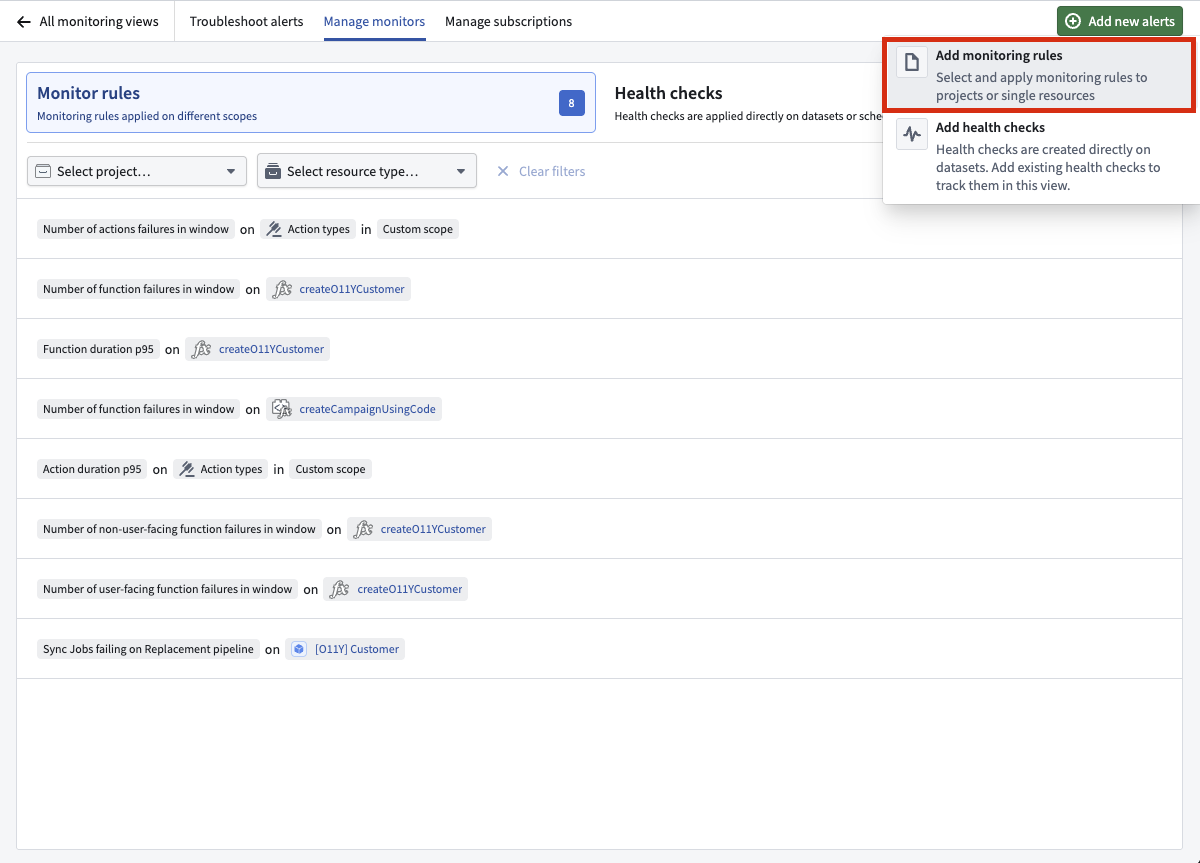
Select Add new alerts -> Add monitoring rules to get started.
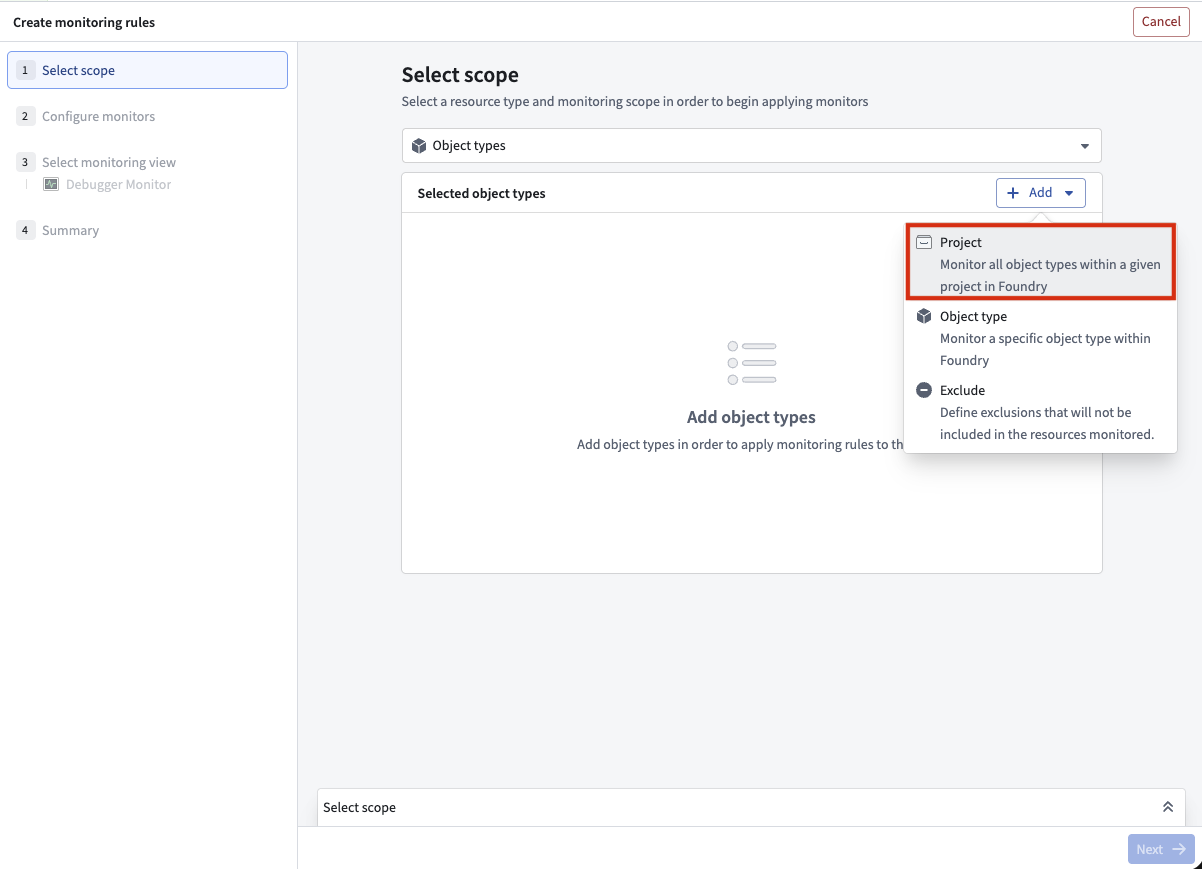
You can now use project scopes for ontology resources.
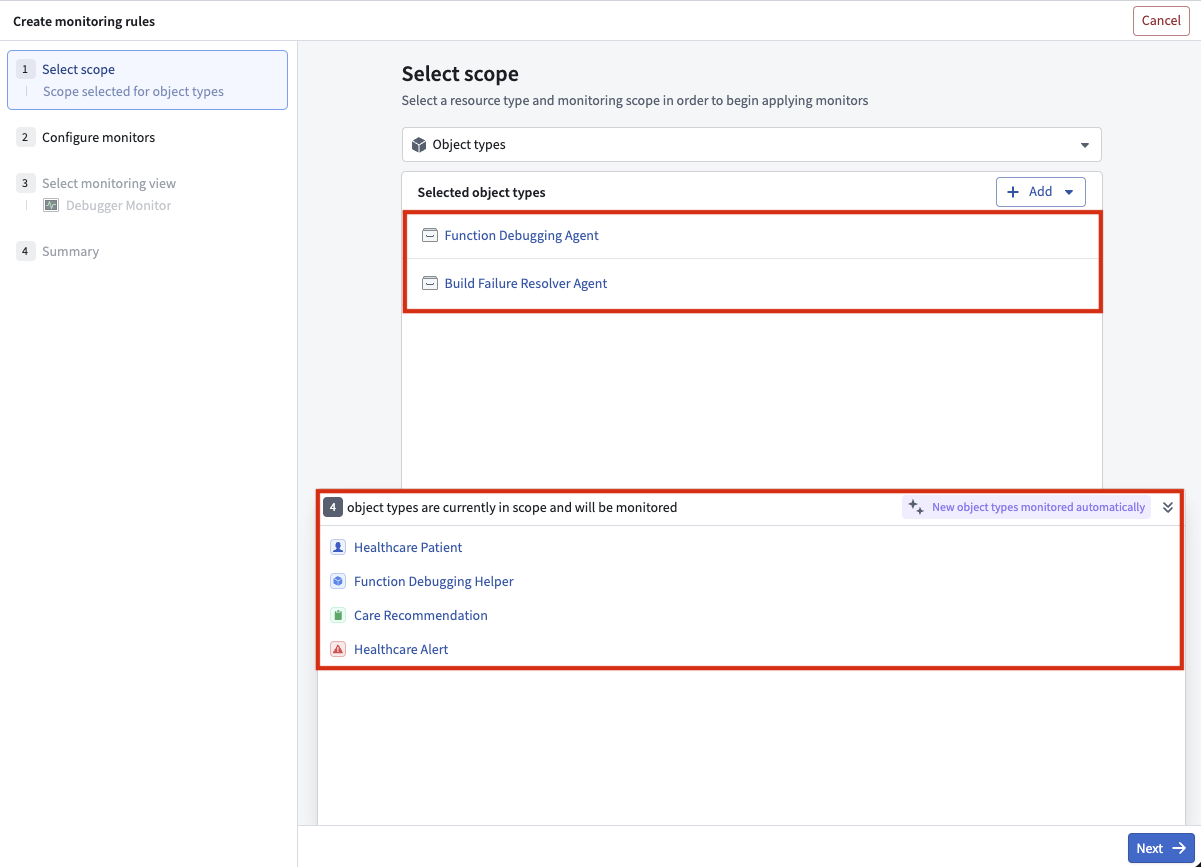
Four object types are in the scope of the two selected projects and will be monitored.
Share your thoughts
We welcome your feedback about Data Health in our Palantir Support channels, and on our Developer Community ↗ using the data-health tag ↗.
Claude Opus 4.6 available from Anthropic, AWS Bedrock, and Google Vertex
Date published: 2026-02-12
Claude Opus 4.6 is now available from Anthropic, AWS Bedrock, and Google Vertex on non-georestricted enrollments. For US and EU non-georestricted enrollments, the model is available from AWS Bedrock and Google Vertex.
Model overview
Anthropic’s latest flagship model, Claude Opus 4.6, sets a new standard for advanced LLMs across coding, agentic workflows, and knowledge work. Opus 4.6 builds on its predecessor with stronger coding skills, deeper planning, longer agent autonomy, and improved code review and debugging. It operates more reliably in large codebases and can sustain complex, multi-step tasks with minimal intervention. For more information, review Anthropic's model documentation ↗.
- Context window: 200,000 tokens
- Modalities: Text, image
- Capabilities: Extended thinking, function calling
Getting started
To use these models:
- Confirm that your enrollment administrator has enabled the relevant model family or families.
- Review token costs and pricing.
- See the complete list of all available models in AIP.
Your feedback matters
We want to hear about your experiences using language models in the Palantir platform and welcome your feedback. Share your thoughts with Palantir Support channels or on our Developer Community ↗ using the language-model-service tag ↗.
Model Studio, our no-code model training tool, is now generally available
Date published: 2026-02-12
Model Studio, a new workspace that allows users to train and deploy machine learning models, will be generally available and ready for use in all environments the week of February 9. This follows a successful public beta period that started in October 2025.
Model Studio transforms the complex task of building production-grade models into a streamlined no-code process that makes advanced machine learning more accessible. Whether you are a data scientist looking to accelerate your workflow, or a business user eager to unlock insights from your data, Model Studio provides essential tools and a user-friendly interface that simplifies the journey from data to model.
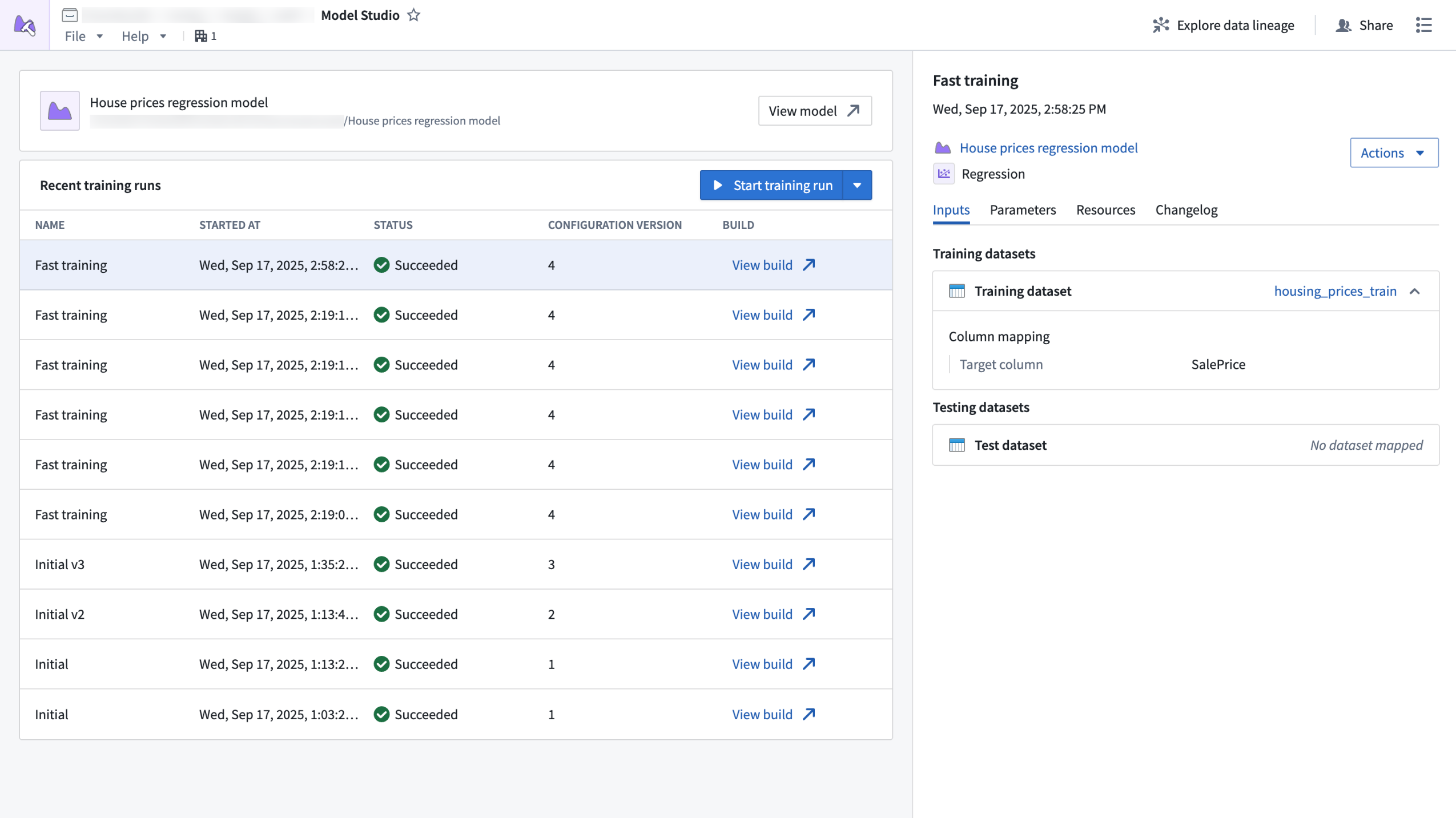
The Model Studio application home page, displaying recent training runs and run details.
What is Model Studio?
Model Studio is a no-code model development tool that allows you to train models in tasks such as forecasting, classification, and regression. With Model Studio, you can maximize model performance for your use cases by training models with custom data while retaining customization and control over the training process with optional parameter configuration.
Building useful, production-ready models traditionally requires deep technical expertise and significant time investment, but Model Studio changes that by providing the following features:
- A streamlined point-and-click interface for configuring model training jobs; no coding required.
- Built-in production-grade model trainers tailored for common use cases such as time series forecasting, regression, and classification.
- Smart defaults and guided workflows that empower you to get started quickly, even if you are new to machine learning.
- In-depth experiment tracking with integrated performance metrics that allow you to monitor and refine your models with confidence.
- Full data lineage and secure access controls built on top of the Palantir platform, ensuring transparency and security at every step.
Who should use Model Studio?
Model Studio is perfect for technical and non-technical users alike. Business users who want to leverage machine learning without coding and data scientists who want to accelerate prototyping and model deployment can both benefit from Model Studio's tools and simplified process. Additionally, organizations can benefit from Model Studio by lowering the barrier to AI adoption and empowering more teams to build and use models.
Getting started
To get started with model training, open the Model Studio application and follow these steps:
- Select the best model trainer for your use case (time series forecasting, classification, or regression).
- Choose your input datasets.
- Configure your model using intuitive options, or stick with the recommended defaults.
After configuring your model, you can launch a training run and review model performance in real time with clear metrics and experiment tracking.
What's next on the development roadmap?
As Model Studio continues to evolve, we are committed to enhancing the user experience. To do so, we will introduce features such as:
- Enhanced experiment logging for deeper training performance insights, including AI-readable content.
- An expanded set of supported modeling tasks.
- Full marketplace support for models built in Model Studio.
- Direct support for time series inputs on top of datasets.
Learn more about Model Studio.
Tell us what you think
As we continue to develop Model Studio, we want to hear about your experiences and welcome your feedback. Share your thoughts through Palantir Support channels or our developer community ↗.
Create unscoped Developer Console applications
Date published: 2026-02-10
Developer Console applications can now be unscoped, giving you full access to Developer Console features that were previously unavailable with standalone OAuth clients, including:
- OSDK usage
- Documentation (OSDK, Platform APIs, development)
- Marketplace integration
- Website hosting
- Metrics
Previously, the only unscoped option was building standalone OAuth clients, and using them meant sacrificing these features entirely. As a result of this improvement, we have deprecated standalone OAuth clients.
How to make your application unscoped
All Developer Console applications are created scoped by default. To make an application unscoped, follow these steps:
- Navigate to the OAuth & scopes tab in your Developer Console application's sidebar
- Under the Application scope section, select Unscoped.
- Confirm your action.
- Select Switch to unscoped.
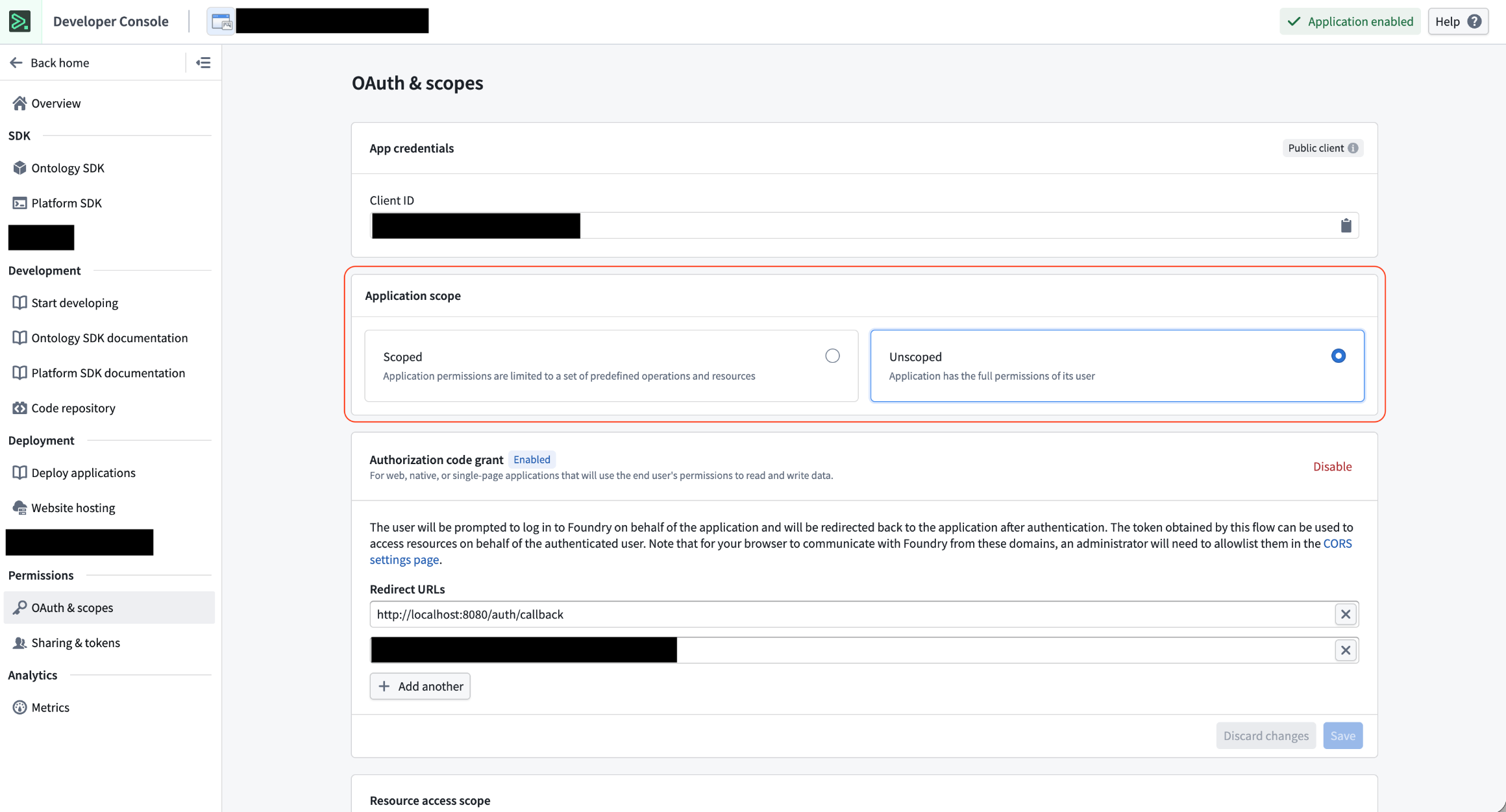
Application scope section in Developer Console.
You can change your application’s scope between scoped and unscoped at any time.
Review the documentation in Developer Console.
Client restrictions
Client enablement project access restrictions are not compatible with Developer Console applications, whether scoped or unscoped. Instead, leave project access and marking restrictions in Control Panel > Third party applications as unrestricted and manage client restrictions directly through Developer Console.
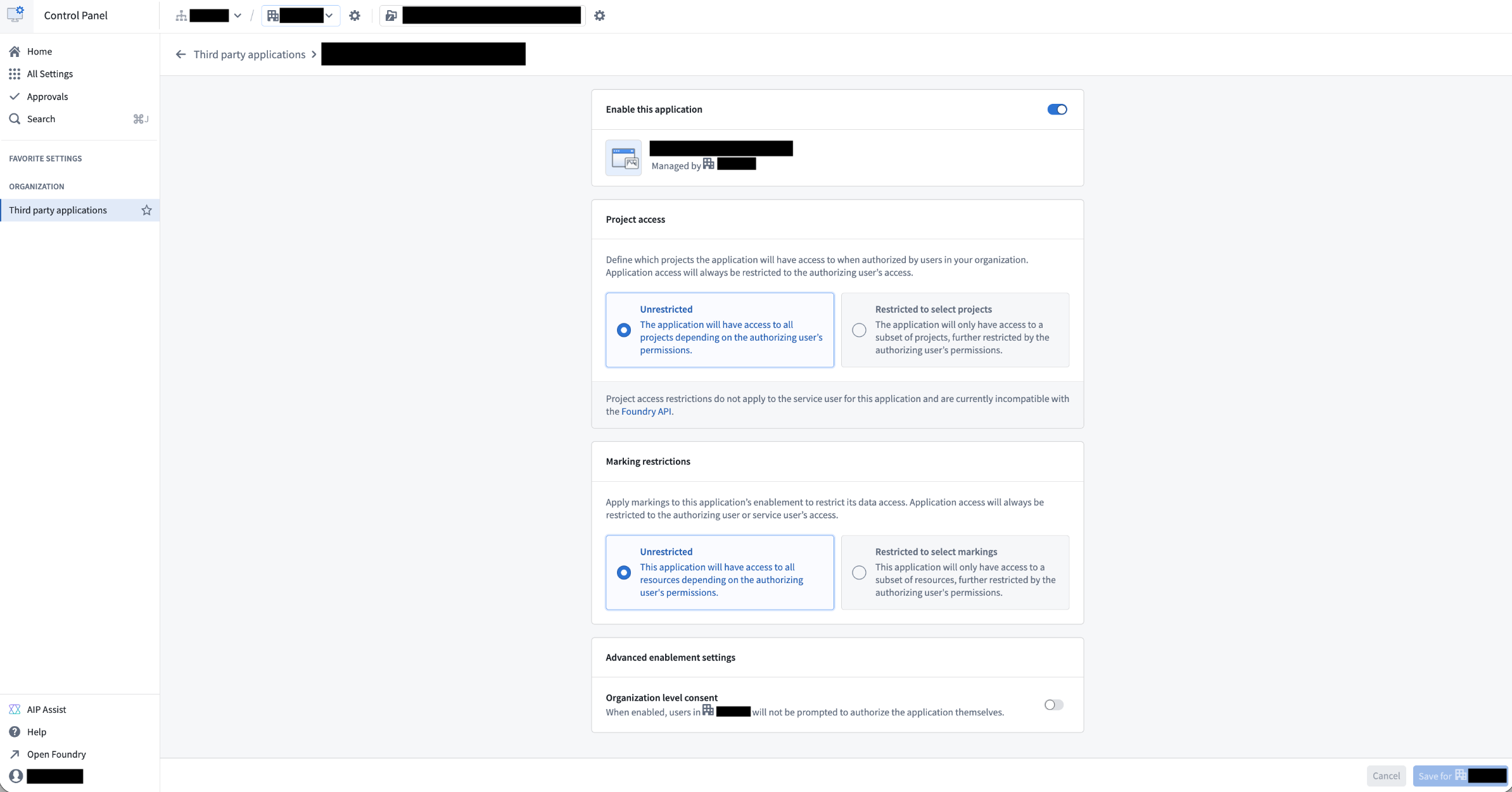
Avoid adding any client restrictions within Control Panel. Set Project access and Marking restrictions to unrestricted.
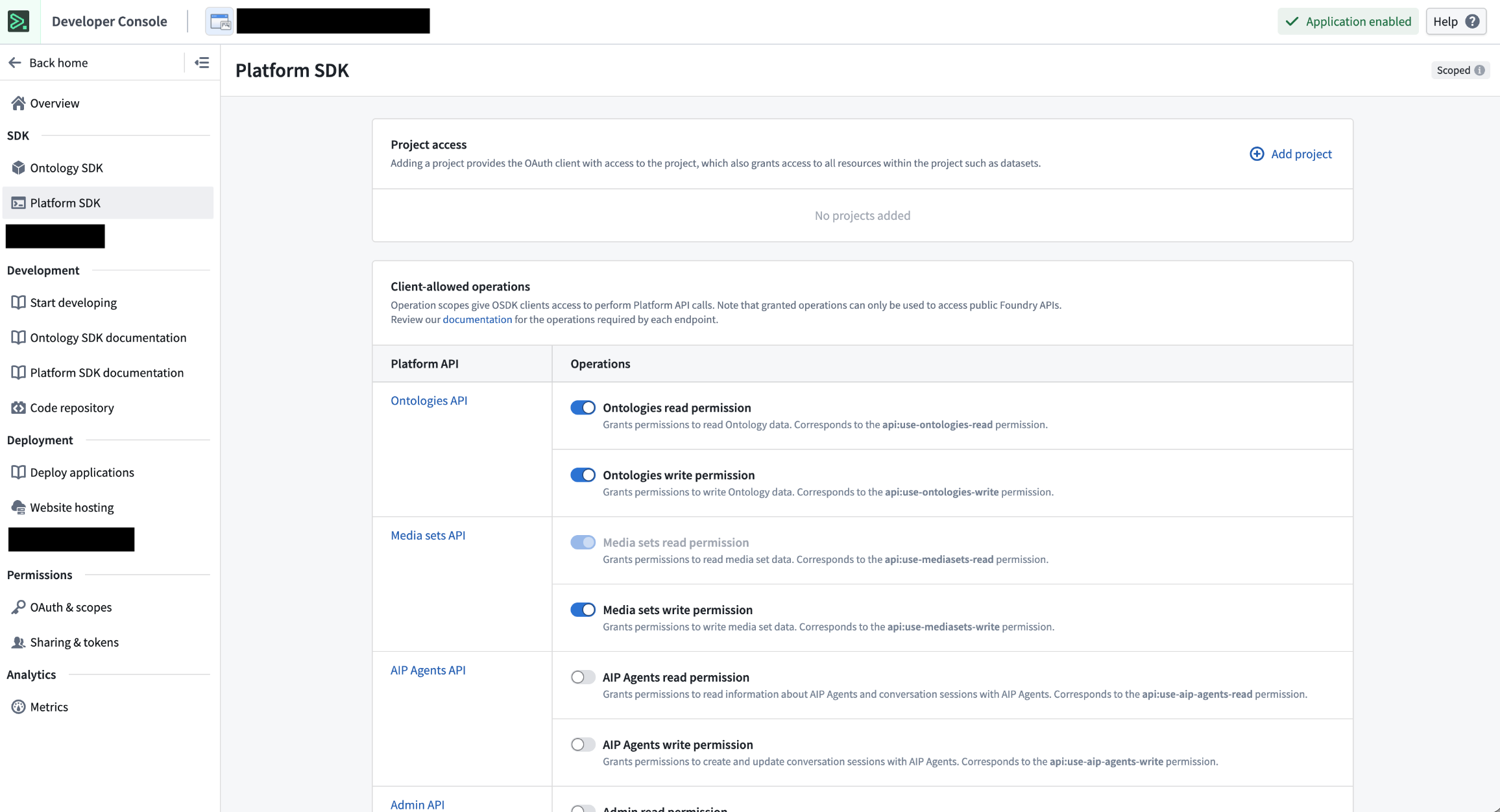
Add project and API restrictions to your client within Developer Console > Platform SDK.
Support for marking restrictions in Developer Console is coming soon.
Your feedback matters
We want to hear about your experiences using Developer Console and welcome your feedback. Share your thoughts through Palantir Support channels or on our Developer Community ↗.
Presentation mode in Workflow Lineage
Date published: 2026-02-10
Presentation mode is now available in Workflow Lineage for all enrollments. Use the presentation mode for Workflow Lineage to create and organize visual frames of your workflow graph, making it easier to present your work. To get started, select the project screen icon in the bottom of the graph.
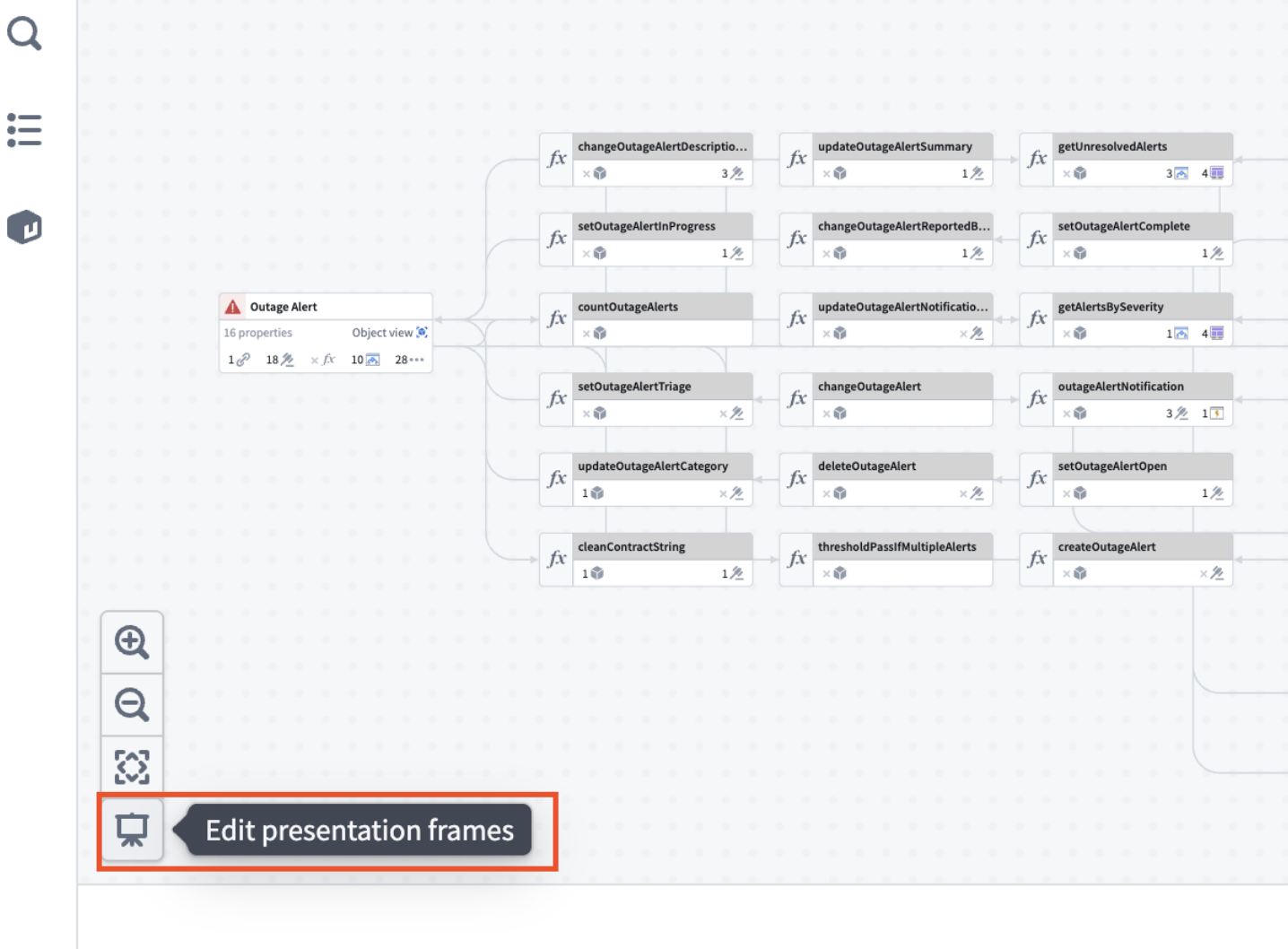
The edit presentation frames entry point in Workflow Lineage.
Once you edit the presentation mode, you can capture frames. You can do this by saving snapshots of your graph’s current state including node arrangement, layout, colors, and zoom level.
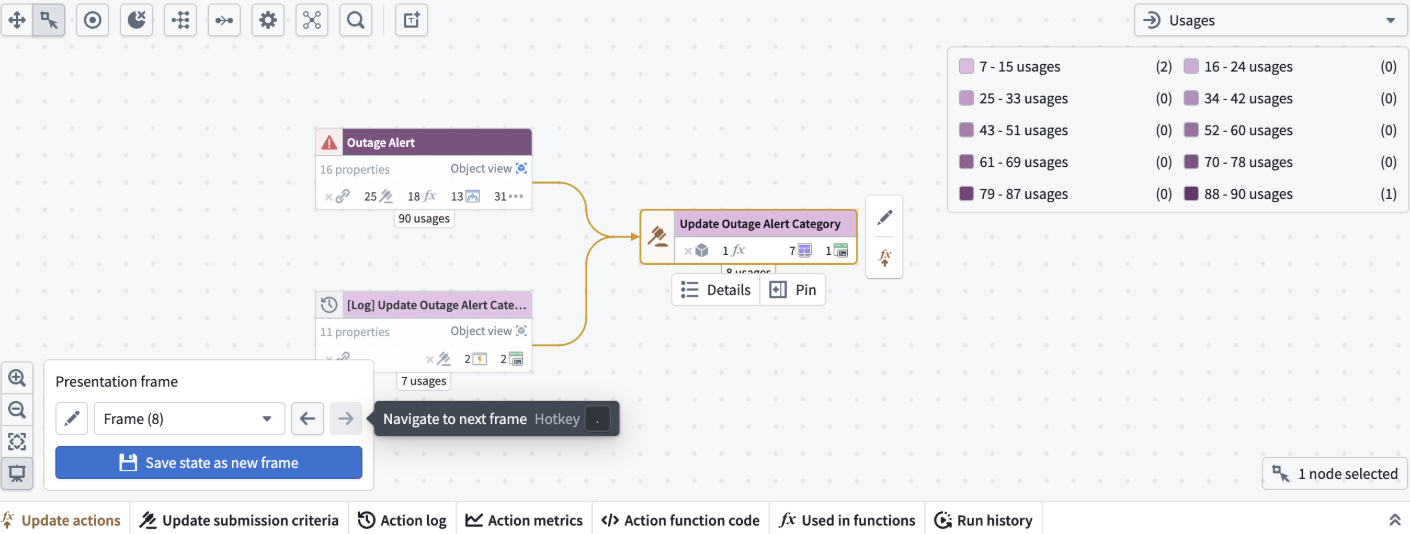
An example of a presentation frame in Workflow Lineage.
Manage existing frames in the bottom window. You can easily rename, reorder, or delete frames as needed.
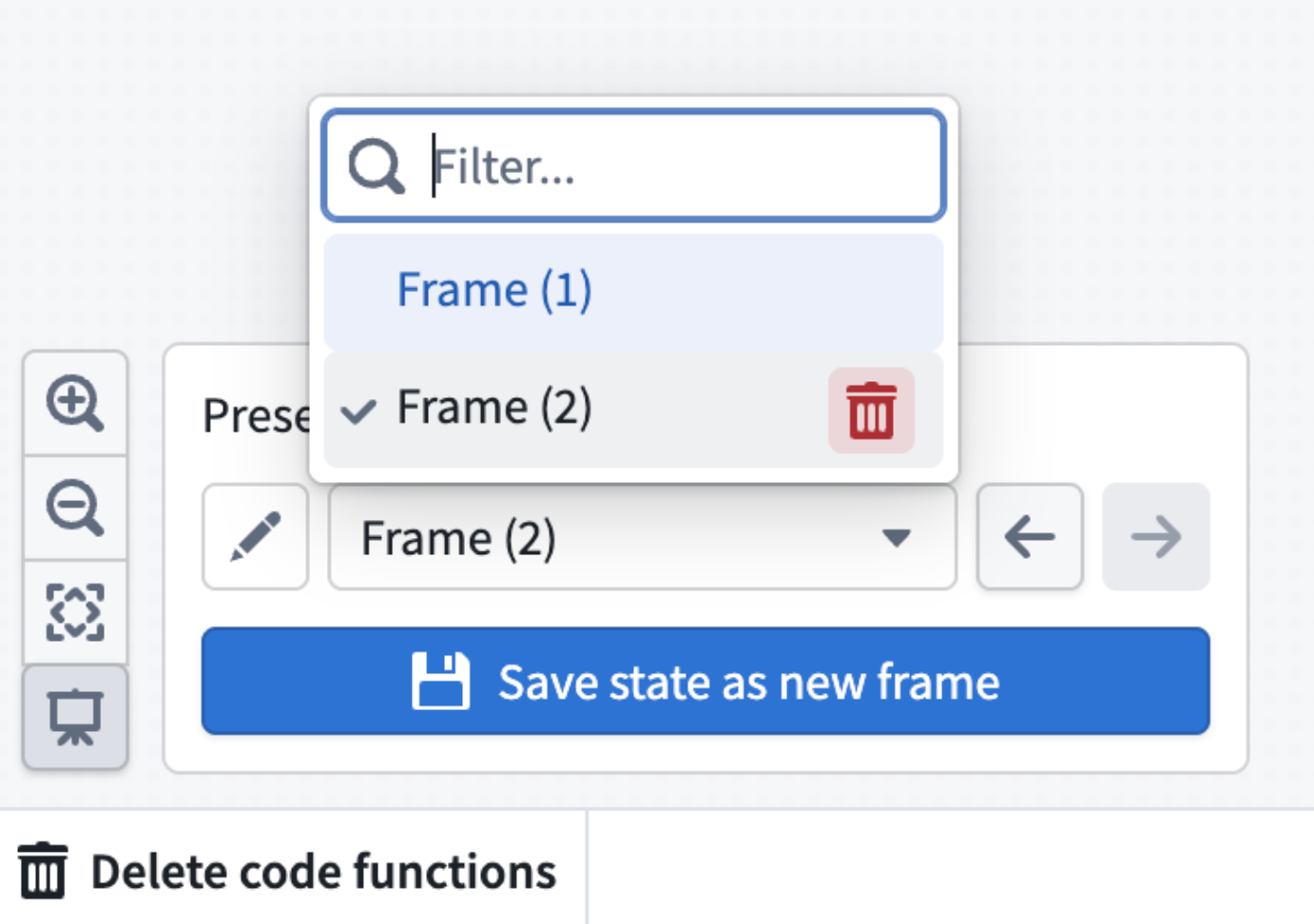
Screenshot of where to delete a presentation frame.
You can also hide frames you do not want to delete but do not want to show in your presentations.
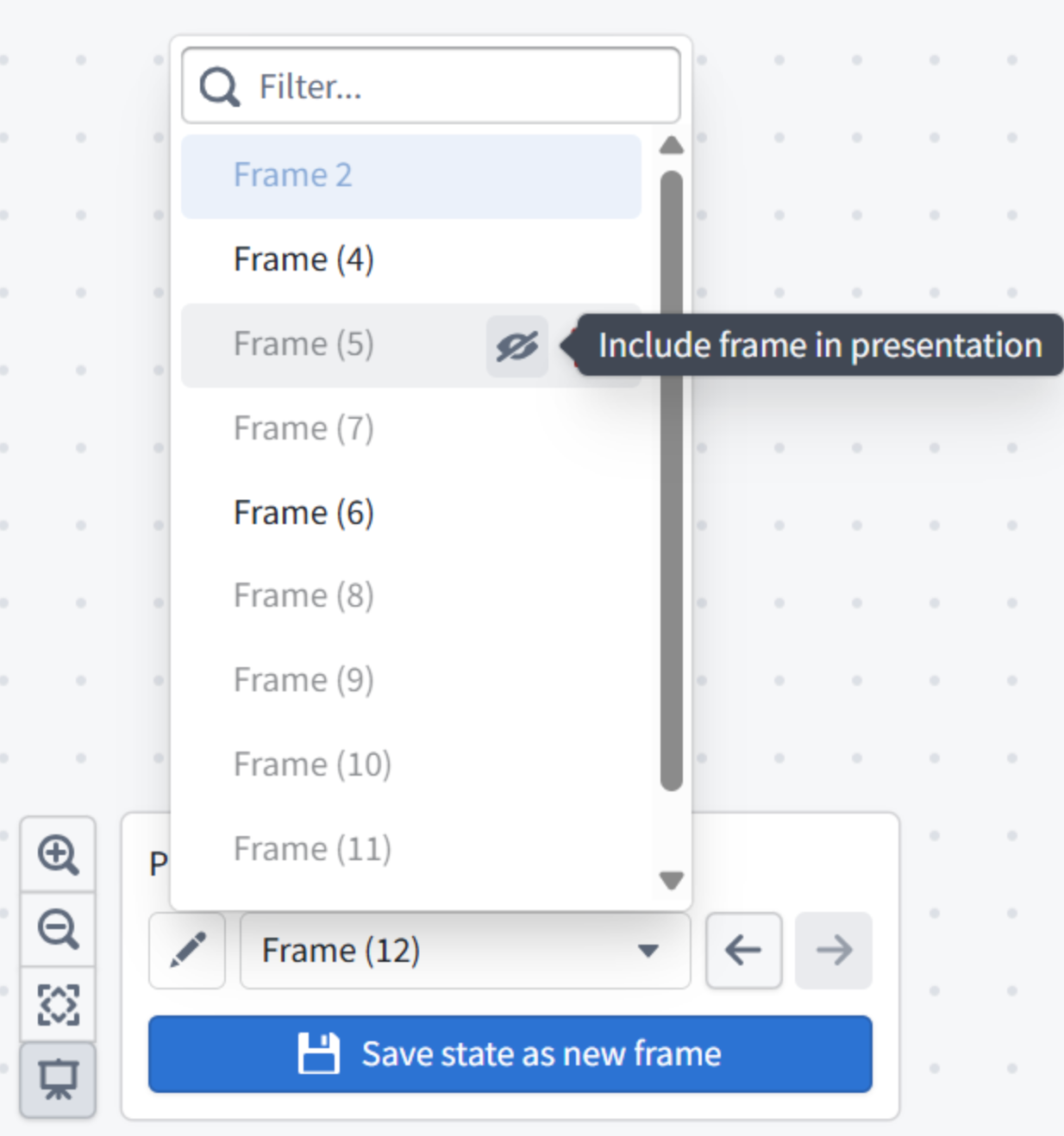
Example of hiding presentation frames.
Use the , and . hotkeys to move back and forth through your presentation.
You must save your graph before using presentation mode. We recommend adding text nodes to each frame to guide your audience step by step with custom descriptions.
Try it out and make your workflow presentations more dynamic and engaging. Learn more about presentation mode.
Claude Sonnet 4.5, Claude Haiku 4.5 now available in Japan region
Date published: 2026-02-05
Claude Sonnet 4.5 and Claude Haiku 4.5 models are now available from AWS Bedrock on Japan georestricted enrollments.
Model overviews
Claude Sonnet 4.5 ↗ is Anthropic's latest medium weight model with strong performance in coding, math, reasoning, and tool calling, all at a reasonable cost and speed.
- Context window: 200k tokens
- Knowledge cutoff: January 2025
- Modalities: Text, image
- Capabilities: Tool calling, vision, coding
Claude Haiku 4.5 ↗ is Anthropic's most powerful small model, ideal for real-time, lightweight tasks where speed, cost, and performance are critical.
- Context window: 200k tokens
- Knowledge cutoff: February 2025
- Modalities: Text, image
- Capabilities: Tool calling, vision, coding
Getting started
To use these models:
- Confirm that your enrollment administrator has enabled the relevant model family.
- Review token costs and pricing.
- See the complete list of all models available in AIP.
Your feedback matters
We want to hear about your experiences using language models in the Palantir platform and welcome your feedback. Share your thoughts in Palantir Support channels or on our Developer Community ↗ using the language-model-service ↗ tag.
Deploy containers with compute modules
Date published: 2026-02-05
Compute modules are now generally available in Foundry. With compute modules, you can run containers that scale dynamically based on load, bringing your existing code, in any language, into Foundry without rewriting it.
What you can build
Compute modules enable several key workflows in Foundry:
Custom functions and APIs: Create functions that can be called from Workshop, Slate, Ontology SDK applications, and other Foundry environments. Host custom or open-source models from platforms like Hugging Face and query them directly from your applications.
Data pipelines: Connect to external data sources and ingest data into Foundry streams, datasets, or media sets in real time. Use your own transformation logic to process data before writing it to outputs.
Legacy code integration: Bring business-critical code written in any language into Foundry without translation. Use this code to back pipelines, Workshop modules, AIP Logic functions, or custom Ontology SDK applications.
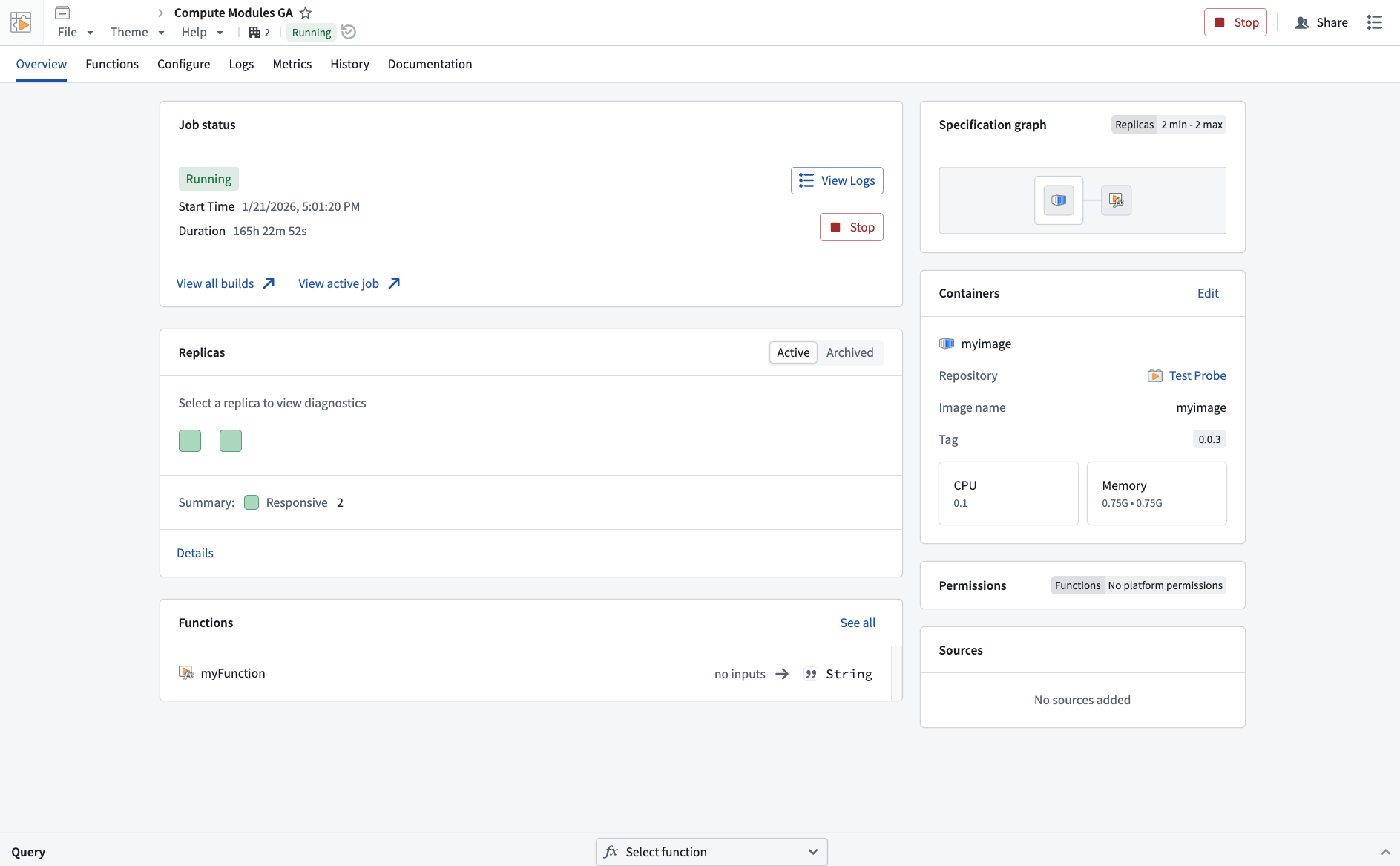
An example of a compute module overview in Foundry, with information about the job status, functions, and container metadeta.
Why it matters
Compute modules solve the challenge of integrating existing code into Foundry. Instead of rewriting your logic in a Foundry-supported language, containerize it and deploy it directly. The platform handles scaling, authentication, and connections to other Foundry resources automatically.
Key features include:
- Dynamic horizontal scaling based on current and predicted load
- Zero-downtime updates when deploying new container versions
- Native connections to Foundry datasets, Ontology resources, and APIs
- External connections using REST, WebSockets, SSE, or other protocols
- Marketplace compatibility for sharing modules across organizations
Get started
Review the compute modules documentation to build your first function or pipeline.
Deploy document extraction workflows with AIP Document Intelligence
Date published: 2026-02-03
AIP Document Intelligence will be generally available on February 4, 2026 and is enabled by default for all AIP enrollments. AIP Document Intelligence is a low-code application for configuring and deploying document extraction workflows. Users can upload sample documents, experiment with different extraction strategies, and evaluate results based on quality, speed, and cost—all before deploying at scale. AIP Document Intelligence then generates Python transforms that can process entire document collections using the selected strategy, converting PDFs and images into structured Markdown with preserved tables and formatting.
Learn more about AIP Document Intelligence.
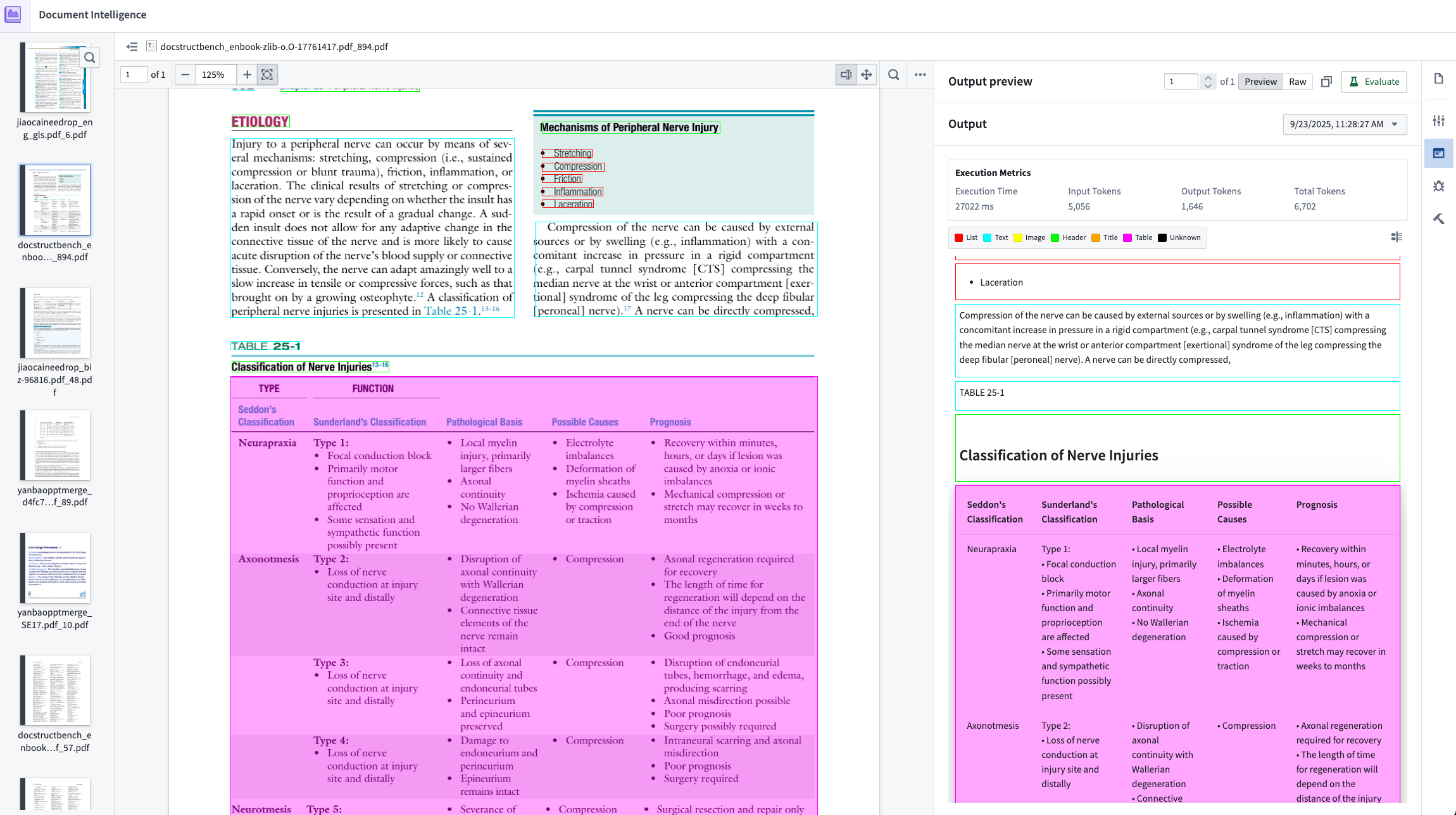
Result of Layout-aware OCR + Vision LLM extraction with metrics on cost, speed, and token usage.
Compare extraction strategies
AIP Document Intelligence provides multiple extraction approaches, from traditional OCR to vision-language models. You can test each method on your specific documents and view side-by-side comparisons of extraction quality, processing time, and compute costs. This experimentation phase helps teams select the right approach for their use case without writing custom code.
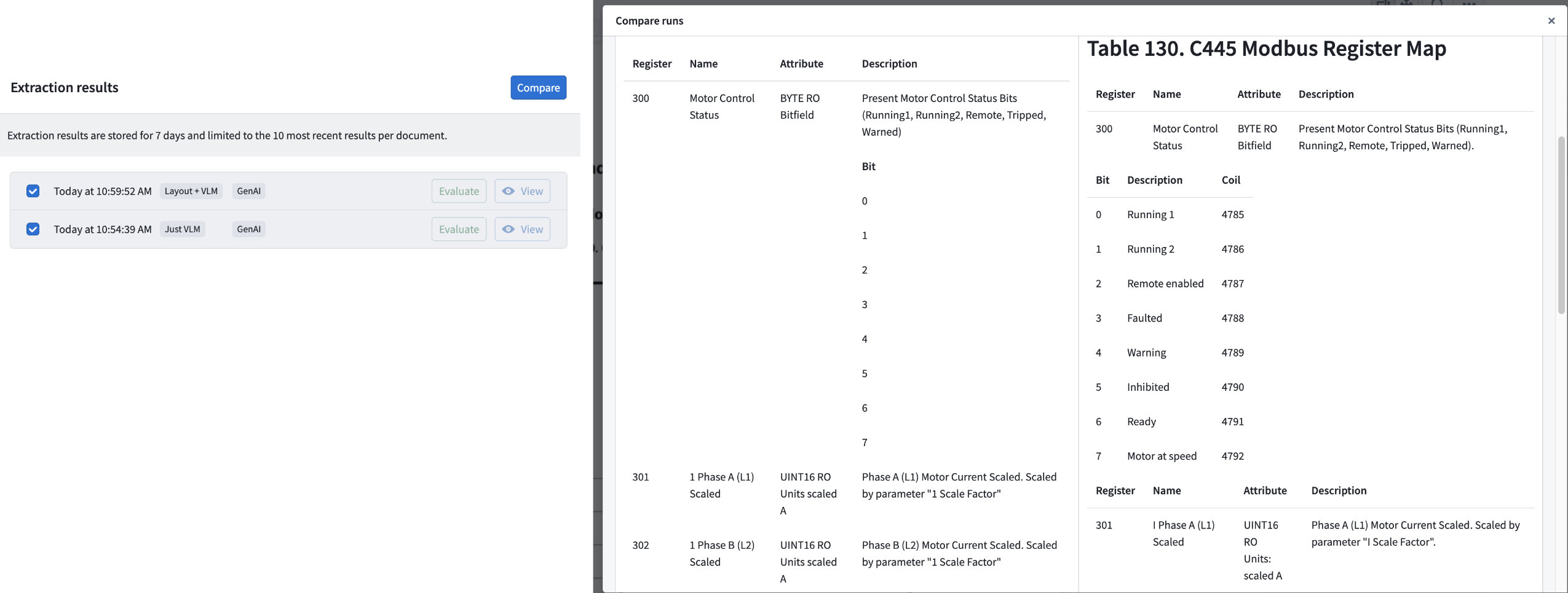
Comparison of Vision LLM Extraction vs. Layout-aware OCR + Vision LLM Extraction shows drastic improvement in complex table extraction quality.
Deploy extraction pipelines in one click
Once a strategy is configured, AIP Document Intelligence generates production-ready Python transforms that process documents at scale. The latest deployment uses lightweight transforms rather than Spark, significantly improving processing speed. Workflows that previously took days extracting data from document collections can now complete the same work in hours. Refer to the documentation for more detailed instruction on how to deploy and customize your Python transforms.
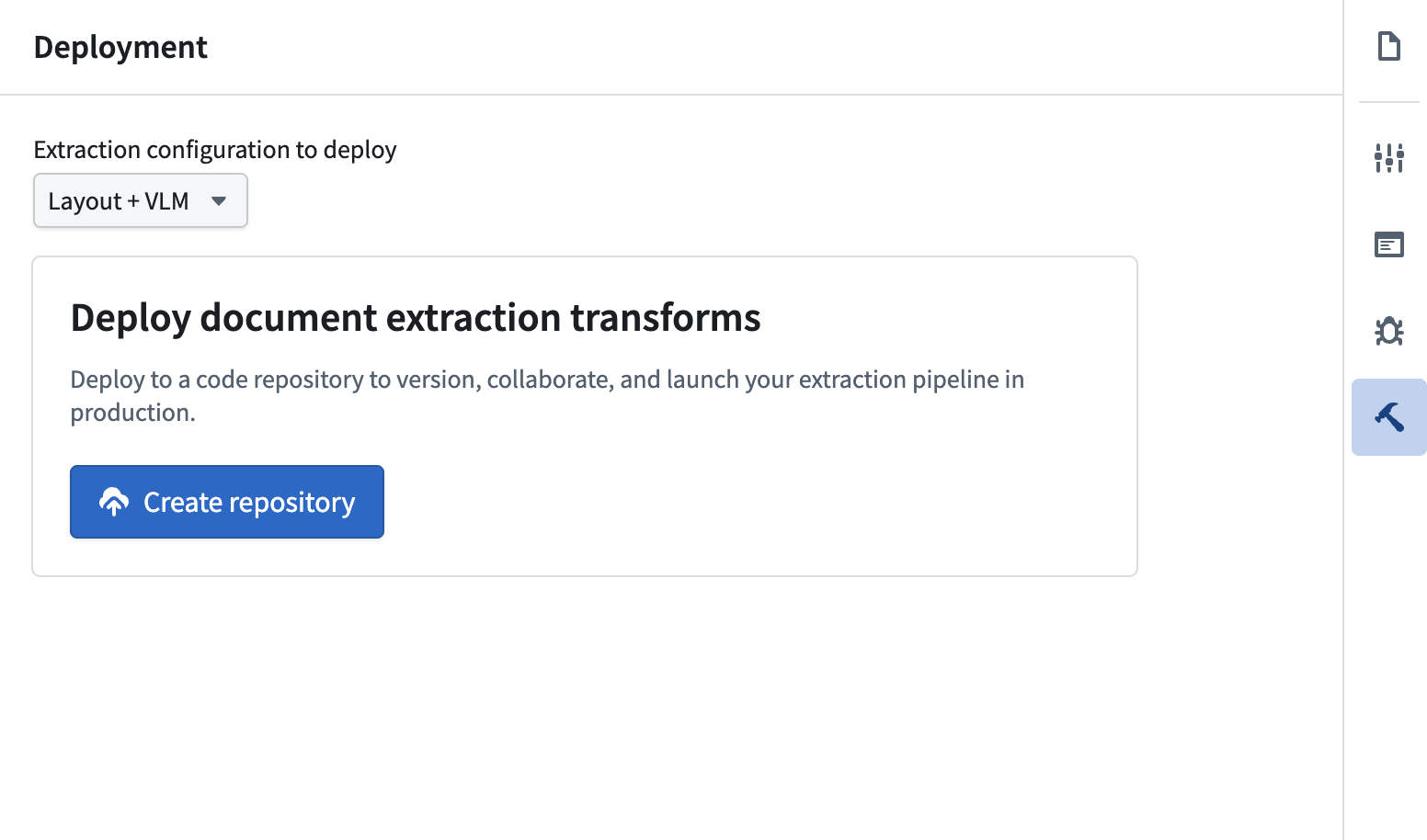
Choose a validated extraction strategy and deploy to a Python transforms to batch process documents.
Maintain quality across diverse document types
Enterprise documents vary widely in structure, formatting, and content density. AIP Document Intelligence handles this diversity through configurable extraction strategies that can adapt to multi-column layouts, embedded tables, and mixed-language content. Users working with maintenance manuals, regulatory filings, invoices have successfully extracted structured data while preserving critical formatting and relationships.
When to use AIP Document Intelligence
AIP Document Intelligence is designed for workflows where document content needs to be extracted and structured for downstream AI applications. This includes:
- Populating vector databases for retrieval-augmented generation (RAG) systems
- Extracting tabular data from reports, invoices, or forms for analysis
- Converting legacy documentation into searchable, structured formats
- Preparing training data for domain-specific language models
For workflows that require extracting specific entities (like part numbers, dates, or named entities) rather than full document content, upcoming entity extraction capabilities will provide more targeted functionality.
What's next on the development roadmap?
- Entity extraction from documents: The team is developing capabilities to extract structured entities, such as equipment identifiers, monetary values, dates, and custom domain concepts, directly from documents. This will enable direct population of Ontology objects from unstructured sources.
- Broader use of AIP Document Intelligence: Allow extraction configurations to be called directly from AIP Logic and Ontology functions to expand Document Intelligence beyond Python transforms to broader workflow automation scenarios.
Your feedback matters
We want to hear about your experiences using AIP Document Intelligence and welcome your feedback. Share your thoughts with Palantir Support channels or on our Developer Community ↗ using the aip-document-intelligence tag ↗.
GPT-5.2 Codex now available in AIP
Date published: 2026-02-03
GPT-5.2 Codex is now available directly from OpenAI for non-georestricted enrollments.
Model overviews
GPT-5.2 Codex ↗ is a coding optimized version of the GPT-5.2 model from OpenAI, with improvements in agentic coding capabilities, context compaction, and stronger performance on large code changes like refactors and migrations.
- Context window: 400,000 tokens
- Knowledge cutoff: August 2025
- Modalities: Text, image
- Capabilities: Responses API, structured outputs, function calling
Getting started
To use these models:
- Confirm that your enrollment administrator has enabled the relevant model family.
- Review token costs and pricing.
- See the complete list of all models available in AIP.
Your feedback matters
We want to hear about your experiences using language models in the Palantir platform and welcome your feedback. Share your thoughts with Palantir Support channels or on our Developer Community ↗ using the language-model-service ↗ tag.
Multi-ontology support in Workflow Lineage
Date published: 2026-02-03
Workflow Lineage just became a lot more robust - you can now visualize resources across multiple ontologies in one unified graph. Instantly identify cross-ontology relationships, spot external resources at a glance, and switch between ontologies without leaving your workflow view.
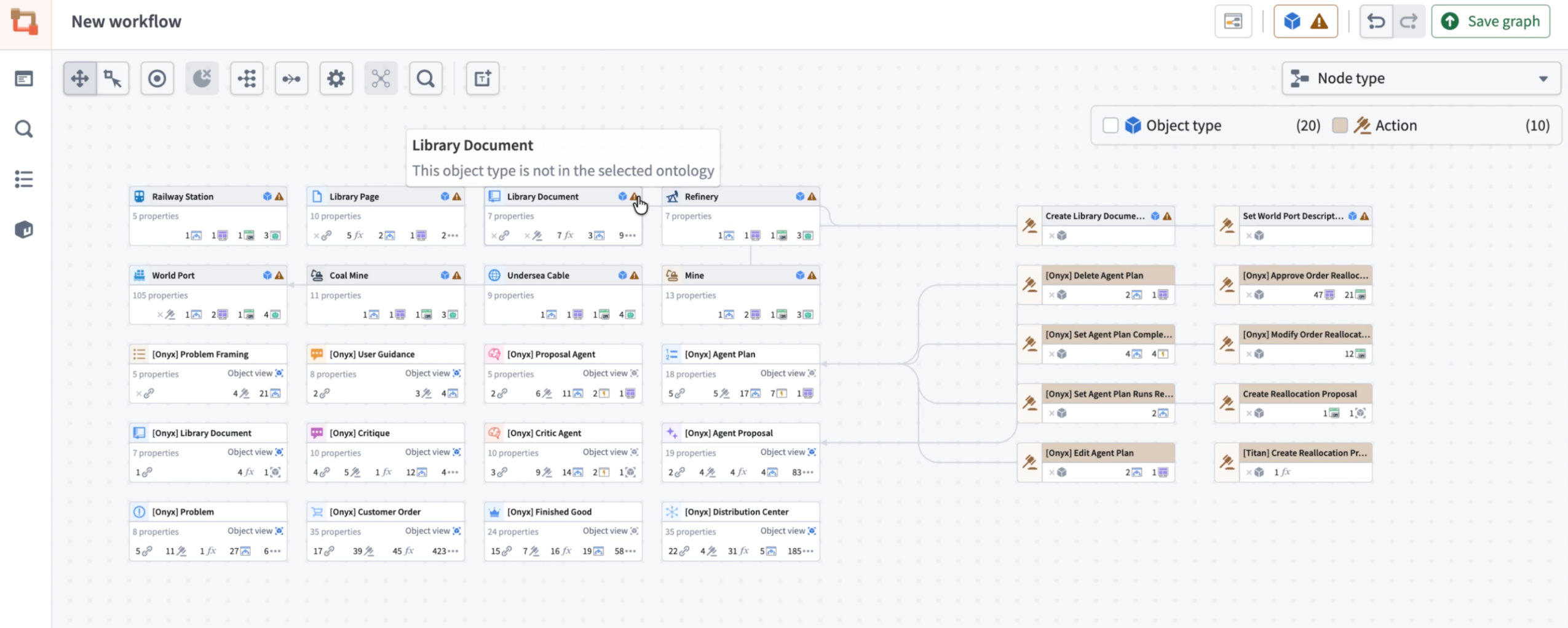
The Workflow Lineage graph now displays resources across multiple ontologies, with visual indicators highlighting nodes from outside the selected ontology.
What's new?
- Unified visualization: The Workflow Lineage graph now displays all resource nodes across different ontologies in a single view.
- Cross-ontology awareness: Object, interface and action nodes from other ontologies appear grayed out with a warning icon, so you can instantly identify their origin.
- Smart warnings: When multiple ontologies are present, a warning icon appears next to the ontology icon at the upper right side of the graph, keeping you informed at a glance.
- Ontology switching: View all ontologies present in your graph and easily switch between them using the ontology icon.
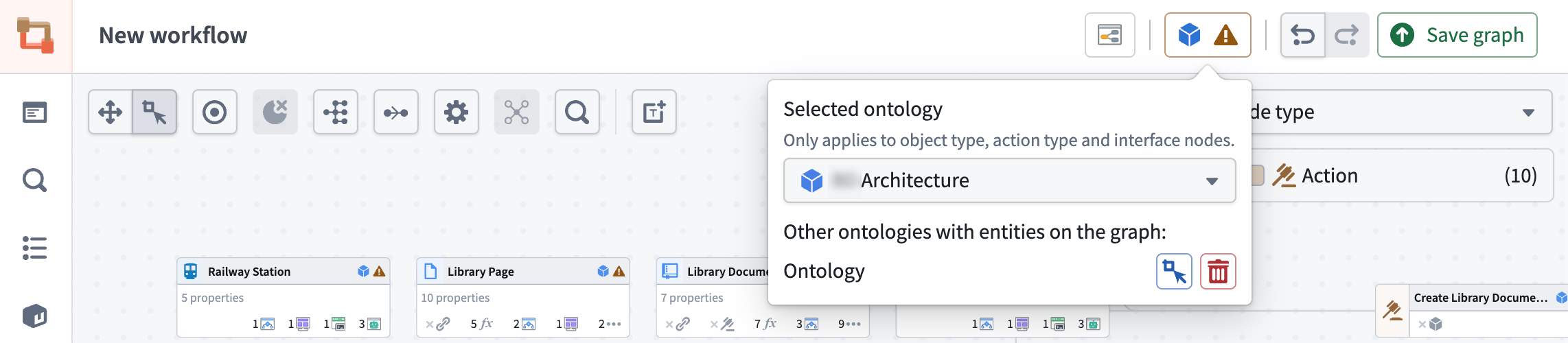
Easily switch between ontologies using the ontology (blue cube) icon to view and navigate all ontologies present in your graph.
For action-type nodes from outside the selected ontology, functionality is limited. For example, bulk updates are only possible for function-backed actions within your currently selected ontology.
Share your thoughts
We welcome your feedback about Workflow Lineage in our Palantir Support channels, and on our Developer Community ↗ using the workflow-lineage tag ↗.