Auto-approve changes in development environments
Apollo users often have a set of environments where they would like to relax approval requirements, such as development or staging environments. Apollo intentionally does not provide a built-in setting that automatically approves all changes in an Environment. Hub administrators must use CEL policies to define which changes, Environments, and authors are eligible for automatic approval.
This page provides a few examples in which Hub admins can configure CEL policies to relax requirements on their development and staging environments.
Selecting which environments should be auto-approved
Using the autoApproveEnvironments CEL variable
Each CEL policy that targets changes within an environment comes pre-configured with an autoApproveEnvironments variable that is initially empty. You can add environments to this variable to allow the changes controlled by this CEL policy to be auto-approved.
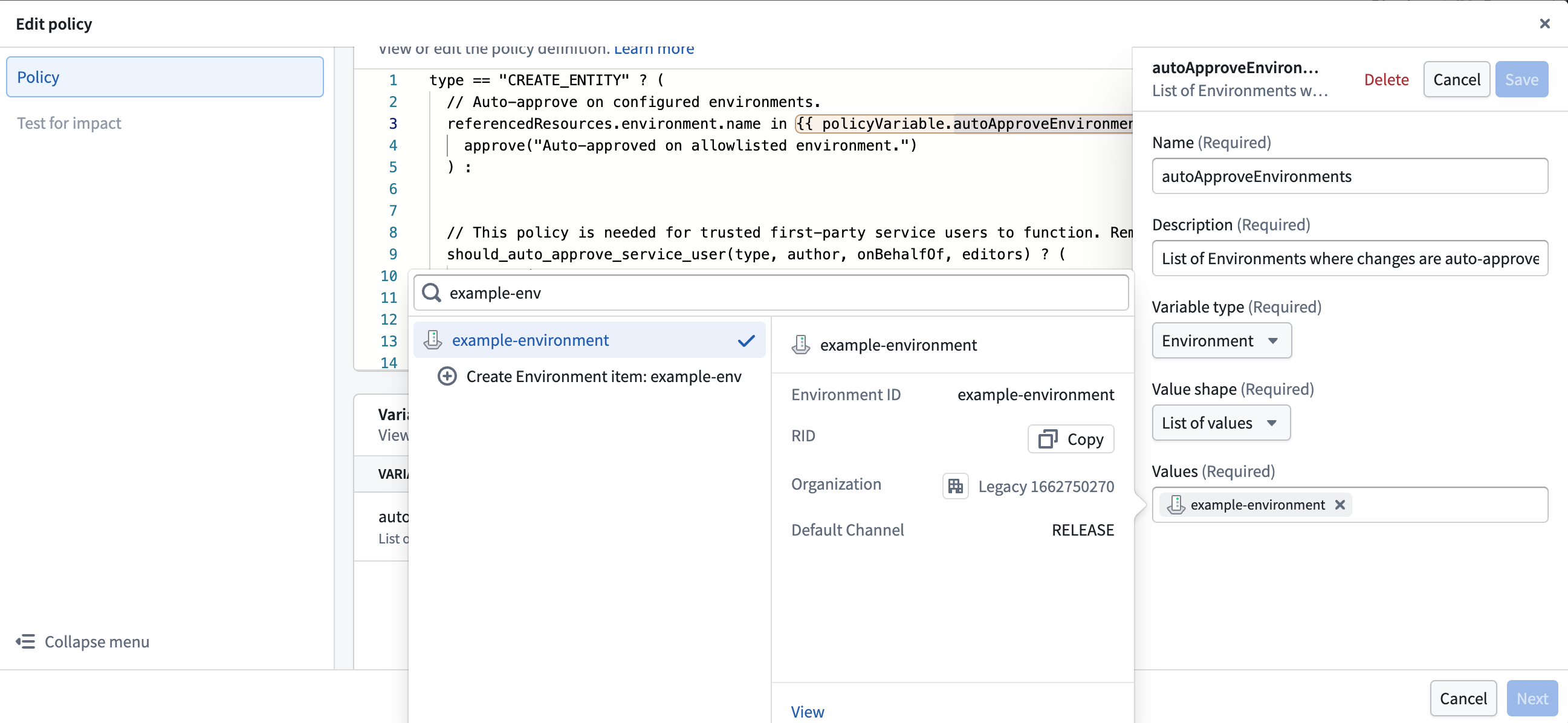
For example, adding an environment to the variable for the entity-create-policy CEL policy automatically approves new Entity installs. It does not automatically approve other changes, such as configuration edits. Update the CEL policy that controls each additional change type that you want to approve automatically.
We recommend being particularly careful about adding auto-approval to the k8s-namespace-approval-policy and
the network-security-approval-policy as they control highly privileged operations.
Defining and using a Label to select development environments
Using a variable is an easy way to get started. However, each new environment requires multiple variable changes, one per policy. If you expect to add new auto-approved environments frequently, you can use a label to simplify the process.
Create a label and add environment to the list of Suggested resource
types. For example, you can name this label security/enable-auto-approval. This would be a Boolean label, so set Accepted values to true and false.
Update each CEL policy that targets a change type you would like to auto-approve on these environments. Add this logic to the policy to auto-approve the changes if the environment has that label:
Copied!1 2 3 4 5... referencedResources.environment.labels[?"security/enable-auto-approval"].orValue("false") == "true" ? ( approve("This change is auto-approved because the environment has security/enable-auto-approval=true") ) : ...
You can now apply this label to your development environments. Changes controlled by the CEL policies you have updated will be auto-approved going forward.
Restricting auto-approval to trusted authors
In the examples above, we have configured auto-approval for specific change types in the configured set of environments, regardless of who opens the change request. We recommend adding restrictions to ensure you only auto-approve changes made by trusted authors, for example, owners of that specific environment.
We can restrict auto-approval to users who have the Environment Operator on the environment being modified by checking
the authorRoles field on the referenced environment. For other users, standard approval requirements would apply:
Copied!1 2 3 4 5 6... "apollo-environments:operator" in referencedResources.environment.authorRoles && referencedResources.environment.labels[?"security/enable-auto-approval"].orValue("false") == "true" ? ( approve("This change is auto-approved because the environment has security/enable-auto-approval=true") ) : ...
You can customize this behavior depending on your use case, for example, by checking the user's teams or checking permissions on a different referenced resource. For the full API spec of CEL policies, see Change type API reference.